 25
25BAC2Sober
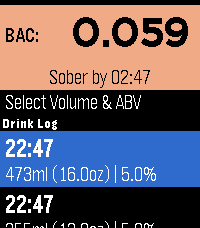
Tools & UtilitiesBAC2Sober is a premium, real-time blood alcohol tracking companion for your Pebble smartwatch. Built with a focus on speed, privacy, and native Pebble aesthetics, it utilizes the trusted Widmark formula to dynamically calculate your current BAC and estimate the exact time you will be completely sober. Whether you are sipping a craft taster or splitting a full bottle of wine, BAC2Sober makes logging your drinks effortless. Features: - Real-Time Tracking: A live dashboard tracks your current BAC and continuously updates your "Sober By" countdown every minute using the system tick timer. - Built-In Watchface: Check your current BAC and countdown to sobriety directly from your wrist without needing to launch the app. - Dynamic Geometric Graphics: Watch your drinks fill up on the screen! Native 2D vector graphics beautifully replicate standard cans, tallboys, bottles, growlers, wine glasses, and shots—keeping the app incredibly fast and lightweight. - Precision Logging: Dial in exact volumes (Metric or Imperial) and ABV percentages down to 0.1% for maximum accuracy. - Timeline Integration: Optionally push a notification pin to your Pebble Timeline when you mathematically hit a specific Target BAC (e.g., 0.05% or 0.00%). - Theme Engine: Fully supports Dark, Light, and Auto modes to match your watch's hardware, highlighted with vibrant UI colors on modern displays and clear high-contrast layouts on monochrome screens. - Accessibility: Fully respects system-wide Pebble OS text size preferences (Large/Small) so text dynamically scales to match your readability settings. Fully touch-enabled interface including a 'back' gesture (for PT2 and PR2). - Privacy First: 100% of your data remains locally on your wrist. No accounts, no cloud sync, no tracking. Liability Disclaimer: The developers of BAC2Sober assume no responsibility for the misuse of this application or the accuracy of its blood alcohol estimates. This application is for entertainment and informational purposes only. It is not a medical device, nor a legal breathalyzer. Its calculations must never be relied upon to determine your ability or fitness to operate a motor vehicle, heavy machinery, or make safety-critical decisions. Always exercise personal responsibility and never drink and drive. AI Disclosure: The source code, geometric vector generation, and user interface for this application were developed in collaboration with an AI language model. The underlying mathematical implementations and firmware integrations were validated against the official PebbleOS open-source SDK.
 1
1Nav Aid
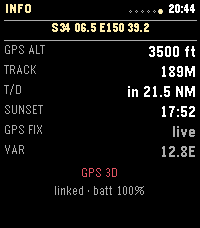
Tools & UtilitiesNav Aid is designed to be a glanceable supplemental information system for navigation and situational awareness in the air. Mostly for GA pilots, but useful for anyone operating in the air. DISCLAIMER: THIS IS NOT AN APPROVED INFORMATION SOURCE, THIS IS SUPPLEMENTAL ONLY AND SHOULD NOT REPLACE OTHER TOOLS / PROCEDURES. THIS WAS ALSO COMPLETELY VIBED, THERE WILL BE BUGS.
 3
3Qibla Compass
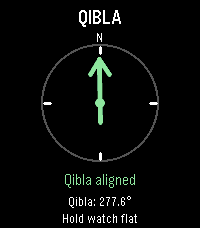
Tools & UtilitiesQibla Compass points you toward the Kaaba in Makkah from wherever you are, right on your wrist. Raise your watch, and an arrow shows which way to turn, with simple directions such as "Turn left 12°". When you face the Qibla, the arrow turns green, the screen reads "Qibla aligned", and your watch gives a short vibration, so you can find the direction without staring at the screen. The exact Qibla bearing for your location is shown too. For accuracy, the watch corrects its compass from magnetic north to true north using the World Magnetic Model (WMM-2025) for your location and today's date. If the compass needs calibrating, the app asks you to move your watch until it is ready. If your location or compass can't be read, tap the screen or press Select to try again. Designed for Pebble Time 2. Your paired phone provides your location, so allow location access for the Pebble app; no account or internet service is needed for the calculation itself. Like any compass, readings can be affected by nearby metal, magnets, or electronics, so hold your watch flat and away from them. Created by Ark-am. Discover our work and custom software development services at https://ark-am.com/
 10
10Phone Sound Mode
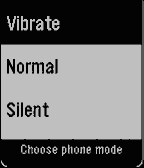
Tools & UtilitiesPhone Sound Mode puts your phone's ringer one press away. Heading into a meeting, a class, or a quiet room? Switch your phone to Vibrate, Normal, or Silent straight from your Pebble, without taking your phone out of your pocket. Open the app, choose a mode, and you're done. A short vibration confirms that your phone has changed, and the app returns to your watchface a moment later. If the change can't be made, the app stays open and tells you why, so you can try again. Clear icons for each mode make it easy to pick the right one at a glance, on round and rectangular screens, in colour or black and white. Android only. Phone Sound Mode requires its free Android companion app. Open the companion once and allow Do Not Disturb access, which Android needs to switch into and out of Silent reliably. Nothing is sent to a server; the watch talks only to your phone. Created by Ark-am. Discover our work and custom software development services at https://ark-am.com/
 49
49AlarmNote
Tools & UtilitiesDaily alarms with custom notes, automatically rescheduled to the next day. Great for taking various different pills on a daily basis. (Do not rely totally on these reminders. Bugs may be present, even though I have tried to verify correct working in many situations.). Time changes are not handled and would be hard to handle. Just select "reset alarms" when changing time zones.
 3
3PebbleAI+
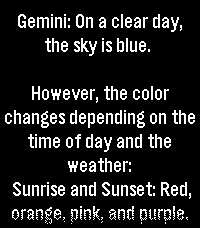
Tools & UtilitiesPebbleAI-Plus is a resource-aware fork of PebbleAI. It keeps the same idea of the original PebbleAI, access to ChatGPT, Gemini, DeepSeek, Grok, or Claude on your Pebble but with a focus on smooth use under tight memory and battery limits. Speak a question on the watch and get a reply from the AI provider you choose. Requires an API key in Settings from your provider of choice: OpenAI: https://platform.openai.com/account/api-keys Claude: https://console.anthropic.com/dashboard Gemini: https://aistudio.google.com/app/apikey Grok: https://console.x.ai/ DeepSeek: https://platform.deepseek.com/api_keys
 1
1MHD HK
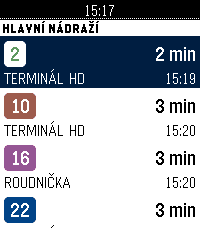
DailyOdjezdy hradecké MHD (DPMHK) přímo na hodinkách. Zvednete ruku, vidíte, za kolik minut vám to jede. CO UMÍ Odjezdy — nejbližší spoje ze zastávky: linka, směr a čas odjezdu. Odpočet do odjezdu se přepočítává průběžně. Oblíbené — až šest zastávek, které používáte denně. Nastavíte je v telefonu (našeptávač všech hradeckých zastávek) nebo přímo na hodinkách: dlouhým stiskem přidáte zastávku z okolí, dalším ji zase odeberete. Nejbližší — zastávky kolem vás podle GPS v telefonu, seřazené podle vzdálenosti. Trasa spoje — u vybraného odjezdu si zobrazíte zastávky, kterými pojede dál. Offline — poslední zobrazený odjezdový panel zůstává v hodinkách. Když je telefon mimo dosah nebo server neodpovídá, appka ukáže uložená data s poznámkou, kdy byla stažena, místo prázdné chybové hlášky. Celé rozhraní je česky, včetně diakritiky. Funguje na všech modelech Pebble včetně kulatých displejů. DATA Data pocházejí z api.dpmhk.cz, tedy ze stejného zdroje, který pohání vyhledávání spojení na dpmhk.cz. Aplikace není oficiálním produktem DPMHK a není s dopravcem nijak spojena. --- Departures for Hradec Králové public transport, Czechia (DPMHK). Favourite stops, nearest stops by GPS, downstream route preview, and an offline fallback board. Czech UI.
 106
106PebbleNTN - Maps Nav Notification To Nav
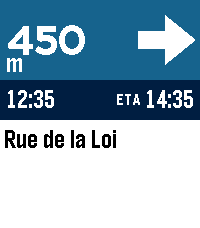
Tools & UtilitiesTurn-by-turn directions from your phone's nav app, on your pebble. PebbleNTN reads your navigation app's notifications and shows the next turn, distance, road, and ETA on your Pebble. No need to reach for your phone! - Google Maps supported now, more coming soon - Accent colours, light/dark, and three arrow styles - Backlight (with RGB support) and vibration options - Metric/imperial, left- or right-hand arrow - Write your own rules, or share logs to help add new apps Requires the companion Android app with notification access. Something not working or have a feature request? Use the 'Contact Developer' option from the Pebble app or create an issue at https://github.com/optio/PebbleNTN/issues
 2
2GymBuddy
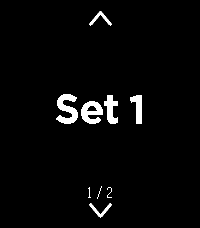
Health & FitnessGymBuddy ======== GymBuddy is a watchapp for Pebble Time 2 (Emery) that replaces paper notes and your phone at the gym. Build your training plans comfortably on your phone — machine settings, sets, reps, weight and rest time per exercise — and have them available on your wrist in large, glanceable text during your workout. SESSION LIST ------------ On launch, the watch shows all saved training sessions (up to 10). Up/Down or swiping up/down selects a session (loops at the ends). Select loads the chosen session. If the session is already cached on the watch and the phone is currently connected, the watch asks: load from the watch (instant, no phone needed) or sync fresh from the phone? With no connection, the watch automatically falls back to the last cached data — so your exercise list stays usable even when your phone isn't nearby. EXERCISE VIEW ------------- Two views per exercise, switch with a left/right swipe: • View 1 — exercise name, machine number, weight • View 2 — seat position, pad position, angle, sets, reps, rest time All values in large text with icons instead of text labels — deliberately designed for maximum readability at a distance. Up/Down or swiping moves to the next/ previous exercise (loops back to the start at the end of the list). A long press on Select highlights the currently shown exercise in green — handy for keeping track of what you've already done during your workout. REST TIMER ---------- Select starts the rest timer for the current exercise, shown as large, classic LCD-style digits. When it reaches zero, the watch vibrates twice and jumps back to the exercise. Pressing Select during the countdown cancels it immediately. CONFIGURATION (via the phone app) ----------------------------------- A custom-built configuration page instead of Clay, since training plans need dynamic lists: • Create, edit, delete and duplicate sessions and exercises • Reorder exercises by dragging (☰) • Rename a session directly from its exercise list • JSON import/export (e.g. to load a complete training plan in one go) • Switchable language: German or English (applies to both the watch and the configuration page) NOTE ---- Touch-swipe and the four hardware buttons both work at the same time — whichever is more convenient in the moment. Pebble Time 2 (Emery) only, uses the touch screen, RGB backlight and vibration motor. APP PICTURES ----------- https://imgur.com/a/38bk1Cv Vibecoded with Claude · Pebble Time 2 (Emery) only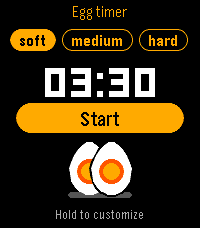 6
6Egg Timer
Tools & UtilitiesGet the perfect breakfast egg - soft, medium or hard - right from your wrist. - Pick soft, medium or hard with Up/Down, press Select to start, pause or resume. - Hold Select to adjust a cooking time (+/-10 s), or set them in the app settings. - Leave the app: the timer keeps running and the watch wakes up when your eggs are ready. - Vibrations when it's done, and a hen cackles on watches with a speaker (Pebble Time 2). Can be turned off, silent during Quiet Time. - The yolk on screen matches your cooking: runny, creamy or firm. - Available in English, French, German, Spanish, Italian, Portuguese, Dutch, Swedish, Danish, Norwegian and Finnish. Free and open source. If you enjoy it, you can support development from the settings page. Hen sound: 'Chickens demanding food' by alys (public domain).
 3
3SupCycle
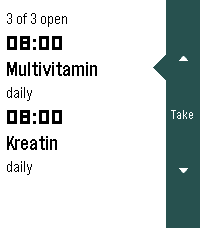
Health & FitnessPräparate im Blick behalten: was heute ansteht, und wo die zyklischen gerade in ihrem Zyklus stehen. Die Oberfläche folgt der Sprache der Uhr (Deutsch und Englisch, Englisch als Rückfall) und dem Timeline-Look der Schwesterapps: weisser Grund, schwarze Schrift, dunkle Seitenleiste rechts. Läuft auf emery, flint und gabbro.
 0
0Fuel Radar
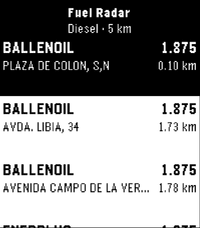
Tools & UtilitiesA lightweight nearby fuel station finder for Pebble with real-time price checks, powered by official government data. 🗺️ Countries: ES (coming soon – PT) Features: ⛽ Instant overview: Nearby fuel stations sorted by price or distance right on your wrist ⛽ Fuel selection: Choose your preferred fuel type (Gasoline 95, Diesel, etc.) via settings ⛽ Station details: View brand, updated pricing, distance, and full address on select ⛽ Glanceable UI: High-contrast, clean layout tailored specifically for Pebble e-paper screens ⛽ Low battery impact: Fast API queries routed via your phone's GPS connection 📍 Location provided by your phone's companion connection Feedback and suggestions are always welcome.
 14
14MORE-RECOMO
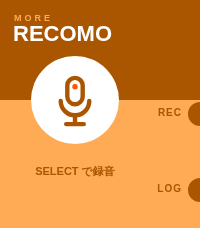
Tools & UtilitiesMORE RECOMO This is an enhanced version of the original RECOMO app. It’s a voice memo and notification app. Jot down, save, and set reminders for thoughts that pop into your head. The app enters recording mode as soon as you launch it. Main Features 1. Voice Recording & Transcription Automatically transcribes audio using Pebble’s speech recognition 2. Log Management Saves transcribed content as logs (up to 20 entries) Use the LOG button to view a list of past logs Unneeded logs can be deleted 3. QR Code Display Converts saved text into a QR code and displays it Can be scanned with a smartphone 4. Notification Scheduling Set up notifications to be received from Pebble at a specified time A countdown is displayed on the home screen while a notification is scheduled Notifications can be canceled using the UP button Voice recognition uses the Pebble free plan, which allows 50 uses per month. Translated with DeepL.com (free version) MORE RECOMO 旧RECOMOアプリの機能強化版です 音声メモ&通知アプリです。 ふと思ったことをメモ、保存、思い出す通知機能。 アプリを起動するとすぐに録音モードになります。 主な機能 1. 音声録音・テキスト化 Pebbleの音声認識で自動的にテキスト化 2. ログ管理 テキスト化した内容をログとして保存(最大20件) LOGボタンで過去のログを一覧表示・閲覧 不要なログは削除可能 3. QRコード表示 保存したテキストをQRコードに変換して表示 スマートフォンで読み取ることができる 4. 通知スケジュール設定 指定した時間後にPebbleから通知を受け取る設定が可能 通知設定中はホーム画面にカウントダウンを表示 UPボタンで通知をキャンセル可能 音声認識は50回/月 のRebble無料プランを利用しています。
 6
67-Minute Workout
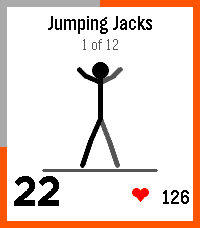
Health & Fitness7-Minute Workout I wanted a Pebble version of my daily exercise. This is the well-known 12-exercise high-intensity circuit for the Pebble, courtesy of Claude Opus 5.5. Includes animations to show the exercises, voice instructions (in 6 languages) and progress tracking. Features: - Two programs: Classic (12 body-weight moves with a chair and a wall) and Advanced (8 dumbbell moves designed by Mark Verstegen of EXOS). - Animated stick figures demonstrating the exercises - Countdown ring - Vibration and spoken cues on watches with a speaker (option of beeps or none) - Live heart rate on watches with a sensor, plus average and peak at the finish. - History: streaks and a calendar on the watch, a 16-week heatmap in the phone settings. - Optional daily reminder silenced if training occurs. Customisation: - 30, 45 or 60 seconds per exercise; no rest or 5 to 20 seconds between. - Reorder, remove or double up exercises, e.g. to protect an injury. Mix classic and advanced moves. - English, French, German, Spanish, Italian and Portuguese localisation. The on-watch voice defaults to English. Save on the settings page to push a non-default voice to the watch (give it a bit, it might take 20-30 seconds). The voices are local to the pebble app install, not hosted remotely. Loading the voices pushes the limits of the pebble storage a little, especially with the limit on KV size. Compatibility: Tested on the Time 2. For other pebbles, tested in emulator, should work fine. Voice needs a watch with a speaker (Time 2, Duo), heart rate needs sensor (Time 2, HR). This is a well-known exercise routine that most people should be able to do (the classic version that is), but of course use common sense. If something hurts, stop (maybe look up how to do pushups safely). Also some exercise routines do the last plank as 30 seconds on each side. Just add another rep in settings and ignore the half-time switch if you want that. CREDITS - Built by Claude Opus 5.5 with requirements, testing and feedback from me. - Classic workout: Klika & Jordan, "High-Intensity Circuit Training Using Body Weight", ACSM's Health & Fitness Journal (2013). - Advanced workout: Mark Verstegen / EXOS (2014). (Both popularised by The New York Times.) - Voices: Piper text-to-speech (Open Home Foundation) with en_US-ljspeech-high fr_FR-siwis-medium de_DE-thorsten-high es_ES-davefx-medium it_IT-paola-medium pt_BR-faber-medium - Audio compressed with QOA, the "Quite OK Audio" format by Dominic Szablewski.
 2.9K
2.9KSports
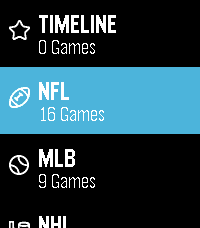
Daily(re)Introducing the Pebble Sports app, now updated for Pebble Time 2 and Pebble Round 2! Featuring live scores from the sports you love, including MLB, College Football, Men's College Basketball, NFL, NBA, NHL and English Premier League. What more could any sports fan ask for? (Seriously, send us a message with your feedback!)