Qibla Compass
Ark-am
Watchapp
Description
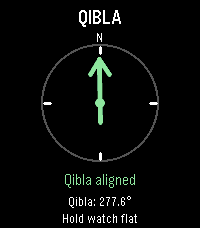
Qibla Compass points you toward the Kaaba in Makkah from wherever you are, right on your wrist. Raise your watch, and an arrow shows which way to turn, with simple directions such as "Turn left 12°".

When you face the Qibla, the arrow turns green, the screen reads "Qibla aligned", and your watch gives a short vibration, so you can find the direction without staring at the screen. The exact Qibla bearing for your location is shown too.

For accuracy, the watch corrects its compass from magnetic north to true north using the World Magnetic Model (WMM-2025) for your location and today's date. If the compass needs calibrating, the app asks you to move your watch until it is ready. If your location or compass can't be read, tap the screen or press Select to try again.

Designed for Pebble Time 2. Your paired phone provides your location, so allow location access for the Pebble app; no account or internet service is needed for the calculation itself. Like any compass, readings can be affected by nearby metal, magnets, or electronics, so hold your watch flat and away from them.

Created by Ark-am. Discover our work and custom software development services at https://ark-am.com/
- DeveloperArk-am
- CategoryTools & Utilities
- PlatformsTime 2
- Updated2026-10-04
- Version1.0.6