 61
61MirrorMsg
NotificationsMirrorMsg is the most advanced messaging client for Pebble. Log in to your accounts and see all your live conversations in chat threads that scroll through the entire chat, with rich modern features: thumbnail previews, HQ images, animated GIFs, video playback, emoji reactions, threaded replies and more. Works with Google Messages, WhatsApp, Telegram, Discord and Facebook Messenger natively, with no separate login beyond the app itself. Already on Beeper? Connect Signal, Instagram, Slack, iMessage and more through it too. NEW IN 0.91 - Watch Google Messages videos right on your wrist (Pebble Time 2). Tap to pause or resume. - Animated GIF previews play right in your chats - Color emoji, and GIANT emoji - Touch controls and zoom on Pebble Time 2 SWITCHING ACCOUNTS Every account you connect has its own conversation list. To switch, scroll to the top of your chats and hold UP, then pick an account and press SELECT. On Pebble Time 2, pull down from the top of the screen from anywhere in the list and choose an account. REPLYING Hold SELECT in a chat and the reply menu slides in, with your conversation still visible beside it. Reply by voice, pick a color emoji, or send one of your quick replies. Open a message first to react to it or reply to it directly, where the network supports it. On Pebble Time 2, pull the reply menu in from the right edge of a chat or message, tap to choose, and swipe right to close it. TOUCH AND ZOOM (PEBBLE TIME 2) - Tap a chat to open it, and tap a message to see it in full - Swipe right to go back from any screen - Zoom: double-tap, keep your finger down on the second tap, then drag down to make things bigger or up to make them smaller. Lift your finger to keep the size; every screen remembers its own. EMOJI - The 100+ most popular emoji show in full color in your messages and in the reply menu. - Open a message that's only emoji to see them GIANT: a single emoji shows huge, and two or three show big, two per row. - Pebble's notifications only support 64 emoji; everything else arrives as blank tofu boxes. MirrorMsg swaps unsupported emoji for the closest one Pebble can render, so the message still makes sense instead of turning into "□□". BROWSE DISCORD LIKE A REAL CLIENT Not just DMs: your full server list, channels, per-server notification controls, and infinite scroll through history. You won't miss a meme, because animated GIFs work! Requires an active MirrorMap subscription (Routes or Dash) to unlock message mirroring. Enter your code right here in this watchapp's settings. Get a subscription at mirrormap.app. Android companion app: the MirrorMsg Android app is required and is on the Google Play Store. Search for MirrorMsg or follow the companion app link below. MirrorMsg's Android app is fully open source (AGPL-3.0): github.com/killdano/mirrormsg Emoji art: Twemoji by Twitter/X and contributors, CC-BY 4.0
 21
21Tasks
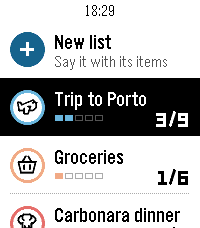
DailyYour lists on your wrist. Tasks is the Pebble companion of the Tasks for Pebble iPhone app (Android coming soon): the same lists on both, in sync within seconds. The watch app requires the mobile app to work. This watch app includes automatic list generation and item addition from your watch which means server costs are there and will require a PRO subscription. If you want to enjoy the app and can't pay for the fees, write an email at [email protected] and I will send you a yearly code. • Say a list: choose "+ New list" and say something like "packing list for a weekend in Lisbon". Tasks writes the list with its items. • Add to any list by voice from "+ Add items". • Check items off with SELECT; the iPhone sees it right away. • Each list shows its icon, colour and a progress row, with animations in the watch's own style. • Hold SELECT on a list to change its icon or colour, clear checked items or delete it. Hold SELECT on your lists to re-sync. • Works offline: your lists stay on the watch, and checks you make offline sync when the phone is back. How to start: install Tasks for Pebble on your iPhone, open Tasks on the watch, press SELECT for a 6-character code and type it in the iPhone app under Settings › Pebble. The watch app needs Tasks Pro, a subscription in the iPhone app with a free trial. Lists on the iPhone are free. Works on Pebble Time 2, Pebble 2 Duo and Pebble Round 2.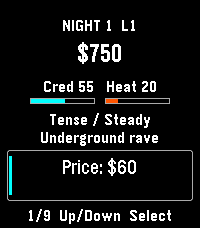 7
7Micro Dose
GamesRemember that drug game on your graphing calculator? ... that. A fictional calculator-era underworld economy. Read the night’s forecast, set price, quantity, quality and distribution, then run the night and see what happened. Climb six career levels from Runner to Empire. Earn profits, buy districts and fronts, and unlock new distribution routes. Career shows your next unfinished goal. Lay low reduces heat while your fronts still bring in income. Build the Empire by earning $60,000 net, owning all six districts and three fronts, and keeping heat below 60. You can keep playing afterward. Negative cash or heat at 100 ends the campaign. Up and Down browse; Select edits or acts. Progress saves automatically. For Pebble Time 2 and Round 2. Touch requires firmware 4.33.2; button controls remain available. By Luke Steuber.
 43
43Iron
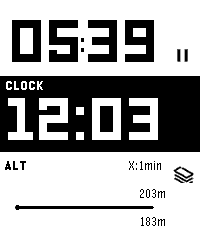
Health & FitnessIron - Workout Companion for Pebble Iron is a high-performance, open-source sports tracker for your Pebble smartwatch. Designed for runners and fitness enthusiasts, it tracks your real-time metrics and seamlessly bridges the gap between your Pebble and modern Android health ecosystems. ⚠️ Important Note: This watch app will not function at all unless used in combination with the Android companion app of "Iron". Also, while designed to support all Pebble platforms, it has not been fully tested on every single model. If you encounter any issues, your feedback is greatly appreciated! 📱 Companion App (Android) To unlock the full potential of Iron, install the companion Android app from Google Play. The companion app runs a stable background service during your workout and securely syncs your Pebble's health data directly to Google Health Connect. Download on Google Play: https://play.google.com/store/apps/details?id=hag1987haaa.pebble.iron&pcampaignid=web_share Zero ads, zero tracking analytics. Requires Location permissions (including background access) to accurately track your GPS routes while your phone is in your pocket. Only writes data to Health Connect with your explicit permission. ✨ Key Features By combining the Pebble app with the Android companion app, you can unlock: Music Control: Intuitively control your music playback directly from the workout screen. Supports swipe gestures on touchscreen models or long-press physical button mapping. Smart Notifications: Get vibration alerts on your wrist for distance laps (e.g., every 1km) or time intervals. Advanced Data Export: Supports both GPX and TCX formats. TCX includes heart rate, calories, and smoothed cadence data—perfect for uploading to Strava or Garmin Connect. Detailed Analytics Charts: View graphs for speed, elevation, heart rate, and steps on your phone. Powerful Automation: Broadcasts intents based on Pebble interactions or app state changes. Fully compatible with automation apps like Tasker. Health Connect Integration: Seamlessly syncs your recorded workout data directly to Android's Health Connect. Voice Assistant Integration: Long-press a button on your Pebble to trigger your phone's default digital assistant (the same one that launches when you hold your phone's power button). Note: Please speak your commands into your phone's or earbuds' microphone. ⚙️ Installation 1. Install this watch app. 2. Download the Iron Companion App for Android from Google Play. 3. Grant the necessary permissions (Location, Health Connect & Notifications) in the Android app. Note: Setting Location permission to "Allow all the time" is highly recommended for stable GPS tracking while your phone screen is off. 4. Start a workout on your Pebble! 🤝 Support & Credits Iron is completely free and open-source. There are no paywalls or locked features. This app was proudly developed with the assistance of Google's AI, Gemini! If you find this app useful for your daily runs, consider supporting the project: ☕ Support me on Ko-fi: https://ko-fi.com/1987haaa 🇯🇵日本語版 (Japanese) Iron - Pebble用ワークアウトコンパニオン Ironは、Pebbleスマートウォッチ用の高性能でオープンソースなスポーツトラッカーです。ランナーやフィットネス愛好家のために設計されており、リアルタイムの数値を追跡しながら、Pebbleと最新のAndroidヘルスケアエコシステムをシームレスに連携させます。 ⚠️ 重要な注意点: 本ウォッチアプリは、Android版『Iron』アプリとセットで使用しない限り機能しません。また、すべてのPebbleプラットフォームで動作するように開発したつもりですが、全モデルでの動作テストは完了していません。もし動かない場合はフィードバックをいただけると非常に嬉しいです! 📱 コンパニオンアプリ (Android) Ironの真の力を引き出すため、Android用のコンパニオンアプリをインストールしてください。安定したバックグラウンドサービスとして稼働し、PebbleのヘルスケアデータをGoogle Health Connectへ安全に同期します。 Google Playストアでダウンロード: https://play.google.com/store/apps/details?id=hag1987haaa.pebble.iron&pcampaignid=web_share 広告ゼロ、トラッキング解析ゼロ。 スマートフォンをポケットに入れた状態でも正確にGPSルートを追跡するため、位置情報(バックグラウンド含む)へのアクセス権限を使用します。 ユーザーの明示的な許可がある場合にのみHealth Connectへデータを書き込みます。 ✨ 主な機能 PebbleアプリとAndroidコンパニオンアプリを組み合わせることで、以下の機能を利用できます。 ミュージックコントロール: ワークアウト画面から直感的に音楽を操作可能。タッチスクリーンでのスワイプ操作や、物理ボタンの長押しに対応しています。 スマート通知機能: 距離ラップ(例:1kmごと)や時間インターバルを振動でお知らせ。 高度なデータ出力: GPX に加え TCX 出力に対応。心拍数、カロリー、平滑化されたケイデンス情報を含み、StravaやGarmin等へのアップロードに最適。 詳細な分析チャート: 速度、高度、心拍数、歩数をスマホでグラフ化。 強力な自動化連携: Pebbleの操作やアプリの状態変化をインテント送信。Tasker等の自動化アプリと連携可能。 Health Connect 完全対応: ウォッチで記録したデータをAndroidのヘルスコネクトへシームレスに同期。 ボイスアシスタント連携: Pebbleのボタン長押しで、スマホの「デフォルトのデジタルアシスタント」(電源ボタン長押しで起動する設定中のアシスタント)を呼び出せます。※アシスタントへの音声指示は、スマホ本体またはイヤホンのマイクで行ってください。 ⚙️ インストール方法 1. 本ウォッチアプリをインストールします。 2. Google PlayからAndroid用Ironコンパニオンアプリをダウンロードします。 3. Androidアプリ内で必要な権限(位置情報、Health Connect、通知)を許可します。 ※画面オフ時にも安定してGPSを追跡するため、位置情報権限は「常に許可」に設定することを強く推奨します。 4. Pebbleでワークアウトを開始してください! 🤝 開発者のサポートとクレジット Ironは完全に無料でオープンソースです。有料の壁はありません。なお、このアプリの開発にはGoogleのAI「Gemini」を活用しています! 毎日のランニングに役立ったと感じていただけた場合は、プロジェクトのサポートをご検討ください。皆様の支援が力になります。 ☕ Ko-fiでサポートする: https://ko-fi.com/1987haaa
 2
2Notes+
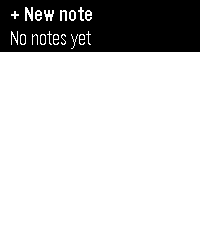
Tools & UtilitiesDirectly inspired by the Simple Notes app. It was just missing 2 features I really wanted. ① Ability to append to notes. ② (and this was the big one) getting the notes out of the watch so I could use them elsewhere. This was a quick 10 minute Claude Opus 5.5 implementation with the features desired. If you don't need or want these features, Simple Notes should be just fine. Aside from that, the feature list is the same, including the quick action behaviour.
 1
1TransLoc
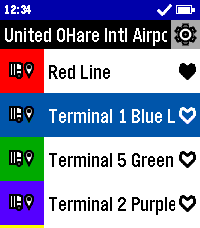
DailyCatch the bus in style with TransLoc for Pebble! This app can get you where you need to go. Don't second guess when your bus will arrive, find out now from the comfort of your wrist! This app is designed to be used in conjunction with either the official TransLoc mobile app, or a live tracker website based on TransLoc services. This app is meant to provide at-a-glance information, but is not meant for viewing a route on a map. Features Include: - At-a-Glance, Up-to-Date Route Information - Support for over 100+ Transit Agencies - Live Bus Distance Tracking* - Live Bus Capacity Tracking* - Location-Based Nearest Stop Information - Favorite Routes Potential Planned Features: - Add Original and Round Watch Support - Filter Running Routes from All Routes - Add Alerts Feature from Transit Agencies *For Buses with Tracking Support This project is open source! Check out the code yourself on GitHub! DISCLAIMER: THIS PROJECT IS NOT AFFILIATED WITH TRANSDEV, TRANSLOC, NOR ANY AGENCIES AVAILABLE WITHIN THE APP.
 15
15WristList (Index 01 for your watch!)
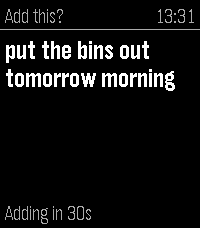
DailyPebble Index for your watch. This app allows you to dictate a message on your watch and publish the dictation to a CalDav server (Nextcloud/Ownecloud etc.) as a Task. Just add the CalDav address into settings along with the user and password to send messages to the server. Map the app to a physical Quick Launch button and adjust the "Quick Launch Action" settings in WristLists watch app to 'Dictate'. This will open the dictation function when the app is launched from a watch button. Speak the Task and either confirm with the select or wait a specified period and it will save automatically. No intermediate processing, uses the Pebble dictation capability and your task is sent direct to your server. Features include: -View your Task Lists -Dictate Task Notes -Edit Tasks (including Task properties) -Mark as Done / Delete Task -Open Dictate on Quick Launch setting option If you like this app please heart it, and if you find it useful feel free to buy me a coffee on Ko-Fi, can say thanks here https://ko-fi.com/ben839721
 19
19BigWeather
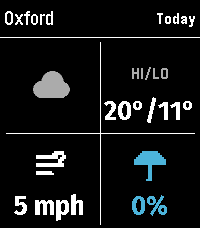
DailyMy eyesight isn't as great as it used to be when I bought the first Pebble watch many moons ago (pesky ageing.......) Anyway it seems like all the weather apps are trying to cram loads of information onto one small screen using tiny icons and small text, so Ive created this app with bigger text which is more suitable for a watch. BigWeather shows current conditions for your location and also any town or city via search, with today, tomorrow, hourly, now/next (+2 hours) and 5-day forecasts with rain, temperature, wind data screens using Open-Meteo (no sign-up, no API key). Features (as of Version 2.0 - August 2026) - Current location, stored and auto-refreshed on open - Improved search with ability to filter preferred location (Phone Settings), - Search any town/city worldwide - Add locations to Favourites - Customisable Today/Tomorrow screens, select which information you want to see (in Phone settings) - Hourly screens (Rain, Temperature, Wind - viewable by pressing Hourly and select to cycle through screens) - 5-day forecasts, per-day detail - Rain forecast (Now/Next) shows next rain, amount and intensity over the daytime, not just the peak % - No API key needed (Open-Meteo); optional OpenWeather with your own key - Units your way: °C/°F, mph/km/h, mm/in, 12/24-hour; large-text mode - Built for the Pebble Time 2 and classic Pebble models If you like this app please heart it, and if you want to buy me a coffee on Ko-Fi you can say thanks here https://ko-fi.com/ben839721
 6
6PebbleRain
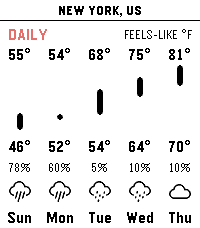
Tools & UtilitiesPebbleRain brings comprehensive real-time weather forecasts directly to your Pebble watch. Powered by Open-Meteo, you can track local current conditions and extended forecasts without any paid subscriptions. [FEATURES] - Simple Three Pages: Press UP/DOWN to cycle between current conditions, a 24-hour hourly forecast, and a 14-day daily outlook. - Multi-Location Support: Long-press UP/DOWN to cycle between current GPS and your custom locations. - Actual vs. Feels-Like Toggle: Press SELECT to instantly switch between actual and apparent temperatures across all pages. - Metric & Imperial Units: Long-press SELECT to toggle between metric (°C, km/h) and imperial (°F, mph). - Touch Navigation: Full support for horizontal touch scrolling to view timeline chart. - Configurable Settings: Use the app settings to toggle live GPS, add cities or custom coordinates, and manage saved locations. [REQUIREMENTS] Requires an active internet connection on paired phone. No API keys required.
 20
20WatchieTalkie2
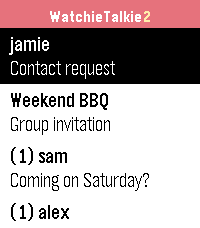
DailyWalkie-talkie for your Pebble – with text. Pick a friend, press SELECT, speak: your words arrive as a text message on their watch. End-to-end encrypted, open source, and you can run your own server. WatchieTalkie2 continues the original Watchie-Talkie app, which has been offline for years. It is a free hobby project: a just-for-fun chat with your friends, right from your wrist. • Speech to text via Pebble dictation (watches with microphone) • Quick replies you define yourself (also for watches without microphone) • Usernames, invitations, blocking • Direct chats and groups (up to 20 people) • History: last 50 messages per chat, kept for 30 days • End-to-end encryption (NaCl): the server operator cannot read your messages • Optional: notifications even when the app is closed, via ntfy (free, also your own server), your own Telegram bot or Pushover – see below • Radio beep on new messages on watches with speaker (Time 2, Pebble 2 Duo, Round 2) – silent during Quiet Time, hold SELECT in the list to mute • Respects Quiet Time: no vibration, no beep • Battery-friendly: long polling only while the app is open, no background activity • Every Pebble: Pebble/Steel, Time, Time Steel, Time Round, Pebble 2, Time 2, Pebble 2 Duo, Round 2 • Open source (MIT) – host your own server with Node.js, no database needed Getting started: open the app settings in the Pebble app, choose a username and invite friends by their username. On the watch: SELECT = speak, long SELECT = quick reply. Why an extra app? A watch app cannot listen for messages while it is closed, and the new Pebble app does not deliver timeline notifications from servers. So a buzz with the app closed needs a normal phone notification, which the Pebble app forwards to your watch. You choose ntfy, Telegram or Pushover; it only gets "New message: <sender>", never the text. Totally optional: without it, messages arrive whenever the app is open. Set it up in the app settings. Beta: use at your own risk, no guarantee of availability or delivery. Not for emergencies. Ideas, feature requests and bug reports are very welcome: https://github.com/sgitaize/Pebble-WatchieTalkie/issues Source code & self-hosting: https://github.com/sgitaize/Pebble-WatchieTalkie Like it? Buy me a Spezi 🥤 to support the server and hosting: https://www.paypal.com/donate/?hosted_button_id=LGAZB9PR4YV5L
 7
7Gentle Wake Plus - Daily Smart Alarm Clo
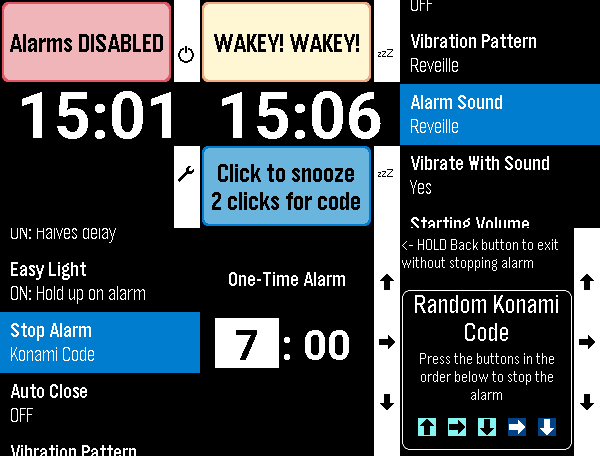
Tools & UtilitiesEvolution of the excellent original by SeaPea software This version adds: - Native Layouts for PT2 and PR2 - Alarm Sounds for PT2 and P2Duo - multiple options including some of the system options like Reveille - More vibration patterns (all watches except Aplite - OG and Steel) - Some small changes to Aplite to prevent crashes - Respects menu text size selected on watch (enabling increased text size on PT2 and PR2) All other functions work as per the original: - Alarms for each day of the week - Smart Alarm attempts to wake you if it detects you stirring shortly before the alarm time, which is the Monitor Period (doesn't interfere with background activity apps) - All settings are in-app (Down button on main screen) - Alarm vibration starts gentle and gets longer and longer to gradually wake you and this can be adjusted with the Vibration Pattern setting - Alarm will vibrate for just over a minute and will then auto-snooze to save battery - Doesn't need to be manually started for the alarms to work (set and forget) - While Alarm is vibrating, a single click on any button snoozes the alarm. 2 quick clicks are required by to turn off the alarm to reduce the chance of accidentally turning it off - Change the 'Stop Alarm' setting to 'Konami Code' to show a random sequence of buttons to turn off the alarm to help really make sure you are awake - Dynamic snooze halves the initial snooze time on each snooze until it reaches 3 minutes - for those of us with a habit of hitting snooze repeatedly ;) - Can temporarily disable all alarms (Single Up button click on main screen) - 'Easy Light' - hold your Pebble vertically to turn on the backlight while the alarm is vibrating/snoozing (no need to shake your wrist!). Can be turned off. - Skip alarms by holding Up on the main screen and choose a date to skip until (alarms restart on that date.) Disabling & enabling alarms, or going into the settings resets skips - DST Check sets the day of the week on which it checks if your location has switched to/from Daylight Savings Time
 65
65Hooky
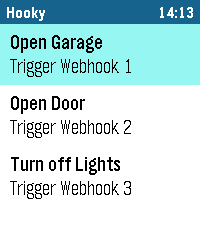
RemotesHooky lets you trigger webhooks from your Pebble smartwatch with a single tap. Control smart home devices, send notifications or connect your favorite services – simple, fast and reliable. Key Features: - Trigger as many custom webhooks as you need, right from your watch. - Custom name, description and button color for each webhook. - Full request control: GET, POST, PUT, PATCH or DELETE, with optional body and custom headers. - Cloudflare Access Service Token support for protected endpoints. - "Ask before running" confirmation for critical actions. - Instant feedback on your watch: Success, Error, Timeout, HTTP status, No phone, Not sent or No response. - Your webhook list is stored on the watch and shows up instantly. - Color themes, dark list, optional sound feedback and auto-close after success. - Touch controls on Pebble Time 2 and Pebble Round 2. - Reorder, duplicate, export and import your webhooks in the settings. Supported watches: Pebble Time 2, Pebble Round 2, Pebble 2 Duo, Pebble 2, Pebble Time, Pebble Time Steel, Pebble Time Round, Pebble and Pebble Steel. How it works: - Add your webhooks in the Hooky settings in the Pebble app on your phone. - Open Hooky on your Pebble, select a webhook and tap to trigger it. - See the result instantly on your watch. Note: - Requires an internet connection via your smartphone. - HTTPS is strongly recommended, especially when using tokens or custom headers. - Sound feedback is available on watches with a speaker (Pebble Time 2, Pebble 2 Duo). Disclaimer: This application was developed with the assistance of Anthropic's Claude. If you encounter any bugs, have ideas for new features or want to suggest improvements, feel free to send me a message! I'm always happy to receive feedback and make the app even better.
 112
112Authenticator
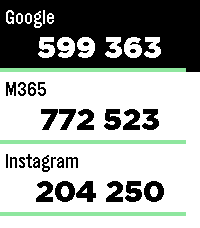
Tools & UtilitiesPebble Authenticator brings your two-factor authentication (2FA/TOTP) codes directly to your Pebble smartwatch. No need to reach for your phone to unlock your accounts, just glance at your wrist. Key Features: • Easy Setup: Import several accounts at once with otpauth:// links, or add them manually in the app settings. • Backup & Restore: Save all your accounts as a backup, optionally protected with a password (AES-256). Unencrypted backups use standard otpauth:// links, so you can also move your accounts to or from other authenticator apps. • Works on Every Pebble: Supports all Pebble watches, including the new Pebble Time 2 and Pebble Round 2 with touch scrolling. • High Capacity: Store up to 100 accounts. Watches with the original Pebble firmware have room for about 50. • Flexible Codes: 6- and 8-digit codes, custom time periods and secret keys of up to 256 characters. • Privacy First: Works completely offline. Your secret keys stay on your phone and your watch. No account, no tracking, no cloud and no external servers. • Easy Management: View and delete accounts in the settings page. The watch confirms when your accounts have been saved. Disclaimer: This app was developed with the help of Anthropic's Claude, which helped bridge the gap between modern JavaScript configuration tools (Clay) and the Pebble C SDK. If you find a bug, have an idea for a new feature or want to suggest an improvement, feel free to send me a message. I'm always happy to get feedback and make the app even better!
 1
1Tautulli
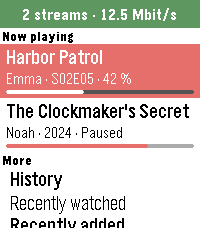
Tools & Utilities**English** Your Plex activity on your wrist, powered by your own Tautulli server. - Now playing: who is watching what, with progress bar, device, quality and bandwidth - Stop a stream with the red stop button – with a confirmation, so nothing stops by accident (needs Plex Pass) - History of everything watched, or just one person's - Recently added movies, episodes and albums - Users: who watched last and how much - Statistics: watch time today, 7 and 30 days, top users, movies and shows - Chart: plays per day for the last 7 or 30 days - Libraries: number of movies, shows, episodes and albums - German and English Private: the app only talks to your own Tautulli server. No tracking, no other servers. Setup: in the app settings enter your Tautulli address (e.g. http://192.168.1.10:8181) and your API key (Tautulli: Settings → Web Interface → API). Your phone talks to Tautulli, so a local address works on your home Wi-Fi. Just curious? Enter "demo" as address to try it with sample data. Free and open source (MIT), built with AI assistance: https://github.com/Zeichenfolge/tautulli-pebble Not affiliated with Tautulli or Plex. **Deutsch** Deine Plex-Aktivität am Handgelenk – über deinen eigenen Tautulli-Server. - Jetzt läuft: wer was schaut, mit Fortschrittsbalken, Gerät, Qualität und Bandbreite - Stream beenden mit dem roten Stopp-Knopf – mit Rückfrage, damit nichts aus Versehen stoppt (braucht Plex Pass) - Verlauf von allem Geschauten oder nur von einer Person - Neu hinzugefügte Filme, Folgen und Alben - Nutzer: wer zuletzt geschaut hat und wie viel - Statistik: Wiedergabezeit heute, 7 und 30 Tage, Top-Nutzer, -Filme und -Serien - Diagramm: Wiedergaben pro Tag der letzten 7 oder 30 Tage - Bibliotheken: Anzahl Filme, Serien, Folgen und Alben - Deutsch und Englisch Privat: Die App spricht nur mit deinem eigenen Tautulli-Server. Kein Tracking, keine anderen Server. Einrichten: in den Einstellungen die Tautulli-Adresse (z. B. http://192.168.1.10:8181) und den API-Key eintragen (Tautulli: Settings → Web Interface → API). Das Handy spricht mit Tautulli, eine lokale Adresse funktioniert also im Heim-WLAN. Nur neugierig? „demo“ als Adresse eintragen und mit Beispieldaten ausprobieren. Kostenlos und Open Source (MIT), entwickelt mit Hilfe von KI: https://github.com/Zeichenfolge/tautulli-pebble Kein offizielles Projekt von Tautulli oder Plex.
 25
25BAC2Sober
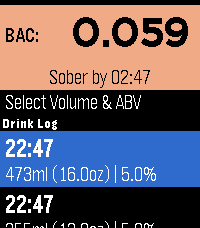
Tools & UtilitiesBAC2Sober is a premium, real-time blood alcohol tracking companion for your Pebble smartwatch. Built with a focus on speed, privacy, and native Pebble aesthetics, it utilizes the trusted Widmark formula to dynamically calculate your current BAC and estimate the exact time you will be completely sober. Whether you are sipping a craft taster or splitting a full bottle of wine, BAC2Sober makes logging your drinks effortless. Features: - Real-Time Tracking: A live dashboard tracks your current BAC and continuously updates your "Sober By" countdown every minute using the system tick timer. - Built-In Watchface: Check your current BAC and countdown to sobriety directly from your wrist without needing to launch the app. - Dynamic Geometric Graphics: Watch your drinks fill up on the screen! Native 2D vector graphics beautifully replicate standard cans, tallboys, bottles, growlers, wine glasses, and shots—keeping the app incredibly fast and lightweight. - Precision Logging: Dial in exact volumes (Metric or Imperial) and ABV percentages down to 0.1% for maximum accuracy. - Timeline Integration: Optionally push a notification pin to your Pebble Timeline when you mathematically hit a specific Target BAC (e.g., 0.05% or 0.00%). - Theme Engine: Fully supports Dark, Light, and Auto modes to match your watch's hardware, highlighted with vibrant UI colors on modern displays and clear high-contrast layouts on monochrome screens. - Accessibility: Fully respects system-wide Pebble OS text size preferences (Large/Small) so text dynamically scales to match your readability settings. Fully touch-enabled interface including a 'back' gesture (for PT2 and PR2). - Privacy First: 100% of your data remains locally on your wrist. No accounts, no cloud sync, no tracking. Liability Disclaimer: The developers of BAC2Sober assume no responsibility for the misuse of this application or the accuracy of its blood alcohol estimates. This application is for entertainment and informational purposes only. It is not a medical device, nor a legal breathalyzer. Its calculations must never be relied upon to determine your ability or fitness to operate a motor vehicle, heavy machinery, or make safety-critical decisions. Always exercise personal responsibility and never drink and drive. AI Disclosure: The source code, geometric vector generation, and user interface for this application were developed in collaboration with an AI language model. The underlying mathematical implementations and firmware integrations were validated against the official PebbleOS open-source SDK.