 3.5K
3.5KTimer
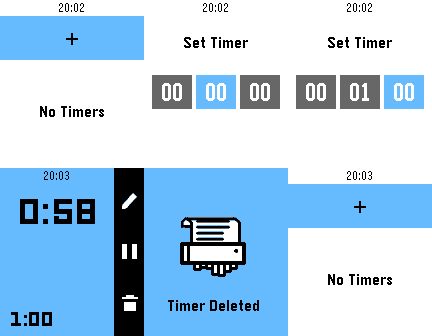
Tools & UtilitiesPebble's first official timer! Set up to eight different timers and watch them run down. Timers longer than fifteen minutes also push a pin to your timeline.
 2
2METAR
Tools & UtilitiesMETAR on your wrist
 8
8Paperless
Tools & UtilitiesYour Paperless-ngx inbox on your wrist. - See the newest documents in your inbox with correspondent and date - Look at the scan: whole page or zoomed in until the text is readable – split into columns, rows, or scroll freely (tap and drag on Pebble Time 2) - Change correspondent, document type, tags and date – Paperless' own suggestions come first - Mark documents as done: the inbox tag is removed and the next one moves up - German and English Private: the app only talks to your own Paperless-ngx server. No tracking, no other servers. Setup: in the app settings enter your server URL and an API token (Paperless: profile → My Profile → API auth token). Just curious? Enter "demo" as server URL to try it with sample data. Free and open source (MIT), built with AI assistance: https://github.com/Zeichenfolge/paperless-pebble — Deine Paperless-ngx-Inbox am Handgelenk. - Die neuesten Dokumente deiner Inbox mit Korrespondent und Datum - Den Scan ansehen: ganze Seite oder so weit gezoomt, dass man den Text lesen kann – in Spalten oder Zeilen geteilt oder frei scrollen (auf der Pebble Time 2 per Finger) - Korrespondent, Dokumenttyp, Tags und Datum ändern – die Vorschläge von Paperless stehen oben - Dokumente erledigen: der Inbox-Tag wird entfernt, das nächste rückt nach - Deutsch und Englisch Privat: Die App spricht nur mit deinem eigenen Paperless-ngx-Server. Kein Tracking, keine anderen Server. Einrichten: in den Einstellungen Server-URL und API-Token eintragen (Paperless: Profil → Mein Profil → API-Auth-Token). Nur neugierig? „demo" als Server-URL eintragen und mit Beispieldaten ausprobieren. Kostenlos und Open Source (MIT), entwickelt mit Hilfe von KI.
 2
2Color Dice
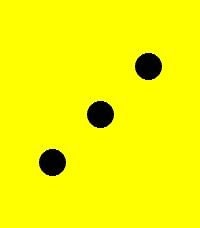
GamesPebble Color Dice is a simple, fast and fun random dice roller made especially for Pebble Time 2. Turn your watch into a classic 6-sided dice whenever you need one. Just open the app and tap the screen — the built-in random generator instantly chooses a number from 1 to 6 and shows it as a full-screen colorful dice face. It is perfect for board games, tabletop games, party games, challenges, drinking games, family games, quick decisions, mini-games, competitions and any situation where you need a random D6 but the real dice is missing. Each side has its own color, the whole display becomes one large dice face, and the short roll animation makes every throw feel more alive. No menus. No settings. No unnecessary buttons. Just tap, roll and play. Keywords: dice, random dice, dice roller, random, D6, board games, tabletop games, party games, challenge, random number, Pebble dice, Pebble Time 2, color dice, virtual dice
 22
22HA Launcher
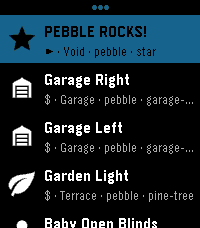
RemotesStored shortcuts launch instantly — no browsing, no waiting. Setup is easy: the app fetches every available SCRIPT and SCENE from your HA automatically. Per-shortcut a confirmation checkpoint can be activated preventing accidental triggers for important ones. Touch navigation is ready, and auto-close keeps it a true quick-launch app. This brings whatever action you can imagine to your wrist! Inspired by home-assistant-shortcuts (https://github.com/Carles-Figuerola/home-assistant-shortcuts), modernized for the newest SDKs. Built with AI, maintained with love.
 3
3BT Guard
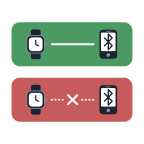
Tools & UtilitiesKeeps your phone on a tight leash. The app runs as a background app, monitoring the bluetooth connection to your phone. If the bluetooth connection is lost, it will buzz you, repeatedly until the connection is re-established. When the connection is first lost, the alert will repeat every 30 seconds, but an interface is presented for you to make this less frequent, or to turn it off altogether. In any case the alert frequency resets to 30 seconds next time the connection is lost. This approach means you can decide not to go back and get your phone immediately, while still keeping an occasional reminder so you don't forget entirely, and without the possibility that you forget to turn it on again. When the connection is re-established you are presented with the option to make the phone make a sound to help you locate it. I suspect this probably only works on android phones, but I don't have an iphone to test that.
 4
4Constellation
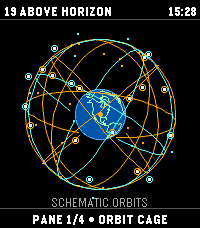
Tools & UtilitiesAn educational orbital-geometry watchapp for Pebble Time 2. Constellation propagates public CelesTrak GP/TLE element sets with SGP4 to plot modeled GPS, Galileo, GLONASS, and BeiDou positions. It is not a GNSS receiver: it does not receive satellite signals, produce a navigation fix, or estimate real-world positioning accuracy. TLE elements do not include an accuracy estimate. FOUR VIEWS • Orbit globe: modeled satellite positions; orbital-plane rings are schematic guides, not fitted to the TLEs. • Skyplot: modeled azimuth and elevation from the selected center. Bars show elevation only, not signal strength. • Geometry: DOP derived from modeled directions; singular or insufficient geometry displays N/A. DOP describes geometry, not position accuracy. • World map: simplified coastlines, selected center, and modeled sub-satellite points; no reception-radius circle. Phone coordinates are used on-device and are not sent to CelesTrak. Choose phone location or validated manual coordinates. A location failure is shown without a substitute location. TLE age is displayed; fresh elements require internet access. Cached elements can be viewed offline. Controls: hold UP/DOWN to change panes; click UP/DOWN on the globe to rotate; SELECT toggles catalog-number labels; hold SELECT refreshes. Data: CelesTrak GP/TLE. Source: https://github.com/globe-and-atlas/constellation-watch
 3
3Satellite Overpass
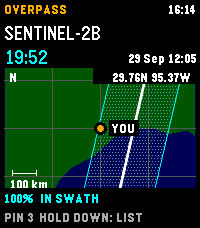
Tools & UtilitiesPlan Landsat 8/9 and Sentinel-2A/B/C passes over your location on Pebble Time 2. See a countdown, hourly cloud forecast, and modeled cross-track coverage. A 30-day history reports matching Earth Search scenes, whole-scene cloud cover, product-lag status, or a catalogue no-match. No-match does not prove that no acquisition occurred. The regional map shows your center, selected ground track, and nominal imaging swath; predictions and maps are cached for offline use. The map is an overview, unavailable above 80° latitude, and not live navigation. Sentinel-2A has a partial acquisition plan. Coverage and swath-edge status are geometric heuristics, not probabilities or guarantees. Cloud forecasts over five days have little skill. Refresh sends current coordinates to Open-Meteo for cloud forecasts and Element 84 Earth Search for scene history. Pin records stay in phone storage and are not included in those requests; open app settings to copy them as GeoJSON. Requires location permission for fresh local predictions and an internet connection for forecasts and scene history. Controls: UP/DOWN selects a pass; hold DOWN switches map/list; SELECT saves a timestamped pin; hold SELECT refreshes. Data: CelesTrak, Open-Meteo (CC BY 4.0), Element 84 Earth Search, Natural Earth (public domain). Source: https://github.com/globe-and-atlas/overpass-watch
 4
4Dungeon Doors
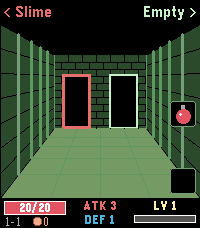
GamesLeft or right? A pocket roguelike for your wrist. Walk through three dungeons, one door at a time. Above each door you see what waits behind it: a chest, an empty room, the merchant – or a monster. Which monster? You only learn its name, not how strong it is. Remember who hurt you. FEATURES - 3 dungeons, each with its own look and 4 new enemy types, 12 pixel-art monsters in total - Automatic battles: every hit earns XP, every level gives +1 ATK and +1 DEF - Blue, green and red swords and shields - Chests with a choice of two items: potions, bombs, gold, gear – and rare finds - The merchant sells permanent upgrades and, sometimes, the Dragonslayer that destroys any boss in one blow - Bag with two slots on the middle and bottom buttons - Beat the boss to descend deeper with all your stats – beat the third one to win - Backlight stays on while you play - English and German CONTROLS Back / Up: left / right door or item Select / Down: use item in bag slot (Select also leaves the merchant) Hold Back: quit How deep can you go?
 6
6Calendar for Office 365
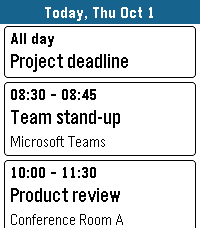
Tools & UtilitiesYour Microsoft 365 and Outlook.com calendar on your wrist. DAY VIEW See all events of a day as clear cards with time, title and location. Swipe left and right to change the day on Pebble Time 2, or long-press up/down on any Pebble. Open an event to see its details, including the description from Outlook. WORKS OFFLINE Today and tomorrow are stored on the watch, so your schedule is there even when your phone is not. DAILY BRIEFING Optional: the app opens at a time you choose, vibrates gently and shows your day. Pick the weekdays you want. MOVE EVENTS Optional: postpone your own events right from the watch – 1 hour, 1 day, 2 days, 1 week later or to next Monday. Turned off by default. MAKE IT YOURS Choose which calendars to show, accent, text and background colors, English or German, touch control, and whether past events are grayed out. The app closes itself after a few minutes without use to save battery. PRIVATE BY DESIGN No server, no tracking, no ads. Your calendar goes straight from Microsoft to your phone and your watch. The developer never sees your data or your sign-in. SIGNING IN Open the app on the watch. It shows a short code – enter it at microsoft.com/devicelogin on your phone or computer and sign in. Keep the app open until your events appear. Microsoft may show the app as "unverified"; this is normal for apps from independent developers. WHICH ACCOUNTS WORK Personal Microsoft accounts (outlook.com, hotmail.com, live.com) work. Work or school accounts usually work in small organizations. Many larger companies block third-party calendar apps or this sign-in method – then the app cannot be used with that account. Made for Pebble Time 2. Also runs on Pebble 2 Duo, Pebble Time, Pebble Time Steel and Pebble 2. Not affiliated with or endorsed by Microsoft. Microsoft 365, Office 365 and Outlook are trademarks of the Microsoft group of companies.
 68
68Peter Guy Funny's
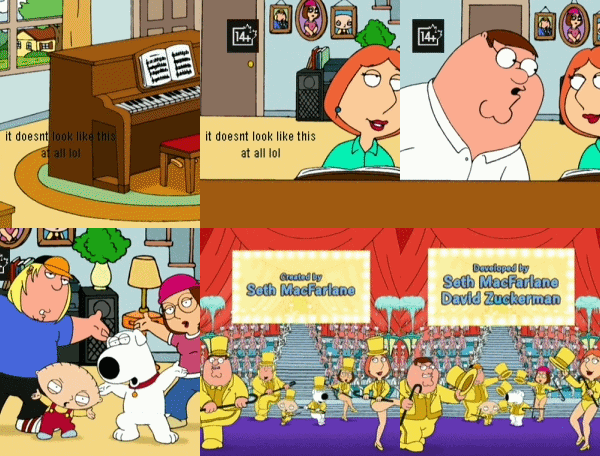
GamesWatch the big peter and his wife stewie on 64-color. with amazing resolution and amazing animations and design, this is the best way to watch the family guys. SEO: family guy video player videos seinfeld diddy balls 8k 4k uhd hdr colors buffering long loading times طرائف بيتر غريفن لساعة بيبل הבדיחות של פיטר גריפין לפבל — מהדורת ביג יאהו 😭
 1
1One and Only
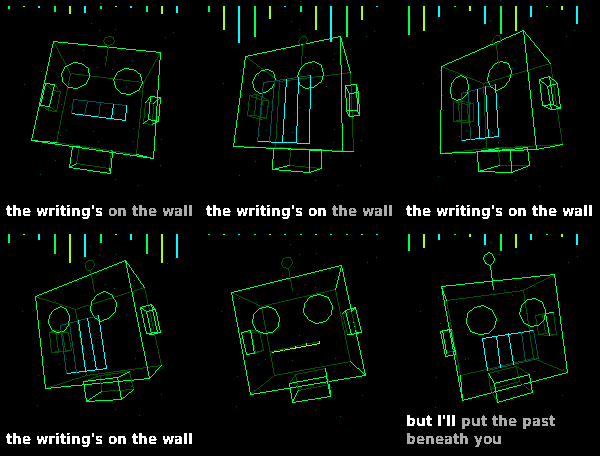
GamesSAM, the 1982 speech synthesizer, sings "One and Only" by rai1367, with a 3D wireframe music video. It's all made on the watch as it plays: SAM's voice (lead and harmony), the bass and the keys are synthesized live, and the drums are played from six tiny drum hits. Nothing is streamed from your phone. A 3D wireframe music video plays along, timed to the music: - Karaoke lyrics, word by word, as text or as 3D wireframe letters - Scenes that change with each part of the song, pulsing to the kick drum and bass - A robot that lip-syncs to SAM's singing - Effects set off by the lyrics, including a cameo from the Index 01 ring - A wireframe Pebble Time 2, made from Core Devices' own CAD models Controls: - The song starts when the app opens - UP / DOWN: volume, in 10% steps - SELECT: backlight on/off (after the song: play it again) - Hold SELECT: lyrics as text or 3D wireframe letters I didn't port over every note, I just got it sounding 'good enough'. Needs a watch with a speaker: Pebble Time 2 only. Original song by rai1367: https://www.youtube.com/watch?v=_llTsFK6GZI Sung by Software Automatic Mouth (S.A.M.). Created with Claude code Open source (MIT): https://github.com/CATEIN/one-and-only-time-2
 15
15Whistle
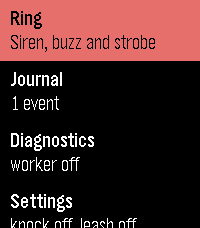
Tools & UtilitiesMake a lost Pebble ring, buzz and flash - and see when it was last in touch with your phone.
 8
8Dicey Depths
Games**** This is in early release state. I've not received my pebble yet so unable to test on real device. Game will be updated soon :) *** Every turn you roll your dice face up, and then decide how to spend them across the equipment you brought in. You always see the randomness BEFORE you commit, so a bad roll is a puzzle to solve rather than a punishment to absorb. Drag a die onto a card, tap one then the other, or play entirely with the buttons. Each card takes a die that matches its slot — any, odd, even, 4+, 3- or an exact number. A card fires once per turn, so a spare die is worth nothing without a card to put it in. Fussy cards pay better: one that only accepts a 1 hits far harder than one that takes anything, and is dead weight on the turn you don't roll one. Status effects attack your rolls, not your health. Frozen flattens your best die. Burn sets one alight and charges you 2 HP to put it out. Shocked takes a card offline until you spend a die clearing it. Every debuff is another puzzle. TWO CLASSES — The Warrior rolls dice and rerolls them. The Robot has no dice at all: it builds each number on a CPU meter, pushing for more and losing the lot if it goes past six. FIVE EPISODES — Each is a ruleset that rewrites the game rather than a difficulty step, and each ends in its own boss. Clear all five to unlock three Bonus Rounds. ENDLESS — No boss, no ceiling. Past floor four each floor throws one of the campaign rulesets at you. Your ten best runs are kept on the watch. Three difficulties. Easy is very hard to lose. Normal is the baseline. Hard adds a named curse to every floor. Lose a fight and the run is over. Built for the Pebble Time 2 and Pebble Round 2, with full touch support and a layout that follows the curve of the round display. No phone required. Inspired by Dicey Dungeons by Terry Cavanagh.
 109
109Beeline
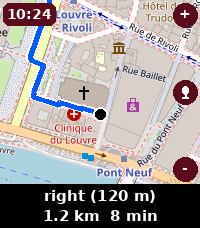
Tools & UtilitiesTurn-by-turn navigation on your wrist. Beeline shows OpenStreetMap maps with walking, cycling and driving routes, plus voice destination search - just long-press to speak where you want to go. Keyless and private: no account, no sign-up, no telemetry.