Phone Sound Mode
Ark-am
Watchapp
Description
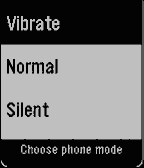
Phone Sound Mode puts your phone's ringer one press away. Heading into a meeting, a class, or a quiet room? Switch your phone to Vibrate, Normal, or Silent straight from your Pebble, without taking your phone out of your pocket.

Open the app, choose a mode, and you're done. A short vibration confirms that your phone has changed, and the app returns to your watchface a moment later. If the change can't be made, the app stays open and tells you why, so you can try again.

Clear icons for each mode make it easy to pick the right one at a glance, on round and rectangular screens, in colour or black and white.

Android only. Phone Sound Mode requires its free Android companion app. Open the companion once and allow Do Not Disturb access, which Android needs to switch into and out of Silent reliably. Nothing is sent to a server; the watch talks only to your phone.

Created by Ark-am. Discover our work and custom software development services at https://ark-am.com/
- DeveloperArk-am
- CategoryTools & Utilities
- PlatformsOG Pebble, Steel, Time/Time Steel, Time Round, 2, 2 Duo, Time 2, Round 2
- Updated2026-10-04
- Version1.0.7