GymBuddy
uaparit
Watchapp
Description
GymBuddy
========

GymBuddy is a watchapp for Pebble Time 2 (Emery) that replaces paper notes and your
phone at the gym. Build your training plans comfortably on your phone — machine
settings, sets, reps, weight and rest time per exercise — and have them available
on your wrist in large, glanceable text during your workout.

SESSION LIST
------------
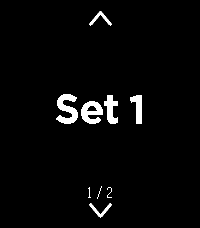
On launch, the watch shows all saved training sessions (up to 10). Up/Down or
swiping up/down selects a session (loops at the ends). Select loads the chosen
session.

If the session is already cached on the watch and the phone is currently connected,
the watch asks: load from the watch (instant, no phone needed) or sync fresh from
the phone? With no connection, the watch automatically falls back to the last
cached data — so your exercise list stays usable even when your phone isn't nearby.

EXERCISE VIEW
-------------
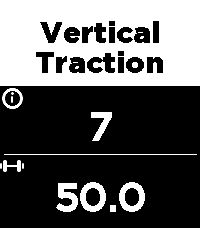
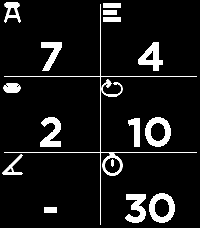
Two views per exercise, switch with a left/right swipe:

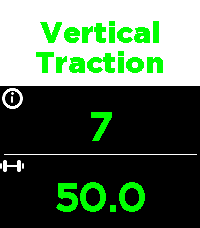
  • View 1 — exercise name, machine number, weight
  • View 2 — seat position, pad position, angle, sets, reps, rest time

All values in large text with icons instead of text labels — deliberately designed
for maximum readability at a distance. Up/Down or swiping moves to the next/
previous exercise (loops back to the start at the end of the list). A long press
on Select highlights the currently shown exercise in green — handy for keeping
track of what you've already done during your workout.

REST TIMER
----------
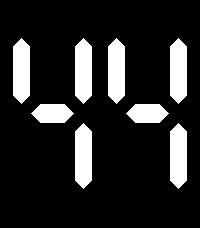
Select starts the rest timer for the current exercise, shown as large, classic
LCD-style digits. When it reaches zero, the watch vibrates twice and jumps back to
the exercise. Pressing Select during the countdown cancels it immediately.

CONFIGURATION (via the phone app)
-----------------------------------
A custom-built configuration page instead of Clay, since training plans need
dynamic lists:

  • Create, edit, delete and duplicate sessions and exercises
  • Reorder exercises by dragging (☰)
  • Rename a session directly from its exercise list
  • JSON import/export (e.g. to load a complete training plan in one go)
  • Switchable language: German or English (applies to both the watch and the
    configuration page)

NOTE
----
Touch-swipe and the four hardware buttons both work at the same time — whichever
is more convenient in the moment. Pebble Time 2 (Emery) only, uses the touch
screen, RGB backlight and vibration motor.

APP PICTURES
-----------
https://imgur.com/a/38bk1Cv


Vibecoded with Claude · Pebble Time 2 (Emery) only- Developeruaparit
- CategoryHealth & Fitness
- PlatformsTime 2
- Updated2026-10-03
- Version1.0.1