 63
63Anki-pebble
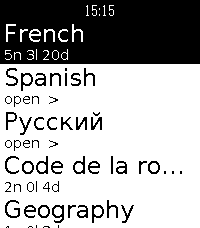
DailyRun your AnkiDroid review sessions straight from your Pebble. Pick a deck, read the question, reveal the answer, and grade it, eyes up, phone in your pocket. ⚠️ REQUIRES A FREE COMPANION APP This watchapp reads your collection through a small open-source Android companion you install separately: → https://github.com/Wyoc/anki-pebble-companion/releases Install the APK, open it once, and grant the AnkiDroid database permission. You also need AnkiDroid installed with your collection. FEATURES • Hierarchical deck menu with due counts (folders and sub-decks) • Scrollable question and answer screens for long cards • Grade with the buttons: hold Up / Select / Down for Easy / OK / Hard, Back for Again • Uses AnkiDroid's modern v3 scheduler (grades sync back to your collection) • On-watch font size (Small / Medium / Large) • Latin and Cyrillic text support CONTROLS Question: Up/Down scroll · Select reveal · Back exit Answer: Up/Down scroll · hold Up/Select/Down = Easy/OK/Hard · Back = Again · hold Back = abandon Deck menu: Select open · Back up a level · hold Select = font settings For any issue or request, please open en issue: https://github.com/Wyoc/anki-pebble-watch/issues Free and open source (GPL-3.0) Not affiliated with Anki or AnkiDroid. Requires AnkiDroid + the Anki-Pebble companion app.
 62
62LifeGame
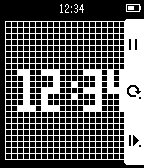
GamesTHE UNIVERSE IS ON YOUR WRIST. This app has four selectable modes. 1. Clock 2. Glider 3. Spaceship 4. R-pentomino
 62
62X-Ray
GamesPlace your Pebble above your left hand and start the x-ray scan. If you move your hand as you tilt your Pebble watch, it will appear as if you are viewing an x-ray. The up button starts the calibration or pauses the x-ray scan. The middle button shows the custom settings. Use the bottom button to exit the x-ray scan and return to the home screen. Custom settings include keeping backlight on and whether or not you find a fracture in your finger!
 62
62home assistant pebble
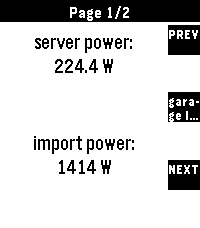
RemotesTransform your Pebble into the ultimate smart home remote Home Assistant for Pebble is a professional-grade integration designed for speed, reliability, and universal compatibility. Whether you're on a classic Pebble, a Pebble Round, or the high-res Pebble Time 2, this app provides a seamless, responsive experience. Setup Instructions: 1. Open the settings for this app in the Pebble mobile app. 2. Enter your Home Assistant URL and a Long-Lived Access Token. 3. (Optional) For the best experience, add `cors_allowed_origins: - https://joshsg3.github.io` to your Home Assistant `configuration.yaml` to enable the "Load Full List Now" button. - If you don't want to do this, save the config page, and open it again, the first 350 entities will be preloaded 4. Configure your dashboard pages and sync! Not affiliated with home assistant If you like this and want to support me: https://buymeacoffee.com/joshsg
 62
62Wristcord
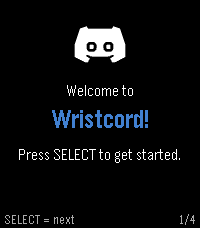
Tools & UtilitiesDiscord on your wrist! Browse your servers, follow chats, and send a reply with your voice, right from Pebble Time 2. Selfbotting is against Discord ToS, by using Wristcord you accept all responsibility.
 62
62Hack Portal - Ingress companion
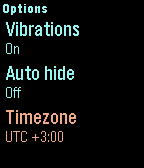
Tools & UtilitiesReminds you to hack your portals when they cool down. Remembers your hacks and knows when the portals burn down. Configurable Heat Sinks and Multi-hacks. You can configure up to 20 portals. Shows current cycle and time to next checkpoint. The hacks are pushed as pins into your timeline. You will get sojourner notification based on last known hack time. Not affiliated or endosed by Niantic Labs.
 62
62Korea Fine Dust
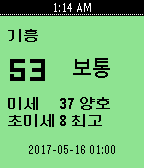
DailySimple Checking Fine Dust App for South Korea data resource 한국환경공단(에어코리아), Daum open API(좌표변환)
 62
62Another Timer
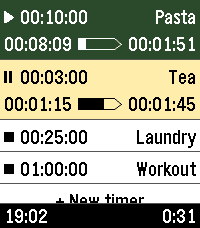
Tools & UtilitiesYet another timer app, built for fast, versatile, & straightforward usage. Features: - Only one touch to create & start new timers - Multiple timers - Reusable saved timers - Run-once timers - Labeled timers - Track remaining time, elapsed time, & overtime - Configure timers either from the phone or from the watch - Optionally start counting from app launch - High configurability The user interface follows the design of the Another Alarm app. Use them both to feel familiar. The app was originally forked from Sykerö Software's Countdown Timer, later mixed with many extra ideas and useful features from other open source apps. The touch dial is adopted from howeaj's Instant Timer, and the label input keyboard from metuuu's Mölkky scorekeeper. Check out also those brilliant apps! Attribution links, Pebble app store: - https://apps.repebble.com/countdown-timer_c1e3e132dae74bbcaf1a8320 - https://apps.repebble.com/timer-instant-timer_1a42bf7ed056404abbdd7bf9 - https://apps.repebble.com/m-lkky-scorekeeper_bb6ffbee520f4c4cafc2b424 Attribution links, GitHub: - https://github.com/Sykero-Software/PebbleCountdownTimer - https://github.com/howeaj/pebble-instant-timer - https://github.com/metuuu/pebble-molkky-scorekeeper
![Social Bundle 3 [Pebble Rocker]](https://assets.repebble.com/screenshots/52f076c6bb34233437001b62-0.png) 62
62Social Bundle 3 [Pebble Rocker]
DailyInclude the Events, Facebook, and Twitter watch apps. IMPORTANT: This watch app requires the Pebble Rocker companion app available via the Google Play store.
 61
61Metronome
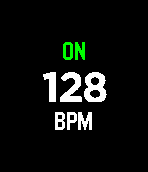
Tools & UtilitiesA minimalistic haptic metronome for the Pebble Time. Adjust the tempo with the up and down buttons and toggle vibration with the select button.
 61
61Metronome
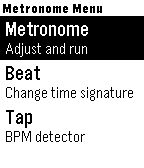
Tools & UtilitiesThis is a haptic metronome app for Pebble devices. It gives you visual and vibration feedback to display the tempo. It is also possible to configure the time signature and tap in a tempo. The app respects Quiet Time and does not vibrate when Quiet Time is active.
 61
61Tideline
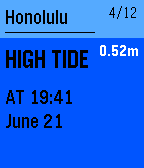
DailyGet accurate tide predictions delivered to your Pebble watch. Tideline adds pins to your timeline for high and low tide events. Tide information can also be viewed directly in the app. Currently supports thousands of tide stations in the USA, Caribbean, Pacific, New Zealand, Australia and Antarctica! More features are planned for future releases including: - Additional tide locations - More animations and eye candy Please contact [email protected] if you have any bug reports, feature requests or just want to say that you like my app ;)![Social Bundle 1 [Pebble Rocker]](https://assets.repebble.com/screenshots/52e485b11e4cae1a79000e2b-0.png) 61
61Social Bundle 1 [Pebble Rocker]
DailyIncludes the Facebook, Foursquare, and Twitter watch apps. IMPORTANT: This watch app requires the Pebble Rocker companion app available via the Google Play store.
 61
61Feel The Time
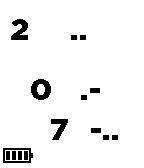
Tools & UtilitiesDon't look. Feel it. Feel the time with your Pebble. When you can't glance the watch like while meeting or presentation or hair cutting or dentist, feel the time vibration with this app. A step for master the feeling is following. <setup> 1. download this app. 2. register this app as QUICK LAUNCH of up(or down) button long press. (this is option) 3. use SETTINGS option for configuration (this is option) <how to use> 3. long press up (or down) button to launch this app. it feels startup vibes. 4. push up button and feel vibe to know the current hour. 5. push middle button and feel vibe to know 10 digit of the current minute. 6. push down button and feel vibe to know 1 digit of the current minute. 7. push back button to quit this app. <configuration> - vibe length : normal/short/long - vibe clock : off/every hour/every 30min - pre clock vibe :off/5min/10min <vibe pattern> vibe pattern consist of long vibe and short vibe. long vibe means 5, short vibe means 1. only 0 is special pattern. all patterns are following. 0 .- 1 . 2 .. 3 ... 4 .... 5 - 6 -. 7 -.. 8 -... 9 -.... 10 -- 11 --.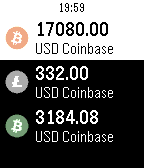 61
61Crypto Watch
DailyCrypto Tracker for Pebble With this app you can watch the price of Bitcoin, Litecoin, Bitcoin Cash, and Ethereum on the Coinbase Market. You will be able to choose your currency type as well. As an added bonus, you can enter a Bitcoin, Litecoin, Bitcoin Cash, Ethereum paper wallet address to track as well. The value of coin and the currency value with be displayed. If you click to select the wallet, a QR Code will appear of the wallet address. This is great for a quick receive barcode of your Bitcoin, Litecoin, Bitcoin Cash, and Ethereum Wallet. If you like this app, you can donate some BTC, LTC, BCH, ETH do the addresses below: BTC: 1D9HuDKKYY5RiMmwicV4xfuRNhVNwtmNJP LTC: LVVFkds7vYEN3yVDpXVPeMUtMYKZ8pNYbu BCH: 15FzrbwukP8VBXoLmKBYfmb8ELK5NxTtns ETH: 0xf02a22f7b4fd26264f6086c79785c80e04ed2256