Description
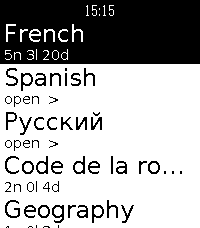
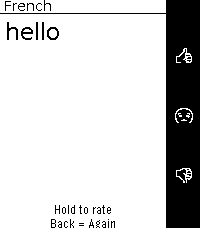
Run your AnkiDroid review sessions straight from your Pebble. Pick a deck, read
the question, reveal the answer, and grade it, eyes up, phone in your pocket.

⚠️ REQUIRES A FREE COMPANION APP
This watchapp reads your collection through a small open-source Android companion
you install separately:
→ https://github.com/Wyoc/anki-pebble-companion/releases
Install the APK, open it once, and grant the AnkiDroid database permission. You
also need AnkiDroid installed with your collection.

FEATURES
• Hierarchical deck menu with due counts (folders and sub-decks)
• Scrollable question and answer screens for long cards
• Grade with the buttons: hold Up / Select / Down for Easy / OK / Hard, Back for Again
• Uses AnkiDroid's modern v3 scheduler (grades sync back to your collection)
• On-watch font size (Small / Medium / Large)
• Latin and Cyrillic text support

CONTROLS
Question: Up/Down scroll · Select reveal · Back exit
Answer: Up/Down scroll · hold Up/Select/Down = Easy/OK/Hard · Back = Again · hold Back = abandon
Deck menu: Select open · Back up a level · hold Select = font settings

For any issue or request, please open en issue: https://github.com/Wyoc/anki-pebble-watch/issues

Free and open source (GPL-3.0)

Not affiliated with Anki or AnkiDroid.
Requires AnkiDroid + the Anki-Pebble companion app.