 51
51Tennis
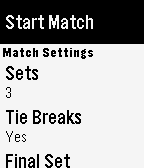
Health & FitnessBuilt by a tennis player for tennis players. Keep track of the score in your tennis matches with simple controls and a clean, uncluttered interface. Match formats are easily configured inside the app and it defaults to the settings you last used. If your yours isn't configurable, let me know because I want to support all commonly played formats. ## Instructions - Select the match format then choose 'Start match' - Use the middle button to toggle who is serving first - Your score is at the bottom and your opponent's score is at the top - Hit the bottom button when you score, the top button when your opponent scores - If you make a mistake, hit the middle button to undo ## Features - Clean interface - Service indicator - Many match formats supported - Infinite undo - Post-match stats ## Roadmap - Ability to save/resume match state with persistent storage - Ability to view stats for previously completed matches - Support any missing match formats
 51
51My Vancouver Bus
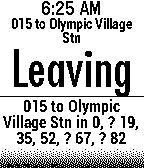
NotificationsBus schedules for Vancouver, BC. Displays scheduled departure time, with an indicator if the real-time bus is early <, late >, or unknown ?. All routes for a given stop are shown. Scrolling down gives additional details. Select up to 8 stops by ID. Includes stop ID search. Repeatedly press select button to choose your preferred route at a stop. Stop validation now turns stop number bold red if stop doesn't exist.
 51
51Stand Up
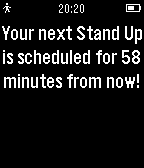
Health & FitnessStand up is a simple reminder app that will notify you to stand up and move around one hour from the time it is started.
 51
51TurnOnBacklight
DailyForce turn on your backlight for 2 seconds. Open backlight manually just like normal electric watch. It's especially useful when auto backlight off. --- How to use? 1. Go to Settings > Quick Launch page Set this app as down button (or up button) long press 2. Long-press the button as you set in the watchface page, backlight will turn on for 2 second. --- Demo video: https://youtu.be/VV7u0Loy_ko ---
 51
51Timers
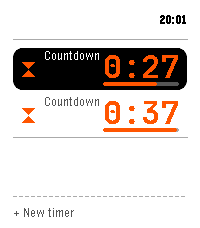
Tools & UtilitiesMulti-timer, stopwatch, single and repeat countdowns for Pebble Time 2. -- Across the app - Run several at once; the home screen keeps each live time visible - Say a timer by voice, English or Spanish ("five minutes", "pasta for eight minutes", "every 20 minutes", "at 6:45"); name it too - Save 12 presets, start one with a press - Fires on time even with the app closed; snooze a fixed amount or a quarter of the set time Countdowns - Big digits with a progress bar, start and end time - Hold to pause, add more time while it runs - Keep counting past the target until dismissed Stopwatch - Latest laps on the main screen; hold Up to add a lap Repeat timers - Repeat on a set interval, with a round tally and quick restart Turn a countdown into a repeat, and back. Controls: hold Select to pause, hold Up for the quick action, Down for the menu. Report bugs or request improvements: https://github.com/Persitz/pebble-timers/issues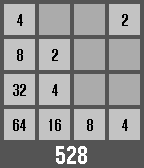 51
512048
Games2048, The addictive computer game made specifically for your wrist! How to play Back button to go left Select button to go right Up button to go up Down button to go down Hold select button to exit and save game NEVER LONG PRESS THE BACK BUTTON!!! (unless you want to not save and lose progress) Please heart it!!!
 50
50Sidecar by flwkt
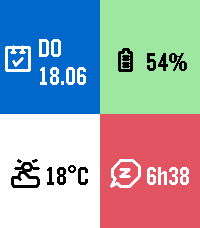
DailySidecar by flwkt Your watchface looks great — but it probably does not show everything you care about. Sidecar is a quick-launch companion watchapp that fills the gaps: a configurable grid of complications you can open in one press and dismiss just as fast. Love a minimal face with no clutter? Keep it. When you need steps, sleep, weather, or battery at a glance, Sidecar is there. Complications Assign any of these to up to six grid slots: - Current weather — Live temperature with a weather icon for current conditions - Weather forecast — High and low temperatures for today with a forecast icon - Steps — Today's step count - Distance — Distance walked or run today - Heart rate — Current heart rate in BPM - Battery — Watch battery level as a percentage - Date — Day of week and calendar date - Time (with seconds) — Current time including seconds; ticks every second only while shown - Sleep total — Total sleep duration for today - Deep sleep — Restful (deep) sleep duration for today - None — Leave a slot empty; only active slots are shown The grid layout adapts automatically based on how many slots you use, from a single full-screen cell up to a 2x3 grid. Features Built for Quick Launch — Assign Sidecar to a Quick Launch button on your Pebble Time 2 for instant access. Press Back, Up, or Down to exit and return to your watchface. Weather from your phone — Current conditions and today's forecast use your phone's location via Open-Meteo. Pick Celsius or Fahrenheit in settings. Health data — Steps, distance, heart rate, and sleep metrics read from Pebble health services when those complications are enabled. Make it yours — Set global background and foreground colors, or turn on per-cell colors for a bolder look. Pick a system font (Gothic, Roboto Condensed, Droid Serif, Bitham, and more) or leave it on Auto to scale with your grid size.
 50
50Color Calendar Redux
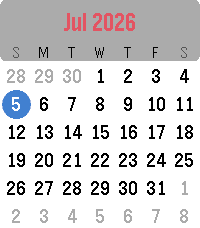
DailyColor Calendar Redux This is an update of the original Color Calendar app created by Kelby. A simple, easy-to-read calendar for your Pebble. Tap or Swipe Up and Down to scroll between months, Tap/Select returns to today, and long select press toggles between Sunday-first and Monday-first week layouts. New in this version: - Full support for Pebble Time 2 and Pebble Round 2, with a layout that scales to fill their larger displays (and it still runs great on Pebble Time and Pebble Time Round). - Touchscreen controls on Pebble Time 2 and Pebble Round 2: swipe up or down to change months, tap to jump back to today. - Simple calendar icon in the app menu - The current date now appears in the launcher under the app name (e.g. "Thu, Jan 1st") Based on the original Color Calendar by Kelby. Full credit to them, I just added some features and native scaling for the new watches. About the Developer - Comet Designs creates fun content for the Pebble platform - Buy me a coffee https://ko-fi.com/cometdesigns
 50
50Swim Buddy
Health & FitnessRecord your swimming workout. During a workout you can count laps by pressing any of pebbles buttons. Information for the current workout like time, distance and speed will be displayed. The last workouts will be stored on the pebble watch.
 50
50Bodybuilding Jesus
DailyBodybuilding Jesus is a free watch app that broadcasts a daily Bible verse, a personal devotional, and a simple workout. We at Renewal Studios believe that physical and spiritual wellness together form a healthy lifestyle. Content for the year will be released periodically so keep an eye out for updates in the future!
 50
50Is It Christmas
DailyThis watchapp tells you whether or not it is currently Christmas. Based on the website isitchristmas.com.
 50
50Netatmo
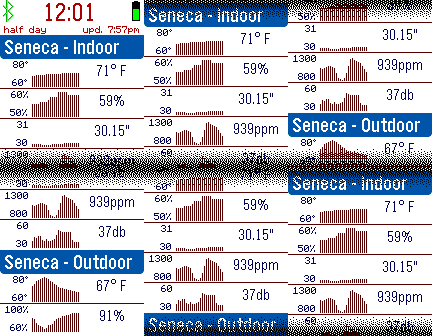
DailySee your Netatmo home weather station readings on your Pebble smart watch. Enter your Netatmo credentials to see your temperature, humidity, and other readings. Customizable for temperature and pressure units, header format, vibration alerts, and more.
 50
50lucidity
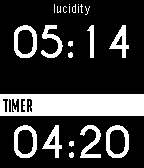
Tools & UtilitiesIn order to lucid dream, one must acknowledge the fact they are dreaming. Lucidity causes the Pebble to vibrate after a certain time determined by the user. Launch the app before bed. The Pebble will vibrate a second time 5 minutes after the set time. Email with feedback please.
 50
50DogeLove
DailyDogeLove is a complete DogeCoin wallet on your watch. Use it to tip friends or pay for services! So nice! So much love! This app is currently in beta test. Use at your own risk. Please contact @sarfata on twitter with feedbacks.
 50
50Alice's Mom's Rescue
GamesThis is the "runner" version of Alice's Mom's Rescue platformer game for Windows & Android. The giant raven has captured Alice's mother. Help Alice save her mother through the 3 worlds and 6 levels! Change Alice's height by jumping on the magic mushrooms to get through the tiny spaces. If you like the game, please get the full version with 25 levels on Android store or Steam !