 128
128Abfahrt! - Departure Times
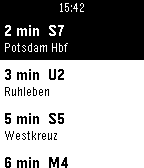
Tools & UtilitiesReal-time departures across Europe. Supported by Pebble! Supports 25 countries with 101+ cities - check full coverage at: https://riles.tech/coverage/ Features: - Automatic location detection - Shows up to 15 upcoming departures - Smart station prioritization - Sorted by departure time - Refresh with SELECT button - Minimal battery usage Developer info: This project and its API are supported by Pebble! The API is developer-friendly and open to other Pebble devs - feel free to reach out if you want to use it in your projects! Support my development: https://ko-fi.com/rilestech https://buymeacoffee.com/rilestech Currently known issues: - Layout with Pebble Round (2) Thanks to all the transit agencies and open data providers making this possible!
 128
128Square Tube 3D
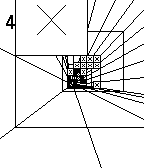
GamesYou are falling down the Square Tube. How long will you survive? Tilt your watch to avoid obstacles.
 127
127NetAtmo for Pebble
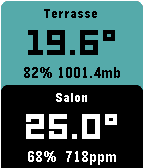
DailyThis watchapp displays data from your NetAtmo® stations. Open the configuration page, enter your credentials and select your default NetAtmo station. The outdoor module is displayed on top. Press the middle button to display the additional modules. Press up/down buttons to display awesome graphs (last 24 hours measures). Do a long press on the middle button to display your other stations. If you like it, feel free to donate by clicking on the website link below or contact me. This app and developer are not associated with NetAtmo® (http://www.netatmo.com/)
 127
127TopoNav
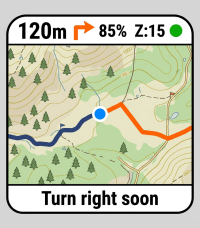
Tools & UtilitiesTopoNav brings offline-style topographic maps and GPX path guidance to your Pebble smartwatch. It streams live outdoor map tiles from your choice of sources (OpenTopoMap, CyclOSM, OpenStreetMap, MtbMap) from your smartphone companion, rendering detailed contour lines, hiking trails, and rivers in Pebble-native 64 colors. Now with full support for Pebble Round displays! Whether you are hiking, walking, or exploring new paths, TopoNav keeps you oriented without needing to pull out your phone. Key Features: 🗺️ Topographic Map Tiles & Sources: Real-time rendering of elevation contours and walking trails with selectable map providers. Toggle Fullscreen Mode to maximize your visible map area. 🥾 On-Watch Route Manager: Swap, start, or deactivate GPX routes directly from a dedicated on-watch menu. 🧭 Navigation View Modes: Choose between a full map view, an Auto-Popup that shows a large turn arrow when approaching a waypoint (< 50m), or a permanent battery-saving Big Arrow mode. 📍 Sensor-Fused Compass Chevron: Real-time direction arrow using the watch's magnetic compass when standing, and switching to GPS-course when walking to filter out wrist-swing jitter. 👣 Live Breadcrumb Trail: Optionally display your real-time traveled route on the map to easily retrace your steps. ⏺️ Activity Recorder: Long-press the Select button on your watch to record your walk. View your completed trips on an interactive map in the settings webview, analyze metrics, and download or copy the standard .gpx file. 📊 Fully Dynamic Dashboard: Customize your view by selecting up to 4 fields from 10 different metrics (Speed, Average Speed, Distance, Elevation Gain/Loss, Duration, Altitude, Watch Battery, Heading, Distance to Destination) alongside live GPS coordinates. The layout intelligently auto-scales to fit your choices perfectly! 🔊 Directional Vibration Alerts: Stay on track with intuitive haptic feedback—distinct vibration patterns tell you whether to turn left or right without even looking at your wrist. You also get 3 rapid pulses if you drift more than 50 meters off-route. Requirements: Requires a persistent connection to your phone's Pebble app with GPS and Internet access enabled. Built as an interactive Vibe-Coding project! 🎸✨
 126
126Transmission Torrent
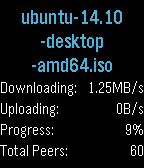
RemotesA remote control for Transmission, with support for the Timeline! Features: - List of torrents - Details for each torrent, such as speed and progress - Start, pause and remove any torrent - Timeline shows when you downloaded a torrent or when you will finish to download it. Complete the configuration with the IP server and the port (e.g. myserver:9091), and check your torrents from wherever you are! Last Update 26/08/2015: - Changed menu colours - Added number of peers
 126
126mybucketz
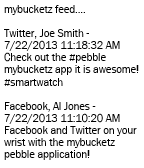
NotificationsThe mybucketz watch application allows you to view the most recent posts from your Twitter/Facebook/Tumblr/LinkedIn feeds. The application integrates with the free web based social media aggregator http://www.mybucketz.com.
 126
126Prayer Times
DailyShows all prayer times for your location, updated automatically.
 125
125TravelCrumbs
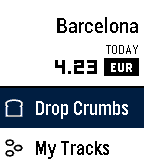
Daily"Fantastic Travel Currency App!" - Eric Migicovsky (Pebble CEO) If you like my app could you please give ❤️ ==New Features== 1. App Glance Mode : Total Spent Money / Today Currency Rates 2. Offline Mode : You don't need to internet! 3. Support for Spanish, French, English, Italian and German is coming soon TravelCrumbs helps people spend their money while traveling. It shows the exchange rates of the current location while it keeps tracking the locations using GPS. As you travel from country to country, all you need to do is to set your currency in your own country. And wherever you are in, TravelCrumbs will detect your location and automatically change the currency. In case you travel domestically TravelCrumbs will be still helpful for tracking where you have visited and checking the amount of money you spend each time. Users can easily input via voice or button control and check the price directly. They can also see an overview of their total expenditure for the day and the places that they have visited. TravelCrumbs is able to detect any value that you have said. We have the accurate exchange rates and location datas for over 39 countries worldwide. **Voice Input Guide** e.g 102.77 USD -> Say "one hundred two dollars and seventy seven cents" or "one hundred two point seventy seven" ==KIEZEL PAY== Travel Crumbs is no longer free, a one time purchase using KiezelPay at $2.99 is required to continue using Travel Crumbs. Thank you. email : [email protected] twitter : @travelcrumbs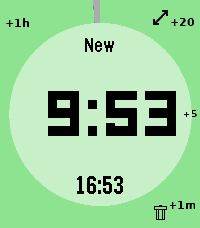 125
125QuickTimer
Tools & Utilities# pebble-timer-quick QuickTimer is a timer app for the Pebble Smartwatch, intended to be the fastest way to start a timer or stopwatch. Made for people that think needing 5 seconds to set a countdown timer or stopwatch is far too long. With QuickTimer, rest assured that you are not fiddling away precious moments of your life. QuickTimer starts counting as soon as you open the app. First press the button, then think how long the timer needs to be. If you want a timer for 1 minute and it takes you 6 seconds to start the timer, then your timer will be off by 10%, and that can be life or death. If you like your soft boiled eggs cooked for exactly 6 minutes and 20 seconds, QuickTimer will help you get the gooey texture you desire. QuickTimer works by pressing buttons to increment the countdown timer by set amounts (1, 5, 20, 60). Once you get used to this, you can set a timer without even looking at your watch. Here's how it works: - Open the app - You enter new timer mode where each button press adds a given amount of minutes to the total countdown time - After 3 seconds of inactivity your timer is set - If you don't press anything, QuickTimer goes into stopwatch mode instead - Once you are in counting mode, you can edit your timer, restart your timer, or you can enable repeat timers - Timers that are in alarm can be repeated, snoozed for 5 minutes, or silenced to become post timer stopwatches. ## Features ### Run several timers at once Need to track more than one thing? Turn on **Multiple Timers** in the settings and QuickTimer can keep up to five timers and stopwatches running at the same time. When you open the app it shows a list of everything that's running — scroll to one and select it to jump straight in, or pick **New Timer** to start another. Hold Down on a timer in the list to delete it. ### Every timer has a name — and you can speak a new one So you never lose track of which timer is which, QuickTimer automatically gives each one a short, memorable name the moment it's created. On Pebbles with a microphone, you can rename the active timer with your voice: while you're setting a timer, hold **Up** first and then press **Back**, then just say the new name. (Requires the **Voice naming** setting to be enabled and a connected phone.) ### Millisecond stopwatch Timing something precise? Pause a stopwatch while it's under an hour and QuickTimer shows the milliseconds too (e.g. `1:23.456`), so you can read off an exact split. The milliseconds disappear once it passes an hour to keep the display readable, and they only ever show on stopwatches — never on countdown timers. Based on [YclepticStudios/pebble-timer-plus](https://github.com/YclepticStudios/pebble-timer-plus).   ## Buttons ### New timer mode - Back: Add 1 hour - Up: Add 20 mins - Select: Add 5 mins - Down: Add 1 min - Hold Up: Toggle reverse direction (increments become decrements) - Hold Select: Switch to EditSec mode (seconds granularity) - Hold Up then press Back: Voice rename the timer (microphone models, when Voice naming is enabled) - Hold Down: Quit app and delete timer After 3 seconds of inactivity, the timer is set and transitions to counting mode. ### EditSec mode (seconds granularity) - Back: Add 60 seconds - Up: Add 20 seconds - Select: Add 5 seconds - Down: Add 1 second - Hold Up: Toggle reverse direction - Hold Select: Switch back to New mode (minutes granularity) - Hold Up then press Back: Voice rename the timer (microphone models, when Voice naming is enabled) - Hold Down: Quit app and delete timer ### EditRepeat mode Entered by holding Up while in counting mode (countdown timers only). - Back: Reset repeat count to 0 - Up: Add 20 repeats - Select: Add 5 repeats - Down: Add 1 repeat - Hold Down: Quit app and delete timer ### Counting mode - Up: Enter edit mode - Select: Toggle play/pause - Down: Extend high-refresh display rate - Back: Quit app - Hold Up: Toggle repeat mode on/off (countdown only) - Hold Select (running): Restart timer to original length - Hold Select (paused): Reset to 0:00 and enter EditSec mode - Hold Down: Quit app and delete timer When a stopwatch is paused and under an hour, the display shows milliseconds (e.g. `1:23.456`). ### Alarm mode When a countdown timer expires, it enters alarm mode (vibrating). - Up: Silence alarm and enter edit mode - Select: Silence alarm and toggle play/pause - Down: Snooze (add 5 minutes) - Back: Silence alarm (timer continues as stopwatch) - Hold Up: Repeat timer (restart with original length) - Hold Select: Restart timer from original length (running) - Hold Down: Quit app and delete timer ## Quickness The table below compares the number of button presses required to set timers in QuickTimer versus in the default Pebble timer. ``` | Timer Amount | QuickTimer | Default Pebble Timer | |--------------|------------|----------------------| | 1 min | 2 | 5 | | 2 min | 3 | 6 | | 3 min | 4 | 7 | | 4 min | 4 | 8 | | 5 min | 2 | 5+ | | 6 min | 3 | 5+ | | 7 min | 4 | 5+ | | 8 min | 5 | 5+ | | 9 min | 5 | 5+ | | 10 min | 3 | 5+ | | 11 min | 4 | 5+ | | 12 min | 5 | 5+ | | 13 min | 6 | 5+ | | 14 min | 5 | 5+ | | 15 min | 4 | 5+ | | 16 min | 5 | 5+ | | 17 min | 6 | 5+ | | 18 min | 5 | 5+ | | 19 min | 4 | 5+ | | 20 min | 2 | 5+ | | 25 min | 3 | 5+ | | 30 min | 4 | 5+ | | 35 min | 5 | 5+ | | 40 min | 3 | 5+ | | 45 min | 4 | 5+ | | 50 min | 5 | 5+ | | 55 min | 4 | 5+ | | 59 min | 4 | 5 | | 60 min | 2 | 5 | | stopwatch | 1 | x | ```
 125
125Find my Phone
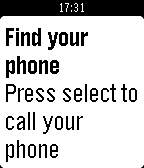
Tools & UtilitiesThanks for 100 ❤'s! If you like Find My Phone give it a ❤! Do you misplace your phone often, or just want to be ready just in case you do? Then Find my Phone is the right app for you. At the push of a button, an automated bot will call your phone so you can hear it from wherever you put it. Unfortunately, you must be in Bluetooth range (About 150 ft.) for it to work. Estimated time to set up is 5 minutes. To set up: 1) Go to https://ifttt.com/join and make an account 2) Go to https://ifttt.com/recipes/407620-find-my-phone-pebble-app (Linked below) 3) Connect the Maker and Phone Call Channel (This will not work for people that do not use a +1 phone number (USA)) 4) In the box that says "Event Name" type "finding_phone" without the quotes 5) Click "Add" 6) Go to ifttt.com/maker and copy your key. DO NOT SHARE THIS KEY WITH ANYONE (Ex: tTfXIFRVJzu9suVW1K0g4k) 7) Install this app to your pebble 8) In the settings paste your key and click "Submit" 9) All done! If you have problems setting up, go to the video tutorial for help: https://youtu.be/VZQzZnMtvQE Or, if that doesn't help go to the troubleshooter: https://goo.gl/K8xeER After you have set the app up, you can re-open the app, and when you click select, your phone will start ringing!
 124
124License Revoked
GamesGTA meets Goat Simulator meets SNES FX-chip graphics — an open-world crime sandbox. Two islands, a causeway. Steal cars, run people down, rob the gun store, and lose the police in a parking garage. No missions — cause mayhem and get away with it. * Controls with one hand: thumbstick on the touchscreen, buttons to turn and fire * Money comes off bodies. Spend it at the gun store, or the strip club * Drive a taxi and pick up fares if you'd rather earn it honestly * Police escalate: arrests first, then guns, then a helicopter and SWAT if you keep it up * Steal the police helicopter
 124
124TenTwentyFour
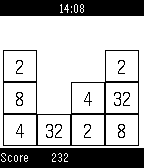
GamesMini-clone of 2048- super addictive 1024 math puzzle game. Slide matching number tiles together until you get to the elusive 1024!
 124
1242048 Touch
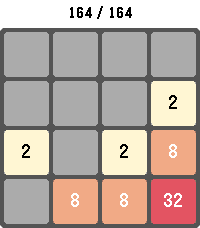
GamesPlay the classic 2048 sliding-tile puzzle on your Pebble. Combine matching numbered tiles to add them together and work your way up to the 2048 tile — and beyond. Swipe to move on touch-capable Pebbles, or use the physical buttons on every other model. Your board, score, and high score are saved automatically, so you can put the watch down and pick the game back up anytime. Long-press SELECT to start a new game, long-press BACK to exit. Supports Pebble Classic, Pebble Time, Pebble Time Round, Pebble 2, Pebble Time 2, Pebble 2 Duo, and Core Devices Pebble.
 124
124Chordinator
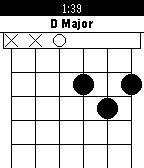
Tools & UtilitiesDisplays guitar chord finger positions. Now shows chords for ukulele and piano too! This data in this app was found by searching Google for chords. The chords may be entirely wrong. If you find an error, email me or create an issue on GitHub. Inversions may have been used. (Usually to make chords fit on the Pebble's screen.) Forked on GitHub from andrewroycarter/Chordinator.
 124
124Weather Underground PWS
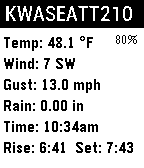
DailyConnect to any Weather Underground Personal Weather Station (PWS) and display Temp, Wind, Wind Gust, Rain Rate, Sun Rise/Set and the local Forecast. You'll need a free Wunderground API Key and the station ID you want to monitor. Get your API key here: http://www.wunderground.com/weather/api/d/login.html