Find my Phone
ALEEF02
⚠️ This apps settings page may not work anymore

Watchapp

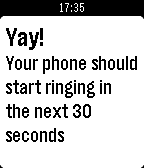
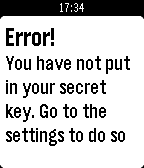
Description
Thanks for 100 ❤'s!

If you like Find My Phone give it a ❤!

Do you misplace your phone often, or just want to be ready just in case you do? Then Find my Phone is the right app for you. At the push of a button, an automated bot will call your phone so you can hear it from wherever you put it. Unfortunately, you must be in Bluetooth range (About 150 ft.) for it to work.

Estimated time to set up is 5 minutes. To set up:
1) Go to https://ifttt.com/join and make an account
2) Go to https://ifttt.com/recipes/407620-find-my-phone-pebble-app (Linked below)
3) Connect the Maker and Phone Call Channel (This will not work for people that do not use a +1 phone number (USA))
4) In the box that says "Event Name" type "finding_phone" without the quotes
5) Click "Add"
6) Go to ifttt.com/maker and copy your key. DO NOT SHARE THIS KEY WITH ANYONE (Ex: tTfXIFRVJzu9suVW1K0g4k)
7) Install this app to your pebble
8) In the settings paste your key and click "Submit"
9) All done!

If you have problems setting up, go to the video tutorial for help: https://youtu.be/VZQzZnMtvQE
Or, if that doesn't help go to the troubleshooter: https://goo.gl/K8xeER

After you have set the app up, you can re-open the app, and when you click select, your phone will start ringing!
- DeveloperALEEF02 · Is this you? Claim your app ›
- CategoryTools & Utilities
- PlatformsOG Pebble, Steel, Time/Time Steel, Time Round, 2, 2 Duo, Time 2 (scaled), Round 2 (scaled)
- Updated2016-07-05
- Version1.1