 14
14Buzz
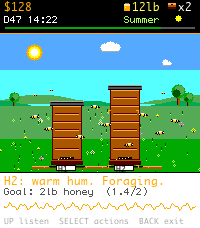
GamesYou've caught a wild swarm. Can you keep it alive through Year 1? Buzz is a pixel-art beekeeping sim for your wrist. The hero mechanic is unique to Pebble: tap your wrist and the watch buzzes your hive's mood back at you — a soft hum for calm, a long roar for queenless, a rapid piping for swarm. Seven mood patterns, all built from Pebble's vibration motor. Learn to feel your hive instead of opening it. Real beekeeping is a sim about restraint. 9 of 10 inspections only stress the colony. Buzz teaches that lesson with outcomes: open the hive too often and stress crushes the queen; do nothing and watch the mood bar climb. A calm-day streak rewards quiet keepers. • 8 actions: Inspect, Check board, Heft, Add super, Feed, Treat mites, Split, Wait • 4 seasons (90 days each): Spring buildup → Summer flow → Fall mite + feed → Winter cluster. Survive Year 1 to win. • Up to 3 hives: catch wild swarms, split strong colonies • 7-milestone progression arc with earned titles (Novice → Master Beekeeper) • 12 badges for restraint, harvest, splits, overwintering • 10 pieces of equipment to buy: smoker, hive tool, bee suit, mite tester, extractor, electric fence, refractometer, observation hive • Beekeeper character strolls the apiary, holds the frame during inspections, stands at the extractor during harvest • One in-game day = 3 real minutes. Save resumes mid-day exactly where you left off. • Vibrations can be toggled off in the menu hub. Made with ❤️ in Manchester , UK 🐝
 14
14Cricket Counter
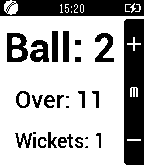
Tools & UtilitiesA basic ball, over and wicket counter for cricket umpires.
 14
14World BloxX 70's
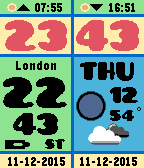
DailyThe ultimate World time watch for Pebble Time and Round. Configurable for 35+ cities/time zones, including half-hour offset zones. Supports 3 favorite time zones. Cycle through the 3 favorites with up and down buttons, no need to use the phone to switch between favorite timezones. Other features: Completely configurable on your wrist. Also configurable via a configuration page. Compass function. Supports 12/24 hour local clock with A/P indicator. Weather icon with temperature in C or F (local weather). Moon phase display. Battery icon. Local sunrise and sunset time. Days of week in English, Dutch, French, German, Italian, Spanish and Klingon. A-Grade energy friendly (extremely low battery usage). BT disconnect warning (temp goes red with optional vibration). Keeps track of DST and timezone date. DST on dual time can be set to Automatic (USA based, recommended), On or Off. This app is also available as watchface, but without the compass. Compass needle is red when not calibrated, orange when almost precise and dark yellow when calibrated. First time calibration is done automatically and can take over a minute! Price $4.95 This is a bundle offer. If you purchase this app you can download the watchface (same name) for free!
 14
14NFASScoring
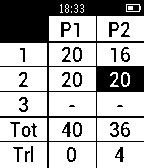
Health & FitnessNFASScoring is an NFAS field archery scoring app for the pebble, this allows an archer to keep score of Big Game rounds for two archers (to be expanded) . The app displays all scores obtained for each archer with a running total, a trailing points indicator, total inner kills, and total kills. Controls Up - Move the selected cell left and then up. Down - Move the selected cell right and then down. Middle - Reduce the current score down, starting from 24. Hold Up 5 seconds - Resets scores. Hold Down 2 seconds - Switches subtotals.
 14
14Feed Me Now!!!
DailyNow supports # Feed Me Now!!! Get food places suggested based on your location and Yelp API. How to use: 1) Open the app and wait to see a suggestion. 2) Shake your pebble to get a new suggestion. 3) Click select button to open full info from Yelp mobile version on your phone. ## Demo pebble watch app for training purposes (Pebble.js) Features: - geolocation (current position) info from the phone. - Ajax requests to Yelp API (food options near you) - Uses different UI components, Vibrate and accelerometer sensor. - Triggers new window on the phone for detailed view. - Distance calculation. Spanish # Alimentame Ahora!!! Obtiene lugares para comer sugeridos en base a tu posición y la API de YELP. Como usar: 1) Abre la aplicación y espera a ver la sugerencia. 2) Sacude tu pebble para obtener una nueva sugerencia. 3) Click select para una vista detallada en la version mobile de Yelp. ## Aplicacion de muestra para pebble watch. Para uso educacional (Pebble.js) Features: - geolocalizacion (position actual) obtenida desde el movil. - Llamadas Ajax a la API de Yelp (opciones de comida cerca tuyo) - Utiliza diferentes componentes de UI, Vibrate y sensor acelerometro. - Dispara una nueva ventana en el movil para vista detallada. - Calcula distancia.
 14
14511NY
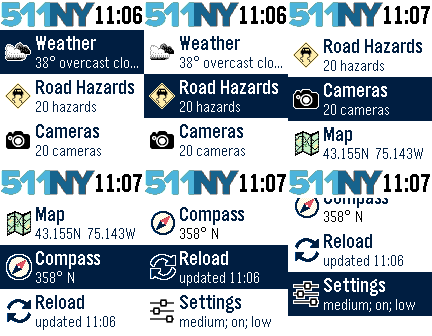
DailyThe 511NY app displays weather and traffic information to help you navigate the roadways of New York State. When launched, you can view your local weather by selecting the first menu item. The closest recorded road hazards are displayed when you choose the Road Hazards item. The roadway hazard list is sorted by distance from your location. Your location is based on your smart phone GPS, so make sure Location Services are enabled for your Pebble Time smart phone app. A list of traffic cameras is next in the main menu, also sorted based on your location. When viewing a traffic cam, the UP button displays the camera name, the MIDDLE button refreshes the camera image, and the DOWN button displays the distance to the camera. The Compass and Map features are next. The compass may need you to rotate your Pebble in a figure eight motion a few times for calibration. When viewing the map, use the UP and DOWN buttons for zooming, and the MIDDLE button to refresh your location. There are custom settings for text size, automated reloading of information, and GPS accuracy. This app was originally created for the DevPost HackFrost competition in February, 2016.
![Utilities Bundle 3 [Pebble Rocker]](https://assets.repebble.com/screenshots/52e1dbe3c16ac15e2d000169-3.png) 14
14Utilities Bundle 3 [Pebble Rocker]
Tools & UtilitiesIncludes Android Settings, Camera Control, Photos, and Tip Calculator watch apps. IMPORTANT: This watch app requires the Pebble Rocker companion app available via the Google Play store.
 14
14Langton's Anthill
GamesLangton's ant is a two-dimensional Turing machine with a very simple set of rules but complicated emergent behaviour. Langton's Anthill simulates one or more ants on a toroidal Pebble-sized field.
 14
14Interval Coach
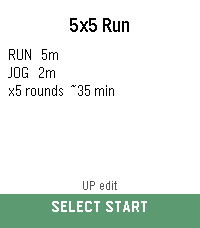
Health & FitnessSet it. Start it. Stay in flow. Set up your interval workout, press start, and let your Pebble guide the session. Interval Coach gives you custom run, jog, walk and rest phases with rounds, a big colour-coded timer, progress tracking, and vibration cues that move you through each phase without needing to stare at the screen. Create and edit workouts on the watch or from the phone settings page, then start the full session with one simple action. Pause, resume, restart a phase, skip ahead, or finish early using Pebble’s buttons. Optional 3-second warnings and post-workout summaries help keep each session clear and controlled. Great for running intervals, HIIT, strides, walk/run workouts and any timed session where you want less fiddling and more flow.
 14
14Rain Map Finland
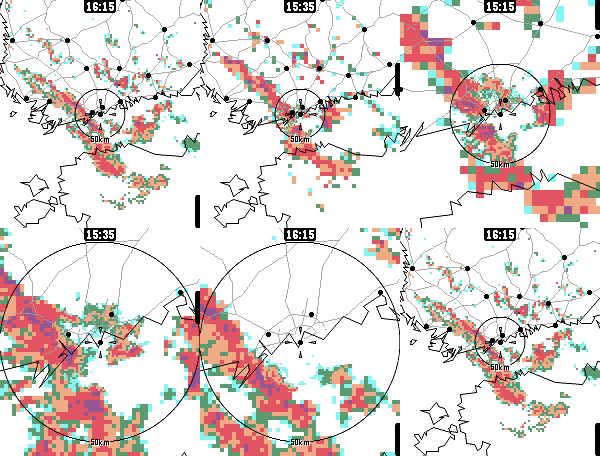
DailyApp for viewing recent rain radar data in Finland. For the most accurate rain forecast. This is an earlier, Finland-only version of my other app, Rain Map. Rain Map has all the same features, and more. I intend to improve & maintain only Rain Map, but this app should work fine as long as the data providers don't panic. The data is downloaded from the Finnish Meteorological Institute's (FMI) open data service, https://en.ilmatieteenlaitos.fi/open-data-manual-radar-data. The app is optimized for reasonably handling the relatively large amount of radar & map information on the watch. Usage: 0. Go to Finland 1. Open the app 2. Select timestep: Press up/down or touch the screen 3. Switch zoom level: Press select/back 4. Show legend: Zoom too much 5. Move yourself to keep dry or to get wet 6. Thank FMI for open data Open source.
 14
14Train Times
DailyThis app allow you to check the status of the italian trains. Currently we support only Trenitalia. In this version: - Check trains status - Manage favorites trains In next versions: - Check stations status - View stations near you - Manage favorite stations - Italian language - Web App
 14
14Meme Stream
Tools & UtilitiesMeme Stream shows random captioned memes pulled live from Reddit's popular meme communities via the public meme-api.com service. Press any button for the next meme. All content is sourced from Reddit and is NOT created, owned, hosted, or endorsed by the developer, who accepts no liability for what appears. An NSFW/spoiler safety filter is applied using Reddit's own content tags only - the developer does not control, review, or guarantee what is shown. Viewer discretion advised.
 14
14Eorzea Watch
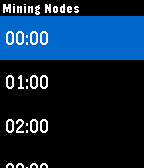
Tools & UtilitiesEORZEA WATCH tells you the time for the FINAL FANTASY XIV world called EORZEA. At the main screen you may do: Up - Mining Nodes (Unspoiled, Ephemeral, Folklore) Down - Botany Nodes (Unspoiled, Ephemeral, Folklore) Select - Vibration Menu (hourly vibration only)
 14
14Enter The Timeline
DailyAn app that sends your timeline token to an android companion app, so you can use the android app to send yourself private timeline data, including reminders. You can set the text color, background color, and the icon as well.
 14
14ptcgwiki
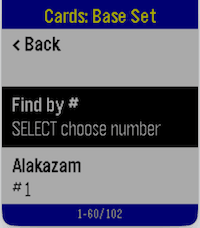
GamesPTCG Wiki for Pebble lets you browse Pokémon TCG data directly from your watch. Navigate from Series → Sets → Cards, open a card, and view key stats, effects, and market pricing in a fast, watch-friendly format. Core Functionalities Browse full Pokémon TCG catalog in hierarchy: Series list Set list per series Card list per set Automatic burst/paged loading while scrolling (supports large sets without loading everything at once) Card detail view includes: HP, Stage, Regulation Mark, Type, Rarity Weakness, Retreat cost Ability + Ability Effect Attack + Attack Effect Cardmarket prices from API (low, avg, trend) with currency unit “Find by #” in card lists (supported platforms) to jump to a card number quickly Stable back-navigation across hierarchy levels Platform Limitations Aplite (Gen1, monochrome, low memory) No image preview support “Find by #” is disabled Card detail text is shortened to fit memory/message limits Smaller in-memory page sizes for reliability Basalt / Chalk / Diorite / Flint Text-first experience (no image preview) “Find by #” available (dictation-first, fallback to manual picker) Emery / Gabbro Full text experience plus image preview support “Find by #” available (dictation-first, fallback to manual picker) Network / Data Notes Requires phone connection and internet access Uses TCGDex API data; availability and fields depend on upstream card metadata