 2
2Should I Run?
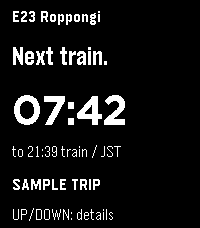
DailyYour next Tokyo-area train, at a glance. Should I Run mirrors your selected station, direction, departure countdown, estimated outdoor distance and pace to Pebble Time 2. Supported lines include Toei, Tokyo Metro, JR East and Tokyu. Requires the Should I Run phone or web app and an internet connection. Open https://should-i-run.yoroshi.workers.dev on your phone, select your trip, then copy the watch connection into this app’s Settings. Keep the phone app open while syncing. Select refreshes the trip; Up or Down shows details. Live reports and scheduled estimates are labeled. Pace advice expires after 30 seconds without fresh data; the last countdown continues with a STALE label. Walk inside stations; distance and pace are estimates. Screenshots show fictional sample trips.
 6
6PebbleChat
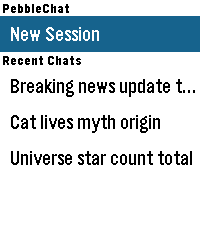
Tools & UtilitiesPebbleChat brings modern AI language models directly to your Pebble watch. Powered by OpenRouter, you can converse with leading models like Gemini, Claude, and GPT simply by speaking into your watch. [FEATURES] - Voice Input: Press SELECT and speak naturally using Pebble's built-in voice dictation to start new sessions or continue ongoing conversations. - Turn History: Long-press UP/DOWN to browse earlier conversation turns. - Session & Turn Rollback: Long-press SELECT in the menu to delete sessions, or inside chat to roll back exchanges up to the current turn. - Multiple Sessions: Save up to 5 recent chat sessions with automatic titles. - Touch & Button Navigation: Full support for touch-swipe scrolling alongside physical button controls. - Online Access: Enable or disable access to the web search tool offered by OpenRouter. - Configurable Settings: Customize models, system prompts, reasoning effort, output tokens, font sizes, and time/location context. [REQUIREMENTS] Requires an OpenRouter API key from openrouter.ai/keys.
 85
85Backtrack
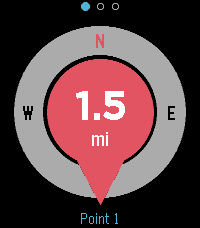
Tools & UtilitiesFind your way back to a saved point. Drop a pin at your location and Backtrack shows a compass-oriented arrow and the distance back to it, and buzzes when you arrive. Great for finding your car, your tent, or a meeting point. Uses your phone's GPS. Localised in 6 languages.
 6
6Signals
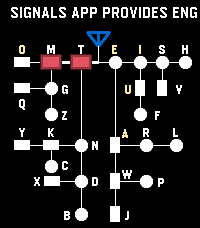
Tools & UtilitiesSignals - Touch, Hear, Learn Practice English and Korean Morse code on your Pebble Time 2. Enter code by touch, hear each mark, replay saved sentences, and clear advancing letters in Game Mode. Korean practice requires a Korean language pack. --- [Touch input] By default, the bottom half of the screen enters dots and dashes; the top half completes characters and adds spaces. A short touch makes a dot, and a longer touch makes a dash. - English: Tap the completion area to finish a letter. Tap again with no pending letter to insert a space. - Korean: Tap to finish a consonant or vowel, then tap again when the syllable is ready to commit it. Tap with no pending input to insert a space. Turn Explicit Boundary Input (EBI) off to use the whole screen for marks and let pauses finish characters and words automatically. The phone Settings page lets you change the touch areas and assign the Cancel Character and Clear All Input buttons. --- [Practice buttons] - DOWN: Switch between enabled English and Korean codes. - Double DOWN: Toggle sound temporarily. - Hold DOWN: Enter Game Mode. - BACK: Exit Signals. - Double BACK: Open MENU. - UP: Cancel the current character. - Hold UP: Clear all input. - SELECT: Replay the remembered sentence. - Double SELECT: Remember the current sentence. - Hold SELECT: Clear replay memory. Press SELECT during REPLAY to stop playback. --- [MENU and timing] Use UP and DOWN to navigate, SELECT to change an option or open a submenu, and BACK to return. MENU includes WPM, Seconds to keep Light On, Speaker Volume Level, Farnsworth Timing, Explicit Boundary Input, Morse Codes, and Game. WPM cycles through 5, 10, 15, and 20; the default is 10 WPM. Speaker volume cycles through OFF, 20%, 40%, 60%, 80%, and 100%. This saved volume setting is separate from the temporary double-DOWN sound toggle. Farnsworth Timing keeps dots and dashes at the selected WPM while making character and word gaps four times longer. REPLAY uses Farnsworth spacing whenever it is enabled, regardless of EBI. In practice and Game Mode, it affects timed character completion and spacing when those options are in use. --- [Game Mode] 1. In practice, double-click SELECT to remember a sentence. It is also sent to the phone's saved sentence list. 2. Open MENU → Game → Fetch Sentences to load saved sentences onto the watch. Set the sentence count and game speed options in the same submenu. 3. Hold DOWN to enter Game Mode, then touch the screen to start. Enter Morse code to remove the rightmost matching visible letter before it reaches your input position. 4. Clear every letter to win. View your game history and typing speed in the phone Settings page. During a game, DOWN switches enabled codes, double DOWN toggles sound, BACK or hold DOWN returns to practice, and double BACK opens MENU and pauses the game. You can also type a sentence in the phone Settings page and send it directly to the watch for REPLAY. To add that sentence to the phone's saved Game list, display it in practice and double-click SELECT
 44
44Murmur
Tools & UtilitiesSpeak to ChatGPT, Claude, Gemini, Mistral and more, straight from your watch.
 26
26Pebble Golf
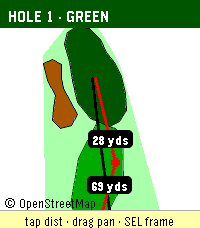
Health & FitnessPebble Golf turns your watch into a golf rangefinder, digital scorecard, and tap-to-measure course map, all live on your wrist. Supported languages: English, Français, Deutsch, Español, Italiano, Português. Pebble Golf turns your Pebble into a golf rangefinder and digital scorecard. Pick a nearby course, choose your tee, and see live distance to the front, center, and back of every green, right on your wrist. Keep score hole-by-hole with par, handicap, strokes, and putts; view a hole map drawn from OpenStreetMap (tap to measure to any point on the touchscreen Pebble Time 2); and browse, edit, or delete your past rounds offline. Playing somewhere that isn't listed? Create a custom course by name and hole count. Finished rounds pin to your Pebble timeline and can export as CSV or to a webhook. Distances come from OpenGolfAPI and OpenStreetMap geometry, with an honest fallback when full data isn't available (a card-yardage number is never shown as a live measurement). Your phone handles GPS and networking; the watch keeps working offline for scoring, the map, and history. Course and map data (c) OpenStreetMap contributors and OpenGolfAPI, under the Open Database License (ODbL). Found a bug, or want to tell me the greens read too fast? Report it or leave feedback on GitHub: https://github.com/chrissnyder2337/pebble-golf. Feedback is genuinely welcome (yes, even the picky kind). And if this app saved you from pacing off yardage like it's 1995, you can buy me a coffee: https://www.buymeacoffee.com/ChrisSnyder. It helps support my time. Even a fraction of what you'd tip the beer-cart person is hugely appreciated, and let's be honest, that's a rounding error next to your green fee. Français Pebble Golf transforme votre Pebble en télémètre de golf et carte de score numérique. Choisissez un parcours à proximité, sélectionnez votre té, et voyez la distance en direct jusqu'à l'avant, au centre et à l'arrière de chaque green, directement à votre poignet. Notez votre score trou par trou avec le par, le handicap, les coups et les putts ; consultez un plan du trou tiré d'OpenStreetMap (touchez pour mesurer vers n'importe quel point sur la Pebble Time 2 tactile) ; et parcourez, modifiez ou supprimez vos parties passées hors ligne. Vous jouez sur un parcours absent de la liste ? Créez un parcours personnalisé par nom et nombre de trous. Les parties terminées s'épinglent à votre timeline Pebble et peuvent s'exporter en CSV ou vers un webhook. Les distances proviennent d'OpenGolfAPI et de la géométrie OpenStreetMap, avec un repli honnête lorsque les données complètes ne sont pas disponibles (un yardage de carte n'est jamais présenté comme une mesure en direct). Votre téléphone gère le GPS et le réseau ; la montre continue de fonctionner hors ligne pour le score, le plan et l'historique. Données de parcours et de carte (c) les contributeurs d'OpenStreetMap et OpenGolfAPI, sous la licence Open Database License (ODbL). Deutsch Pebble Golf macht aus deinem Pebble einen Golf-Entfernungsmesser und eine digitale Scorecard. Wähle einen Platz in der Nähe, wähle deinen Tee und sieh die Live-Distanz zum vorderen, mittleren und hinteren Teil jedes Grüns, direkt am Handgelenk. Zähle Loch für Loch mit Par, Handicap, Schlägen und Putts; sieh dir eine aus OpenStreetMap gezeichnete Lochkarte an (auf der Pebble Time 2 mit Touch zum Messen antippen); und durchsuche, bearbeite oder lösche deine früheren Runden offline. Du spielst auf einem Platz, der nicht gelistet ist? Lege einen eigenen Platz per Name und Lochzahl an. Beendete Runden werden an deine Pebble-Timeline geheftet und lassen sich als CSV oder an einen Webhook exportieren. Die Distanzen stammen von OpenGolfAPI und der OpenStreetMap-Geometrie, mit einem ehrlichen Rückgriff, wenn keine vollständigen Daten verfügbar sind (eine Karten-Yardage wird nie als Live-Messung dargestellt). Dein Handy übernimmt GPS und Netzwerk; die Uhr funktioniert offline weiter für Score, Karte und Verlauf. Platz- und Kartendaten (c) OpenStreetMap-Mitwirkende und OpenGolfAPI, unter der Open Database License (ODbL). Español Pebble Golf convierte tu Pebble en un telémetro de golf y una tarjeta de puntuación digital. Elige un campo cercano, selecciona tu tee y ve la distancia en directo a la parte delantera, central y trasera de cada green, directamente en tu muñeca. Anota hoyo a hoyo con par, hándicap, golpes y putts; consulta un mapa del hoyo dibujado a partir de OpenStreetMap (toca para medir a cualquier punto en la Pebble Time 2 táctil); y revisa, edita o borra tus rondas pasadas sin conexión. ¿Juegas en un sitio que no está en la lista? Crea un campo personalizado por nombre y número de hoyos. Las rondas terminadas se fijan en tu timeline de Pebble y se pueden exportar como CSV o a un webhook. Las distancias provienen de OpenGolfAPI y la geometría de OpenStreetMap, con un respaldo honesto cuando no hay datos completos disponibles (un número de yardas de tarjeta nunca se muestra como una medición en directo). Tu teléfono gestiona el GPS y la red; el reloj sigue funcionando sin conexión para la puntuación, el mapa y el historial. Datos de campo y de mapa (c) colaboradores de OpenStreetMap y OpenGolfAPI, bajo la Open Database License (ODbL). Italiano Pebble Golf trasforma il tuo Pebble in un telemetro da golf e una scorecard digitale. Scegli un campo vicino, seleziona il tuo tee e guarda la distanza in tempo reale dalla parte anteriore, centrale e posteriore di ogni green, direttamente al polso. Segna buca per buca con par, handicap, colpi e putt; consulta una mappa della buca tracciata da OpenStreetMap (tocca per misurare verso qualsiasi punto sul Pebble Time 2 touch); e sfoglia, modifica o elimina i tuoi giri passati offline. Giochi in un posto non in elenco? Crea un campo personalizzato per nome e numero di buche. I giri completati si fissano alla tua timeline Pebble e si possono esportare in CSV o verso un webhook. Le distanze provengono da OpenGolfAPI e dalla geometria di OpenStreetMap, con un ripiego onesto quando non sono disponibili dati completi (un numero di iarde da scorecard non viene mai mostrato come misura in tempo reale). Il telefono gestisce GPS e rete; l'orologio continua a funzionare offline per il punteggio, la mappa e la cronologia. Dati di campo e di mappa (c) collaboratori di OpenStreetMap e OpenGolfAPI, con licenza Open Database License (ODbL). Português O Pebble Golf transforma o teu Pebble num telémetro de golfe e num cartão de pontuação digital. Escolhe um campo próximo, seleciona o teu tee e vê a distância em direto até à frente, ao centro e às costas de cada green, diretamente no pulso. Marca buraco a buraco com par, handicap, tacadas e putts; consulta um mapa do buraco desenhado a partir do OpenStreetMap (toca para medir até qualquer ponto no Pebble Time 2 tátil); e percorre, edita ou apaga as tuas voltas anteriores offline. A jogar num sítio que não está na lista? Cria um campo personalizado por nome e número de buracos. As voltas terminadas são fixadas na tua timeline Pebble e podem ser exportadas como CSV ou para um webhook. As distâncias vêm do OpenGolfAPI e da geometria do OpenStreetMap, com um recurso honesto quando não há dados completos disponíveis (um número de jardas do cartão nunca é mostrado como uma medição em direto). O teu telemóvel trata do GPS e da rede; o relógio continua a funcionar offline para a pontuação, o mapa e o histórico. Dados de campo e de mapa (c) colaboradores do OpenStreetMap e OpenGolfAPI, sob a Open Database License (ODbL).
 5
5Orationes
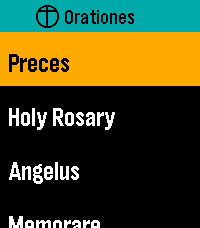
DailyMake time for prayer. On your wrist. Available offline. Orationes is a Catholic prayer book for Pebble Time 2. Large text and clear contrast help you focus on the words. Your prayers stay on your watch, ready without a phone or internet connection. PRAY THROUGHOUT YOUR DAY Start with Latin Preces, Holy Rosary, Regina Caeli, Angelus, and Memorare. Explore Come, Holy Spirit, the Litany of Humility, Adoro Te Devote, blessing and grace at meals, 92 Aspirations, 14 Prayer Cards, the Litany of Loreto, psalms, prayers before work, preparation for Confession, and more. The Rosary mystery reference previews today's set and weekday before opening it. All Mysteries separates each set's name from its weekday details. KEEP YOUR PRAYERS CLOSE Choose and arrange up to seven shortcuts to individual prayers or collections. Personalize them on the watch or through Settings in the Pebble mobile app. Browse All Prayers and press Select to open a prayer directly; hold Select and release for Open/Pin options. A readable first-use hint explains where the gesture works. Settings → Help offers eight selectable topics covering navigation, reading, resuming, pinning, layout, phone settings, Rosary, and reminders. Scroll through each topic with Up/Down; Select or Back returns to topics. PICK UP WHERE YOU LEFT OFF With Remember Place On, opening a prayer from any menu resumes its saved position, or starts at the beginning if none exists. With it Off, prayers always start at the beginning and saved places are cleared. Continue displays your last saved prayer name prominently and opens it directly. Recent Prayers keeps separate places for up to eight prayers. Enable Continue First at the top of watch Settings or in phone Settings to put Continue above your shortcuts; the setting stays synchronized between both. Both Settings pages show their bundled app version at the bottom. READ YOUR WAY New installations start with Dark appearance, Ocean title accent, and Lime navigation highlight. Choose Large or Extra Large text, Light or Dark appearance, and independent title and navigation colors. Existing preferences are preserved on upgrade. Prayer text retains strong black-and-white contrast, with clearer response blocks and stanza spacing. The Litany of Humility attribution stays in small print. Compact headers, submenu chevrons, and a narrow list-position indicator make menus easier to browse. Compact Menus fits short rows into 36 pixels instead of the spacious 54-pixel default, keeping full-size text and expanding longer names. Short Settings labels and values share a line when they fit. Compact Menus is available on the watch and in Clay and syncs in both directions. Opening phone Settings requests current watch values; if the watch does not reply, cached values are clearly labelled. Open Orationes on the watch and reopen phone Settings to refresh. The Preces blessing cross is supported in both text sizes. RESTORE YOUR DEFAULTS One Restore Defaults action resets shortcuts and shared preferences: Dark/Ocean/Lime colors, Large text, Remember Place On, Continue First Off, Compact Menus Off, and the noon reminder Off with a 10-second duration. Saved prayer positions are kept. On the phone, tap Save Settings to apply the reset. MOVE AT YOUR PACE Swipe to scroll, tap Up or Down, or hold either button to move faster. Press Select while reading for Start again or Jump to section where available. Aspirations offers ten jump groups covering all 92 entries. Double-press Select while reading to return to your watchface. PAUSE AT NOON Enable an optional vibration reminder for Angelus or Regina Caeli, selected automatically for the season. EXPLORE THE PRAYER DIRECTORY https://github.com/ewijaya/pebble-orationes/blob/main/docs/prayer-list.md
 21
21Dad Jokes
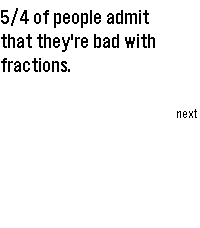
DailyGet ready to roll your eyes and groan. Dad Jokes delivers over 1100 of the finest, most agonizingly punny dad jokes right to your wrist. Built from the ground up for the 2026 Core Devices Pebble lineup but also backwards compatible, this app doesn't just display text—it performs. Whether you are waiting in line at the grocery store or just need some fresh material to test out on your seven-year-old, this app guarantees an audible reaction. It features a custom, bare-metal PCM synthesizer that plays custom audio stingers directly from your watch's physical speaker. Nail the punchline with a perfectly timed "Ba-Dum-Tss!" rimshot, a descending circus march, a vintage digital watch beep, or a classic flatulence sound. Key Features: - Massive Growing Library: Over 1100 classic dad jokes loaded dynamically. - Custom jokes integration through settings - Custom Audio Engine: Synthesized percussion and melodies that utilize exact hardware timing for crisp, staccato sound effects. - Smart Scheduling: Configure jokes to appear at a specific time of day or at random intervals within a set window. - Tailored UI: High-contrast (light and dark modes), easily readable text with native scroll indicators mapped directly to the physical buttons, as well as touch scrollable (where applicable).
 19
19Zzz..
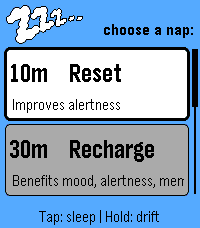
Health & FitnessZzz.. Make time for a little rest. A simple nap companion for Pebble Time 2. Choose your nap, settle in, and let Zzz.. guide you gently back to your day. Pick Reset (10 minutes), Recharge (30), Recover (50), Deep Rest (90), or set your own duration from 5 to 180 minutes. Tap Select to begin settling, or hold it for a calming two-minute breathing exercise with softly building Zzz.. lettering. A movement-based settling period gives you time to get comfortable before the nap countdown begins. It lasts up to six minutes, and you can start the timer immediately with Select. Wake gradually with staged vibrations, a rising sun, and a soothing harp melody that loops and gradually increases in volume in the final wake stage. Need a little longer? Snooze for five minutes. Afterward, record how you feel and see your timed rest, logged naps, and accumulated rest time, with a little encouragement for the rest of your day. Simple controls. A quiet design. A little time for you.
 1
1emstime
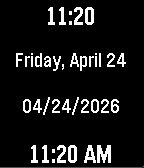
Tools & UtilitiesRapid-reference time and date dashboard for EMS. Track 12h/24h time and critical date metrics instantly at a glance
 10
10Pebble Buy
DailyBESCHREIBUNG DEUTSCH ---------------------------------------------------------------- Pebble Buy – die Einkaufsliste am Handgelenk. Leg dir eine Liste je Laden an – Aldi, Edeka, Baumarkt, Drogerie – und ruf im Laden einfach die passende auf. Abhaken geht mit einem Druck oder Tipp; der nächste Artikel rutscht direkt unter die Markierung. Erledigtes wandert durchgestrichen nach unten. Neue Artikel auf der Uhr: • Diktieren: „Milch, Eier und zwei Kilo Äpfel“ wird zu drei Artikeln – mit Menge • Anfangsbuchstaben wählen, dann aus Vorschlägen tippen (rund 300 Begriffe + deine eigenen) • „Häufig“: deine üblichen Artikel, was bald wieder fällig ist, steht oben Kategorien werden automatisch erkannt und farbig markiert. Funktioniert auch ohne Netz im Laden – Änderungen werden nachgeschickt. Bequem am Computer pflegen: pebble.ni3d.de/buy (Web-App mit Hell/Dunkel-Modus) – drei Tage gratis testen, mit Pro unbegrenzt. Gratis: 2 Listen, Web-App 3 Tage zum Testen. Pebble Buy Pro (einmalig 2.99 USD zzgl. MwSt.): Web-App unbegrenzt, bis zu 20 Listen, Listen mit dem Haushalt teilen (live abgeglichen – wer eingeladen wird, braucht kein Pro) und Statistik mit Kaufrhythmus und „bald wieder fällig“. Freischalten direkt auf der Uhr. Datenschutz: Konto mit E-Mail, gespeichert auf ni3d.de in Deutschland. Keine Werbung, keine Weitergabe; eine anonyme Artikel-Statistik gibt es nur, wenn du sie einschaltest. BESCHREIBUNG ENGLISCH ---------------------------------------------------------------- Pebble Buy – your shopping list on your wrist. Create one list per store and open the right one when you get there. Tick items off with one press or tap; the next item slides right under the cursor. Done items move to the bottom. Add items on the watch: • Dictate: "milk, eggs and two kilos of apples" becomes three items – with quantities • Pick the first letters, then choose from suggestions (built-in + your own items) • "Frequent": your usual items, the ones due soon on top Categories are detected automatically and color-coded. Works offline in the store – changes sync when you're back online. Edit on your computer at pebble.ni3d.de/buy (web app with light/dark mode) – free for three days, unlimited with Pro. Note: the built-in word list and dictation splitting are German-first. Free: 2 lists, web app for 3 days. Pebble Buy Pro (one-time 2.99 USD + VAT): unlimited web app, up to 20 lists, share lists with your household (live sync – invited people don't need Pro) and statistics with buying rhythm and "due soon". Unlock right on the watch. Privacy: account with e-mail, stored at ni3d.de in Germany. No ads, no data sharing; anonymous item statistics only if you opt in.
 12
12Pebble Arcade
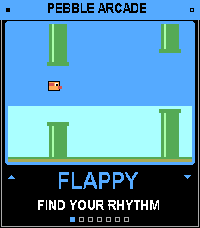
GamesSix retro arcade games in one app, playable with just your watch buttons. Pick a game from the menu, play a quick round, and hit SELECT to retry. Games Flappy: tap to flap through the pipes. Snake: turn left and right to grow the snake. Stack: time each drop to build the tallest tower. Pong: keep the ball alive against the wall. Breakout: smash the bricks, then clear each level. Helicopter: hold to rise, release to fall, and thread the cave.
 1
1Disc Golf
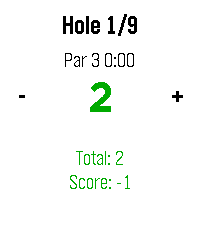
Health & FitnessSimple app to track basic disc golf round stats.
 0
0JustText
Tools & UtilitiesFor learning
 409
409Member card
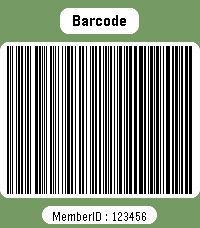
DailyWear your membership cards on your wrist. Works with linear and 2D barcodes: CODE128, CODE39, CODE93, EAN8, EAN13, UPC-A, CODABAR, ITF, Data Matrix, PDF417, Aztec and QR Code. QR Code helpers are included for vCard contact cards and Wi-Fi network sharing. You can also add memo cards for short notes, IDs, locker codes, or any text you want to keep on your watch. Select cards with the up/down buttons. Press select to enter scan mode with forced backlight and a wider display area. Cards are stored on the watch, so no phone is needed to display them. Storage is limited by Pebble's persistent storage: the app uses up to about 4 KB for saved cards. The exact number of cards depends on barcode type and content size.