 0
0JustText
Tools & UtilitiesFor learning
 409
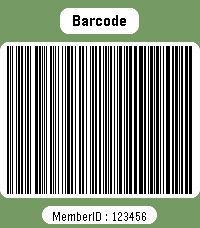
409Member card
DailyWear your membership cards on your wrist. Works with linear and 2D barcodes: CODE128, CODE39, CODE93, EAN8, EAN13, UPC-A, CODABAR, ITF, Data Matrix, PDF417, Aztec and QR Code. QR Code helpers are included for vCard contact cards and Wi-Fi network sharing. You can also add memo cards for short notes, IDs, locker codes, or any text you want to keep on your watch. Select cards with the up/down buttons. Press select to enter scan mode with forced backlight and a wider display area. Cards are stored on the watch, so no phone is needed to display them. Storage is limited by Pebble's persistent storage: the app uses up to about 4 KB for saved cards. The exact number of cards depends on barcode type and content size.
 11
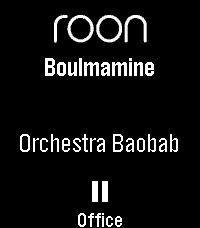
11Roon Remote for Pebble
RemotesRoon Remote is a Pebble app that connects seamlessly to your Roon Core, letting you manage your audiophile endpoints without ever reaching for your phone. KEY FEATURES - Complete Playback Control: Play, pause, and skip tracks with ease. - Instant Volume Adjustments: Use your physical buttons to quickly dial in the perfect volume, complete with a sleek visual overlay and fixed-volume endpoint detection. - Zone Management: Seamlessly cycle through and control all of your active Roon audio zones on the fly. - Live Metadata: See the current track, artist, and zone name updating in real-time on your watchface. - Touch Enabled: Fully supports tap-to-play/pause, skip tracks, and adjust volume on modern capacitive touch screens (Pebble Time 2 / Pebble Round 2): Tap: play/pause Swipe Left/Right: change tracks Swipe Up/Down: change zone Hold-and-swipe Up/Down: adjust volume Tap-and-hold: pause all zones - Highly Customizable: Tweak font sizes, enable marquee or multi-line wrapping scrolling for long track names, and set smart battery-saving inactivity timeouts via the companion settings page. REQUIREMENTS (Companion App) To connect your watch to your Roon Core, this app requires a lightweight Node.js bridge extension running on your local network (easily deployed via Docker, a NAS, or a local PC). Detailed setup instructions and the open-source bridge code are available at the project's GitHub repository. Watchface version available as well, see the Roon Community posting for more details.
 0
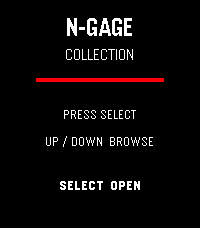
0N-Gage Collection Deck
Tools & UtilitiesN-Gage Collection Deck A visual checklist for Nokia N-Gage collectors. Track Release Games, G3.0, G2.0, G1.5 and Not For Sale cards with individual collection status.
 2
2Red Flagr
DailyWould you like to know if he's the one, or just one more red flag? Red Flagr is the magic 8-ball for your love life, and it lives on your wrist. Shake your Pebble and it reveals a red flag about him, like "Emotionally unavailable," "Still follows his ex's mom" or "Says he's not into labels," with a short buzz as it appears. Need a second opinion? Press the bottom button for honest advice, from "RUUUN" to "Why are you surprised?" to "Block. Delete. Heal." Press the top button to start fresh with the next date. With 30+ red flags and 20 pieces of advice, it never shows the same line twice in a row. It has a bold red and black look on colour watches, a clear black and white look on older Pebbles, and big centered text that fits both round and rectangular screens. Use it on first dates, last dates and in the group chat. For entertainment only. Red Flagr has never been wrong. Probably.
 18
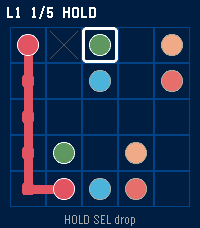
18Twine
Games1024 flow puzzles on your wrist. Daily board, undo, hint, mid-save. Each colour sings a different note.
 63
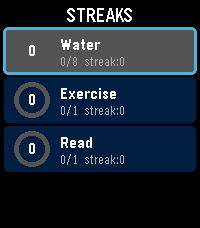
63Streaks
Health & FitnessTrack your daily habits and build streaks right from your wrist. Streaks is a simple, colorful habit tracker for Pebble that helps you stay consistent with up to 6 customizable daily goals. Set up habits like drinking water, exercising, reading, meditating -- anything you want to do every day. Each habit gets a vibrant progress ring that fills as you tap toward your daily goal. Complete your goal and feel the satisfying buzz. Keep going day after day to build your streak. Features: Track up to 6 daily habits Customizable names, goals (1-20), and colors for each habit Visual progress rings with completion animations Streak counter tracks consecutive days Best streak memory to beat your personal record Quick-tap to increment from the list, or open detail view for full stats Works on rectangular (Emery) and round (Chalk) Pebble watches Settings configurable from your phone via Clay Build better habits, one day at a time.
 36
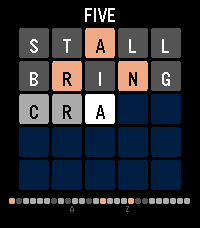
36Five
GamesA daily word puzzle for your wrist, a wordle clone ;). Guess the five-letter word in 5 tries. Letters turn green (correct), yellow (wrong spot), or gray (not in word). One new puzzle every day -- play it on the go in seconds. Tracks your stats, win percentage, and streak. Supports Pebble Time 2 and Pebble Time Round.
 3
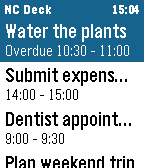
3Nextcloud Deck
DailyPebble watchapp for Nextcloud Deck: browse cards, mark them done or archive them from your wrist, and get timeline pins with actions.
 45
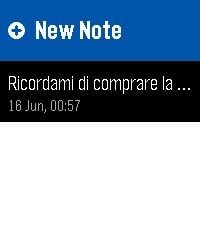
45Simple Notes
Tools & UtilitiesFast, minimalist voice notes right on your wrist. Simple Notes is a clean productivity app designed for Pebble smartwatches. No clutter, no endless menus: just a fast way to capture your thoughts using your voice. Key Features: Instant Voice Dictation: Speak to your Pebble to transcribe reminders into text in seconds One-Click Quick Launch: Assign the app to a Quick Launch. It will open straight to dictation, save your note, and close automatically. Zero extra clicks. Smart Layout: The main list displays text previews with exact dates and times right below them. High Contrast UI: Features dynamic color inversion on the selected row for perfect readability under direct sunlight. How It Works (With touchscreen and buttons!) Record: Tap New Note or press SELECT (or use Quick Launch), then speak. Review: Swipe up/down or use UP/DOWN to browse your saved notes. Tap or press SELECT to open one. Delete: Tap a note to open it, then tap anywhere or press SELECT to delete it. Swipe left/right or use BACK to navigate between notes.
 1
1Habit view
Tools & Utilitiesused AI to build a habit tracker i had on my mind.
 0
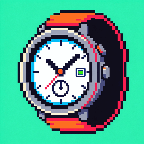
0My First watch
Dailyexperimenting with building watchface
 18
18Fatal Run
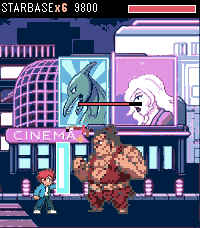
GamesFatal Run is a side-scrolling brawler for Pebble Time 2. You auto-run the street. Punch, kick, and jump-kick through ten stages, then finish the boss. Combos go up to six hits Fill the yellow bar with landed hits, then hold the bottom two (SELECT + DOWN) for FIRE PUNCH. FEATURES • Time 2 only • 10 photo stages, four enemy types, foes drop and stay • Street props from the full sheet: crate, pipe, barrel, logs, cones, bottle, hydrant, drum, boxes • Random street clutter with per-prop damage; mid-stage burger restores half your health • HP bars on every fighter • Six-hit combo meter, two-button block, and FIRE PUNCH special • Fatality sequences on every boss • Boss Run: all ten bosses, unlocked after campaign clear • Sound, music, vibrate, volume
 1
1Pour Decisions - Weekly Drink Tracker
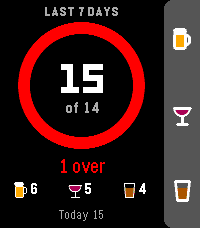
Tools & UtilitiesMake some Pour Decisions with this simple drink counter for your wrist. One button for each drink, one glance to see where your week stands. HOW IT WORKS Up: +1 beer Middle: +1 wine Down: +1 shot Hold any button to take back an accidental press A progress ring fills up as you get closer to your weekly limit. It starts green, turns yellow near the limit, orange when you hit it and red when you go over. The watch buzzes when you reach your limit, so you don't have to keep checking. FEATURES Weekly total shown against your limit, plus how many drinks you have left Separate counts for beer, wine and shots Today's count, and in rolling mode, how many drinks drop off at midnight Quick buzz to confirm each add, double buzz for each undo Your weekly total shows under the app name in the launcher Works offline and keeps everything on your watch SETTINGS (from the Pebble phone app) Weekly limit: defaults to 14, the NIAAA low-risk guideline for men (7 for women). Set it anywhere from 1 to 40. Week style: a rolling 7 days (default), or a calendar week that resets every Sunday. One drink = 12 oz of beer, 5 oz of wine, or a 1.5 oz shot. Built for Pebble Time 2. Also runs on Pebble Time, Pebble Time Steel and Pebble 2.
 21
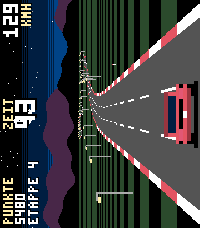
21Turbo Drift
GamesTurbo Drift is an OutRun-style arcade racer made for Pebble Time 2. Hold your watch sideways like a tiny handheld: the bottom-left button steers left, bottom-right steers right, the middle button brakes. Brake into a curve at speed and you drift - your watch vibrates, smoke flies, and drift points pile up. FEATURES - Pseudo-3D road with curves, traffic and roadside palms, cacti, lamps and pines - Road forks before every checkpoint: go left or right, each side leads to a different landscape - 5 landscapes: coast, desert, sunset, night and snow - Beat the clock: every checkpoint adds bonus time - Drift system with vibration feedback - Original synth soundtrack with 2 songs plus sound effects (uses the Pebble Time 2 speaker) - Top 5 high score table with arcade-style initials - Online world ranking at pebble.ni3d.de/turbodrift - Play sideways (watch off) or upright on your wrist 7 free races, then unlock the full version once via KiezelPay (one-time purchase, no subscription). Made by Ni3D.