Signals
A.J
Watchapp
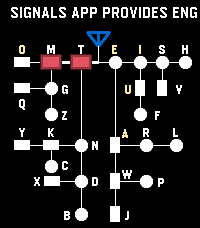
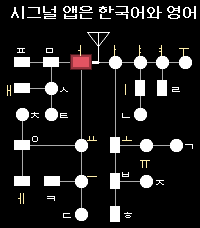
Description
Signals - Touch, Hear, Learn

Practice English and Korean Morse code on your Pebble Time 2. Enter code by touch, hear each mark, replay saved sentences, and clear advancing letters in Game Mode. Korean practice requires a Korean language pack.

---

[Touch input]

By default, the bottom half of the screen enters dots and dashes; the top half completes characters and adds spaces. A short touch makes a dot, and a longer touch makes a dash.

- English: Tap the completion area to finish a letter. Tap again with no pending letter to insert a space.
- Korean: Tap to finish a consonant or vowel, then tap again when the syllable is ready to commit it. Tap with no pending input to insert a space.

Turn Explicit Boundary Input (EBI) off to use the whole screen for marks and let pauses finish characters and words automatically. The phone Settings page lets you change the touch areas and assign the Cancel Character and Clear All Input buttons.

---

[Practice buttons]

- DOWN: Switch between enabled English and Korean codes.
- Double DOWN: Toggle sound temporarily.
- Hold DOWN: Enter Game Mode.
- BACK: Exit Signals.
- Double BACK: Open MENU.
- UP: Cancel the current character.
- Hold UP: Clear all input.
- SELECT: Replay the remembered sentence.
- Double SELECT: Remember the current sentence.
- Hold SELECT: Clear replay memory.

Press SELECT during REPLAY to stop playback.

---

[MENU and timing]

Use UP and DOWN to navigate, SELECT to change an option or open a submenu, and BACK to return. MENU includes WPM, Seconds to keep Light On, Speaker Volume Level, Farnsworth Timing, Explicit Boundary Input, Morse Codes, and Game.

WPM cycles through 5, 10, 15, and 20; the default is 10 WPM. Speaker volume cycles through OFF, 20%, 40%, 60%, 80%, and 100%. This saved volume setting is separate from the temporary double-DOWN sound toggle.

Farnsworth Timing keeps dots and dashes at the selected WPM while making character and word gaps four times longer. REPLAY uses Farnsworth spacing whenever it is enabled, regardless of EBI. In practice and Game Mode, it affects timed character completion and spacing when those options are in use.

---

[Game Mode]

1. In practice, double-click SELECT to remember a sentence. It is also sent to the phone's saved sentence list.
2. Open MENU → Game → Fetch Sentences to load saved sentences onto the watch. Set the sentence count and game speed options in the same submenu.
3. Hold DOWN to enter Game Mode, then touch the screen to start. Enter Morse code to remove the rightmost matching visible letter before it reaches your input position.
4. Clear every letter to win. View your game history and typing speed in the phone Settings page.

During a game, DOWN switches enabled codes, double DOWN toggles sound, BACK or hold DOWN returns to practice, and double BACK opens MENU and pauses the game.

You can also type a sentence in the phone Settings page and send it directly to the watch for REPLAY. To add that sentence to the phone's saved Game list, display it in practice and double-click SELECT
- DeveloperA.J
- CategoryTools & Utilities
- PlatformsTime 2
- Updated2026-09-30
- Version1.0.0