 9
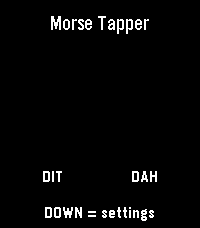
9Morse Tapper
Tools & UtilitiesMorse Tapper is a Pebble Time 2 Morse code touch keyer and trainer. Tap the left side for dit and the right side for dah, or use the physical buttons. Includes adjustable WPM, flash and vibration feedback, SOS test, and multiple keyer modes.
 3
3Dictate Unit Conversions
Tools & UtilitiesA helpful app to assist users with unit conversion tasks. Whether that be in the kitchen or in the workshop, you can view common unit conversions quickly. You can also dictate your unit conversion question (e.g. "How many mm is 2.3/8" divided by 2?"), and have the app respond using the Wolfram Alpha Quick Answers API.
 214
214Pebble Meds
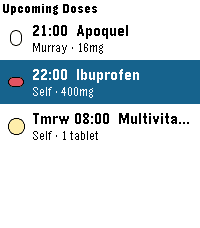
Health & FitnessNever miss a dose — for you, your family, or your pets. PebbleMeds delivers quiet, wrist-based medication reminders with simple one-button confirmations. It's designed for people managing multiple medications or schedules across multiple people (or animals) in a household. Features: - Up to 16 medications with flexible scheduling — fixed daily times (e.g. 8am and 10pm) or interval-based (e.g. every 8 or 12 hours) - Multiple takers — track medications for yourself, family members, or pets, all in one app - Take, skip, or snooze any reminder directly from your wrist — no phone required once configured - Colorful pill icons — choose from round, oval, oblong, drop, or shield shapes in your color of choice, so you can identify medications at a glance - Privacy mode — notifications and Timeline pins show "Medication Due" instead of the medication name, useful in public or shared spaces - Timeline integration — upcoming doses appear as pins so you can see your full schedule at a glance - Snooze control — if you miss a reminder, it re-alerts after a configurable delay (default 15 minutes); skipping a dose stops further reminders for that dose - Optimized for Pebble Round 2 and Time 2; fully compatible with all Pebble models including classic monochrome devices How It Works Configure your medications using the Pebble phone app. Your schedule syncs to the watch, which handles all reminders independently - no phone connection needed once synced. When a dose is due, your watch vibrates and displays the medication details. Press the middle button to confirm you took it, the bottom to skip it, or the top to snooze for a few minutes. Interval-based medications (like antibiotics taken every 8 hours) reset their timer when you mark a dose as Taken, so the next reminder is always spaced correctly from when you actually took it- not from a fixed clock time. Limitations - Requires the Pebble phone app to configure medications; the watch stores the schedule locally after the first sync - Up to 8 wakeup slots scheduled at a time due to a Pebble platform limit; the app self-reschedules automatically after each dose fires - Interval scheduling tracks the last-taken timestamp on the watch; if the watch is reset or the app is reinstalled, interval timers restart from the configured start time
 16
16Chimer
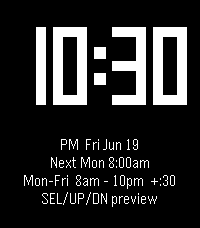
Daily*Chimer brings back the classic hourly beep... Casio-style, but yours to tune* Inspired by Casio watches and the Sensor & Ollee mods, Chimer sounds a chime and/or buzzes your wrist at the top of every hour, then flashes a big, easy-to-read clock for two seconds. Make it yours: When: choose the days and the hour range it runs How often: add optional half-hour chimes What you feel & hear: distinct beep + vibration patterns for the top of the hour, the half hour, and the first and last chime of the day, so you always know which is which without looking _Set it once and let your wrist keep time_
 4
4Vacuum
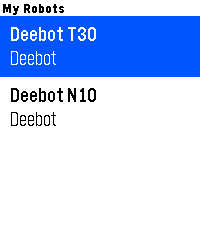
RemotesPut your robot vacuum on your wrist. Vacuum connects your Pebble watch to your robot's cloud API, so you can check and control it without reaching for your phone. Built to grow — v1.0 supports Ecovacs Deebot, with room for more brands later. - Start or resume cleaning instantly - Pause, stop, or send your robot back to its dock - See live status: Cleaning, Paused, Returning, Charging, Washing Mop, or Idle - Check battery level and dock station state at a glance - Try the full watch experience safely with the `DEMO` API key - Runs on every Pebble generation — B&W, colour, and round screens Set your brand and API key in the phone settings, select a robot, and take control from your watch. Get an Ecovacs API key at open.ecovacs.com.
 37
37Lizard
GamesTOUCH SCREEN REQUIRED Press to hear "Lizard". That is all. I wanted to learn how to make an app for my new watch, this is said app.
 4
4LCD Analog App
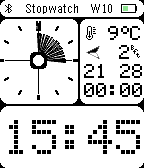
Tools & UtilitiesLCD DOT Analog App — Stopwatch & Timer The same clean look as LCD DOT Analog — now with a stopwatch and countdown timer built in. LCD DOT Analog App combines two design worlds: the analog clock face is inspired by the Casio AE-20W, repurposed here as a live progress ring, while the digit displays and status bar follow the classic LCD display aesthetic. In stopwatch mode, tick marks fill the analog face as seconds and minutes accumulate. In timer mode, the face counts down visually, with wider markers indicating remaining hours. The large LCD-style digit display at the bottom shows seconds and tenths in stopwatch mode, or minutes and seconds in timer mode. A smaller digit row above shows hours and minutes. Stopwatch: start, stop, and reset with the side buttons. Counts up to 23:59:59 with centisecond precision. State is saved if you leave the app and return. Countdown timer: set hours, minutes, and seconds by holding and scrolling the up/down buttons. The timer continues counting down even when the app is closed, and will wake the watch with a vibration alarm when time is up — even from the watchface. The alarm animates the analog face and pulses the vibration motor. Weather, city name, temperature, wind, and battery display are all present just as in the watchface version. Switch between stopwatch and timer with a short press of the middle button when not running. This app shares its design with LCD DOT Analog — if you just want the watchface without the stopwatch and timer, that's the one to install.
 50
50TimePulse
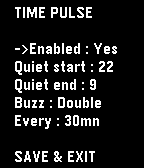
NotificationsTime Pulse is a practical timekeeping app designed to assist you throughout your day. - With Time Pulse, you can set specific intervals for notifications, helping you stay aware of the passing hours. It's especially nice if this feature isn't supported by your watchface. Here are some key features: - Minimal battery usage: Time Pulse utilizes the Pebble wakeup_schedule function, ensuring it has virtually no impact on your device's battery life. - Background efficiency: Time Pulse does not run in the background, so it does not occupy the background app slot. -Offline customization: Customize Time Pulse directly from your watch without the need for internet connectivity or external servers. Time Pulse is your reliable companion for staying on schedule. (Forked from "nag for Pebble" from YGalanter)
 5
5PROTOCOL
Tools & UtilitiesLife is Chaos. Organize it with PROTOCOL.
 94
94Pulse Metronome
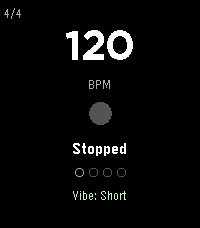
Tools & UtilitiesPulse is a serious practice metronome for your wrist. Not a toy — it has the features working musicians actually need. Rock-solid timing: Anchor-based tick scheduling eliminates the cumulative drift that plagues timer-based metronomes. At 130 BPM, a naive implementation drifts 54ms after 100 beats. Pulse drifts zero. The scheduler even rides out clock adjustments (like phone time syncs) without missing a beat. Audible click on Pebble Time 2: A real metronome sound through the speaker — higher-pitched accent on the downbeat, lighter click on upbeats and subdivisions. Falls back to vibration automatically when the speaker is muted. Haptic accent patterns: Beat 1 hits harder than the upbeats — you feel the downbeat, not just count it. Three click styles (Sharp, Double, Buzz) each have distinct accent variants. Two intensity levels (Short and Strong) scale the entire feel. Time signatures: 2/4, 3/4, 4/4, 5/4, 6/8, 7/8. Beat position dots at the bottom show exactly where you are in the measure. The downbeat dot is visually distinct. Subdivisions: Layer 8th notes, triplets, or 16th notes over any time signature. Subdivision pulses use a lighter vibration so you can feel the rhythmic grid without losing the main beats. Tempo trainer: Automatically bumps BPM every N bars — set it and forget it. Default is +2 BPM every 4 bars. Great for building speed on a passage. Caps at 300 BPM. Simple controls: UP/DOWN set the tempo, SELECT starts and stops. Everything else lives in a settings menu on long SELECT — no gesture memorization required. Power users still get shortcuts: double-tap UP/DOWN to cycle time signature/subdivision, long-press BACK to toggle the trainer. Tap tempo: A dedicated tap screen (settings menu > Tap Tempo): tap SELECT to the beat and the BPM follows your feel — while playing, the beat locks to your taps instantly. Averages up to 8 taps for a stable reading. Resets after 3 seconds of silence. Everything persists: BPM, time signature, subdivision, haptic mode, click style, and tempo trainer settings all survive app restarts. CONTROLS UP - BPM +1 (hold to repeat — accelerates to +5, then +10) DOWN - BPM -1 (hold to repeat — accelerates) SELECT - Start / Stop SELECT hold - Settings menu (tap tempo, time sig, subdivision, click mode, click style, trainer) BACK - Exit (double-press; single press shows a hint) Shortcuts: double-tap UP cycles time signature, double-tap DOWN cycles subdivision, hold BACK toggles the tempo trainer. CLICK STYLES Sharp - Single short tap. Clean and minimal. Best for fast tempos. Double - Two quick taps with a gap. Easier to feel at slower tempos. Buzz - Sustained vibration. Strongest presence on the wrist. Each style has three intensity levels: normal (upbeats), accent (downbeats in Short mode / upbeats in Strong mode), and heavy (downbeats in Strong mode). CLICK MODES Off - No vibration. Visual-only metronome. Vibe Short - Light upbeats, medium accent on beat 1, subtle subdivision taps. Vibe Strong - Medium upbeats, heavy accent on beat 1, firmer subdivision taps. Full intensity for loud environments. Sound (Pebble Time 2) - Audible clicks through the speaker: G6 downbeat, C6 upbeats, G5 subdivisions. Falls back to vibration when muted. Vibration pulses are tuned per motor type — ERM (original Pebble, Time, Time Round) and LRA (Pebble 2 and newer) get different durations so every model feels crisp. TIME SIGNATURES 2/4, 3/4, 4/4 (default), 5/4, 6/8, 7/8. Pick from the settings menu (long SELECT), or double-tap UP to cycle. Beat position dots update to show the new measure length. The beat counter resets to beat 1 when you switch. SUBDIVISIONS Off (quarter notes only), 8th, Triplet, 16th. Pick from the settings menu (long SELECT), or double-tap DOWN to cycle. Subdivision ticks use a lighter vibration than main beats so the rhythmic hierarchy stays clear. TEMPO TRAINER Toggle from the settings menu, or long-press BACK. When active, the BPM label shows the trainer settings (e.g. "BPM +2/4b" = +2 BPM every 4 bars). The increment applies at the start of each cycle. Stops at 300 BPM. PLATFORMS All Pebble models: Aplite, Basalt, Chalk (round), Diorite, Flint (Pebble 2 Duo), Emery (Pebble Time 2), Gabbro (Pebble Round 2). Layout adapts proportionally to each screen size — big 60px BPM digits on Pebble Time 2 and Round 2. Color accent (mint green) on color displays; clean white on B&W. Supports quick launch: assign Pulse to a button shortcut and it starts ticking the moment it opens.
 94
94Hive for Ecobee
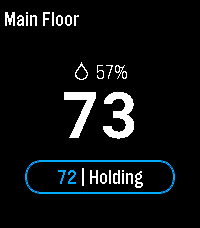
RemotesPebble smartwatch app that allows you to control ecobee ( www.ecobee.com ) thermostats.
 10
10Thymer
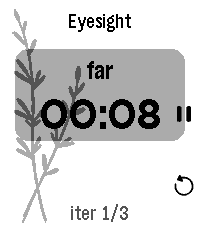
DailyThymer is a highly configurable timer app specifically tuned for Pebble Time 2: moderately big text for my old eyes, touch controls, and... that's it I guess. Timer definitions are written in TOML, processed on the phone, and sent to the watch where they are cached for daily use.
 5
5INTERVAL
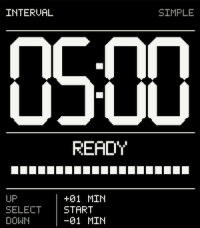
Tools & UtilitiesA timer app. Simple, clean, more when you need it to be. (Long-press UP)
 1
1Crohn's Watch
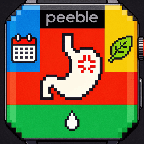
Health & FitnessKeep track of various Crohn's disease symptoms. Report stools, pain, well-being and generate weekly summaries. Check for correlations against common dietary triggers.
 9
9Caltrain.app
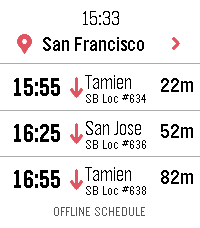
DailyCatch the right Caltrain from your wrist. Features: • Upcoming departures in a fast, glanceable list • Live estimates and delay information • Train details and a scrollable route timeline • Touch gestures and equivalent hardware-button controls • Tailored layouts for Pebble Round 2 and Time 2 ONLINE With a phone connection, Caltrain.app can use a one-time location lookup to select the nearest station. You can also choose and remember a preferred station. OFFLINE When your phone or internet is unavailable, the app retains useful live results and falls back to a compact schedule stored directly on the watch. Scheduled information is clearly distinguished from real-time data. PRIVACY No accounts, ads, analytics, or background location tracking. Unofficial community app. Not affiliated with or endorsed by Caltrain.