 23
23tg
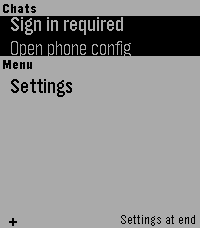
DailyTelegram interface for Pebble (unofficial). Read your messages and send with dictation. Message your friends -- or your OpenClaw -- all from your Pebble!
 2
2BEARING
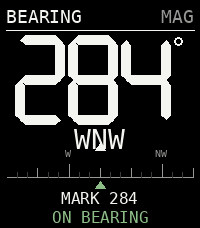
Tools & UtilitiesNot all those who wander are lost...
 13
13RingView
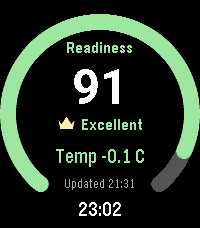
Health & FitnessRingView brings selected Oura readiness, sleep, activity, heart-rate, and stress/recovery summaries to Pebble in a focused native watch app. Move between full-screen metric overviews with the hardware buttons or touch gestures. Each overview shows the latest value, a glanceable progress or range ring, and the last successful update. Open a detail view for seven-day score history, last-night sleep stages, an intraday heart-rate graph, or recent stress and recovery durations. RingView connects directly to Oura from PebbleKit JS on the paired phone. The access token remains phone-side and is never sent to the watch. API failures retain the last valid display, and refreshes are intentionally conservative. RingView has no backend, accounts, advertising, analytics, or trackers. An Oura account and compatible Oura data are required. RingView is an independent companion and is not affiliated with or endorsed by Oura Health Oy. It is not a medical device and should not be used for medical decisions.
 90
90Time2Paint
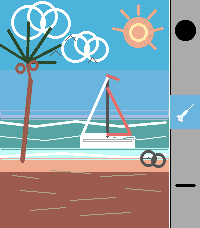
Tools & UtilitiesA full-featured drawing app for Pebble Time 2 and Pebble Round 2. Paint, sketch, and create directly on your wrist with 8 tools, 30 colors, and 3 save slots. Whether you want to doodle on the go, sketch a quick idea, or just see what you can create on a tiny screen, Time2Paint gives you the tools to do it. Use the Screenshot button in the Pebble app to save your creations! Tools -Brush — Freehand drawing with stroke smoothing for clean, fluid lines. Tap to place a dot. -Eraser — Erase by dragging over your drawing. Uses the current brush size. -Line — Draw a perfectly straight line. Touch to start, drag to end, lift to commit. -Fill — Flood-fill any area from a tap point outward. -Box — Draw a rectangle outline. Tap MID while Box is active to toggle filled mode. -Box Fill — Draw a solid filled rectangle. -Circle — Draw a circle outline. Tap MID while Circle is active to toggle filled mode. -Circle Fill — Draw a solid filled circle. Sidebar Shows your current color, active tool, and brush size. Hides automatically after a few moments, tap any button to re-open it. A stroke-count meter tracks how much canvas slot capacity you've used — blue is fine, yellow means 75% full, red means 90%. Save Slots Three independent canvases that each save automatically. Hold DOWN to open the canvas slot manager, switch between them, or hold a slot to permanently clear it. Controls UP button - Tap — Cycle Colors - Hold — Open the Color Picker MIDDLE button - Tap — Toggle the Eraser on/off. - Hold — Open the Tool Menu DOWN button - Tap — Cycle brush sizes - Hold — Open canvas slot manager BACK button -Tap — Undo last stroke Shake Shake the watch twice to clear the canvas. About the Developer - Comet Designs creates fun content for the Pebble platform - We'd love to see your drawings! Send them to us at [email protected] . - Buy me a coffee https://ko-fi.com/cometdesigns 15
15Gabagool.
GamesGabagool. featuring: Gubby THE Plexer [JP] (explicit) as seen on CloudPebble (sorry guys) Crowned first pebble shitpost
 777
777Muninn - Battery Wisdom
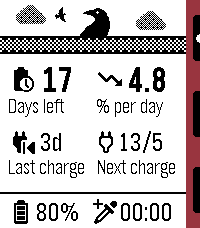
Tools & UtilitiesMuninn is an extremely lightweight battery tracking and prediction app. It uses the Wakeup API (every 6 hours) instead of the Background Worker to monitor trends and provide insight without negatively affecting battery life, using a moving average of readings over time to estimate days left, rate of discharge, next charge date, and more! Note: the Settings page is used for web stats, available after a few days of samples have been collected. Features: - Negligible battery impact - Days remaining and drain rate estimation - Last observed charge and predicted next charge date - Graph log of recent samples, up to 4 days - Sync up to 120 days of data to the phone for long-term insights - Upload and view all your data in web config page - Set an AppGlance to show estimate in the launcher menu - View general battery tips Options: - Custom low battery threshold notification (50%/20%/10%) - Timeline pin at noon on the last day remaining - High (above average) rate of drain notification - One day left notification - Auto-update of web config page stats (noon daily) Important notes: - If the watch is off at the next sample time, the app must be launched to allow wakeups to be resumed. - The initial estimate may be an overestimate but will smooth out soon after.
 65
65WhisperClock
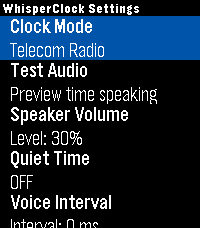
Tools & UtilitiesTimekeeping should be accessible to everyone, in any situation. WhisperClock is a discrete, audio-first utility designed exclusively for the Pebble Time 2, delivering the exact time directly to your ear through spoken audio clips. Whether you are navigating a visual impairment, keeping your eyes safely on the road, or checking the time in the middle of the night without waking up to a blinding screen, WhisperClock provides immediate, glance-free awareness. Built for efficiency, WhisperClock entirely bypasses background sensors by default, ensuring zero battery drain when not in use. Core Features: - Tactile Quick Launch: Integrates directly with PebbleOS Quick Launch. Trigger a time readout via a discrete, physical button hold—no need to look down or navigate menus. - Audio-First Interface: Features a 16-bit audio engine with real-time upsampling and a custom active-silence drip feed for crystal-clear playback on the Pebble Time 2. - Deep Customization: Tune your audio experience with a software-driven volume scaler, adjustable speech intervals, and dynamic audio trimming to strip silent tails off audio clips. - Experimental Physics: An optional, hands-free physics engine allows you to trigger the time using arm movements (via Dynamic Time Warping) or by tapping the watch glass. 100% Open Source: Privacy and transparency are paramount. WhisperClock is MIT Licensed. Inspect the code, fork the repository, or even contribute your own native language voice pack!
 2
2Trello GTD
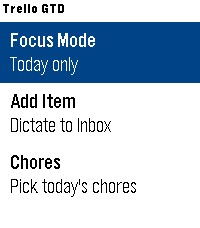
Tools & UtilitiesTrello GTD brings a focused Trello workflow to your Pebble Time 2. Work through cards from your Today list one at a time, mark tasks as done, or skip between them. Use voice dictation to quickly capture new items in your Trello Inbox, and build today’s plan by selecting recurring chores from a dedicated checklist board.
 0
0EMF Club Mate Stock
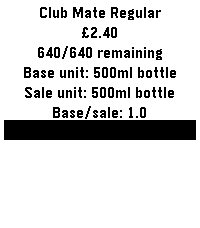
DailyGet the remaining Club Mate stock at EMFcamp (https://www.emfcamp.org/). Loads regular Club Mate stock on startup. Hold UP to refresh regular Club Mate. Hold DOWN to refresh Club Mate Granat. This was very quickly hacked together the day before EMFcamp while I should have been packing, and is my first pebble app. Probably mostly works. Only tested on my Time 2. YMMV.
 7
7US Tidemaps
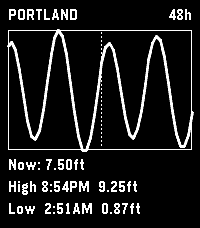
Tools & Utilities# US Tidemaps Standalone Pebble app showing NOAA tide predictions for a user-configured station. Designed for the Pebble Time 2 (emery). 48-hour hourly window centered on "now" (24 past, 24 future). UP / DOWN scroll the rendered window by one hour. SELECT toggles between 24h and 48h views. BACK exits. ## Build ``` npm install pebble build pebble install --emulator emery ``` ## Configuration Set a NOAA tide station ID via the Pebble app's settings page. Find your station's 7-digit ID at https://tidesandcurrents.noaa.gov/. ## Visual consistency with JY Time This app is a sibling project to the JY Time watchface (https://github.com/jashyotes/simple-pixel-style). Visual changes to fonts, icons, or layout patterns should be mirrored across both projects where applicable so they read as the same family in a Pebble menu.
 3
3Huckleberry
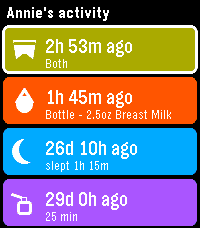
DailySee your children's latest logs from Huckleberry so you can always stay on top of diaper changes and upcoming bottle feedings. In order to use this app on your watch, you will need to generate an access token to authenticate with Huckleberry. I have created a simple dashboard for using Huckleberry on the web, as well as generating tokens here: https://huckleberry-dashboard.bfmw-dev.workers.dev/ * This project is an independent, unofficial integration. It is not affiliated with, endorsed by, or connected to Huckleberry Labs, Inc.
 33
33Digital Dice Roller
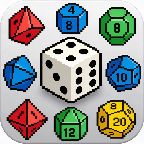
GamesDigital Dice Roller Choose your dice and roll on your wrist! A handy dice roller for tabletop gamers — right on your Pebble watch. No need to carry physical dice to your game night. Features: 6 dice types: 4-sided, 6-sided (cube), 8-sided, 10-sided, 12-sided, and 20-sided Shake your wrist or press SELECT to roll Classic d6 shows dot pips, other dice show numbers Stylish 3D isometric dice graphics Rolling animation with vibration feedback Roll history — see your last 3 results Controls: SELECT / Shake — Roll the dice UP / DOWN — Switch dice type Perfect for D&D, board games, or any time you need a quick random number.
 6
6Digital Dice Roller
GamesDigital Dice Roller Choose your dice and roll on your wrist! A handy dice roller for tabletop gamers — right on your Pebble watch. No need to carry physical dice to your game night. Features: 6 dice types: 4-sided, 6-sided (cube), 8-sided, 10-sided, 12-sided, and 20-sided Shake your wrist or press SELECT to roll Classic d6 shows dot pips, other dice show numbers Stylish 3D isometric dice graphics Rolling animation with vibration feedback Roll history — see your last 3 results Controls: SELECT / Shake — Roll the dice UP / DOWN — Switch dice type Perfect for D&D, board games, or any time you need a quick random number.
 9
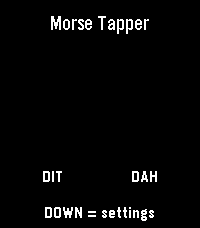
9Morse Tapper
Tools & UtilitiesMorse Tapper is a Pebble Time 2 Morse code touch keyer and trainer. Tap the left side for dit and the right side for dah, or use the physical buttons. Includes adjustable WPM, flash and vibration feedback, SOS test, and multiple keyer modes.
 3
3Dictate Unit Conversions
Tools & UtilitiesA helpful app to assist users with unit conversion tasks. Whether that be in the kitchen or in the workshop, you can view common unit conversions quickly. You can also dictate your unit conversion question (e.g. "How many mm is 2.3/8" divided by 2?"), and have the app respond using the Wolfram Alpha Quick Answers API.