 28
28CountUpVibe Timer
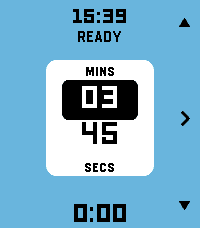
Tools & UtilitiesStay in the rhythm without watching the clock. Fire the timer first and then set time on-the-fly. Fastest way to launch a timer on Pebble. CountUpVibe Timer counts upward and taps your wrist at the interval you set — great for workouts, focus sprints, hydration nudges, posture checks, or any habit that needs a steady beat. It will give a gentle buzz on your wrist when a present time interval passes. Optimized for quick launch and fast adjustment with minimum key presses. Features: - ⏱ Quick-launch count-up timer. Once app is launched, timer immediately starts. Ideal to use with a Quick Launch button. - 🔔 Set vibration intervals while timer is running. Custom vibration interval (15s up to 99:59 — default 5 min) - 🌊 Draining water-fill shows the time to your next buzz at a glance. Change the water-color to your preference - ✏️ Launch the timer with one key press. Adjust later while timer is running - ⏯ Intuitive and minimal key presses to set the timer - 📿 Keeps reminding you in the background after you leave the app. Optimized operation for minimal battery usage - ⌚ Made for Pebble Time 2 and also runs on every Pebble (I only tested it on Pebble 2. Please give me a feedback if you try it on your Pebble) - Settings section in Pebble Smartphone part of CountUpVibe Timer let's you change the default settings/preferences and color palette. - Works with Quiet-Time (Silent Mode) in Pebble. If Quiet-Time is on, timer will run but watch won't vibrate. Set it once and let your wrist keep the beat. Operation Instructions: - Timer automatically starts counting the time upwards when you launch the app. It will buzz every 5 mins by default. App starts in Adjust mode. - Adjusting Vibration (Buzz) interval: In Adjust mode, Press Up and Down key to adjust minutes. Press Central key to highlight seconds adjustment (with UP and Down key). Press Central key again (or wait for 15 secs) to set the buzz time interval. Now you enter Run mode. - Run mode: Top key pauses/resumes timer. Bottom key resets/starts timer. Central key enters Adjust mode. - Timer will keep running in the background and it will keep buzzing/vibrating at the set interval. To stop it, press bottom (reset) key in Run mode. - The app is made to be used intuitively to rapidly launch a timer without too many key presses. - Settings menu in Pebble App changes the default settings/preferences and color palette. You can set the default vibration interval, minimum step of interval change and color of water-animation of you choice
 429
429Drag Racing
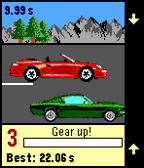
GamesXDA-Pebble Contest Winner It's not easy to create a good game for Pebble that's actually easy to control. Just a very few made this right. But there is a popular game genre that ought to be comfortable and fun to play on your wrist! Three buttons are just about right for this kind of game. Also, there's a zero BS factor. No waiting for gas, no double currency. Just a fair game designed to be fun!
 6
6Cigarette Tracker
DailyAn app to track cigarette smoking. (Vibe-coded and WIP, expect breaks/issues)
 0
0DownTimer
Tools & UtilitiesA looping two-stage interval timer with a running total, cycle count, and a separate on-demand reminder — all on your wrist.
 9
9Omnitrix
GamesJust a simple copy of Ben 10's omnitrix with functions you can play with
 0
0PT2SwimPool
Health & FitnessTESTING APP * PLEASE DO NOT USE IT
 1
1VSA Timer
Tools & UtilitiesA timer to help run VSA calls: every X (Standard 2) minutes, it will vibrate leading up to the call, so the rescuer (Of any level) can do a rhythm analysis and remember drug admin windows.
 5
5Fantasy Band
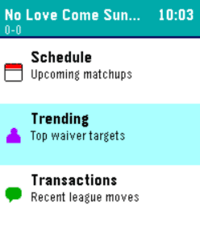
GamesFantasy Band is a Pebble smartwatch app that brings your Sleeper fantasy league straight to your wrist, giving you real-time scores, standings, and matchup data on the go. Think of this app as your window into your league, at a glace! Leave a like if you enjoy! 📋 Lineup & Schedule — View your starters and bench, check upcoming matchups, and monitor live game scores with projected points 📊 Power Rankings & Division — Track your league's power rankings, playoff odds, and division race in real time 🔔 Trending & Transactions — Stay on top of top waiver wire targets and recent league moves so you never miss a roster opportunity
 351
351Navi App
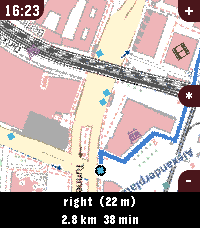
Tools & UtilitiesWelcome to Pebble Navi - Turn-by-turn navigation and a map on your wrist - No companion app needed - Support walking, driving and cycling modes - Destination selection from saved locations - You can dicate a destination to your watch if it has a micro - Save current location - Support for Imperial and Metric units - Added Rotation mode, the map rotates with the user and the route. - Supports every nearly pebble - Dynamic rerouting - Preview routes on your phone - NEW: Vibrate on left and right turns (only in walking and cylicng mode) You can manage locations in the apps phone menu. To people with older pebbles: There are two new options, one is to Enable experimental mode were we maximise sending speed of the map, but that can lead to instability, together with the telemetry option I hope i can make sure the update works fine on ever watch. When im sure it works fine with every watch model, i want to remove the telemtry again. I only could test this on my time 2 but the emulator behavior and hw behavior is different. If you have any suggestions or issues send me a message using the contact developer option or open a issue on github. Rebble Store Listing: https://apps.rebble.io/en_US/application/6a2ec9ab000bc200090963fc
 43
43Patch
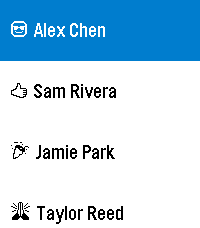
DailyHarness the power of iOS Automations to send text messages (including iMessages) from your Pebble! No server required. Patch uses Outlook (yes, Outlook!) to send an email to yourself, which triggers an Apple Shortcuts automation to intercept the notification and send the text message. The whole process takes less than ten seconds and requires no intervention after you hit send on the Pebble. You can also assign emojis to contacts, and program up to 10 canned messages. This app only works if you properly configure the automation on your phone. Be sure to carefully follow the setup guide in the app settings. Official text response functionality on iOS should be coming soon to the EU as a result of Article 6(7) of the Digital Markets Act.
 23
23pendler2
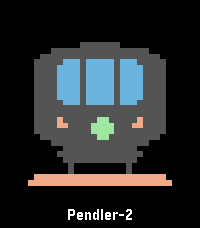
DailyÜber diese Anwendung kannst du deine nächste Zugverbindung per Knopfdruck abrufen. Die App greift dabei auf offizielle und freie APIs der Deutschen Bahn zu. Die Anwendung „pendler“ (2017) ist angelehnt an „myBahn“ von Frank Küpper (2016). „pendler2“ ist eine Neuentwicklung von „pendler“. Bei der Entwicklung habe ich diesmal auf die Unterstützung von „Claude Code“ und "gemini" zurückgegriffen. # Bahnhöfe Wähle zuerst den Startbahnhof aus. Klicke auf „Bahnhöfe“ > „hinzufügen“. Du kannst nun wählen, ob du den Bahnhof über den Service der Deutschen Bahn (Standard) oder über den Service des „VBB“ suchst. Für die meisten Bahnhöfe ist die Standard-Suche passend. Sprich jetzt in das Mikrofon deiner Pebble den gesuchten Bahnhof. (Beispiel: Mainz, Frankfurt, Münster). Wenn die Suche zu nur einem Ergebnis führt, wird der Bahnhof direkt übernommen und gespeichert. Wenn es mehrere Suchergebnisse gibt, musst du den passenden Bahnhof noch auswählen. Du kannst die so gewählten Bahnhöfe sowohl als Start- als auch als Zielbahnhof nutzen. # Verbindungen Klicke auf deiner Pebble auf den Menüpunkt „Verbindung“. Wähle zuerst einen Startbahnhof aus, den du im vorherigen Schritt bereits hinzugefügt hast. Nach der Auswahl des Startbahnhofs musst du den Zielbahnhof bestimmen. Hier kannst du entweder direkt einen Namen diktieren oder einen anderen Bahnhof auswählen, den du ebenfalls bereits hinzugefügt hast. Manchmal ist die Diktierfunktion hier unerlässlich, weil du bei der Verwaltung der Bahnhöfe immer einen konkreten Bahnhof auswählst. Der Frankfurter Hauptbahnhof z. B. hat aber mehrere EVA-Nummern (also mehrere „Unter-Bahnhöfe“). Wenn du hier einfach „Frankfurt“ diktierst, findet die Anwendung alle Verbindungen nach Frankfurt, unabhängig vom jeweiligen Unter-Bahnhof. Diese Option ist daher flexibler. # Weiterfahren nach... Wenn du eine konkrete Verbindung ausgewählt hast, kannst du durch einen Knopfdruck einen weiteren Bahnhof auswählen (Option „Weiterfahren nach...“). Dann wird der vorherige Zielbahnhof zum neuen Startbahnhof und du kannst einen neuen Zielbahnhof festlegen.
 50
50Color Calendar Redux
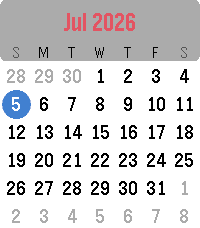
DailyColor Calendar Redux This is an update of the original Color Calendar app created by Kelby. A simple, easy-to-read calendar for your Pebble. Tap or Swipe Up and Down to scroll between months, Tap/Select returns to today, and long select press toggles between Sunday-first and Monday-first week layouts. New in this version: - Full support for Pebble Time 2 and Pebble Round 2, with a layout that scales to fill their larger displays (and it still runs great on Pebble Time and Pebble Time Round). - Touchscreen controls on Pebble Time 2 and Pebble Round 2: swipe up or down to change months, tap to jump back to today. - Simple calendar icon in the app menu - The current date now appears in the launcher under the app name (e.g. "Thu, Jan 1st") Based on the original Color Calendar by Kelby. Full credit to them, I just added some features and native scaling for the new watches. About the Developer - Comet Designs creates fun content for the Pebble platform - Buy me a coffee https://ko-fi.com/cometdesigns
 49
49Fartini Maximo - Fart Machine
RemotesWhats funnier than a well timed fart? Featuring four delightful sound effects to really let you get the most out of your sophisticated new smartwatch. Now featuring One Shot Mode for use with quicklaunch. Enable by holding down, now the app will launch, play a random fart sound and close. The disable just press any key while the screen is open and the process will be interrupted, now you can toggle it on and off again. Make sure your speaker is enabled! Settings // Sounds and Haptics // Mute Speaker "Off" & Volume "100"
 9
9Plant Tracker
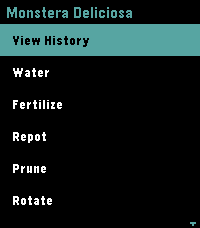
Tools & Utilities🌿 Pebble Plant Tracker is a premium, offline-first companion application designed to manage your indoor garden directly from your wrist. It displays your plants in a sleek, high-contrast dark theme showing the relative time since their last care event (e.g. `W: 3d ago | F: 12h ago`). You can instantly log eight maintenance actions (Watering, Fertilising, Repotting, Pruning, Rotation, Cleaning, Treating, and Relocating) and review up to 20 historical logs in a scrollable timeline on the watch. Configure your plant list, planting dates, and view a complete history timeline through the phone's Pebble settings dashboard. Your data remains secure and synced even when offline.
 0
0D666_Weather
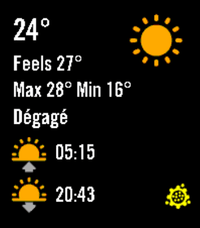
DailyWeather dashboard that only works for Montreal, Quebec, Canada with data from meteomedia.com