 1
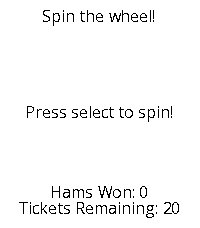
1Ham Raffle Simulator
GamesSpin the wheel. Win some hams!
 450
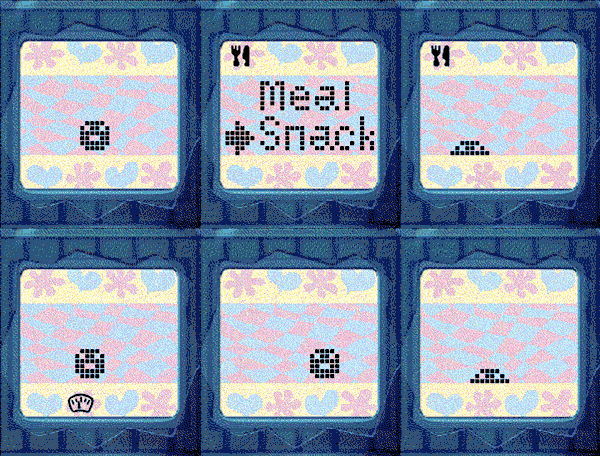
450Tamagotchi Emulator
GamesNEW: Now with sound for Pebble watches with speaker! Press A+C to toggle the sound. Tamagotchi Emulator for Pebble! Run the original 1996-1997 Tamagotchi (P1 and P2) on your Pebble. Includes optional support for running your own background service to keep your Tamagotchi running when closed. Tamagotchi is a virtual pet which you need to take care of! Watch it evolve based on your care for it. How long can you keep your pet alive? If you like this project, please drop a heart! Thank you :) (You could help me win a Pebble so every like makes a difference!) See the readme for full instructions on how to get started: https://github.com/StefanBauwens/Tamagotchi-Emulator-Pebble You can also use this app together with the TamaTime watchface! (https://apps.repebble.com/c80224317250460987b9bb68) Never miss a call for attention! Created for the Pebble 2026 Spring Contest. Powered by TamaLIB by jcrona.
 4
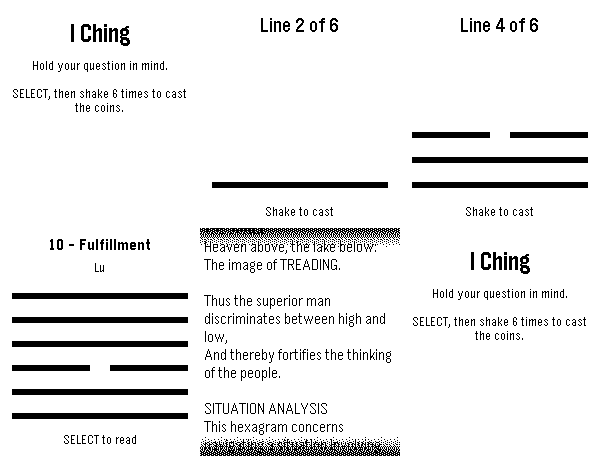
4I Ching
GamesGet I Ching reading on your watch!
 12
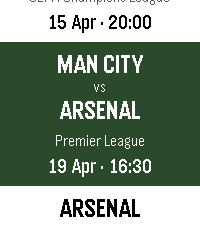
12Fixtures
NotificationsStay up to date on all the upcoming football matches of your favourite teams and competitions with Fixtures! In this first release of Fixtures: - Choose your favourite football teams - Track their upcoming fixtures in the app - Receive Timeline pins for upcoming games The app supports the following leagues: - Premier League - Championship - Bundesliga - La Liga - Serie A - Ligue 1 - Champions League How to use: - Select your favourite team via "Manage teams" - All your favourite team's fixtures will be automatically sync'ed to your Timeline - View upcoming fixtures by selecting your team on the main page To receive Timeline pins, ensure "Emulate Timeline Webservice" is on in Settings > Apps. Supported languages: - English - Français (French) - Deutsch (German) - Español (Spanish) - Italiano (Italian) - Português (Portuguese) - 中文(简体)(Chinese Simplified) - 中文(繁體)(Chinese Traditional) Note: The app is currently running on a free server - loading fixtures may occasionally take up to 45 seconds.
 51
51Timers
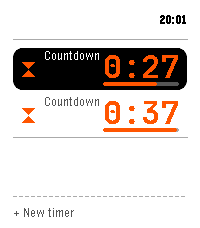
Tools & UtilitiesMulti-timer, stopwatch, single and repeat countdowns for Pebble Time 2. -- Across the app - Run several at once; the home screen keeps each live time visible - Say a timer by voice, English or Spanish ("five minutes", "pasta for eight minutes", "every 20 minutes", "at 6:45"); name it too - Save 12 presets, start one with a press - Fires on time even with the app closed; snooze a fixed amount or a quarter of the set time Countdowns - Big digits with a progress bar, start and end time - Hold to pause, add more time while it runs - Keep counting past the target until dismissed Stopwatch - Latest laps on the main screen; hold Up to add a lap Repeat timers - Repeat on a set interval, with a round tally and quick restart Turn a countdown into a repeat, and back. Controls: hold Select to pause, hold Up for the quick action, Down for the menu. Report bugs or request improvements: https://github.com/Persitz/pebble-timers/issues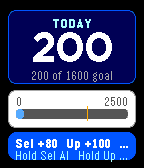 5
5Calorie Log
Health & FitnessA fast, offline-first manual calorie tracker for Pebble Time. Select adds 80 calories, Up adds 100, and Down undoes the last addition. The total persists on the watch and resets at the start of each new day. No account, API key, or internet connection required. Designed for Pebble Time (Basalt).
 6
6Sykerö Track Work Time
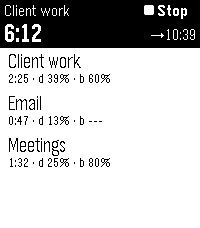
Tools & UtilitiesControl Sykerö Track Work Time from your wrist — start/stop tracking, switch tasks, and see time worked today and time remaining. Pair it with the Sykerö TimeStyle watchface to see your live work-time status right on your watchface. Companion to the Sykerö Track Work Time Android app (work hours, flextime & budgeted tasks).
 62
62home assistant pebble
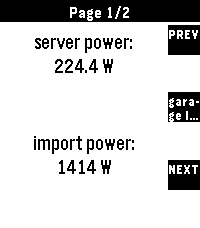
RemotesTransform your Pebble into the ultimate smart home remote Home Assistant for Pebble is a professional-grade integration designed for speed, reliability, and universal compatibility. Whether you're on a classic Pebble, a Pebble Round, or the high-res Pebble Time 2, this app provides a seamless, responsive experience. Setup Instructions: 1. Open the settings for this app in the Pebble mobile app. 2. Enter your Home Assistant URL and a Long-Lived Access Token. 3. (Optional) For the best experience, add `cors_allowed_origins: - https://joshsg3.github.io` to your Home Assistant `configuration.yaml` to enable the "Load Full List Now" button. - If you don't want to do this, save the config page, and open it again, the first 350 entities will be preloaded 4. Configure your dashboard pages and sync! Not affiliated with home assistant If you like this and want to support me: https://buymeacoffee.com/joshsg
 14
14Wakka Wakka
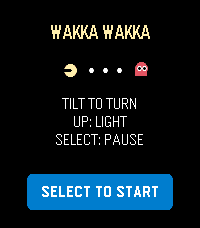
GamesWakka Wakka is a compact maze-chase game designed for Pebble Time 2 and Pebble Time or Time Steel. Guide a quick golden runner through a scrolling stage by tilting your wrist. Clear every energy dot while four colorful rivals use different pursuit strategies to close in. Large energy dots briefly reverse the chase: rivals turn blue and become vulnerable, giving you a chance to hunt them for bonus points. Three lives, a clear ready prompt, responsive buffered turns, a wraparound tunnel, and an optional gameplay backlight make each run easy to start and difficult to master. Controls: • Tilt: buffer turns at the next legal junction • UP: toggle backlight • DOWN: south-direction emulator fallback • SELECT: start/restart or pause/resume and recalibrate • BACK: exit Hold the watch level during calibration. Supports Emery and Basalt with platform-aware 200×228 and compact 144×168 layouts. English interface. Runs entirely on the watch with no account, configuration, network connection, or phone service during play.
 52
52Timeline WX
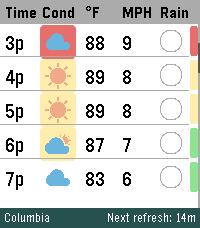
DailyYour next 48 hours, visualized. Built specifically to push the limits of the Pebble Time 2's high-resolution display. Whether you're coordinating a Scout campout, dialing in your morning commute, or tracking incoming storms, Timeline WX delivers precision meteorological data at a glance, with no squinting required. Instead of static daily summaries, smoothly scroll through a continuous 48-hour timeline. We have stripped away cluttered text and replaced it with clean, data-driven visual indicators so you can assess your environment instantly. THE ARCHITECTURE Instant Offline Resume: Your timeline is cached directly to the watch's flash memory. Launch the app and see your forecast instantly, even if your phone is disconnected. Auto-Pruning Timeline: The watch continuously syncs with the hardware clock to automatically hide past hours, ensuring your scroll always starts exactly at "Now." Ultra-Battery Optimized: Completely rewritten to run natively on the Pebble OS background clock, reducing battery drain by up to 98 percent. FREEDOM OF WEATHER DATA (NO API KEY REQUIRED) You are no longer locked into a single weather provider. Timeline WX now features an internal translation engine, allowing you to seamlessly swap between four world-class meteorological APIs directly from the settings menu. Choose the provider that works best for your specific geographic location: Open-Meteo is the default option. It is great for global use and requires no API key, though it relies on broader aggregated models. The National Weather Service (NWS) is highly accurate for US locations using regional grid data, but it is restricted to the US and lacks UV Index data. Yr.no / Met.no provides world-class precision MEPS modeling for European and Nordic locations, but also lacks UV Index data. OpenWeather OneCall 3.0 provides complete global data including the UV Index, but requires registering for a personal API key. (Note: If a selected provider does not support UV data, the UV safety bar will gracefully hide itself rather than displaying false information). SMART ENVIRONMENTAL WARNINGS Stop reading numbers and start seeing conditions. Timeline WX actively processes combinations of temperature, wind speed, UV, and humidity to color-code threats. Dynamic Hazard Badges: A colored badge sits directly behind the weather icon based on a custom algorithm. Yellow means uncomfortable (muggy, hot, or cold). Orange means a warning (high winds, severe UV, or approaching storms). Red means dangerous (extreme temperatures or severe weather). Temperature Alerts: Values turn Red when blistering hot (90F or higher) and Blue when freezing (32F and below). High Wind Warnings: Wind speeds turn Orange when gusts exceed 20 MPH, which is perfect for knowing when to tie down the tent fly. Midnight Dividers: High-contrast double lines and red timestamps explicitly mark when the forecast crosses into a new day. INTUITIVE RAIN AND UV TRACKING Rain Pie Charts: Ditch the confusing percentage text. Custom blue pie charts show you exactly how likely it is to rain, hour-by-hour. UV Safety Bar: A dynamic, color-coded safety bar runs down the right edge of the screen, letting you know exactly when you need sunscreen on a Green to Purple scale. CORE FEATURES AND CUSTOMIZATION On-Wrist Settings Menu: Long-press the Select button to toggle Dark Mode or swap units directly from your watch, and changes instantly sync back to your phone. Decoupled Measurements: Mix and match your preferred units. Supports Fahrenheit, Celsius, Kelvin, and Rankine for temperature, alongside MPH, KPH, m/s, and Knots for wind. Dark Mode: Invert the UI for a high-contrast, low-light optimized viewing experience. Live Telemetry Banner: The bottom banner dynamically displays live countdowns to the next refresh, active server connections, and current location. Precision Location: Choose between automatic Phone GPS or a manual Zip Code, with background refresh intervals adjustable from 15 minutes to 2 hours. SETUP INSTRUCTIONS Install the app, and you are immediately ready to go using Open-Meteo as the default provider! If you prefer to use OpenWeather, you will need to supply your own key to keep the app free. Sign up for a free account at OpenWeatherMap.org. Subscribe to the "One Call 3.0" API and generate a free API Key. Set your daily call limit to 1000 to ensure it remains completely free. Paste the key into the Timeline WX settings page, switch the provider dropdown to OpenWeather, and save. If you enjoy what I am making, don't forget to heart the app! If you want to support continued development, consider a donation at https://ko-fi.com/ericmccormick
 12
12FitoTrack Display
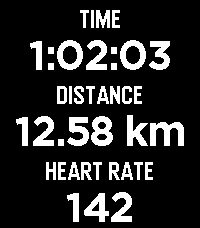
Health & FitnessFitoTrack Display shows the most important numbers of your current FitoTrack workout on your Pebble (Android only). Pebble support is available in FitoTrack since version 16.1. (Related pull request: https://codeberg.org/jannis/FitoTrack/pulls/669)
 6K
6KCompass
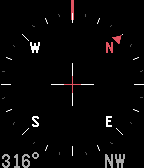
Tools & UtilitiesCompass app elegantly animates between two different modes: A compass rose when you look down at your Pebble and a heading indicator when hold the watch in front of the horizon. A spirit level is included with exact degrees for where you're heading and smooth animations make this the perfect companion for any outdoor activity. And, even works under water!
 116
116Web-Slinger
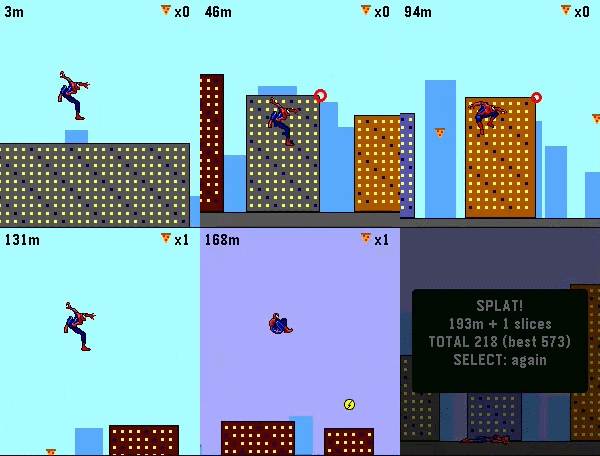
GamesSwing through the city like Spider-Man. Web-Slinger is a momentum-based arcade game made for those spare one-or-two minutes on your wrist. Made with Real Sprites from Spider-Man: the Movie on Gameboy advance! Hold any button or use the touchscreen and hold your finger anywhere on the screen to fire a web and swing. Gravity does the rest: dive to build speed, whip through the bottom of the arc, and release on the upswing to launch. Your swings ARE your speed, so clean timing sends you flying through the skyline while sloppy timing bleed your momentum away. Careful — the web snaps if you dangle too long. Collect slices of pizza on your way to boost your score! Grab a lighting boost for extra speed! Falling to the ground ends the run and records your high score! Features: Real pendulum swing physics — momentum you can feel Six suits: classic red & blue, black symbiote, Iron Spider, Miles, 2099, and Scarlett — your pick is saved. Day & Night Cycle based on how far you make it! Touchscreen and button controls, works great with either. Best score saved on the watch, auto-pause when notifications interrupt. Built for Pebble Time 2 and Pebble Round 2
 4
4TheEconFeed
DailyA section menu of all 17 Economist sections leads to scrollable headline-and-dek feeds you can flick through story by story. Everything is cached on the watch, so once a section has loaded it keeps working offline from that cache. Reads The Economist's public RSS feeds. Not affiliated with or endorsed by The Economist. Collects anonymous usage statistics, including approximate country.
 101
101VitalGauge
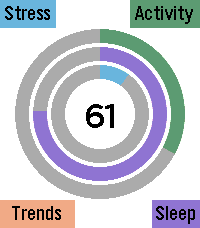
Health & FitnessVitalGauge is a fully autonomous, 100% offline biometric health suite engineered specifically for the Pebble Time 2. Designed for maximum privacy and battery efficiency, VitalGauge synthesizes your physiological data to provide real-time insights into your body's true energy levels. Comprehensive Health Tracking VitalGauge does more than just track steps; it maps your entire physiological state throughout the day: Energy Reserve: A singular, dynamic score synthesized from your sleep quality, daily exertion, and cardiac efficiency, telling you exactly how much "gas is left in the tank." Activity & Sleep Architecture: Automatically visualizes your daily movement and categorizes your sleep into Deep, Light, and Awake cycles. Historical Trends: Access a unified hub to visualize your progress across Energy, Sleep, Stress, and Activity trends over the last week. Smart Stress Management Never be caught off guard by a stress spike again: Intelligent Background Monitoring: Runs a high-efficiency background worker that monitors for heart rate anomalies while you are stationary. Hybrid Stress Algorithm: When a potential spike is detected, the app performs a high-resolution, 60-second background EKG scan to verify your stress score using a custom variance-based algorithm. Timeline Integration: Verified anomalies trigger a silent, persistent pin pushed directly to your Pebble Timeline history, allowing you to review events without intrusive alarms. Personalization & Interventions VitalGauge puts you in the driver’s seat of your own biometric data: Interactive Settings UI: Hold Select at any time to access a deep customization menu. Toggle between Light and Dark modes, adjust haptic intensity, set your preferred breathing style, and manage backlight behavior. Guided Breathing: Follow a 5-minute, audio-visual breathing routine—complete with dynamic pacing rings and hardware-optimized audio cues—designed to actively lower your heart rate. Offline Privacy: VitalGauge operates completely on-device. There are no accounts to create, no cloud servers to sync with, and your health data never leaves your watch. If you enjoy what I am making don't forget to heart the app. If you want to support continued development, consider a donation: https://ko-fi.com/ericmccormick