Timeline WX
Eric McCormick
Watchapp
Description
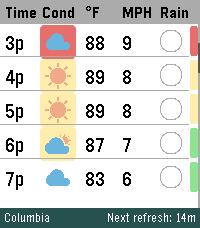
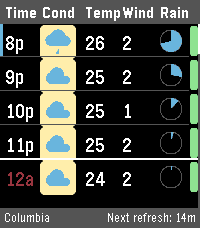
Your next 48 hours, visualized. Built specifically to push the limits of the Pebble Time 2's high-resolution display. Whether you're coordinating a Scout campout, dialing in your morning commute, or tracking incoming storms, Timeline WX delivers precision meteorological data at a glance, with no squinting required.

Instead of static daily summaries, smoothly scroll through a continuous 48-hour timeline. We have stripped away cluttered text and replaced it with clean, data-driven visual indicators so you can assess your environment instantly.

THE ARCHITECTURE
Instant Offline Resume: Your timeline is cached directly to the watch's flash memory. Launch the app and see your forecast instantly, even if your phone is disconnected.

Auto-Pruning Timeline: The watch continuously syncs with the hardware clock to automatically hide past hours, ensuring your scroll always starts exactly at "Now."

Ultra-Battery Optimized: Completely rewritten to run natively on the Pebble OS background clock, reducing battery drain by up to 98 percent.

FREEDOM OF WEATHER DATA (NO API KEY REQUIRED)
You are no longer locked into a single weather provider. Timeline WX now features an internal translation engine, allowing you to seamlessly swap between four world-class meteorological APIs directly from the settings menu. Choose the provider that works best for your specific geographic location:

Open-Meteo is the default option. It is great for global use and requires no API key, though it relies on broader aggregated models.

The National Weather Service (NWS) is highly accurate for US locations using regional grid data, but it is restricted to the US and lacks UV Index data.

Yr.no / Met.no provides world-class precision MEPS modeling for European and Nordic locations, but also lacks UV Index data.

OpenWeather OneCall 3.0 provides complete global data including the UV Index, but requires registering for a personal API key.

(Note: If a selected provider does not support UV data, the UV safety bar will gracefully hide itself rather than displaying false information).

SMART ENVIRONMENTAL WARNINGS
Stop reading numbers and start seeing conditions. Timeline WX actively processes combinations of temperature, wind speed, UV, and humidity to color-code threats.

Dynamic Hazard Badges: A colored badge sits directly behind the weather icon based on a custom algorithm. Yellow means uncomfortable (muggy, hot, or cold). Orange means a warning (high winds, severe UV, or approaching storms). Red means dangerous (extreme temperatures or severe weather).

Temperature Alerts: Values turn Red when blistering hot (90F or higher) and Blue when freezing (32F and below).

High Wind Warnings: Wind speeds turn Orange when gusts exceed 20 MPH, which is perfect for knowing when to tie down the tent fly.

Midnight Dividers: High-contrast double lines and red timestamps explicitly mark when the forecast crosses into a new day.

INTUITIVE RAIN AND UV TRACKING
Rain Pie Charts: Ditch the confusing percentage text. Custom blue pie charts show you exactly how likely it is to rain, hour-by-hour.

UV Safety Bar: A dynamic, color-coded safety bar runs down the right edge of the screen, letting you know exactly when you need sunscreen on a Green to Purple scale.

CORE FEATURES AND CUSTOMIZATION
On-Wrist Settings Menu: Long-press the Select button to toggle Dark Mode or swap units directly from your watch, and changes instantly sync back to your phone.

Decoupled Measurements: Mix and match your preferred units. Supports Fahrenheit, Celsius, Kelvin, and Rankine for temperature, alongside MPH, KPH, m/s, and Knots for wind.

Dark Mode: Invert the UI for a high-contrast, low-light optimized viewing experience.

Live Telemetry Banner: The bottom banner dynamically displays live countdowns to the next refresh, active server connections, and current location.

Precision Location: Choose between automatic Phone GPS or a manual Zip Code, with background refresh intervals adjustable from 15 minutes to 2 hours.

SETUP INSTRUCTIONS
Install the app, and you are immediately ready to go using Open-Meteo as the default provider!

If you prefer to use OpenWeather, you will need to supply your own key to keep the app free. Sign up for a free account at OpenWeatherMap.org. Subscribe to the "One Call 3.0" API and generate a free API Key. Set your daily call limit to 1000 to ensure it remains completely free. Paste the key into the Timeline WX settings page, switch the provider dropdown to OpenWeather, and save.

If you enjoy what I am making, don't forget to heart the app! If you want to support continued development, consider a donation at https://ko-fi.com/ericmccormick
- DeveloperEric McCormick
- CategoryDaily
- PlatformsTime 2
- Updated2026-07-28
- Version2.3.1