 8
8Nothing Battery
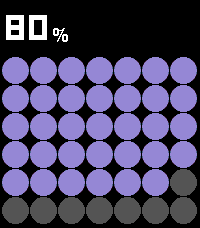
Tools & UtilitiesPebble Battery is a clean, glanceable battery app inspired by the Nothing Phone widget aesthetic. The main screen fills the display with a bold dot grid, purple on dark, red on light, where each circle represents a portion of your remaining charge. The current percentage is displayed prominently at the top using a dot-matrix LED-style font. Press UP or DOWN to open the summary view, which shows your estimated time remaining (or time until full when charging), drain rate in %/HR, and the last recorded delta. Press SELECT to toggle between dark mode (black background, purple dots) and light mode (white background, red dots, gray empty circles), your preference is remembered between sessions. When the battery drops below 20%, the percentage and dots turn red as a low-battery warning. When charging, an animated wave of dots sweeps across the grid.
 1
1Volleyball Score Keeper
Health & FitnessVolleyball Scorer turns your Pebble into a glanceable, sunlight-readable scoreboard. Hold the top button to add a point for US and the bottom button for THEM, and the watch buzzes the moment a set is won at 25 by two. Tapped the wrong team? Press the middle button to arm removal, then press a team to take a point back. Your score saves automatically, so you can close the app mid-match and reopen exactly where you left off, with each team's button sitting right next to its score.
 7
7Hive
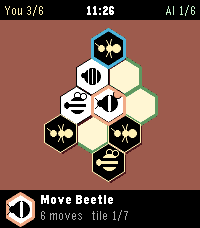
GamesThe game Hive utilizing ideas from these creators AIs https://github.com/jonthysell/Mzinga https://github.com/edre/nokamute If you find any bugs let me know, I will try to continue to work and improve on it. Thanks!
 8
8Ham Locator
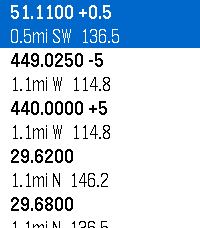
Tools & UtilitiesLocates repeaters within your area and gives you relevant data Uses data sourced from HearHam.com
 15
15Clinch
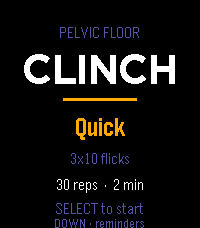
Health & FitnessGuided pelvic floor training, on your wrist. Clinch runs your pelvic floor sets so you don't have to count in your head. Each rep is a guided squeeze and release, cued by vibration, so you can train with your wrist down and your attention somewhere else. Pick a protocol and press start: Mixed — 10 quick reps to train the fast reflex, then 3×10 five-second holds for endurance. The one to run daily. Long holds — 3×10, five seconds on, five off. Straight endurance work. Quick — 3×10 short flicks in about a minute, for when you've only got a moment. While a set runs, a column fills as you squeeze and drains as you release, so a glance tells you where you are without reading a number. A short buzz starts each rep, a double buzz sends you into the release, and a longer pattern marks the end of a set. Pause, skip a rest, or bail out any time. Reminders that fit your day. Set up to three daily nudges and put them at any hour and minute you like — hold to open the editor and scroll each field. When a reminder fires, the watch buzzes and opens straight to a start prompt. It all runs on the watch's own scheduler, so it works whether or not your phone is nearby. Stays on your wrist. No account, no companion app, no data leaving the watch. Your protocol choice and reminder times are saved locally between sessions. Controls Menu: SELECT starts · UP changes protocol · DOWN opens reminders During a set: SELECT pauses · DOWN skips a rest · UP or BACK returns to the menu Reminders: UP/DOWN pick a slot · SELECT toggles it on/off · hold SELECT to set the time ***Medical Disclaimer*** Clinch is a training timer, not medical advice. Pelvic floor exercises are widely recommended, but roughly a third of people doing them from written instructions use the wrong muscles. If you're training for a specific symptom rather than general maintenance, it's worth seeing a pelvic floor physical therapist once to confirm your technique — it'll make every session here count for more.
 13
13QuickTodoist
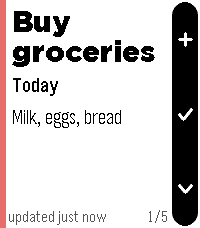
Tools & UtilitiesI wanted a Todoist app that starts instantly, so QuickTodoist caches your tasks and shows them the moment you open the watch. No spinner, no waiting on your phone. It refreshes quietly in the background after that. It's meant for a quick glance at your top tasks and to jot down a new one. Everything else is faster on your phone or desktop, so it's deliberately left out here. FEATURES - Today at a glance: each task is a fullscreen card with due time, project, priority color and description - flip through them with up/down - Instant startup from cache; auto-refresh every time you open the app - Add tasks by voice on watches with a mic (Todoist quick-add understands "buy milk tomorrow p1"); other watches refresh manually instead - Shows Today's tasks, or any Todoist filter you choose - Mark tasks done from your wrist (hold select) - Timeline pins for tasks scheduled at a specific time today - Configure once on your phone: API token, filter, and sort order (Todoist order, priority, or due time) - Text size follows your watch's own Text Size setting No token yet? The app shows sample tasks so you can try it right away. Add your free Todoist API token when you're ready (Todoist: Settings -> Integrations -> Developer). Not affiliated with Doist. Todoist is a trademark of Doist Inc.
 10
10CharWatch
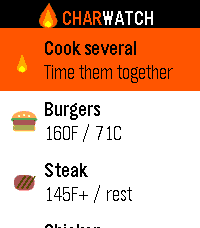
Tools & UtilitiesGrill timers and safe internal temps, right on your wrist. CharWatch turns your Pebble into a BBQ command center. Pick what you're grilling and it walks you through every stage — when to flip, when to add cheese, when to pull it — with a buzz on your wrist at each step, so you're never chained to the grill watching a phone. What it does 11 grill foods with USDA-safe internal temperatures built in Guided cook timers that prompt you to flip, toast buns, add bacon or cheese, rest, and confirm temp Steak, your way — five doneness levels that adjust the sear time Burger thickness — thin, regular, or thick, and the timer scales to match (no more raw-in-the-middle thick patties) Build your plate — toggle buns, bacon, and cheese per burger or dog Cook Several — put the whole spread on one timeline. CharWatch staggers each item so everything finishes together, and merges nearby prompts into a single buzz so you're not pinged six times a minute Confirm-temps reminder before you serve Runs entirely on the watch — no phone, no internet, no account Whether it's two burgers or a full cookout, CharWatch keeps the timing straight so you can focus on the fun part. Designed for the Pebble Time 2. Also builds for classic Pebble models.
 31
31Solitaire
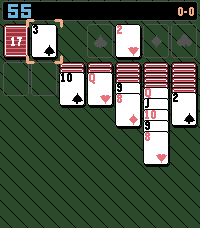
GamesA simple solitaire game with a twist
 19
19Tuned Stone
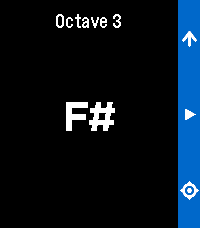
Tools & UtilitiesRefreshed app called Pitch Pipe. A chromatic pitch-pipe on your wrist. Play any note instantly. Cycle through all twelve chromatic tones with the Up button then press and hold Select to sound the note for as long as you need. It runs entirely on your Pebble.
 22
22LaunchPad
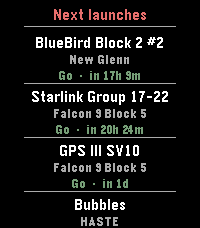
Tools & UtilitiesLaunchPad brings the world's rocket launch schedule to your Pebble. Scroll through the next 10 upcoming orbital launches, each showing: * Mission name — what's flying (BlueBird, Starlink, GPS III ) * Rocket — which launcher (Falcon 9, New Glenn, Electron…) * Status & countdown — color-coded Go / TBC / TBD with a human-readable time like "in 17h 1m" or "25 Apr · 14:00Z" App is pure alloy, data comes live from Launch Library 2 by The Space Devs — the same open database that powers many of the best space-tracking apps. Credit: launch data provided by thespacedevs.com
 7
7Daily 8-Bit Song
DailyPlays a random 8-bit-style song directly on your Pebble Watch Speakers! Songs are from https://vgmusic.com/music/console/nintendo/nes/ Save your favorites, and discover random tracks!
 32
32French Press Buddy
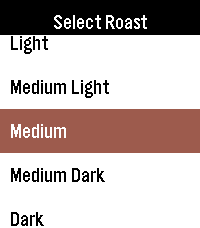
Tools & UtilitiesFrench Press Buddy is a simple, easy to use app to help you create the best French press coffee you can in 3 easy steps! 1. Select the roast of your coffee 2. Enter the amount of water you want to use. The app will automatically calculate the amount of coffee you need, based on your water amount and coffee type 3. Set the timer to how long you want to brew It's never been easier to make a cup of coffee with your pebble!
 4
4Fasting Timer
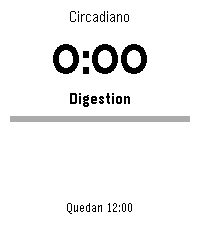
Tools & UtilitiesTrack your intermittent fasting right from your wrist. Fasting Timer is a simple, focused widget that shows your current fasting window at a glance and keeps working quietly in the background. As the hours pass, the watch shows the metabolic stage you're moving through - from digestion and glycogen depletion to ketosis and autophagy - so every hour on the clock means something.
 2
2Interval Timer
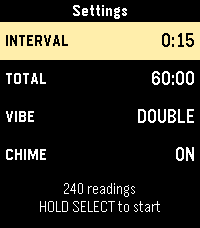
Tools & UtilitiesThis is an interval timer. Initially made for opacity testing it can used for anything else that requires a timer with intervals of 15 seconds.
 6
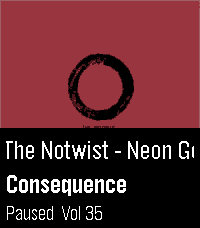
6Squeeze Lyrion LMS
RemotesLeave your phone in your pocket! A native, touch-first remote for Squeezebox, squeezelite, and Lyrion Music Server — the server formerly known as Logitech Media Server (LMS) or SlimServer — tailored for the Pebble Time 2 and Pebble Round 2. Browse your server's entire menu tree, start playback anywhere in your library, and control your Squeeze players right from your wrist without ever needing to unlock or pick up your smartphone. Works with all Squeeze endpoints: original Squeezebox hardware (Classic, Boom, Duet, Radio, Touch), squeezelite, WiiM, piCorePlayer, Max2Play, and LMS software players. ✨ KEY FEATURES: • Now Playing with Cover Art: Album sleeve rendered at full screen width for local files, streaming plugins (Spotify, Deezer, Tidal, Qobuz) and internet radio. • Full Artwork Mode: Hold the SELECT button anytime to view the complete album cover without UI overlays. • Intuitive Player Touch Controls: Tap to Play/Pause, Swipe left/right to skip tracks, Swipe up/down for volume — keeping all 4 physical buttons free for menu navigation! • Complete Server Menu: Browse My Music, Radio, Favourites and Plugins. Paginated so folders with 2,000+ albums stay ultra-fast. • Smart Path Memory: Reopening the menu returns straight to the folder you were browsing instead of resetting to root. • Marquee Scrolling: Long track, artist and folder names scroll smoothly instead of being cut off. • Multi-Player Support: Switch between all your Squeeze players right from the start screen. 🎮 CONTROLS: • Tap screen: Play / Pause • Swipe Left / Right: Previous / Next Track • Swipe Up / Down: Volume ±5 • Up / Down buttons: Volume ±5 (repeating) • Select button: Open Server Menu / Select Item • Hold Select: Full Album Sleeve (or jump back to player from menu) • Back button: Step back / Close ⚙️ SETUP: 1. Open the Pebble app on your phone. 2. Go to the app settings (Clay configuration). 3. Enter your LMS server's Hostname or IP address (e.g. 192.168.1.100) and Port (default: 9000). 4. Tap "Save Settings" — your player list will automatically appear on your watch! ☕ Support on Ko-fi: https://ko-fi.com/pagnotta34838 Open source under the MIT License.