 0
0HA-launch script from shortcut 01
Tools & UtilitiesLaunch any Home Assistant script from a physical button of the watch. - Faceless app (just the button-click) - Vibrates after fire Settings from phone: - HA url - Token - script, e.g.: script.unlock_door:user=me,from=pebble_watch
 25
25Flashback F1 Results
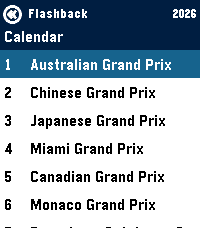
Tools & UtilitiesGet info on the current F1 Formula 1 Season - Current calendar + weekend schedule in your local timezone - Timeline pins for each event per weekend - Drivers Standings - Team Standings
 8
8SG Bus Lai Liao
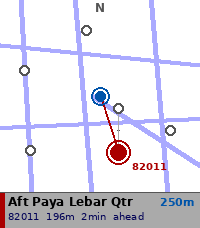
DailySG Bus Lai Liao — Real-time Singapore bus arrivals on your wrist. Now with a map. Powered by LTA DataMall, get live arrival times for any bus stop in Singapore directly on your Pebble watch. NEW IN 3.0 — MAP VIEW - Nearby Stops can now show a map instead of a list: the stops around you, plotted over Singapore's road network - The map turns with you — compass heading keeps the way you're facing at the top of the screen - Zoom 100m / 250m / 500m / 1km with UP and DOWN - Stops across the road from each other fan apart when you select them, so you can tell which side you actually want - Tap a stop to select, hold SELECT to open its arrivals - Walking time shown alongside distance - Nearby Stops now finds 12 stops instead of 5 - Choose list or map in the app settings on your phone ALSO NEW — KEYPAD - Enter a stop code in five taps on a full 12-key touch keypad - Auto-submits on the fifth digit FIXES - Arrivals list no longer jumps to the top when it refreshes, and keeps your selected bus even when others drop off the list - Auto-refresh no longer stalls if the phone stops responding - Errors such as "Timeout" now display correctly - Long stop names no longer cause Nearby Stops to come up empty - Fixed memory leaks when leaving Nearby, Bookmarks and Search FEATURES - Nearby Stops — GPS-based detection of the 12 closest bus stops, as a list or a map - Search by Code — 12-key touch keypad, or the button-driven digit picker - Bookmarks — save your favourite stops for quick access - Grouped arrivals — buses grouped by service number, up to 3 incoming shown - Load indicator — Low / Med / Full crowd level per bus - Auto-refresh — arrivals update every 60 seconds, or swipe left for now - Offline stop names — descriptions cached locally, refreshed monthly - Offline road map — Singapore's road network ships with the app, no data needed to draw it REQUIREMENTS - Free LTA DataMall API key (datamall.lta.gov.sg/content/datamall/en/request-for-api.html) - Configure your key via the app settings in the Pebble phone app SUPPORTED WATCHES - Pebble Time 2 (Emery) — optimised - Map and keypad need the touchscreen; other models use the list and the digit picker, and everything else works the same HOW TO USE 1. Open app settings in the Pebble phone app 2. Enter your LTA DataMall API key 3. Choose whether Nearby Stops opens as a list or a map 4. Select Nearby Stops, search by code, or pick a bookmark 5. Swipe left to refresh, long press SELECT to bookmark a stop Tested with Pebble Time 2 only. Bus and road data © Land Transport Authority of Singapore, used under the Singapore Open Data Licence (data.gov.sg/open-data-licence). Built with ❤️ in Singapore.
 1
1Quick Counter
DailyQuick Counter which can increment, decrement, or be reset to 0. When started using Quick Launch, Quick Counter automatically increments the counter. It also exits after 1 second, so you don't have to.
 11
11Ukraine Alerts
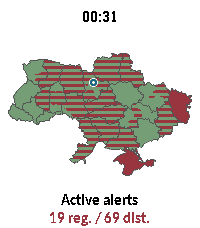
DailyUkraine Alerts brings real-time air raid alert monitoring and situational awareness directly to your Pebble smartwatch. Featuring an interactive vector map of Ukraine, the app tracks sirens across all regions and districts with live updates every 15 seconds. Key Features: 🗺️ On-Device Vector Map: Renders full vector boundaries for all regions and districts with instant color-coded status. 📍 "My Safety" & GPS Pin: Uses your phone's location to place a marker on the map and prioritizes alert status for your immediate area. ⏱️ Active Sirens & Durations: Browse a dedicated list of currently alarmed regions with elapsed time counters (minutes, hours, days). 🔍 Smooth Navigation & Zoom: Zoom in (1.0x to 4.0x) to inspect specific raions or tap any region for instant details. Full touchscreen drag & tap support on compatible hardware (emery, gabbro). 🌐 Multilingual & Cyrillic Support: Bundles clean Cyrillic typography (Carlito font) and in-app language switching (Ukrainian, English, etc.). 🔄 Resilient Data: Automatically polls every 15 seconds with built-in API failover to ensure dependable uptime. Controls: UP / DOWN: Zoom in & out (1.0x – 4.0x) SELECT: Open Active Alerts & Safety menu BACK: Clear selection / Reset view / Exit Touch / Tap: Drag to pan across the map, tap to inspect any oblast or district Privacy & Data: Geolocation is only used to compute your relative position within Ukraine and is never stored or transmitted externally. Data sources: vadimklimenko.com & ubilling.net.ua.
 17
17PENTA
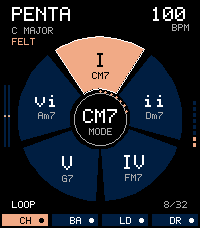
Tools & UtilitiesPENTA turns Pebble Time 2 into a small musical instrument. Touch a pad, slide into the next, and tilt your wrist to shape the sound. Record a chord progression, put a bass line beneath it, add a melody, and finish with a beat. The watch makes the sound through its own speaker, and your little composition stays on your wrist. (Small beta, stuff can go unexpectedly, things can go boom, though probably not. For any questions, suggestions, complaints, stories of forgotten lands and faraway shores - feel free to mail me). Here is the whole story, from your first note to your first four-part loop. THE FIRST NOTE Open PENTA and touch any of the five outer pads. Slide to another pad to change what you play. Move your finger toward or away from the center for expression within a pad. Tap the center to move between Chord, Bass, Lead and Drum. The CH, BA, LD and DR tabs along the bottom select those parts directly. You can also choose a part through Settings, then Sound, then Role. The screen reads one touch at a time. A single pad can play a whole chord, and latch and the looper let several notes sound together. THE FOUR PARTS Chord gives each pad a place in the harmony. In C major, clockwise from the top, the pads are I, ii, IV, V and vi. With the default seventh voicings, those become Cmaj7, Dm7, Fmaj7, G7 and Am7. Shared notes are kept where possible when you change chords, helping a progression move smoothly. Bass follows the harmonic roots. Record it beneath a chord progression or play a bass line by itself. Lead offers five notes that follow the current chord. A playing chord loop can guide the melody while you improvise. For a pentatonic layout instead, open Settings, then Harmony, then Lead Map. Drum gives you kick, snare, hat, tom and clave. All five percussion sounds are synthesized on the watch. THE BUTTONS The touch surface plays the pads. The physical buttons handle the supporting jobs. Tap the middle button to open Settings. Hold it for about two-thirds of a second to arm or finish recording. The same hold works from a settings menu and returns you to the playing screen. By default, Up toggles latch and Down starts or stops the loop. Latch keeps a played note or chord sounding after you lift your finger. You can also toggle latch by holding the center of the wheel for just over half a second, then releasing it. A quick center tap changes part instead. Make Up and Down your own through Settings, then Buttons. Each can be assigned to Off, Play/Stop, Latch, Volume Up, Volume Down, Next Role, Previous Role, Center Wrist, Motion On/Off, Metronome or Stop All. Neither button selects a pad or plays a note. Inside settings, Up and Down move between rows. Tap middle to open a row or edit its value. While editing, Up increases and Down decreases; tap middle again to confirm. Back returns, keeping the current value. On the playing screen, press Back while sounding or armed to stop everything. Press Back when idle to exit. A long Back press is handled by the watch operating system. THE HARMONY Open Settings, then Harmony, to choose your key, scale, chord style and register. PENTA offers all 12 keys and four scales: Major, Natural Minor, Dorian and Mixolydian. Chord styles are Triad, Seventh, Ninth, Sus2, Sus4 and Sixth. Ninth voicings use four notes and omit the fifth. For a moving pattern within a chord, turn on the arpeggiator. Choose Up, Down, Pendulum or Random order, with an eighth-note or sixteenth-note rate. Harmony also contains the lead mapping and latch settings. THE SIX SOUNDS Choose a melodic part, then open Settings, Sound and Preset. Each melodic part remembers its own choice. Felt is rounded and softly decaying. Glass is clearer, with a fading bell-like partial. Velvet is gently detuned, with a slower attack and release. Reed has a firmer, sustained pulse-and-triangle character. Pluck has a quick transient and short decay. Pulse is a compact, sustained electronic tone. Drum uses the Compact Kit. Sound also contains the selected part's level, overall volume, tone, resonance and effects. A new preset applies to new note attacks; notes already sounding finish with their original sound. Eight voices are shared between the four parts. A six-voice option is also available in Sound. With dense layers, a new note may replace an older voice. THE SPACE BETWEEN THE NOTES Reverb adds a short, damped room around the sound. Echo adds a short repeating delay. Space combines the original ambience and echo character. Set their base amounts under Settings, then Sound. To make effects respond to you, open Settings, then Motion. X tilt, Y tilt, movement energy and touch radius each offer the same choices: Off, Tone, Bend, Vibrato, Resonance, Space, Tremolo, Volume, Reverb and Echo. Open a source, select its destination, then set Amount between -100 and +100. A negative amount reverses the direction, and zero removes that source's contribution. These routes shape the shared sound, including a playing loop. A fresh installation starts with X tilt controlling Tone and Y tilt controlling Bend. Try changing X to Reverb with Amount 45 and Y to Echo with Amount 35. Play a chord, move gently, and listen to the space change. Swap the axes, choose something else, or turn either route off. The assignment is yours. For a comfortable neutral position, hold your wrist still for a moment and select Center Wrist in Motion. PENTA measures tilt relative to that position using the accelerometer. Motion can be disabled. Flick gestures can be Off, Strum, Accent or Shaker, with three sensitivity levels. THE FIRST LOOP Begin with Chord. Open Settings, then Looper, and choose Tempo and Length. Try 100 BPM and two bars for your first pass. Return to the pads and hold the middle button to arm recording. The first pad you touch starts the clock. Play a short progression. Recording continues around the loop until you hold middle again to finish. Now switch to Bass. While the loop plays, hold middle to overdub, add your line, then hold middle to finish. Repeat with Lead and Drum. Down, with its default assignment, stops or restarts playback. The looper has four parts and lengths of 1, 2 or 4 bars. Tempo runs from 40 to 200 BPM. Add swing or a metronome, and mute individual parts in Looper to hear different combinations. Clear Part clears the selected part after confirmation. Recording stores musical events on a sixteenth-note grid, including how long notes are held. Each part has one event per grid slot; a new event in an occupied slot replaces the old one. Wrist motion stays live and is not recorded as automation. Recording captures your pad performance, not microphone audio. KEEPING AN IDEA Open Settings, then System, then Save Session to store the current settings and pattern. Saving this way stops playback. Idle changes also save automatically, and normal exit saves. The next launch restores the session silently, ready for you to press Play. PENTA keeps one session. There is no song library, audio export or undo history. Recording over a part or clearing it changes that session, so finish and save an idea before moving on. INK, PAPER AND A LITTLE HELP Choose the dark Ink theme or light Paper theme through Settings, System and Theme. Settings also includes an on-watch Help section. Audio timing information is available through System, then Diagnostics. If you cannot hear anything, check the watch's system volume and Quiet Time, then PENTA's volume and part level. A notification or another app can interrupt the speaker; return to PENTA and start playing again. Back stops everything when you need a clean start. If sound breaks up, try a lower volume and note the preset and whether a loop was playing. WHAT YOU NEED PENTA v0.2 is made for Pebble Time 2, using its touch surface and built-in speaker. This release does not support other Pebble models. It needs no account, companion app, internet connection or subscription to play. IN THIS RELEASE v0.2 brings touch-only pad performance, configurable supporting buttons, the same destination choices for both tilt axes, and independent Reverb and Echo routing. Chord changes now retain their full voicing, and more efficient drawing keeps audio refills responsive during rapid playing.
 16
16Bloop
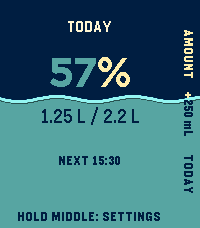
Health & FitnessBloop turns Pebble Time 2 and Pebble Round 2 into calm, glanceable water trackers. Middle logs your usual drink; Top opens Add Water for a custom amount. Every new drink can be undone immediately, and Today offers a guarded delete-last action. Rhythm shows when you drank and your longest gap. This Week compares each day with the target that actually applied. To get to Settings: hold Middle on Home, or press Bottom to Today, Bottom to Rhythm, then Middle. The watch edits Goal, Drink, Gap, and Adaptive mode. Open Bloop's gear in the Pebble phone app for snooze, quiet hours, profile, activity, weather, and location options. On either touch watch, swipe up for the Bottom action, swipe down for Top, or tap a visible action. Every flow also works through the physical Top, Middle, and Bottom buttons. Adaptive mode is optional and starts off. Keep a custom ordinary-day target or choose a 2.2 L or 3.0 L starting reference. Bloop can learn an activity reference from completed Pebble Health days and add a modest heat adjustment. The phone makes at most one normal weather attempt per day when Bloop connects; there is no polling loop. Automatic coordinates are rounded to a coarse grid before Open-Meteo use, while manual coordinates stay exact. The watch runtime is native C with bounded history and one UI timer. Activity and heat change only the target, never reminder frequency. Automatic increases are limited to 30% and the target to 5 L. This is an ordinary-use estimate, not medical advice. This is a beta of a small project, things can go wrong, or, just not be as good as you want them to be. Feel free to write me about any problem, or any idea.
 36
36Voice Relay
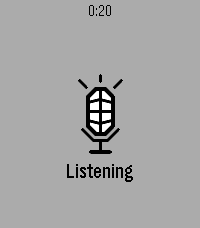
RemotesLaunch Voice Relay and it starts listening straight away. Press Select when you've finished speaking, and what you said is sent to an HTTP endpoint you choose — your own server, your own model, your own key. The reply comes back as text on the watch. Setup Open the app's settings in the Pebble phone app and fill in two fields: the endpoint URL, and any headers you need (one per line, Name: value — an API key goes here). A Test button posts the word "test" so you can confirm the endpoint works before speaking to it. The contract Voice Relay posts {"text": "what you said"} and expects {"response": "what to show"} back. Anything that speaks JSON will do — a language model, a webhook, a note-taking service, a home automation script. On the watch Select speaks again. Up and Down scroll a long reply. Back exits. Errors are shown in plain words, not codes — a failed request tells you the status and whatever the server said about it. You need your own endpoint. There is no built-in service and no account to create; nothing is sent anywhere except the address you enter. Speech recognition uses the same phone-based dictation as the rest of the watch, so a phone connection is required.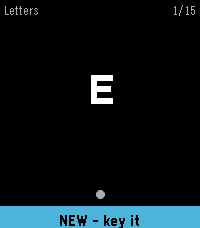 12
12Learn Morse
Tools & UtilitiesLearn to send Morse code on your wrist. Learn Morse shows you a character and you key it back. A short press of the DOWN button is a dot and a hold is a dash; on Pebble Time 2 you can key on the screen instead. The symbol you are sending is drawn as it grows, so a dot visibly becomes a dash and the timing turns into something you feel rather than count. Spaced repetition decides what you practise. A letter you miss comes back a few cards later, and a letter you know stretches out to hours and then days. You start on the 26 letters, introduced easiest first, and go on to the digits, 67 short words, and 20 sentences and stock phrases. A new word only appears once you have started on the letters that spell it. Also included: the full code chart, per-deck progress, an input test that reports what your watch actually delivers, and adjustable dash threshold, letter gap, hints and vibration. Everything is kept on the watch and no phone is needed.
 31
31Wrist In Peace
GamesA city has fallen to the dead, and the whole thing lives on your watch. Wrist In Peace is an online-only survivor-vs-zombie survival horror MMORPG in the tradition of a long-running text game that kept players hooked for 2 decades. Play a survivor scavenging for weapons and eradicating the dead, or a zombie hunting the living. The people you fight, heal, and infect are real players on their own watches. Computer-controlled survivors and zombies fill out both sides with realistic movement, horde surges & sieges, so the streets are never empty. Every action costs action points, and you earn those by walking in the real world. Search buildings for gear, fight, unlock skills, and climb skill trees for both factions. Death is not the end here: survivors rise as zombies, zombies can be revived, and the siege never really stops. A key design tenet is readability and ease-of-use on the small watch screen. As such, we've offloaded several information screens to the app's settings page on the phone, to aid in extended planning & review on a larger screen. In the app's settings, there are tabs for Status, Maps, Settings, & Help. However, the game is fully playable without referencing the phone. Regarding data privacy - the game server only knows the tokenized / anonymized identity of your Pebble account (or watch if no account is found). Your raw step count never leaves the watch, but the game server can often infer your step count within 50-100 steps, for the purposes of granting action points. Your IP is handled by Cloudflare to route requests and block abuse, as with any other service routed through them. Everything else received by or stored on the server is game-state only, and you can initiate a complete account deletion from the app’s settings page whenever you like. Your data is never sold, and playing is always free. Join the fight, and if you die - wrist in peace!
 26
26Theremin
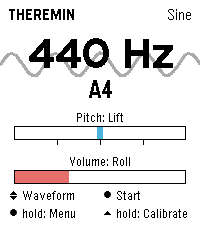
Tools & UtilitiesPlay a theremin on your wrist: raise your hand for pitch, twist it for volume. Theremin turns the Pebble Time 2 into an instrument you play without touching it. Just like the original, the position of your hand shapes the sound: raising and lowering your hand changes the pitch, twisting your wrist controls the volume. The tone is synthesized in real time and played through the watch's speaker. Features - Four waveforms: sine, triangle, square, sawtooth - Vibrato in three depths or driven by the tremble of your hand - Reverb in three room sizes - Up to four octaves of range, selectable lowest note - Snap to scales: chromatic, major, minor, pentatonic, or play continuously like a real theremin - Freely assignable control axes: lift, roll or compass, each invertible - Adjustable sensitivity, portamento and volume - Automatic calibration on launch: hold the watch still for a second and you're set - Live readout of frequency and note name, with the animated waveform in the background - Noise gate switches the speaker off during silence - Every setting available on the watch or conveniently in the Pebble phone app - Seven languages (EN, DE, FR, ES, IT, PT, NL) Controls - SELECT: sound on or off - UP and DOWN: waveform - Long SELECT: settings - Long UP: recalibrate the neutral position Tip: Keep the watch still for a moment when the app starts; that pose becomes the middle of the pitch range. Tilted towards you is loud, tilted away silent. Pebble Time 2 only (needs the speaker). Compass mode is experimental. Vibe coded from start to store. That is the only reason it exists alongside a full time job. The app is free and has no ads. If you enjoy it, a coffee is much appreciated: https://buymeacoffee.com/SIDEffects
 44
44Home Assistant on your Wrist
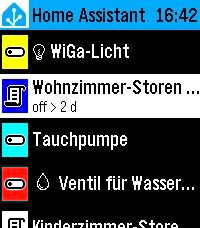
Tools & UtilitiesEasy access to your Home Assistant instance This is a fork of "Home Assistant WS" but enhanced with many new features: - Easy Favorites Pinning - Edit the favorites directly on the smart phone - Favorites Colors - Assign colors to your favorites for easier handling - Security - The Home Assistant Token is only stored on the watch (not sent to the remote configuration page for security hardening) - Backup and Restore - Settings import/export for easy backup and restore - UI enhancements
 5
5BORK
GamesBORK! BORK! BORK! (BORKs when a button is pressed. Also BORKs when opened via quick launch for faster BORKing! Bork sound from https://pixabay.com/sound-effects/nature-dog-bark-effect-382711/)
 19
19Bibble
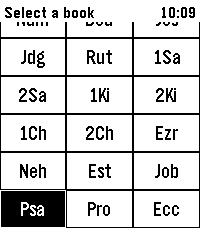
DailyA Bible app for Pebble with modern features Hold Select to dictate a Book, Chapter, or Verse, e.g. "Psalms 23". Or dictate a word or phrase, e.g. "God so loved the world" to jump to John 3:16
 7
7Space Salvage
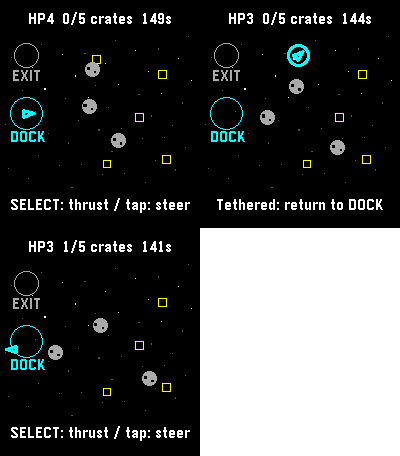
GamesFive crates. One battered tug. Bring the cargo home, then reach the exit before the clock or your hull runs out. Steer through drifting rocks, catch crates with your tether, and return them to the dock. Tap a destination or use the buttons to steer and thrust. A run has a 150-second limit. Save and exit to continue later. For Pebble Time 2 and Round 2. Touch requires firmware 4.33.2 or later; buttons remain available. By Luke Steuber.