 8
8Rosetta
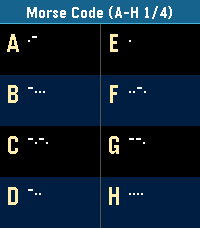
Tools & UtilitiesPocket Rosetta: The Wrist Decryptor for Pebble Turn your Pebble into the ultimate field manual for cryptographers, geocachers, escape-room addicts, and vintage sci-fi fans. Pocket Rosetta puts over 20 essential scripts, historic alphabets, and substitution ciphers directly on your e-paper display—no internet connection required. Whether you're tapping out an SOS, decoding ancient stone tablets, or cracking an encrypted transmission mid-run, cycle through complete reference tables and quick translation lookups with just the side buttons. Classic Signals & Radio: Morse Code, NATO Phonetic Alphabet, Flag Semaphore, Naval Flags Historic Scripts & Glyphs: Egyptian Hieroglyphs (Names & Glyphs), Cuneiform, Elder Runes (Names & Letters) Alphabets & Transliterations: Greek (Names, Letters, Written), Cyrillic/Azbuka (Names, Letters, Written) Ciphers & Cryptography: ROT13 / Caesar Shift, Atbash, Baconian Cipher, Polybius / Tap Code, Pigpen Cipher, A1Z26 Numeric Binary, Tactile & Geek Culture: 5-Bit Binary, Braille, and Alienese (Futurama) Fast, battery-friendly, and lightweight. Keep centuries of secret communication strapped right to your wrist.
 12
12Minesweeper Hex
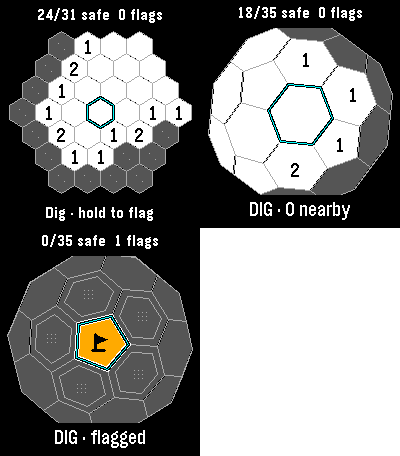
GamesClassic, Infinite and 3D minesweeper in one watch app. Each mode keeps its own board. Every launch offers a mode choice, then resumes that board where you left off. Classic has 37 cells and six mines: reveal all 31 safe cells to win. Hexsweeper 3D wraps 42 cells around a sphere, including twelve pentagons. Rotate it and uncover all 35 safe cells. Infinite lets you pan across a continuing hex field and build your safe-cell count, with no final board. Numbers count neighboring mines. Flag suspected mines, then select an open clue to chord when the neighboring flag count matches. Incorrect flags can lose the game. Your first dig and its neighbors are safe. Amber tiles and black pennants distinguish flags. Tap to aim; Select digs and hold Select flags. Drag pans Infinite or rotates 3D. Every mode also works with buttons. Infinite retains 64 explored 8-by-8 chunks; it warns when history is full and preserves existing discoveries. No account or connection required. For Pebble Time 2 and Round 2. Touch requires firmware 4.33.2; button controls remain available. By Luke Steuber.
 10
10Micro Moria
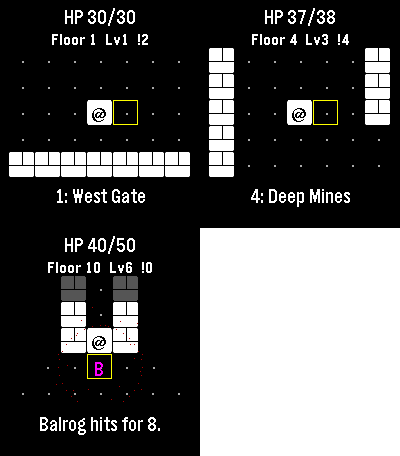
GamesI lost countless hours as a kid to a text Rogue derivative also themed after Moria, and I’m already zoned into playing it on the watch. Descend ten floors through Moria, collect treasure and equipment, and face the Balrog at the Bridge of Khazad-dum. Goblins pursue you, orc archers prepare ranged attacks, and cave trolls strike hard. Bump an enemy to fight. Play a few turns and come back later: the watch automatically saves your floor, position, enemies, health and gear. Gold and purchased equipment survive death or a return to camp. Spend gold between expeditions on blades, mail and lembas packs. Defeat the Balrog and take the final exit to unlock New Game+, up to five harder tiers. Up and Down turn; Select steps. Back opens healing, waiting and camp. Step onto stairs to choose whether to descend. Touch also moves you. No timer, account or connection required. For Pebble Time 2 and Round 2. Touch requires firmware 4.33.2; button controls remain available. By Luke Steuber.
 1
1Days Counter
Tools & UtilitiesCount the days since — or until — any event, right on your wrist. Full description: Days Since turns your watch into a simple, no-fuss day counter. Pick a name and a date for an event, and your watch shows "DAYS SINCE" (or "DAYS UNTIL," if the date's in the future) with a live count that updates automatically every day. Set up to 8 counters at once — track a work anniversary, a habit streak, a countdown to a trip, whatever matters to you — and cycle between them right on the watch with the Up and Down buttons. No phone required once it's set up. Features: Up to 8 independent counters Easy date picker in settings — no fiddly typing Counts up automatically, or down for future dates Cycle through counters with Up/Down Works fully offline, updates once a day
 14
14Rozkład jazdy pociągów Polish Trains
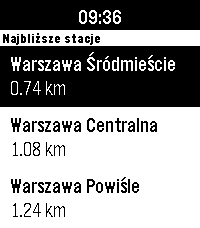
DailyNever miss your train again! The app shows the closest stations and departures with delays, platform and track numbers. It primarily uses the custom backend in `rozklad_backend/` directory, which serves the data from the official [PKP PLK PDP API](https://pdp-api.plk-sa.pl/swagger/index.html), and falls back to the unofficial [API Bilkom](https://kalkulatorkolejowy.pl/bilkom) when the custom backend is unreachable or does not know a station. The app bases on [PebbleRail](https://github.com/jccit/pebblerail). If you find any bugs or have any ideas for improvements, please open an issue on GitHub with the appropriate label. Pull requests are also very welcome 😉 Tags: PKP, SKM, WKD, Polish, Poland, train, timetable
 21
21FastForge
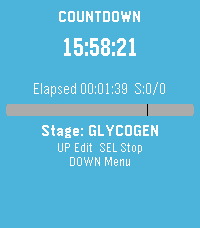
Health & FitnessTrack intermittent fasting from your wrist. Start and monitor fasts with a clear timer, use quick presets for common schedules, and review history and streak-friendly stats when you need context. Adjust settings to match how you fast, and export a backup when you want your data elsewhere. Built for Pebble so glances stay fast and the phone stays in your pocket.
 3
3Abakusapp
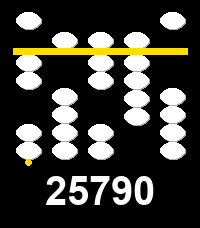
Tools & UtilitiesAbakusapp is a hands-on soroban (Japanese abacus) number-entry toy for Pebble's touch-capable watches (Pebble Time 2, Pebble Round 2). Five vertical stacks let you dial in any 5-digit number: swipe a bead towards the separator bar to activate it -- and everything between it and the bar -- or swipe away to deactivate; tap for a quick +/-1. A long horizontal swipe clears everything. Works with buttons too, on every Pebble: Select picks a stack, Up/Down adjusts it, long-press Select clears. The current number is always echoed as plain digits below the stacks. Stone/background/separator colors are configurable from the phone's Settings screen. This is an experimental first project built specifically to learn Pebble's new touch/gesture API. It's done with the skill (see https://repebble.com/blog/spring-2026-pebble-app-contest) using Claude.
 2.7K
2.7KSleep as Android
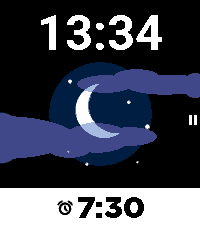
Health & FitnessSleep as Android Alarm clock with sleep cycle tracker now fully integrated with Pebble. Comfortable wrist-tracking though Pebble's build-in accelerometer. Wakes you in optimal sleep phase with a silent vibe-alarm. Remote pausing, snoozing, dismiss. Battery optimized - weeks of battery life with 8h sleep daily.
 219
219Wristotle
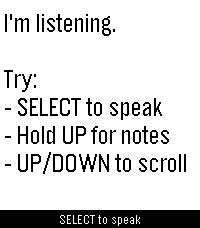
DailyWristotle turns your Pebble's dictation button into a voice command surface. Press the button, speak, and the Wristotle companion app on your Android phone handles it — calls, texts, reminders, alarms, music, notes, tasks, weather, sports, world clock, calculator, and an Ask-Agent path — then sends the answer back to your wrist. Replies arrive as chat bubbles, and lookup-style answers render as full-screen cards: a colored band shows the action and an icon shows the subject, so you can read the result at a glance. Highlights - Voice commands straight from the dictation button — no extra hardware - Full-screen reply cards for sports, weather, and meetings - Browse your notes and tasks right on the watch - Set and view alarms on the watch (phone / watch / both) - Optional spoken replies on supported watches (Pebble Time 2) - Configurable buttons — bind SELECT and long-press Up/Down to Dictation, Menu, Notes, or Tasks - Optional colour theme and chat bubbles Requires the free Wristotle companion app on your Android phone (works with microPebble or Core Devices). Everything runs on-device by default — no account, no tracking. AGPLv3. Companion app + setup guide: https://wristotle.codeberg.page/ Needs a Pebble with a mic (basalt, chalk, diorite, emery, flint, gabbro — not aplite).
 4
4DownTime: Voice Crosswords
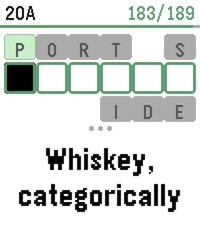
GamesDownTime is an offline collection of 200 new crossword puzzles (9,000+ clues), supporting dictation for speech-to-text, or bespoke on-watch typing. It uses a custom crossword engine which displays one clue at a time to maximize legibility, and a tuned voice interpreter to increase dictation accuracy. Includes two crossword sizes: Mini (7x7) Regular (15x15) And two difficulties: Peaceful Challenging For maximum accuracy, it's recommended to use the Cloud provider for Pebble speech recognition (available in the Pebble app settings). However, we also support spelling out individual letters via voice dictation, which is easier for local models to parse. Or, use the on-screen swiping to type text! Special thanks to Nicole Feng (nzfeng on Github) for providing the "MsFit Crossword Dataset"!
 17
17Still Alive
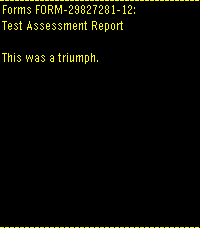
GamesPortal end credits song 'Still Alive' Runs entirely on device, a little over 700 kilobytes Credits run after song due to screen size. I was too lazy to try to fit the ASCII art onto the screen as well. "Still Alive" and all Portal characters, music, and content are the property of Valve Corporation. Most of the data came from this repo: https://github.com/errorer/Portal_StillAlive_Python
 7
7MARC Tracker
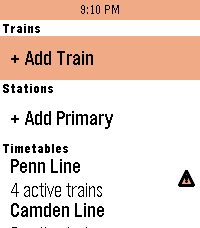
Tools & Utilities"Oh hi MARC!" MARC Tracker is a real-time MARC (Maryland Area Rail Commuter) and VRE (Virginia Railway Express) train status app, allowing you to follow trains on all 5 DMV-area regional passenger railroad lines at the touch of a button. Features: - See upcoming stops, arrival times, and estimated delays for all trains. - View current service alerts for MARC trains (VRE service alerts not currently supported) - Favorite up to 4 trains and 2 stations for quick glances, or scroll through the timetables to view every active, scheduled, completed, and canceled train today. - Works with Pebble Time 2, Pebble Round 2, Pebble 2 Duo, Pebble 2, Pebble Time Round, Pebble Time, and Pebble Time Steel. Originally inspired by the MARC Map app for iOS by Quinn Patwardhan and Pebble apps for many other regional rail services. Uses Maryland Department of Transportation (MDOT) and Virginia Railway Express (VRE) data but is not in any way affiliated with or endorsed by MDOT, MARC, or VRE.
 0
0SleepMode
Tools & UtilitiesSleepMode Screen is black with only the time displayed. Buttons for up, down and select don't work so you don't press them by accident while sleeping. Pressing on the back button for 2 seconds stops the app. (Standard Pebble behavior) Alarm clock works. With vibrations and/or sound (if applicable) (except when Quiet Time is on) Made for and tested on Pebble Time 2
 12
12Cardia
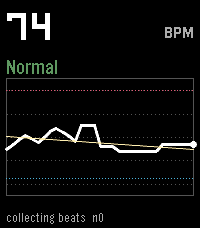
Health & FitnessA PebbleOS watchapp that watches your heart rate more closely than the system does by default and flags three things: sustained high rate, sustained low rate, and irregularly-irregular rhythm (the pattern linked to atrial fibrillation).
 2
2xDrip CGM
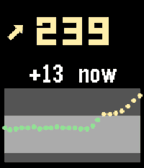
DailyA Pebble quick-launch app that shows your xDrip+ CGM data — number, trend, delta and a 2-hour graph. It is not a watchface, so you can run any watchface and still get a glucose glance on demand. Uses the local XDrip web service to enable - xDrip+ → Settings → Inter-app settings → enable xDrip Web Service.