 5
5FuelWatch
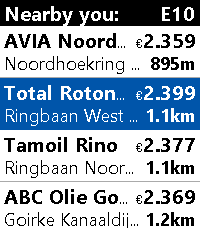
DailyA Pebble nearby fuel station finder for Europe with price check, which kindly and gratefully uses the ANWB© fuel prices api. Watch compatibilty: Basalt, Diorite, Emery and Flint. Features: ⛽ Main screen gets a list of fuel stations with their prices, to a distance up to 3 km aroiund you ⛽ Fuel type can be set in phone setting (E10, Super, Diesel and LPG) ⛽ List setting in phone to cap at 10, 20 or 30 stations. ⛽ On select you get the Details screen with full Address, chosen fuel type Price and Distance ⛽ Select again and a simple map view is shown to give you a rough sense of direction (use actual address for actual navigation). Top is always north ⛽ Map / Detail screen supports advancing to next/previous stations with buttons (or touch on Emery) ⛽ Fully touch compatibel on Emery I have a Time 2, but none of the others. So Basalt, Diorite and Flint were built on the emulator which doesn't support my map (works fine on my Time 2 hardware but also not on Emery emulator). So I'd be delighted if someone could send a screenshot of an actual map view on actual Basalt/Diorite/Flint hardware. Contact me on Fedi: https://social.vivaldi.net/@moaske or via the store link below with your screenshots (do so too when you find the easter-egg in the app). Coverage / credits: Fuel station data by the dutch ANWB (copyright owned by ANWB). Should provide data in and of the following countries (so most of EU): NL, BE, LU, DE, FR, ES, PT, IT, CH, DK, NO, SE, FI, GB, TR, UA, RU. Location by your phone 😏. Map tiles by Open Street Maps. Built on CloudPebble with Claude. Like the app? Give it heart! ❤️ And do check out my other stuff here:
 118
118CityBuddy
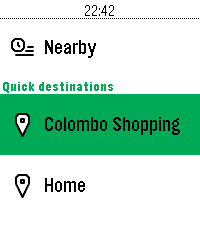
DailyPlan your public transit routes directly from your Pebble with CityBuddy. Quickly choose a destination, select a route, and check detailed stop information, all powered by the Transit API. Whether you're commuting to work or exploring a new city, CityBuddy is your wrist-based transit guide. Features: - Choose destinations from quick access options or by voice/typing. - Get route details and stop information. - Get the times for nearby transit. - Powered by real-time data from Transit. Public transit icons Copyright Jay Michalska <[email protected]> (CC BY-SA 4.0)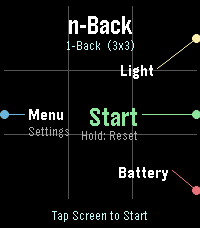 12
12nBack
GamesnBack - Advanced Working Memory Training for Pebble Time 2 (Emery) Elevate your cognitive performance with nBack, a scientifically grounded working memory training application crafted exclusively for the Pebble Time 2 (Emery Platform). Rooted in cognitive neuroscience standards, nBack challenges your brain to retain and update dynamic sequences of information in real time, expanding your active working memory capacity and attentional control. KEY FEATURES: - Multi-Modal Stimuli: Train across multiple modalities simultaneously, including Spatial Position (3x3 grid), Color palette, 10 Geometric Shapes, Numbers (1-9), Phonetic Letters, Haptic Vibration patterns, and Audio Morse tones. - Adaptive Auto-Leveling: Automatically scales difficulty from 1-Back up to 7-Back based on your real-time performance thresholds. - Full Emery Hardware Utilization: Optimized for the 200x228 64-color Sharp MIP display, capacitive touchscreen, 4 physical buttons, and built-in raw tone generator. - Flexible Input: Respond using tactile physical buttons or intuitive touchscreen taps. - Customizable Protocols: Fine-tune exposure times, pause intervals, stimulus combinations, and performance thresholds. TRAINING STATISTICS & SETTINGS (BETA): Access the companion Settings page directly from your Pebble mobile app to inspect your cognitive progression: - Peak n-Back level, average accuracy rate, and total completed sessions. - Sandboxed local storage powered by your phone browser's Origin Private File System (OPFS). - Complete control over session logging via the in-app 'sync Data' preference toggle. Challenge your mind, track your neuroplastic progress, and master working memory on your wrist.
 83
83QuickRemind
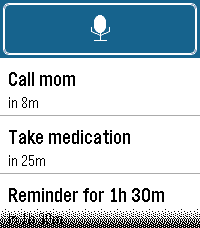
Tools & UtilitiesQuickRemind — voice-first reminders for your Pebble. Just raise your wrist and speak: "remind in 20 minutes to call mom" or "remind me at 3 pm to leave" and QuickRemind sets a reminder that alerts you until you dismiss it. FEATURES • Voice dictation — say the time and what to remember, no typing • English & Turkish — pick your language in settings (set your phone's dictation language to match) • Relative delays — "5 minutes", "1 hour 30 minutes", "2 hours to leave" • Exact clock times — "at 3 pm", "at 5:30 pm", "at 17:45" (12- or 24-hour) • Audible alarm — alerts you with sound and/or vibration until dismissed, even if the app is closed • Alert patterns — pick from 10 built-in styles, including vibration rhythms (Pulse, Nudge Nudge, Jackhammer, Gentle) and real tunes played through the Pebble Time 2 speaker (Reveille, Mario, Ode to Joy, Twinkle Twinkle, Für Elise) with rich polyphonic harmony • Alert mode — choose Vibration only, Sound only, or Sound & vibration • Quick launch — assign QuickRemind to a watchface quick-launch button and it jumps straight into voice dictation, so a reminder is just a button-press and a sentence away (optional, off by default) • Timeline pins — optionally add each reminder to your Pebble timeline as a pin with its own reminder notification (optional, off by default) • Up to 8 reminders, sorted soonest-first • Adjustable notification strength (Low / Medium / High) for buzz and volume • Configurable trigger phrases from the phone settings CONTROLS • Touchscreen on Pebble Time 2 — tap the mic to add, tap a reminder to delete • Button navigation on all other Pebbles — Up/Down to move, Select to open, Select to delete, Back to cancel Sound requires the built-in speaker on Pebble Time 2; every other model alerts with vibration. Works on Pebble Time 2, Time, Time Steel, Time Round, and Pebble 2 — any Pebble with a microphone. Non-touch devices are fully supported via the physical buttons. Bugs & suggestions: [email protected]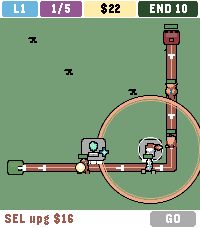 19
19Hourguard
GamesHOURGUARD is lane tower defence for Pebble Time 2. Creeps walk a unique path each level. Green IN. Red END with 10 HP. Ten leaks and the gate falls. 50 levels. 5 waves each. Wave 5 is a crowned boss — 25 different looks. Level 50 wave 5 is the titan. Odd levels are day. Even levels are night. Two pads on level 1. Six on level 50. Gold is tight: place the right type and upgrade, or later lanes will leak. Your two strongest towers ride to the next map. END heals each new level. CONTROLS - Up / Down cycle pads and GO - SEL empty pad pick a type, SEL again to place - SEL tower upgrade - Hold SEL sell half (build) or 2x (wave) - SEL GO in a wave zap $10 TYPES (all six on every map) - SHOOT $10 bolt - SLOW $14 freeze - FIRE $16 splash - BEAM $12 two in a row - NOVA $16 hits all in range - HEX $18 heavy hit plus slow
 33
33Punchy
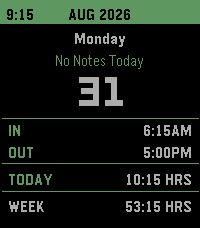
Tools & UtilitiesA versatile time card app to keep track of work hours and earnings more easily. -Track hours by punching in and out -Change data and hours at any time -Adjustable default punch times and automatic break deduction -Displays each days hours along with weekly total -Wage Dashboard to see the days, weeks, months, and years total earnings. -Adjustable tax deductions to see an estimate of your net pay -Ability to export the years data to google sheet (check Github for setup instructions) -Ability to import the data from google sheet -Automatic overtime adjustment -Adjustable colors -Voice dictation notes for each day This app was made primarily with Claude.
 2
2Telegram Voice
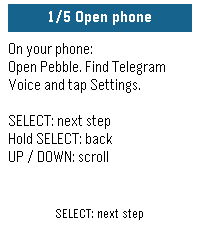
Tools & UtilitiesUse your Pebble watch to speak to your Telegram bot. Press SELECT, say what's on your mind, and read your bot's reply on your wrist. Connect your own compatible AI assistant or automation bot for quick questions, notes and requests without typing on your phone. MAKE IT ONE BUTTON Assign Telegram Voice to Hold SELECT in Pebble's Quick Launch settings. Hold the button from your watchface to open the app and start speaking. Press SELECT again for follow-up messages; UP and DOWN scroll the answer. SET UP WITH YOUR WATCH The watch walks you through numbered instructions while you complete setup on your phone. Each person configures their own watch bot token and destination bot. Try the offline demo before connecting anything. YOU WILL NEED A Pebble with a microphone, a connected phone with internet and working dictation, a dedicated Telegram watch bot, and a compatible destination bot. For private bot conversations, both bots must enable Bot-to-Bot Communication Mode, and the assistant must accept bot messages. Messages are delivered as text. Replies are checked while the app is open; the latest reply is saved on your phone. Very long replies are shortened. No voice playback. Your bot, your choice. No developer account or hosted bridge service is required. Independent community app; not affiliated with Telegram.
 19
19Floe
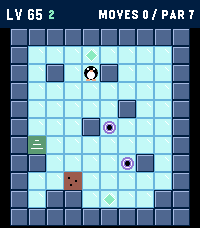
GamesFloe is an ice-slide puzzle campaign built for Pebble: one button press is one slide, and the little penguin glides until something stops him. Plan the whole route, collect the gems, and reach the stairs in as few slides as you can. 1000 LEVELS the first ten chapters each teach a trick: - Gems that gate the exit - Gravel that stops you mid-slide - Thin ice that collapses behind you - Keys and colored doors - Force arrows that bend your slide - Warp portals - Switches and toggle walls - Patrolling critters that follow the beat of your moves - A gauntlet that mixes everything EARN YOUR GEMS - every level has a par (the proven optimal solution). Match it for 3 gems, 100 points per gem. WATCH-NATIVE CONTROLS: - UP / DOWN slide up and down - SELECT and BACK slide left and right - Flip them from the menu to match how you wear your watch (HAND: LEFT / RIGHT) - Hold SELECT to pause (undo, retry, menu) - Hold UP/DOWN in level select to fast-scroll Levels 1 and 2 teach you everything you need. Good luck on level 1000.
 61
61Legend of Pebble
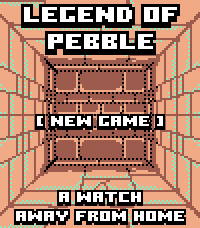
GamesLEGEND OF PEBBLE A first-person dungeon crawler RPG for your wrist. THE STORY You check the time. The watch flares. The world twists. You wake in a rift ruled by the Signal Keepers. Ten floors. Merchants. Bosses. Break the Signal. Get home. FEATURES • First-person exploration (Grimrock-style) • Stairs up/down — revisit merchants, beds, chests • Turn-based combat with enemy HP on screen • Signal Magic — Heal, Purge, Decode (SELECT cycles) • Weapons, armor, chest upgrades • Merchants — potions, gear, spells, carryable MAP/REST • Puzzles — keys, plates, blocks, teleporters, secrets, pits • Mid-boss The Keeper · final boss The Architect • Fair gold: first kill full, second 25%, then capped • Save/Continue · amber/teal pixel art (Time 2 + Round 2) CONTROLS UP: Forward / Attack DOWN: Turn left (hold: inventory) / Cast in combat SELECT: Turn right / Cycle spell·potion / Confirm BACK: Run (not vs Architect) HOLD SELECT: Minimap (UP = legend) TOUCH Top/Bottom/Left/Right: move · Center: menu Combat: tap DOWN icon to cycle; tap below to cast CREDITS Fork of Dungeon Escape by Brian Ouellette (GPL-3.0). https://apps.repebble.com/dungeon-escape_4d6fde68a2b047ef83381221 @brianenders.bsky.social · art lineage: Clint Bellanger Thank you Brian — this would not exist without your game.
 6
6Toggl Timer
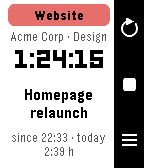
Tools & UtilitiesStart, stop and switch your Toggl Track timers from your wrist. Toggl Timer puts your Toggl Track time tracking on the Pebble. See the running entry with project, client, elapsed time and today's total, stop it with one press, or start the next one from your favourites, your recent entries or the project list. A timer stopped on the phone shows up on the watch within half a minute. Features • Status screen with project colour, description, running time and daily total • Favourite tiles: up to four entries you use every day, one tap to start • Recent entries and all projects, with the time booked today • Voice dictation of a new description, then pick the project (Pebble Time 2) • Touch: tap to open the picker, swipe left for the previous entry, swipe right to stop (Pebble Time 2) • Reminders: the watch wakes the app when a timer runs longer than you want or late in the evening, and optionally on weekday mornings when nothing is running • Optional rounding to 5, 15 or 30 minutes when stopping • Launcher glance with the running entry and its duration • Languages: English, German, French, Italian, Spanish (follows the watch) Buttons UP refresh · SELECT start/stop, hold to dictate · DOWN favourites or list Setup Open the settings in the Pebble app and paste your Toggl API token (found at the bottom of track.toggl.com/profile). Type "demo" as the token to try the app with sample data. Works with every Pebble; dictation and touch need the Pebble Time 2. Not affiliated with Toggl. Vibe coded from start to store. That is the only reason it exists alongside a full time job. The app is free and has no ads. If it makes your day a little easier, a coffee is much appreciated: https://buymeacoffee.com/SIDEffects
 40
40Petress
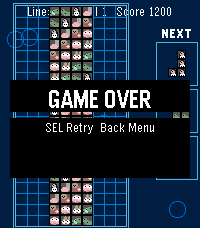
GamesPetress is a falling-blocks puzzle game for Pebble Time 2 (Emery). Seven adorable animal tiles (long dog, hamster, owl, worm, caterpillar, penguin, llama) drop as familiar shapes. Clear full rows to score, level up, and survive as gravity speeds up across **100 levels**.
 1
1RFD Hot Deals
NotificationsCanadian deals forum comes to your wrist! The Hot deals feed of Redflagdeals.com (No affiliation) vibe coded into a feed with comments intact you can check from your pebble watch. Built for the time 2 and very much a WIP still.
 2
2Speed Test Game
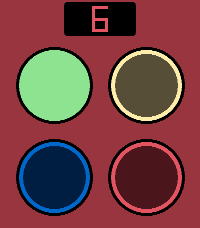
GamesA reaction speed game for Pebbles with touchsreen. Four different colored buttons that light up randomly. Tap the buttons in correct order, while the tempo gets faster and faster. Are you fast enough to beat the high score? Includes sound effects (off by default). Based on the classic Finnish game "Nopeustesti" from the 90's.
 83
83Quick Peek
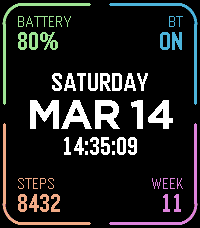
Tools & UtilitiesTake a quick look at useful info by adding Quick Peek to your quick launch. Many otherwise nice watchfaces don't show all the info you need throughout the day. Quick Peek solves this issue by displaying additional info, easily accessible when configured as a quick launch app. And auto exit handles returning to you watchface automatically (with ability to cancel auto exit). Lot's of configuration options to make it show what info you need. 7 complication slots, where you can choose what info to show + color. Ability to define a second page for even more info (navigate using up/down buttons or swipe on touchscreen). Available complications: * Date (with configurable format) * Day of week * Time (with or without seconds) * Battery percent * Bluetooth connection status * Step count * Week number * Heart rate * Distance * Calories * Active minutes * Sleep * Weather (icon + current temp) * Today's high and low temp * Tomorrow's weather (icon + high and low temp) * UV index * Sunrise * Sunset * Phone battery * Next alarm time (within 24h) * Second time zone (configurable city, which also acts as the label) * Agenda — today's appointments, from one or more calendar feeds on the phone. In the big center slot it takes the whole column and lists the day; anywhere else it shows only next appointment. * Webhook** (drawn as a button to tap on touchscreen) Configurable buttons, choose what action each of the up/middle/down buttons does, both normal press and long press. Available button actions: * Swith page * Disable auto-exit * Reset auto-exit * Webhooks** In addition to the physical buttons, flicking the watch resets auto-exit timer and tapping on touchscreen disables auto-exit. Additional configuration options: * Date format * Light mode, which puts the whole display on white and darkens the corner colors to suit * Temperature unit (Celsius or Fahrenheit) * Auto exit delay (when launched from quick launch) Webhooks: Define up 6 webhooks by specifying a URL that will we called when the webhook is triggered. You can point this to any publicly available URL or something on your local network, for example Home Assistant so that you can toggle lights on/off, open your carage door or whatever Home Assistant can automate. Ability to choose HTTP method (GET/POST/PUT), define a JSON payload, and a Bearer token for authentication.
 9
9Pocket Bowling
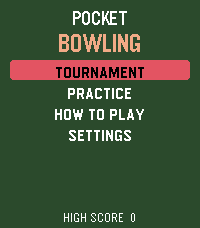
GamesPocket Bowling brings a complete ten-pin bowling experience to your wrist. Aim your shot, time the accuracy and power meters, and send the ball down the lane with realistic pin-to-pin action. Play a quick Practice game across five difficulty levels or enter a five-match Tournament against CPU opponents. Follow every frame with live score tables, including strikes, spares, bonuses, and running totals. Climb the tournament ranks and build your ball collection. Every tournament victory unlocks a new ball color. Can you defeat the final opponent to claim the prestigious Golden Ball? Features: • Complete ten-frame bowling scoring • Practice mode with five difficulty levels • Five-match Tournament mode • Live player and opponent scorecards • Random accuracy and power sweet spots • Gutter balls and interactive pin collisions • Unlockable and selectable ball colors • Win the tournament to claim the Golden Ball • Haptic feedback and built-in instructions • Support for every modern Pebble platform One complete Practice game is included free. Unlock the full game for $1.99 with a one-time KiezelPay purchase. No subscription is required. Gameplay works offline. An internet connection through your paired phone is only needed for purchasing, restoring, or periodically verifying the full-game license.