 342
342SkyMaster
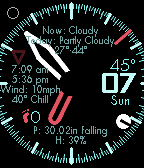
FacesPrepare for takeoff with SkyMaster A weather-centric analog GMT watchface with Pebble Health step count. Battery level indicator between the 12 and 2 position (ie 9min past the hour is 90%, 3min is 30%). GMT/24hr indicator (red triangle) which can be adjusted to any timezone in settings (time indicated on a 24 hour scale, not 12 hours). Current temp, day and date always on. Quick wrist shake to show second hand and full weather info. Another shake hides second hand and weather or will auto hide after 2 minutes. Weather info includes; -current conditions -daily forecast (temp range and conditions) -Sun rise and set times -Wind speed and chill -% humidity -Current air pressure + rise/fall/steady -Moon phase OPTIONS: -Light or dark color scheme -Vibe on BT disconnect NEW: GMT hand automatically adjust to local daylight savings time using the TimezoneDB.com API
 25
25Info Timer
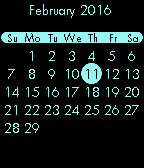
Tools & UtilitiesInfo Timer is a voice controlled countdown timer, chronograph with a tachymeter/telemeter and a calendar. Control the chronograph with the UP button. One click to start. One click to stop. Hold to reset. Press the DOWN button to start dictation. Say "five minute timer", "one hour timer" or "two hour, 37 minute, 52 second timer" to start a countdown timer. If you open Info Timer by using a Quick Launch and no other timers are running, you will go directly to the voice input. To leave the voice input, shake the watch. You can exit the app and your timer will still wake the app up just before the timer runs out and vibrates. Press SELECT to view a calendar. The current month and day are shown. Press UP or DOWN to go back or forward, month by month. Press SELECT or BACK to exit the calendar.
 24
24Zenith GMT
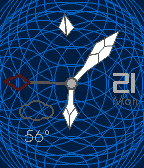
FacesAnalog watchface with a 24 hour hand, date and weather. A tap input (shaking the watch) will display a second hand for 2 minutes. Quick launch to Info Timer for a seamless, multi-functional experience.
 111
111Voice Watch
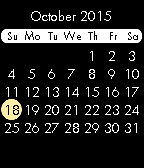
FacesAnalog watchface with; -Pebble Health step counter -voice control for a NEW countdown timer, chronograph, calendar and weather forecast. Tilt the watch toward your face until you see a microphone on the left side of the screen (~45 deg toward you). Hold for 2 seconds to enter the dictation UI. NEW Say an amount of seconds, minutes and hours and "timer" to set a countdown timer. For example "one hour, five minute, 30 second timer". Say "forecast" for the 4 day forecast, "calendar" for a calendar, "start", "stop", "reset" to control the chronograph or "steps" to send the previous days step count to the timeline (in case it did not automatically send after midnight). Drop your hand to your side to exit dictation UI, forecast or calendar. -Optional second indicator. Say "second" to enable/disable. -a 24 hour indicator (red circle) -moon phase in the upper left -current temp/weather conditions -day/date -battery percentage
 49
49ChronoTwist Axis
FacesChronoTwist Axis is a watchface with a gesture based chronograph, Pebble Health step counter and current weather condition/temperature. Instructions: To initialize the chronograph, hold the watch facing up (watchface flat relative to the ground) until the twist symbol appears. Twist the watch so that it is facing away from you (~90 degrees from where you started) until you feel a brief vibration. When you are ready to start the chronograph, twist the watch back to the starting position (facing up) until you feel another brief vibration. At this point the chronograph and tachymeter will appear. To stop the chronograph, repeat the previous steps and the time will turn red to indicate the chronograph is stopped. The chronograph can be restarted using the same actions. To reset the chronograph, hold the watch facing up until the twist symbol appears. Twist the watch so that it is facing away from you (~90 degrees from where you started) until you feel a brief vibration. Next twist the watch so that it is facing directly downward (~180 degrees from where you started) until you feel a brief vibration. Credits: merred's taller, loved the 90 degree text dividing the hour and minute.