Info Timer
Mike D
Watchapp
Description
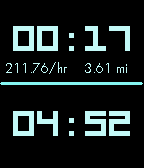
Info Timer is a voice controlled countdown timer, chronograph with a tachymeter/telemeter and a calendar.
Control the chronograph with the UP button. One click to start. One click to stop. Hold to reset.
Press the DOWN button to start dictation. Say "five minute timer", "one hour timer" or "two hour, 37 minute, 52 second timer" to start a countdown timer.
If you open Info Timer by using a Quick Launch and no other timers are running, you will go directly to the voice input. To leave the voice input, shake the watch. You can exit the app and your timer will still wake the app up just before the timer runs out and vibrates.
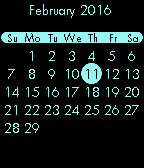
Press SELECT to view a calendar. The current month and day are shown. Press UP or DOWN to go back or forward, month by month. Press SELECT or BACK to exit the calendar.
- DeveloperMike D · Is this you? Claim your app ›
- CategoryTools & Utilities
- PlatformsTime/Time Steel, Time Round, Time 2 (scaled), Round 2 (scaled)
- Updated2016-02-12
- Version1.2