Voice Watch
Mike D
Watchface
Description
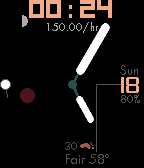
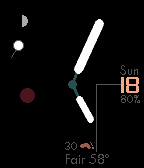
Analog watchface with;
-Pebble Health step counter
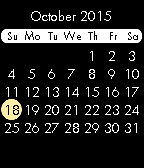
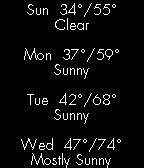
-voice control for a NEW countdown timer, chronograph, calendar and weather forecast. Tilt the watch toward your face until you see a microphone on the left side of the screen (~45 deg toward you). Hold for 2 seconds to enter the dictation UI. NEW Say an amount of seconds, minutes and hours and "timer" to set a countdown timer. For example "one hour, five minute, 30 second timer". Say "forecast" for the 4 day forecast, "calendar" for a calendar, "start", "stop", "reset"  to control the chronograph or "steps" to send the previous days step count to the timeline (in case it did not automatically send after midnight). Drop your hand to your side to exit dictation UI, forecast or calendar.
-Optional second indicator. Say "second" to enable/disable.
-a 24 hour indicator (red circle)
-moon phase in the upper left
-current temp/weather conditions
-day/date
-battery percentage
- DeveloperMike D · Is this you? Claim your app ›
- CategoryFaces
- PlatformsTime/Time Steel, Time Round, Time 2 (scaled), Round 2 (scaled)
- Updated2016-02-07
- Version2.0