 53
53Vibes
Tools & UtilitiesSimple app with a single window. Press up for a continuous vibration, press down for a pulsing vibration.
 53
53Trivia for Pebble
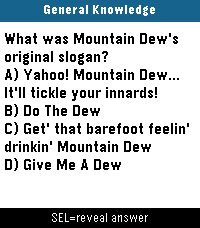
Games❓Pebble Trivia A trivia game for Pebble smartwatches. Questions pulled live from the Open Trivia Database - completely free, no account or API key needed. 🕹️How to Play 1. Pick a category When you open the app you get a category menu. Choose what you want to be quizzed on: 🌍 All Topics - random questions from everything 🧠 General - general knowledge 🗺️ Geography - countries, capitals, landmarks 📜 History - historical events and figures 🔬 Science - physics, chemistry, biology, and more 🎬 Entertainment - movies, TV, music, books 🏆 Sports - athletes, teams, records 🐾 Animals - wildlife and nature ✅ True / False - quick true-or-false questions ⭐ Easy (Kids) - family-friendly easy questions 2. Pick a difficulty After choosing a category, pick how hard you want it: 🎲 Any Difficulty - mix of everything 🟢 Easy - beginner friendly 🟡 Medium - a solid challenge 🔴 Hard - for trivia nerds only 3. Select your answer The question appears on screen with four shuffled answer choices (A, B, C, D) - or just True / False for that category. Use UP / DOWN to highlight an answer, then press SELECT to lock it in. The app automatically checks your answer — no self-reporting needed. On Pebble Time 2 and Pebble Round 2, you can also swipe up/down to move the highlight and tap to confirm. 4. See your result The screen immediately shows whether you were right or wrong: Correct - green flash, short buzz, score goes up Wrong - red flash, double buzz, correct answer highlighted in green The result auto-advances after 2 seconds. Press any button (or tap) to skip ahead. 🎮 Controls Category and difficulty menus: UP / DOWN - move the highlight SELECT - confirm selection Swipe up / down - move the highlight (Time 2 and Round 2 only) Tap - confirm selection (Time 2 and Round 2 only) Question screen: UP / DOWN - move the answer highlight SELECT - lock in your answer Swipe up / down - move the answer highlight (Time 2 and Round 2 only) Tap - lock in your answer (Time 2 and Round 2 only) BACK - return to the difficulty menu Features Live questions - fetched fresh from the internet every session, so you never run out Automatic scoring - the app checks your answer, no self-reporting Score display - shown in the label bar as Geography 5/8 x3 (correct/total + streak) Category colors - each category gets its own color on color-screen Pebbles Difficulty filter - fine-tune how hard the questions are per category True / False mode - a quick-fire category with simple yes-or-no questions Marquee scrolling - long answer choices scroll horizontally after a 1-second pause, then repeat Question auto-scroll - questions too long to fit scroll up automatically, pause, and repeat Touch support - swipe and tap to navigate on Pebble Time 2 and Pebble Round 2 Round screen support - layout is adjusted for round Pebble displays All platforms - runs on every Pebble ever made No account needed - completely free, no API key, no login
 53
53Muchos(Menu)
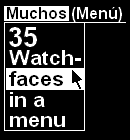
DailyEsta app maneja 35 relojes diferentes y sus opciones mediante un sistema de menú. (Sí, treinta y cinco). This app handles 35 different watch-faces and their options by means of a custom menu system. (Yes, thirty five). If you really like it, give a "heart" to this app and, when it gets "muchos" (plenty of) hearts, I will develop an English version of it.
 53
53Find My Gadgetbridge (Find My Phone)
Tools & UtilitiesPebble app to trigger Gadgetbridge's "Find My Phone" feature.
 53
53Minecraft Clock
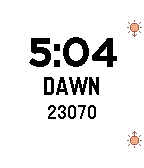
Tools & UtilitiesMinecraft Clock lets you track Minecraft in-game time whether it's nighttime. So, you will never lose the exact time while mining underground. To use this effectively, 1. Standing on the sea level (y coordinates should be 63) 2. There are 2 ways to start the timer - Press up button when the last pixel of the sun disappears - Press down button when the first pixel of the sun appears On the screen, you will see 1. Minecraft Time in hour:minute 2. Status (DUSK, DAYTIME, DAWN, NIGHTTIME) 3. Time in ticks (24000 ticks = 1 day) The clock updates every 5 seconds (100 ticks)
 53
53Pebble Fidget App
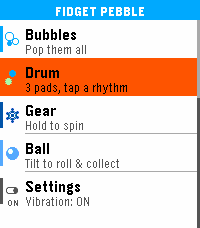
GamesFidget Pebble turns your wrist into a fidget toy — 7 satisfying minigames, all powered by haptic feedback. If you need to focus, decompress, or just keep your hands busy, it has you covered Pop It — Navigate a 5×5 bubble grid and pop them all. Tap to pop, hold to move back. Clears with a celebration animation. Pusher — Two cylinders take turns rising. Press the right button at the right moment to keep the rhythm going. Choose your vibe pattern with SELECT. Screw — Tighten and loosen a hex bolt with UP and DOWN. Feel the thread with every turn. SELECT snaps to the nearest end. Bubbles — Three screen zones, three buttons. Pop bubbles and watch your history fill up. Drum — Three pads, three distinct vibration patterns. Tap out your own rhythm. Gear — Two interlocked gears fill the screen. Hold UP or DOWN to spin them, release and feel the haptic pulse. SELECT cycles vibration intensity. Ball — Tilt your wrist to roll a ball around the screen. Collect targets laid out like dice faces — 1 dot, then 2, then 3, up to 6. Controls vary by minigame — all intuitive, no instructions needed. Settings — Toggle vibration on/off globally from the main menu. The setting persists across restarts. Supported Platforms: Emery
 53
53Dungeon Escape
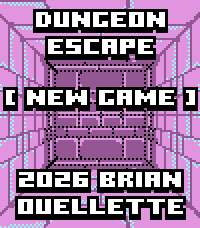
GamesDUNGEON ESCAPE A first-person dungeon crawler RPG built for your wrist. THE STORY You wake in a prison cell with no memory. Accused of a murder you didn't commit, your only choice is to escape. But the deeper you venture into the dungeons beneath, the more you realize this prison holds darker secrets... FEATURES First-person perspective dungeon exploration Turn-based combat with multiple enemies Equipment system - find weapons and armor to strengthen your character Puzzle elements - switches, keys, hidden passages Save/load system - your progress persists between sessions Custom pixel art in classic CGA color palette CONTROLS UP: Move forward DOWN: Open menu SELECT: Turn right / Confirm BACK: Turn left / Run from combat LONG HOLD BACK: Exit Game TOUCH CONTROLS Exploration: Top of screen: Move forward Bottom of Screen: Move Back Left of Screen: Turn Left Right of Screen: Turn Right Center of Screen: Open Menu Menu: Press icon to use item Touch left of screen to exit menu Dialog: Touch anywhere to progress Combat: Touch icon to fight, use potion, or run DEMO CONTENT This demo includes the first two levels of the game. Part 3 will conclude the game and will be in a later release. Please contact me with any bugs. Thank you! CREDITS Created by Brian Ouellette Find me on Bluesky: @brianenders.bsky.social Original Artwork and JavaScript Code: Clint Bellanger https://clintbellanger.net/
 52
52Daily WalkRun Fitness
DailyALL NEW The ultimate Running/Walking fitness timer and step counter that also works great as your daily watchface. Includes Time/Date/Stopwatch/Timer/Steps/Miles/Kilometers/Total steps/watch status (including charge %, Bluetooth, charging mode)/compass. version 4.0 allows setting MPH/KPH (doubletap down button, set MAXIMUM pace) and web access info and bug fixes - doubletap select button
 52
524-Across
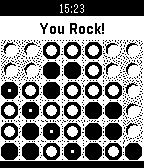
Games4-Across, the classic "Connect Four" style game, is now available on the Pebble Watch. The game is implemented as you against the computer on a 7x6 grid. The computer is no slouch. It knows every solution that you can play to win the game and will actively block your pursuits while also analyzing the board and taking the best position.
 52
52Magic Dict8-Ball
GamesShould you run for President? Should you have another drink? Is that person next to you really annoying or do they just look annoying? Stop answering life's hard questions and let the mystical powers of the Magic Dict8-Ball decide for you! Simply speak your question into your Pebble's mic and let the power of the Random Number Generator decide your fate... Features all 20 of the iconic responses for the original Magic 8-Ball. Think this app is ridiculous? You should check out my watch faces!
 52
52BusPath
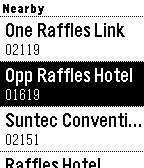
DailySingapore Pebble users! Get the very first Pebble app that provides realtime bus arrival predictions on your Pebble for bus stops around you! For both SBS & SMRT buses. v3.0: Entire overhaul. v2.2: PebbleTime support! Fixed NUS bus timing! v2.1: Added short pulse vibration on load of bus arrival timing. Credits: @Neo for suggestion. v2.0: Star/Bookmark your favourite bus stops now! Long press select a bus stop to add to bookmark.
 52
52Timeline WX
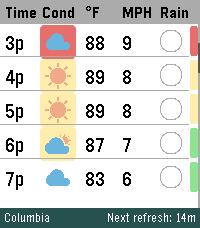
DailyYour next 48 hours, visualized. Built specifically to push the limits of the Pebble Time 2's high-resolution display. Whether you're coordinating a Scout campout, dialing in your morning commute, or tracking incoming storms, Timeline WX delivers precision meteorological data at a glance, with no squinting required. Instead of static daily summaries, smoothly scroll through a continuous 48-hour timeline. We have stripped away cluttered text and replaced it with clean, data-driven visual indicators so you can assess your environment instantly. THE ARCHITECTURE Instant Offline Resume: Your timeline is cached directly to the watch's flash memory. Launch the app and see your forecast instantly, even if your phone is disconnected. Auto-Pruning Timeline: The watch continuously syncs with the hardware clock to automatically hide past hours, ensuring your scroll always starts exactly at "Now." Ultra-Battery Optimized: Completely rewritten to run natively on the Pebble OS background clock, reducing battery drain by up to 98 percent. FREEDOM OF WEATHER DATA (NO API KEY REQUIRED) You are no longer locked into a single weather provider. Timeline WX now features an internal translation engine, allowing you to seamlessly swap between four world-class meteorological APIs directly from the settings menu. Choose the provider that works best for your specific geographic location: Open-Meteo is the default option. It is great for global use and requires no API key, though it relies on broader aggregated models. The National Weather Service (NWS) is highly accurate for US locations using regional grid data, but it is restricted to the US and lacks UV Index data. Yr.no / Met.no provides world-class precision MEPS modeling for European and Nordic locations, but also lacks UV Index data. OpenWeather OneCall 3.0 provides complete global data including the UV Index, but requires registering for a personal API key. (Note: If a selected provider does not support UV data, the UV safety bar will gracefully hide itself rather than displaying false information). SMART ENVIRONMENTAL WARNINGS Stop reading numbers and start seeing conditions. Timeline WX actively processes combinations of temperature, wind speed, UV, and humidity to color-code threats. Dynamic Hazard Badges: A colored badge sits directly behind the weather icon based on a custom algorithm. Yellow means uncomfortable (muggy, hot, or cold). Orange means a warning (high winds, severe UV, or approaching storms). Red means dangerous (extreme temperatures or severe weather). Temperature Alerts: Values turn Red when blistering hot (90F or higher) and Blue when freezing (32F and below). High Wind Warnings: Wind speeds turn Orange when gusts exceed 20 MPH, which is perfect for knowing when to tie down the tent fly. Midnight Dividers: High-contrast double lines and red timestamps explicitly mark when the forecast crosses into a new day. INTUITIVE RAIN AND UV TRACKING Rain Pie Charts: Ditch the confusing percentage text. Custom blue pie charts show you exactly how likely it is to rain, hour-by-hour. UV Safety Bar: A dynamic, color-coded safety bar runs down the right edge of the screen, letting you know exactly when you need sunscreen on a Green to Purple scale. CORE FEATURES AND CUSTOMIZATION On-Wrist Settings Menu: Long-press the Select button to toggle Dark Mode or swap units directly from your watch, and changes instantly sync back to your phone. Decoupled Measurements: Mix and match your preferred units. Supports Fahrenheit, Celsius, Kelvin, and Rankine for temperature, alongside MPH, KPH, m/s, and Knots for wind. Dark Mode: Invert the UI for a high-contrast, low-light optimized viewing experience. Live Telemetry Banner: The bottom banner dynamically displays live countdowns to the next refresh, active server connections, and current location. Precision Location: Choose between automatic Phone GPS or a manual Zip Code, with background refresh intervals adjustable from 15 minutes to 2 hours. SETUP INSTRUCTIONS Install the app, and you are immediately ready to go using Open-Meteo as the default provider! If you prefer to use OpenWeather, you will need to supply your own key to keep the app free. Sign up for a free account at OpenWeatherMap.org. Subscribe to the "One Call 3.0" API and generate a free API Key. Set your daily call limit to 1000 to ensure it remains completely free. Paste the key into the Timeline WX settings page, switch the provider dropdown to OpenWeather, and save. If you enjoy what I am making, don't forget to heart the app! If you want to support continued development, consider a donation at https://ko-fi.com/ericmccormick
 52
52Notes 365
DailyDisplays OneNote notebooks from Office365 or OneNote Online on Pebble. P.S. This app was NOT developed by Microsoft and is not affiliated with Microsoft. Office 365 is trademark and OneNote is registered trademark of Microsoft Corporation.
 52
52Hearts Matter
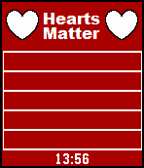
DailySuper simple watch app for pebble devs. Lets you track how many hearts your apps are getting. Tracks up to 5 apps. - Application name is whatever name you want to show on your pebble. - Application ID is the 24 digit alphanumeric which identifies your app on the dev-portal. When you select your app in the dev-portal it is in the web address. - Select button updates heart information - Oh, and it shows the time, because Pebble is a watch, right? Give it a heart if you like it...I'm watching:)
 52
52Better Dice
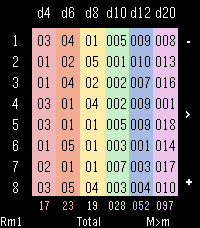
GamesThe better dice roller app for tabletop RPGs. I made this for myself after being frustrated with other dice apps during my weekly D&D game. No menus, just pick how many dice you want, roll everything at once, and add on formulas that do the math for you. Use top and bottom buttons to add or remove rows on the roll table, and press the middle button to roll everything. Supports a max of 8 dice per type per reroll to accomodate a regulation fireball. Long press the buttons to cycle between modes that affect the dice pool and results. Result Formulas Long press the middle button to cycle between formulas for the result row - Total, Highest, Lowest, Remove Highest, Remove Lowest. Reroll Modes Toggle Reroll modes via long press of the bottom button. This lets the app accommodate "Brutal" rolls and other similar logic. Rerolls are handled before everything else in the logic chain. Reroll Modes (shown in bottom left when active): Rm1: Reroll dice showing the minimum value once RmX: Reroll any dice showing the minimum value recursively until no min value dice are rolled RM1: Reroll dice showing the maximum value once RMX: Reroll any dice showing the maximum value recursively until no max value dice are rolled Replace Modes Toggle Replace modes via long press of the top button. This lets the app accommodate "Confidence and Desperation" rules found in some PbtA systems, and similar logic. Replacements are handled after all Rerolls are completed, but before the selected formula is calculated. Replace Modes (shown in bottom right when active): m>M: Replace Min value rolls with Max value M>m: Replace Max value rolls with Min value Quick Reset A quick press of the top button when only one row of dice is active will reset all formula, reroll, and replace modes to their default values, letting you "clear the table" and start fresh. Color Themes Exclusive to Time 2 - press down when all 8 rows are visible to cycle between color palettes. Future plans: Add shake/touch functionality. I don't personally like shake-to-roll because it can accidentally trigger and make you lose your last roll, but I'm experimenting with using a shake gesture to highlight any dice from your last roll that were affected by formulas, rerolls, etc. Other ideas for functionality are welcome and appreciated, I want this app to be the best it can be.