 69
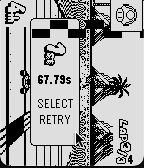
69Core Kart
Gamesan adaption of yoshi falls from the DS play as you would mario kart with a single sideways joycon
 69
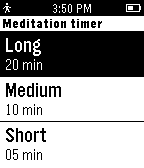
69MeditationTimer
Health & FitnessA simple meditation timer. Preparation time - relax and prepare mind for meditation Meditation time - focus mind in breathing or in the entire body Finalization time - slowly prepare mind to return to rotin Version 1.1 -------------------- - Turn the backlight on when event is finished; - New screen on end of meditation
 69
69Peter Guy Funny's
GamesWatch the big peter and his wife stewie on 64-color. with amazing resolution and amazing animations and design, this is the best way to watch the family guys. SEO: family guy video player videos seinfeld diddy balls 8k 4k uhd hdr colors buffering long loading times طرائف بيتر غريفن لساعة بيبل הבדיחות של פיטר גריפין לפבל — מהדורת ביג יאהו 😭
 68
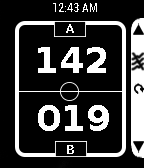
68ScoreKeeper
Tools & UtilitiesScoreKeeper is a simple app to keep track of scores of any two teams and any Game. Simple to use: Up Key - Increment the score of Team A by 1 Up Key (Long press)- Decrement the score of Team A by 1 Down Key - Increment the score of Team B by 1 Down Key (Long press)- Decrement the score of Team B by 1 Select Key (Long press)-Reset the sco
 68
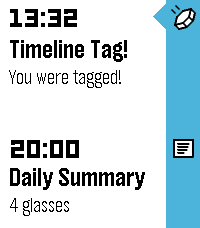
68Timeline Tag!
GamesTimeline Tag is a multiplayer game, played entirely within the Pebble Timeline! To join the game, simply open the app. Shortly after starting, you will receive your first tag within your timeline. This first tag will be easy to find, the subsequent ones slightly less so.... The tag will report your current score and rank. When you receive it, it will give you a selection of recipients to send the tag to. When you select a recipient, the tag will be sent to them, and you will be awarded the points value of the tag. Tags start out worth 1 point, and their points value increments each time the tag is sent to a recipient. The more a tag is forwarded on, the higher it's points value, so make sure you keep forwarding them on! The tags will arrive silently to some point on the timeline, so you'll have to keep an eye out to make sure you don't miss any. Any tags that drop off your timeline without being forwarded on will die. Hint: Look out for your own ID in the recipients list for the tag - you could get more points by sending it back to yourself to do it all again! IMPORTANT: Timeline Tag requires an active internet connection, so if you do not receive your starting tag, ensure that you open the app when you have a good internet connection and wait until the first tag arrives.
 68
68Rudd
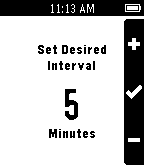
Tools & UtilitiesRudd is an app for Pebble that helps you manage time by vibrating on a set interval. When you're working out for a given interval, don't keep checking your watch, set Rudd for 1-2 minutes. Time flies when you're having fun, but drags on when you're bored, so set Rudd to 5-15 minutes to give your mind a new perception of time. Set Rudd for 30-60 minutes to remind yourself to take a study break.
 68
68Cocktails
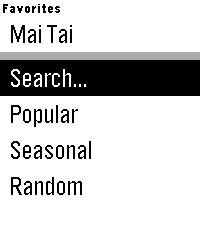
Tools & UtilitiesHaving people over and want to show off your minibar? Training to become a bartender? Cocktails gives you access to over 3000 drink recipes right on your wrist. Features: - Search for drink recipes by name or ingredient using voice dictation - Browse curated lists of popular or seasonal drinks - Save your favorite recipes in the main menu for quick access Cocktails is powered by TheCocktailDB. www.thecocktaildb.com
 67
67ChinaBus
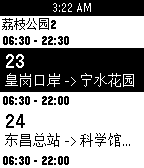
Tools & Utilities可实时获取附近公交到站时间 可在公交详细页按选择键收藏,用以加入快捷菜单(即启动app第一屏列表中)快捷打开常用公交 目前只是测试了pebble time 第一版本暂没有提供清除数据的功能 大家有建议或者有发现问题请联系 注: (请打开gps!!) QQ: 1534760747 Email: [email protected]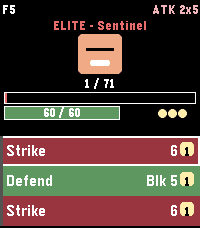 67
67Micro Deckbuilder
GamesMicro Deckbuilder is a roguelike card game for Pebble Time 2. Climb 30 floors. Six classes, 70 cards, 40 enemies. Draft, shop, and rest, then beat floor 30. Win again on a harder ascension, up to A10. Clear A10 to unlock the Gauntlet: five bosses with a deck you build from cards you have collected. Hold SELECT on New Run to climb the normal ladder with that deck too. Daily uses today's seed, so everyone faces the same dungeon. Leaving a fight saves the run. The first launch is five short pages. How to Play on the menu has the rest. Up and Down scroll. Select plays a card. Hold Select to end the turn. Hold Up for a potion. Back saves and leaves.
 67
67MirrorMap
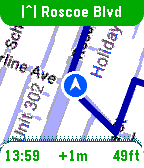
Tools & UtilitiesSee it in action: https://x.com/MirrorMapNav/status/2057143831699796173 *Pebble app needs it's BATTERY set to UNRESTRICTED to reliably send GPS* A navigation watchapp showing live directions on a smoothly rendered map with rerouting and travel modes. This is Pebble's nav app we've been missing! MirrorMap uses the Gmaps API for the best routing available. It can mirror a trip from your phone — share the destination from Gmaps , and it syncs the same trip on your wrist, or just select one of the saved addresses for a standalone trip! Three ways to use MirrorMap: THE MAP: Get the free watch app to explore at 30fps and see your real-time position. ROUTES (subscription): Save *home*, *work*, and *custom* addresses. Start navigating from the watch or even the Pebble settings page. Miss a turn? Shake to reroute! DASH (Play Store app): Besides having it's own Routes subscription, Dash can receive destination shares from any app with a share button-- watch instantly navigates there. Also, share a location from google maps, and both the phone and watch navigate together, in sync, so you can pay attention to either. For prices and more info go to: https://Mirrormap.app (click website link below) Android only: iOS Pebble app lacks the browser APIs that MirrorMap depends on.
 67
67Sports
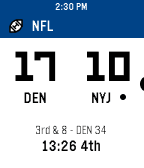
DailyA native sports app for Pebble-- get your favorite NFL, MLB, NHL, and NBA scores live on your wrist
 67
67Pebble Controller
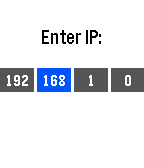
RemotesThis watch app allows you to transmit button presses from your Pebble to a computer and perform actions there. See the github page at https://github.com/andars/pebble-controller (linked below) for instructions to set up the server on your computer.
 67
67Watch Messenger Pro
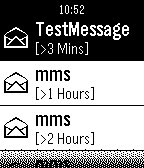
NotificationsCombine notification and call notify. With history list; Three scales chars display; Reading notifications; Remote control call function; Send SMS...
 67
67kijete
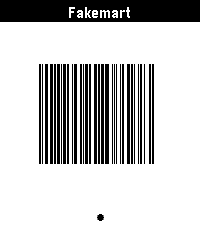
Tools & Utilitieskijete is an app for Pebble that allows you to display Code 128, Aztec, Data Matrix, PDF417, and QR codes on your wrist. It is a fork of Skunk by Harley Watson, and is so named because in toki pona, a skunk would be described by the word kijetesantakalu, or for short, kijete or kije. It swaps out a ruby web app for config and barcode generation for a fully client-side JS application. Its Aztec code support actually works, and it generates codes that are identical to those in my Google Wallet, which is generally a desirable trait. It is using the 2D-Barcode library.
 67
67Tesla Time
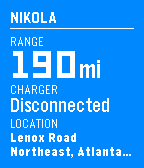
RemotesMonitor and control your Tesla Model S from your wrist. **IMPORTANT** Make sure you visit the settings from your Pebble or Pebble Time app first. The app won't work without it! - Check your range and charge status - Remember where you parked - Forgot your key? Unlock and remote start. - Too cold? Too hot? Turn on the AC or heat to prep your car. Log in to your Tesla account via the Settings.