 86
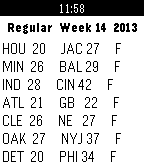
86American Football Scores
NotificationsGet football scores in realtime on your Pebble, never again miss what's going on.
 86
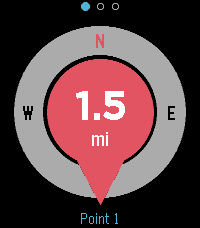
86Backtrack
Tools & UtilitiesFind your way back to a saved point. Drop a pin at your location and Backtrack shows a compass-oriented arrow and the distance back to it, and buzzes when you arrive. Great for finding your car, your tent, or a meeting point. Uses your phone's GPS. Localised in 6 languages.
 86
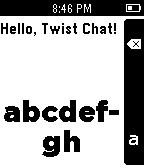
86Twist Chat
Tools & UtilitiesType and send SMS with your wrist - using the accelerometer! Great for short replies, and capable of long messages if desired. Just in case, here are the controls: - Wrist rotate: Choose letter/letter group - Select: Insert letter/select group - Select long-press: Send message - Up: Backspace/return to group list - Down: Shift > Caps lock > neither
 86
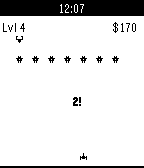
86Phoenix
GamesPhoenix is a shoot-em-up game based in space. It includes never ending levels and a store where you can buy different guns and upgrades. Tilt your wrist to move the ship and destroy the enemies. How long can you survive? If you enjoy the game, please consider donating here http://richardvanderdys.com/phoenix
 85
85XKCD Reader
DailyXKCD Reader — the entire archive on your wrist. Over 3,000 XKCDs, pulled on demand. The app streams today's comic when you launch it. Press SELECT to roll a random strip from the full archive. UP / DOWN scroll the comic panel-by-panel — hold either button for smooth scrolling through tall strips (Climate Timeline, Timeghost…) or wide multi-panel ones (Regex Golf, Life Goals). Long-press SELECT or shake your wrist to reveal the alt-text — the hover-text joke Randall hides behind every comic. BACK exits. Your phone handles the heavy lifting: it fetches the XKCD JSON metadata and PNG, bilinear-resizes to match your Pebble's resolution, Floyd-Steinberg dithers into crisp monochrome line art, then streams the bitmap over AppMessage. Wide comics auto-scroll horizontally, tall ones vertically, so text stays legible instead of getting squished into 200 pixels.
 85
85Watch Caching
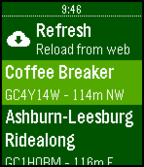
Tools & UtilitiesWatch Caching enables you to navigate to nearby geocaches using only your pebble smartwatch. It will retrieve a list of up to 50 nearby geocaches from geocaching.com and, using the compass in the watch and the GPS in your phone, will show you the distance and direction so that you can find the geocache without ever taking your phone out of your pocket. Because of Geocaching Live API limitiations, basic members will only be able to get details of traditional geocaches.
 85
85TVShow Time
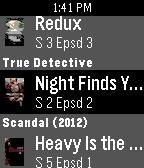
DailyTVShow fans your favourite tvshowtime.com service is finally on your Pebble Watch. Features : - List of episodes to watch - Mark an episode as watched - Set your emotion about an episode - Episodes information - Your TVShow agenda - All your TVShows - Many TVShow information If you like the app feel free to make a donation by using the website link bellow. The developer of this app is not affiliated to the website www.tvshowtime.com
 85
85Wrist Pilot
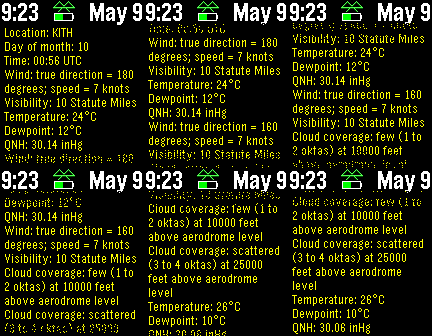
Tools & UtilitiesDisplays METAR or TAF weather reports for selected stations. This Pebble app is designed for small craft pilots who want updated reports at their fingertips (or wrist). There are menu settings for changing the text size and refresh interval. Use the up and down Pebble buttons for scrolling, and shake to refresh the weather immediately
 85
85Plus HR
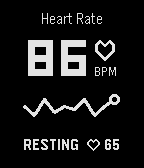
Health & FitnessWatchapp based on Pebble 2 +HR marketing materials. Track heart rate in real time.
 84
84Wæther - Weather information
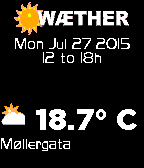
DailyWæther is a weather display app. Its main feature is that it gets its weather information from the Norwegian Meteorological Institute. Features: - Celsius or Fahrenheit; - forecast for the next days (mostly 10 days); - up to 2 favorite locations + current location (gps-based); - Wind speed (mps) and direction + sunrise and sunset time (by pressing the select button) - Rain precipitation (mm) Data from The Norwegian Meteorological institute. Names for geolocating provided by Google. Symbols provided by yr.no. I'd appreciate any feedback with suggestions of improvement - and if you use it, please "like it" here and I'd be happy if you consider a $1 donation.
 84
84GPS Location
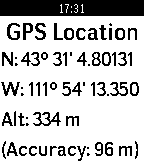
Tools & UtilitiesSimply displays the current latitude, longitude and elevation of your connected phone. Version 1.1: Shows altitude and accuracy in feet or meters. Version 1.2: Shows decimal Degrees, DM or DMS.
 84
84SM Reader
Tools & UtilitiesRead the text configured from the phone.
 84
84Cut/up+
DailyCut/up+ is a complementary watchapp to be used in conjunction with the Cut/up watchface, which has been created as response to a Reddit request made by /u/stegosaurusflex1 who conceived the "cutting edge" design. One deficit of the clean design is that the watchface only shows the time. To remedy this I have created Cut/up+ to show additional data. You can tie Cut/up+ to a quick launch button and configure it to look exactly like the watchface. If you press the quick launch you will get a short glimpse of the data you selected and then return to the watchface. Of course the watchapp can also be used without Cut/up if you have another watchface that is missing some data you want to see at the quick press of a button. For a generic looking version check out my other app "Quick Info". * Available data to chose from - Day of the month - Month - Year - Battery level - Calendar week - Day of the week * All colors are fully customizable (backgrounds, number colors, number borders, cutting line and cutting line borders). * The cutting line doubles as a Bluetooth connection status indicator. * Animations can be disabled. * Leading zeroes can be hidden. The font is called "Peace Sans", designed by Sergey Ryadovoy. Please remember to give the Watchapp a "heart" if you like it. Thanks!
 84
84Bike Sharing
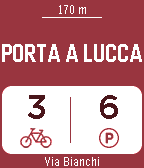
Tools & UtilitiesWith the BIKE SHARING app you'll always have the closest bike sharing station on your wrist with the number of free bikes and free slots. It works worldwide!! Pisa, Paris, New York, Wien, Chicago, London, Barcelona, Milano, Montreal, Miami and many other cities. Use the select button to update the data and the down button to view other nearby stations. NEW: Long press on select button enable/disable refresh with shaking! -> Follow me on twitter @ferra_andre and use #bikesharing4pebble BIKE SHARING is powered by http://api.citybik.es/v2/
 84
84watchNlights
RemotesControl the lights of your Philips Hue set with your Pebble. Lights can be switched ON/OFF and brightness can be controlled. If you like it, LIKE it. (Give it a heart!) This watchapp was not made by Philips. Harrie45