 83
83Image Viewer
Tools & UtilitiesProof of Concept Display images from internet on your Pebble Choose your image in the configuration page (jpeg/gif/png or pbi)
 83
83QuickRemind
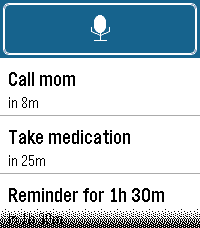
Tools & UtilitiesQuickRemind — voice-first reminders for your Pebble. Just raise your wrist and speak: "remind in 20 minutes to call mom" or "remind me at 3 pm to leave" and QuickRemind sets a reminder that alerts you until you dismiss it. FEATURES • Voice dictation — say the time and what to remember, no typing • English & Turkish — pick your language in settings (set your phone's dictation language to match) • Relative delays — "5 minutes", "1 hour 30 minutes", "2 hours to leave" • Exact clock times — "at 3 pm", "at 5:30 pm", "at 17:45" (12- or 24-hour) • Audible alarm — alerts you with sound and/or vibration until dismissed, even if the app is closed • Alert patterns — pick from 10 built-in styles, including vibration rhythms (Pulse, Nudge Nudge, Jackhammer, Gentle) and real tunes played through the Pebble Time 2 speaker (Reveille, Mario, Ode to Joy, Twinkle Twinkle, Für Elise) with rich polyphonic harmony • Alert mode — choose Vibration only, Sound only, or Sound & vibration • Quick launch — assign QuickRemind to a watchface quick-launch button and it jumps straight into voice dictation, so a reminder is just a button-press and a sentence away (optional, off by default) • Timeline pins — optionally add each reminder to your Pebble timeline as a pin with its own reminder notification (optional, off by default) • Up to 8 reminders, sorted soonest-first • Adjustable notification strength (Low / Medium / High) for buzz and volume • Configurable trigger phrases from the phone settings CONTROLS • Touchscreen on Pebble Time 2 — tap the mic to add, tap a reminder to delete • Button navigation on all other Pebbles — Up/Down to move, Select to open, Select to delete, Back to cancel Sound requires the built-in speaker on Pebble Time 2; every other model alerts with vibration. Works on Pebble Time 2, Time, Time Steel, Time Round, and Pebble 2 — any Pebble with a microphone. Non-touch devices are fully supported via the physical buttons. Bugs & suggestions: [email protected] 83
83PebbleBan
GamesPlay 'PebbleBan', the great classic Soukoban (Warehouse Keeper) in your Pebble. Including these nice features to provide a joyful experience: - 50 small levels - UNDO - Save State Do you dare to tidy all 50 warehouses? Can you achieve it in fewer movements?
 83
83Recordense Voice Recorder
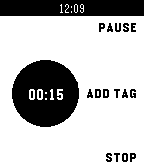
RemotesRecordense is the only voice recorder for Pebble that allows to bookmark important moments while recording. Recordense allows to: - Start your recording instantly/in one tap right from your wrist. - Mark important moments by putting time-coded tags while recording. - Follow the event flow using time counter of the recording indicator. - Make as many records as you want.
 83
83Chronograph
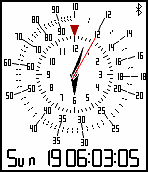
Tools & UtilitiesChronograph looks like an watchface. But it can change face(round or square). has 60 min marker (up or down button to rotate). has slide rule (up or down button to rotate) and presets. has stopwatch (down button to start or stop) and automatic tachymeter, has compass. displays like analog slide rule bezel and retro digital font.
 83
83BPM Detector
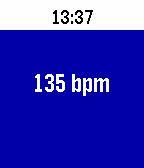
Tools & UtilitiesSimple BPM detector. Tap on the Pebble's face (or tap on the table with the hand the watch is on) to get the beats per minute of your taps. Press the select button to change the sensitivity (how hard you tap on the face, or how hard you tap your fingers on the table or even tap the back of your hand with your other hand).
 83
83Korea current weather
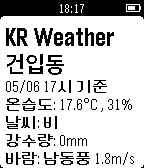
Daily한국 기상청 API를 활용한 위치기반 현재 날씨 확인 앱 이용 가능 정보: 온습도, 날씨, 강수량, 풍향, 풍속 *설정페이지에서 현재 위치기반 혹은 선택한 주소기반 서비스를 선택할 수 있습니다. *매시 30분에 정보가 업데이트되며 기상청 상황에 따라 몇 분 정도 업데이트가 늦을 수 있습니다. *본 애플리케이션은 한글을 지원하는 페블 기기에서만 정상 동작합니다.
 83
83Quick Peek
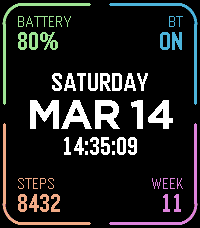
Tools & UtilitiesTake a quick look at useful info by adding Quick Peek to your quick launch. Many otherwise nice watchfaces don't show all the info you need throughout the day. Quick Peek solves this issue by displaying additional info, easily accessible when configured as a quick launch app. And auto exit handles returning to you watchface automatically (with ability to cancel auto exit). Lot's of configuration options to make it show what info you need. 7 complication slots, where you can choose what info to show + color. Ability to define a second page for even more info (navigate using up/down buttons or swipe on touchscreen). Available complications: * Date (with configurable format) * Day of week * Time (with or without seconds) * Battery percent * Bluetooth connection status * Step count * Week number * Heart rate * Distance * Calories * Active minutes * Sleep * Weather (icon + current temp) * Today's high and low temp * Tomorrow's weather (icon + high and low temp) * UV index * Sunrise * Sunset * Phone battery * Next alarm time (within 24h) * Second time zone (configurable city, which also acts as the label) * Agenda — today's appointments, from one or more calendar feeds on the phone. In the big center slot it takes the whole column and lists the day; anywhere else it shows only next appointment. * Webhook** (drawn as a button to tap on touchscreen) Configurable buttons, choose what action each of the up/middle/down buttons does, both normal press and long press. Available button actions: * Swith page * Disable auto-exit * Reset auto-exit * Webhooks** In addition to the physical buttons, flicking the watch resets auto-exit timer and tapping on touchscreen disables auto-exit. Additional configuration options: * Date format * Light mode, which puts the whole display on white and darkens the corner colors to suit * Temperature unit (Celsius or Fahrenheit) * Auto exit delay (when launched from quick launch) Webhooks: Define up 6 webhooks by specifying a URL that will we called when the webhook is triggered. You can point this to any publicly available URL or something on your local network, for example Home Assistant so that you can toggle lights on/off, open your carage door or whatever Home Assistant can automate. Ability to choose HTTP method (GET/POST/PUT), define a JSON payload, and a Bearer token for authentication.
 82
82Yelpful
DailyHungry? Thirsty? Need a haircut? Use this app to find local places close to you. This app is better than the official yelp app since you can see a map, view images, deals, and the category. If you see green stars, then the place has a yelp deal! Customize by choosing the sort method, miles or kilometers, view only deals, and GPS accuracy.
 82
82WeightTracker
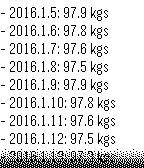
Health & FitnessSimple, standalone pebble app to record, monitor and track weight loss (or gain) in the last 14 days period. Supports daily reminders and timeline pins. Both unit of measurement (kilograms, stones, pounds) and date format can be configured.
 82
82cnBeta
DailycnBeta阅读器继续优化阅读体验,带来更成熟的1.4版本~~~ 此版本缩小了字体的显示,能够在满屏状态下显示更多的新闻内容~~~ 1.减小字体大小,方便阅读更多的新闻。 2.去掉新闻摘要的滚动显示方式,统一摘要和正文都采用翻页的方式。在同屏显示更多内容的情况下,提升了阅读体验,减少了按键的损耗。 [ps:开发者在中途入了ticwatch,所以暂停了一段时间更新,最后发现tic、aw等表续航和功能都不满意,目前回到了OG pebble,以后会有更多新闻类应用上架pebble,敬请期待~~~联系我扣扣185261784]
 82
82simbble hue
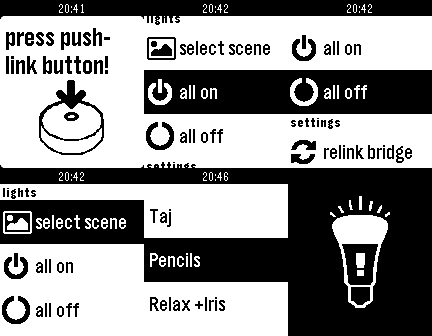
RemotesA simple hue app: recall scenes, switch hue lights on/off, select favorites and recall them. With version 0.8 I added a favorite scenes menu. You can add favorite scenes by "longpressing" the select button in the "select scene" menu. To delete a scene from the "favorites" menu "longpress" the select button. I'm going to add color to the app soon. If you want to help me with a little donation you can fund me and help me to get an Pebble Time: http://www.gofundme.com/y4mkrew This Watchapp is NOT made by Philips!
 82
82Tris
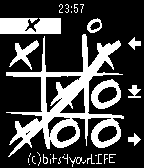
GamesWould you like to relax a little? Do you have to wait for a few minutes before your meeting? Why not play a game with Tris? Choose among 4 difficult levels and try to beat your Pebble! Simple, fun and Quick!
 82
82Custom Note Live
Tools & UtilitiesWith CustomNote, it is easy to create and save custom lines of notes directly from your phone to show up on your watch. Now, with version 4.0, notes you enter on the settings page are updated live on the watch. Also new in 4.0 is the ability to save several supported emoji's in the note lines.
 82
82Jarvis
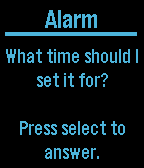
Tools & UtilitiesA Voice Assistant for Pebble Time I can help you in the following ways: Add an alarm to your phone Launch an app on your phone Add an event to Calendar Search Contacts and return email and phone number Send text message by contact name Play music Start navigation to a given address Return temperature with high and low for a time and/or place Return travel time from current location to a given address Return when the next episode of a TV show will be on Tweet Query Wolfram Alpha Check sports scores