 2
2Tautulli
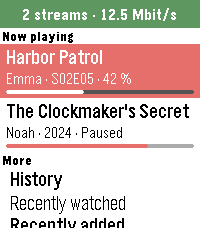
Tools & Utilities**English** Your Plex activity on your wrist, powered by your own Tautulli server. NOW PLAYING - Who is watching what, with progress, device and quality - Progress as percent, time left or end time - Stop a stream with the red stop button (with confirmation, needs Plex Pass) - The watch vibrates when something was watched to the end BROWSE - History and recently added movies, episodes and albums - Users: who watched last, with watch time, chart and history per person - Statistics: watch time today, 7 and 30 days, top users, movies and shows - Chart: plays per day for the last 7 or 30 days - Libraries: number of movies, shows, episodes and albums SETUP Open the app settings and enter your Tautulli address (e.g. http://192.168.1.10:8181) and your API key (Tautulli: Settings > Web Interface > API). With a local address the app works on your home Wi-Fi. Just curious? Enter "demo" as address to try it with sample data. PRIVATE The app only talks to your own Tautulli server. No tracking, no other servers. Free and open source (MIT), built with AI assistance: github.com/Zeichenfolge/tautulli-pebble Not affiliated with Tautulli or Plex. **Deutsch** Deine Plex-Aktivität am Handgelenk, über deinen eigenen Tautulli-Server. JETZT LÄUFT - Wer was schaut, mit Fortschritt, Gerät und Qualität - Fortschritt in Prozent, als Restzeit oder als Uhrzeit des Endes - Stream beenden mit dem roten Stopp-Knopf (mit Rückfrage, braucht Plex Pass) - Die Uhr vibriert, wenn etwas zu Ende geschaut ist STÖBERN - Verlauf und neu hinzugefügte Filme, Folgen und Alben - Nutzer: wer zuletzt geschaut hat, pro Person mit Wiedergabezeit, Diagramm und Verlauf - Statistik: Wiedergabezeit heute, 7 und 30 Tage, Top-Nutzer, -Filme und -Serien - Diagramm: Wiedergaben pro Tag der letzten 7 oder 30 Tage - Bibliotheken: Anzahl Filme, Serien, Folgen und Alben EINRICHTEN In den Einstellungen der App die Tautulli-Adresse (z. B. http://192.168.1.10:8181) und den API-Key eintragen (Tautulli: Settings > Web Interface > API). Mit einer lokalen Adresse funktioniert die App im Heim-WLAN. Nur neugierig? „demo“ als Adresse eintragen und mit Beispieldaten ausprobieren. PRIVAT Die App spricht nur mit deinem eigenen Tautulli-Server. Kein Tracking, keine anderen Server. Kostenlos und Open Source (MIT), entwickelt mit Hilfe von KI: github.com/Zeichenfolge/tautulli-pebble Kein offizielles Projekt von Tautulli oder Plex.
 2
2Red Flagr
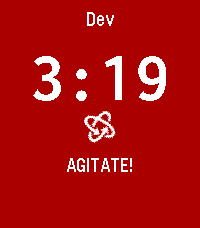
DailyWould you like to know if he's the one, or just one more red flag? Red Flagr is the magic 8-ball for your love life, and it lives on your wrist. Shake your Pebble and it reveals a red flag about him, like "Emotionally unavailable," "Still follows his ex's mom" or "Says he's not into labels," with a short buzz as it appears. Need a second opinion? Press the bottom button for honest advice, from "RUUUN" to "Why are you surprised?" to "Block. Delete. Heal." Press the top button to start fresh with the next date. With 30+ red flags and 20 pieces of advice, it never shows the same line twice in a row. It has a bold red and black look on colour watches, a clear black and white look on older Pebbles, and big centered text that fits both round and rectangular screens. Use it on first dates, last dates and in the group chat. For entertainment only. Red Flagr has never been wrong. Probably.
 2
2Khelljyr Framework Example (garbage coll
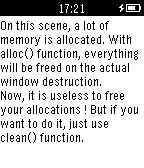
Tools & UtilitiesThis is an example made with Khelljyr Pebble Framework The topic of this example is the garbage collector feature. /!\This is a code example for pebble. Unless you are a developer, this application is useless for you, don't blame it ;p/!\ If you want to see the code of this project, go on the github project ! (https://github.com/nvareille/Khelljyr)
 2
2Mi T03
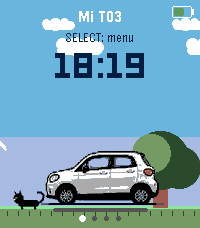
Tools & UtilitiesMi T03 connects your Pebble watch to your Leapmotor T03 through Home Assistant (leapmotor-ha integration) — no custom servers or MQTT bridges needed. From your wrist you can: - Check battery level, estimated range, and charging status at a glance. - See whether the car is parked, driving, or charging, with large, clear icons — including estimated charge-end time, charging power, and current speed while driving. - View all 4 tire pressures on a top-down car diagram. On touch-capable models, tap a wheel to highlight it and see its exact pressure. Any tire at 2 bar or below turns red automatically, with a one-time Timeline alert. - See at a glance whether the car is locked, via a color-coded lock icon next to the battery indicator. - Check the state of all 4 windows on a car diagram, same style as the tire page. - Trigger fast cooling, fast heating, or turn off climate control, with on-watch confirmation. - Open or close the sunshade. - Lock or unlock the car. - Feel a distinct vibration for successful vs. failed actions, without looking at the screen. - Get a Timeline notification when charging stops, a tire is low, a window is left open while parked, or the car is left parked and unlocked. - Pick your car's display color (white, black, or light blue). - Refresh manually, or let it auto-refresh every 15/30/60 seconds while the app is open (configurable, battery-friendly by design). Requires your own Home Assistant instance with the Leapmotor T03 already set up via leapmotor-ha (github.com/kerniger/leapmotor-ha), reachable from your phone (LAN, VPN, or public domain), and a Home Assistant long-lived access token. Everything is configured from the watch — nothing to set up outside of it.
 2
2Film Devle
Tools & UtilitiesBlack and White photographic film development timer
 2
2arcadetimes2
DailyA daily app that looks and feels like an arcade game from the 80's, with all the capabilities of the modern Pebble Time 2.
 2
2Lap counter
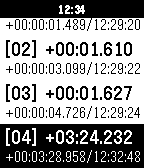
Tools & UtilitiesA simple lap counter for runner or swimmer.
 2
2Eight Pebbles
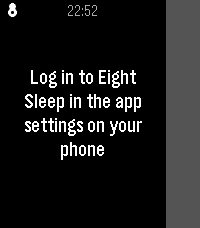
RemotesControl your Eight Sleep mattress from your wrist. Designed around one use case: nudging the bed temperature at 3am without reaching for your phone.
 2
2Lapin Futé
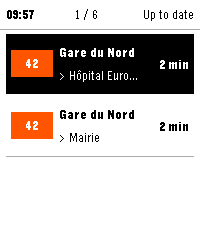
Tools & UtilitiesLapin Futé brings the next Île-de-France public transport arrivals to your Pebble. Save up to six favorite journeys across Métro, RER, Transilien, tram and bus services. Choose your departure stop, line and arrival stop, then check upcoming arrivals, see whether times are live or scheduled, and view available traffic information for each line. Data refreshes when the app opens, when you switch favorites or when you request it. Recent results are reused to limit network calls, with no periodic background polling. Watch controls: Favorites • Up / Down: move through favorites and the "Refresh all" row. • Select: open the highlighted favorite, or refresh every favorite when "Refresh all" is highlighted. Arrivals • Up / Down: switch favorite. • Select: open the traffic view. • Hold Select: force a refresh. Traffic • Up / Down: page through messages. On any screen • Back: return to the previous screen. Lapin Futé uses data from Île-de-France Mobilités' PRIM platform. A personal PRIM API key and a connected phone are required. Your key remains stored on your phone and is never sent to the watch or to a Lapin Futé server. Available in French and English. Supported watches: • Pebble Time 2 • Pebble Round 2, experimental support Lapin Futé is an independent project and is not affiliated with Île-de-France Mobilités, PRIM or Pebble.
 2
2Timebridge
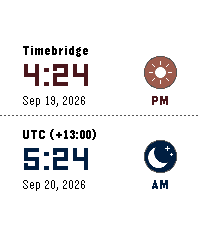
Tools & Utilities🌍 Time Bridge — Compare local and global times at a glance, switch timezones instantly with the Up/Down buttons, and enjoy fun sun ☀️ and moon 🌙 icons. Browse recent zones, customize themes, dates, icons, and 12/24-hour time. ⏰✨
 2
2Hnefatafl
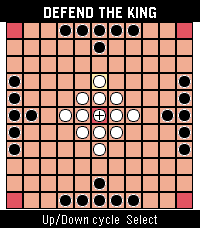
GamesHnefatafl app
 2
2Next Meal
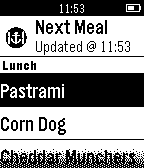
DailyGet the menu for your next meal at King Hall on your wrist! - Updated in realtime - Featuring six week rotation of delicacies - Experimental asian cuisine Never be left wondering what the Next Meal is! Note: Requires internet to retrieve menu.
 2
2eDisponent
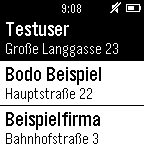
Tools & UtilitiesApp for eDisponent. Only usable with eDisponent-Account.
 2
2JP Trails
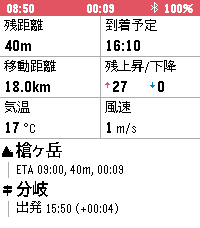
Health & FitnessJP Trails は、登山記録アプリと併せて使う Pebble Time 2 用の登山ナビです。スマホを取り出さなくても、手首を見るだけで登山の状況を一目で把握できます。 YAMAP で作った登山計画の URL をアプリの設定から取り込むだけで、地図に登山計画とルート・現在地が表示されます。 記録を開始すると GPS の軌跡やデータフィールドを確認できます。 できること (UP/DOWN で画面切り替え) - 記録の開始: Select 長押しで開始/停止 - 地図: 登山計画の取り込み時に地図を事前取得するので圏外でも地図が確認できます - データフィールド: 次の項目から 6 つを選んで表示できます - 累積上昇/下降: 記録開始からの累積の登り・下り - 心拍数 - 消費カロリー: YAMAP 式の消費カロリー (体重と装備重量を設定) - 現在標高 - 最高標高: 記録開始からの最高到達点 - 移動距離: 記録開始からの距離 - 上昇速度: 直近 20 分の平均上昇率 - 残距離 / 残上昇・下降 / 残時間 / 到着予定: 本日のゴールまで - ゴール標高差: ゴールと現在地の標高差 - コース逸脱: 計画のルートからの距離 - 日の入 / 日の出: 次の明暗の変わり目の時刻と、そこまでの残り時間 - 気温 / 風速 / 最高・最低気温: 現在地の予報 - 天気変化: 次に空模様が変わる時刻と変化の内容。記録中は 3 時間ごとに予報を更新 - 次の経由地ナビ: 次の経由地の名前・種別アイコン・到着予定時刻・残り距離・残り時間と、直近に通過した経由地の名前・通過時刻・計画との差分 (遅れ/進み) を常時表示 必要なもの - 計画の取り込みには通信が必要です。今のところ YAMAP のみ対応で、ヤマレコなど他のサービスや GPX の取り込みは今後検討します - 位置情報はスマホの GPS を使います。山行中は時計側で JP Trails を開いたままにしてください (終了するとスマホ側の GPS も止まります)。スマホの画面は消えていて構いません --- 出典 地図データ: 国土地理院 (地理院タイル一覧 https://maps.gsi.go.jp/development/ichiran.html) を加工して作成 天気: Open-Meteo
 2
2Bit Spender Fork
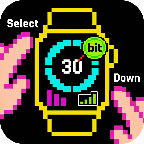
DailyFork of Tonda's Bit Spender App. Recreated using Gemini to add some new QoL features. Now used for MY thesis! Select a focus which starts a 30 minute timer. After 30 minutes, you earn a bit. You can hold Select to add a bit without the timer. Hold Down to see stats. New QoL features include: - Combined the Bit Display with the Bit Selection Display so that you can select a timer as soon as the app opens - Persistent Timer which runs even when you exit out of the app. Also vibrates and brings you back to the app when the timer goes off - Made Daily Bits have colors corresponding to your focus so you can visually see what you've been focusing on during the day - made a smoother way to add specific bits without a timer (holding select now works consistently) - Made the histograms stacked with color so you can visually see what you've been focusing on the last few days - When using app with Quick Start, exits you out of app 3 seconds after starting timer - Can cancel timer