 2
2Bit Spender Fork
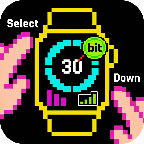
DailyFork of Tonda's Bit Spender App. Recreated using Gemini to add some new QoL features. Now used for MY thesis! Select a focus which starts a 30 minute timer. After 30 minutes, you earn a bit. You can hold Select to add a bit without the timer. Hold Down to see stats. New QoL features include: - Combined the Bit Display with the Bit Selection Display so that you can select a timer as soon as the app opens - Persistent Timer which runs even when you exit out of the app. Also vibrates and brings you back to the app when the timer goes off - Made Daily Bits have colors corresponding to your focus so you can visually see what you've been focusing on during the day - made a smoother way to add specific bits without a timer (holding select now works consistently) - Made the histograms stacked with color so you can visually see what you've been focusing on the last few days - When using app with Quick Start, exits you out of app 3 seconds after starting timer - Can cancel timer
 2
2Bonnaroo 26
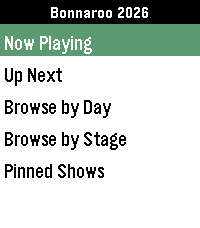
NotificationsAn unofficial festival schedule app for Bonnaroo 2026. Browse shows, plan your festival, and get reminders when a show you don't want to miss is coming up. Browse shows by day or stage, click into a show to save it to your timeline. Press down when on a Show Details page to see all shows that overlap with the selected set or are beginning within an hour of it wrapping up. Minor visual touchups coming in future updates, but all the functionality I wanted is in and working well. I created the app using a robust system that should be able to accomodate other festival schedules - see the readme in the source code for details. If you use this to make your own app, I just ask that you give me some credit. Have fun, and Happy Roo.
 2
2JumpingJacks
Health & FitnessJumping Jacks counter
 2
2Ladbrokes
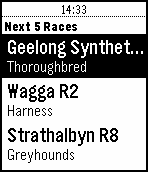
DailyDownload the unique Ladbrokes app to check odds on: Hundreds of Local and International Sports markets Thousands of Local and International Thoroughbred, Harness and Greyhound racing markets
 2
2KVRIdle
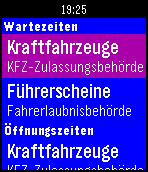
NotificationsDie App zeigt Ihnen die aktuellen Wartezeiten der KFZ-Zulassungsbehörde und der Führerscheinbehörde im Kreisverwaltungsreferat der Landeshauptstadt München an. Gleichzeitig können Sie die Öffnungszeiten der beiden Behörden abfragen.
 2
2Voice
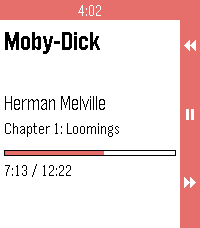
RemotesVoice for Pebble controls an Android audiobook player from the wrist. One watchapp drives two players: Voice, the open-source audiobook player, and Audible. It runs on Pebble 2 Duo and Pebble Time 2, and needs a small companion app on your phone, available from the project's GitHub Releases. ON THE WATCH Now playing. Book, author, chapter, a progress bar, and the cover when the player offers one. Transport. Up / down skip back / forward by the player's skip time. Long-press for the previous / next chapter. Select is play / pause. Long-press select opens the actions menu. Actions. Browse books, Source (switch between Voice and Audible), Volume up, Volume down. Browse. The player's library, with a cover thumbnail on each row the player provides a cover for. ON THE PHONE Voice: full transport, browse, chapter skip and the now-playing cover. Audible: grant notification access to "Voice for Pebble" for full control, titles, cover and chapters. Without it the companion sends media buttons (skip, chapter, play/pause) and the watch shows "Buttons only". The companion reads no notifications. STATUS Tested on a Pebble Time 2 with Audible in buttons-only mode. The Voice app itself and Audible with notification access are not yet tested on hardware. REQUIREMENTS - Voice or Audible on your Android phone - The Core Devices Pebble app paired to your watch - The Voice for Pebble companion APK (installed by hand from the project's GitHub Releases, one time) SOURCE AND SUPPORT Source and companion APK: https://github.com/P1R4N351/voice-for-pebble NOT AFFILIATED This project is not affiliated with Voice, Audible, Amazon or Core Devices. Names are trademarks of their respective owners.
 2
2Rasktur
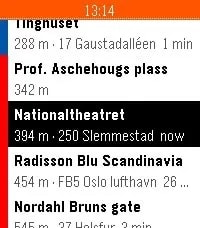
Tools & UtilitiesSee the next buses, trams, metro, trains and ferries departing from stops around you, with live times from Entur's national data. Save the places you actually travel to - home, work, the office in Bergen - and Rasktur pins the closest boarding stop with a service heading that way to the top. Colour-coded by mode, shake to refresh. Works across Pebble, Pebble Time, Time Round, Pebble 2 and Time 2.
 2
2Nova's Next Ride
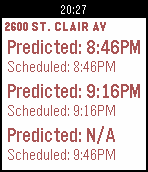
Tools & UtilitiesCheck realtime/scheduled transit times for the Greater Cleveland Regional Transit Authority (GCRTA) on your watch. Save frequently uses stops as favorites for quick & easy access. You can also select the color you like best Performance Notice: This app uses pebble.js which, according to Pebble, is still in beta. This is important to know because the app can be slow at times and it may not start up right the first time resulting in a screen that says "Disconnected, run the pebble app". The app has been tested and it does work but it may not work well at times. The app also makes round trip communication with your phone for each interaction. This uses up more battery on the watch which is why it is recommended to save frequently used stop. Service Notice: This app relies on data provided by the GCRTA which may change or be discontinued at any time. In the event the data is changed or discontinued the app will stop working for some time. Please do not contact the GCRTA about these issues as this app is not maintained by them.
 2
2Pebble Peaks
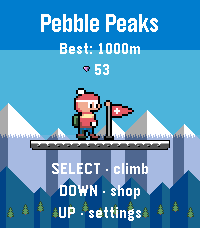
GamesJump. Climb. Don't freeze! Jump ledge to ledge up a mountain with two buttons while freezing mist rises below. Collect gems, buy gear, plant the flag at 1000 m. Pebble Peaks is a vertical arcade climber for the Pebble Time 2. UP jumps up-left, DOWN jumps up-right — once you're in the air, the arc is fixed, so every jump is a choice. Below you, icy mist keeps rising. Stand still too long and you're frozen. Climb from a sunny pine valley through the sunset into a starry night with northern lights, all the way to the summit. Higher up the mountain gets meaner: ice ledges slide you toward the edge, crumble ledges give way under your boots, and from 300 m boulders come tumbling down. Gems carry over between runs; spend them on grip soles, a down jacket and a climbing rope: a grappling hook that saves a missed jump or reaches gem ledges too far to jump to. And at 1000 m, a flag waits on the summit — but only a fully equipped climber will realistically get there. FEATURES • Two-button climbing: UP jumps left, DOWN jumps right, no holding. • Rising mist that speeds up the higher you climb. • Snowy rock, slippery ice and crumbling ledges; falling boulders from 300 m. • Gems persist between runs — three upgrades with five levels each. • Climbing rope: SELECT mid-air hooks a ledge and you climb back up; SELECT on a ledge raises the hook — time the swinging aim (or tilt the watch) and fire at gem ledges out of jump reach. Find rope coils along the way. • A real ending: reach the summit at 1000 m and grab the flag. • Early-90s style pixel art made for the Pebble Time 2 (Emery) colour screen, with parallax mountains and a sky that runs from day to night. • Also plays on the round Pebble Round 2 (Gabbro), on a column in the middle of the circle; no sound there. • Chip sound effects on the Time 2 speaker, and a backlight that takes the colour of the sky and flashes red when the mist closes in. • Settings for backlight, light effects, vibration, sound and aiming. • Plays entirely offline — no phone app or internet needed. • Available in English, Nederlands, Français, Deutsch and Español, following your watch's system language automatically. • Your gems, upgrades and record are saved on the watch itself.
 2
2Khabaru
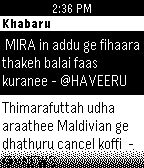
DailyGet the latest headlines from your local news websites with a single click from Haveeru, sun.mv, Vaguthu, vnews, Dhiislam, Addulive, Avas.mv Powered by Adafi (Noos/Habaru): goo.gl/FQuXW1 Special credits to: @inthiaano (twitter.com/inthiaano)
 2
2Timer / Chrono
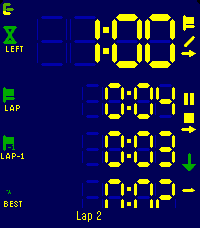
Tools & UtilitiesModes ----- Count up, count down for a duration, or count down until a clock time. The three are distinguishable modes, each with its own screen layout, colours and alarms. Flexible layout --------------- You decide what every line shows. Up to four lines per mode, each one picked from: total time, remaining, current lap, prior lap, fastest, average, the gap between the current lap and any of those, the end time, or the lap count. Pick a size per line: XL, L, M or S. The LCD digits fill whatever space is left. Laps ---- Laps work in both directions and exclude paused time. The lap list shows each lap against the one before, with the fastest marked. Alarms ------ Alarms fire at the end, before the end, at intervals, or when a lap reaches a reference lap. Each one can vibrate, sound, or both. Alarms still fire with the app closed. Buttons ------- Every button shows what a short press and a long press will do, and how far a hold has got. Touch ----- Setup, changing start/end times etc. can be done with gestures too: Click a field and use clockwise to increment, counter clockwise to decrement. Watch/Phone ----------- Everything runs on the watch. Layouts and colours are edited on the phone, where there's room for it, which is a single-setup most of the times. Ready for Pebble Time 2, Pebble Time and Pebble 2.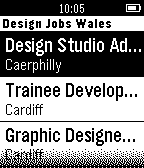 2
2Design Jobs Wales
DailyDisplays the latest jobs from Design Jobs Wales
 2
2Exchange Bitcoin (BTC)
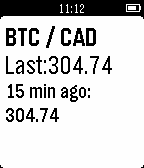
Tools & UtilitiesExchange BTC vs the most famous currencies
 2
2PyGrunn 2015
Tools & UtilitiesThe schedule for PyGrunn 2015 on your wrist!
 2
210-20-30
Health & Fitness10-20-30 is a way to spice up your running giving you good results. This app tracks an entire run.