 5
5Dungeon Doors
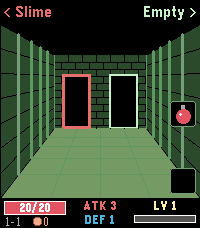
GamesLeft or right? A pocket roguelike for your wrist. Walk through three dungeons, one door at a time. Above each door you see what waits behind it: a chest, an empty room, the merchant – or a monster. Which monster? You only learn its name, not how strong it is. Remember who hurt you. FEATURES - 3 dungeons, each with its own look and 4 new enemy types, 12 pixel-art monsters in total - Automatic battles: every hit earns XP, every level gives +1 ATK and +1 DEF - Blue, green and red swords and shields - Chests with a choice of two items: potions, bombs, gold, gear – and rare finds - The merchant sells permanent upgrades and, sometimes, the Dragonslayer that destroys any boss in one blow - Bag with two slots on the middle and bottom buttons - Beat the boss to descend deeper with all your stats – beat the third one to win - Backlight stays on while you play - English and German CONTROLS Back / Up: left / right door or item Select / Down: use item in bag slot (Select also leaves the merchant) Hold Back: quit How deep can you go?
 5
5Dictionary - EN
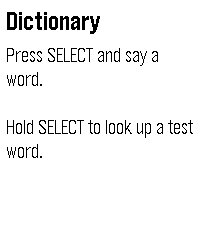
Tools & UtilitiesLook up any English word by saying it. Press SELECT and say a word. Your watch shows what it heard so you can confirm it or try again, then displays up to six definitions. Scroll with the UP and DOWN buttons, or drag the text with your finger. To try it without speaking, hold SELECT to look up a sample word. Requirements Dictation and lookups need your phone to be connected and online. Where the definitions come from Definitions are from Wiktionary (wiktionary.org), extracted by the Wiktextract project (kaikki.org). Wiktionary content is available under the Creative Commons Attribution-ShareAlike 4.0 license (CC BY-SA 4.0). Entries can be incomplete or wrong; anyone can correct them on Wiktionary. Privacy Your speech is converted to text by the Pebble app's dictation service; this app only receives the resulting text. To find its definition, the word is sent over an encrypted connection to the developer's server, along with your IP address, as with any web request. The server may keep standard access logs of these requests. To prevent abuse, it also counts requests per IP address, stored only as a one-way hash, and clears old counts automatically. No account, no ads, no tracking.
 5
5Storyline
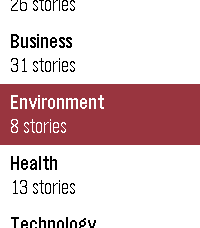
DailyShows what news outlets are reporting, grouped by event rather than by publisher. When several papers cover the same story you get one card, not eight near-identical headlines. When a story runs for days the watch keeps the thread: press SELECT on a card marked "N updates" to walk back through how it developed, one day at a time. - Eleven publishers, refreshed daily - Stories grouped by event, not repeated per outlet - Multi-day timelines for stories that keep running - Browse by category: world, politics, sport, culture, business, technology, science, health, education, environment and UK - Works on every Pebble, from the original through to Pebble Time 2 Where sources disagree on the facts or the framing, cards are marked so you know the story is contested. A fuller explanation of how they differ is coming to the web. Coverage is currently UK publishers, with other regions planned. Collects anonymous usage statistics: how often the app is opened, which categories are read, how far down the feed you scroll, and whether story timelines are opened. This includes your country and a random per-watch identifier so repeat use can be counted. It does not include your name, your location beyond country, your IP address, or which individual stories you read. Not affiliated with, endorsed by, or a publication of any news organisation. Headlines and summaries are generated from publicly available RSS feeds.
 5
5outrun
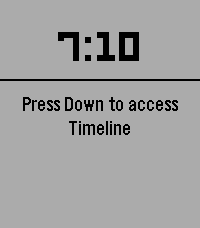
Health & FitnessOutrun is a running pacer built for Pebble: your phone tracks GPS pace and distance, your watch shows how you’re doing and buzzes when you drift off target. It’s wrapped in a horror “skin” — a stalker on your tail, a killer bar that empties when you fall behind, and a chase heartbeat when you’re in danger. Pair your watch with the Pebble app on your phone. Start a run on the watch and GPS kicks in on the phone; current pace, distance, and target are sent to the watch over Bluetooth. Pace is smoothed for a steadier read, and the watch shows “Acquiring GPS” until a real fix arrives instead of faking live data. When you stop at a light or for water, the run auto-pauses and resumes when you move again.
 5
5Pointer Planetarium
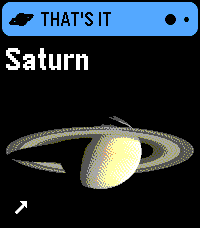
Tools & UtilitiesPoint at almost anything in the sky, and Pointer Planetarium will tell you what it is, and often includes an interesting fact. Categories the app knows about: Planes (private, commercial, military) Planets (with images for all of them) Satellites (Hubble, Starlink trains, comms satellites) Space Stations (ISS & Tiangong) Space junk (e.g. rocket boosters still in orbit) Stars (~3,000 named & unnamed) Constellations (all 88) Don't know where to look? It can guide you, with a "Find It" mode. Anything you find is recorded in the Logbook, in Pointer Planetarium's settings page in the Pebble phone app. Pointer Planetarium stands on the work of many astronomers, agencies and open-data projects: Stars: Yale Bright Star Catalogue, 5th Revised Edition (Hoffleit and Warren 1991, CDS VizieR V/50). Star names from the IAU Working Group on Star Names (WGSN, CC BY), as mirrored by E. Mamajek. Star distances from Hipparcos (ESA 1997, VizieR I/239). Constellations: boundaries from N. G. Roman (1987, PASP 99, 695; VizieR VI/42). Stick figures from Marc van der Sluys, ConstellationLines (CC BY 4.0, adapted). The Moon and planets: positions after Paul Schlyter's "How to compute planetary positions"; Mercury and Venus brightness after Mallama and Hilton (2018). Pictures: public domain NASA images: Mercury (MESSENGER, PIA11364), Venus (Mariner 10, PIA23791), Mars (Hubble Heritage Team), Jupiter (Cassini, PIA02873), Saturn (Cassini, PIA06193), Uranus and Neptune (Voyager 2, PIA18182 and PIA01492), and the Moon (NASA's Scientific Visualization Studio). Their use doesn't imply NASA's endorsement. Magnetic north: the World Magnetic Model 2025 (NOAA NCEI and the British Geological Survey, public domain), evaluated with code ported from magvar (MIT, Darren Yeates). Satellites: orbits from CelesTrak (from Space-Track.org data), computed with satellite.js (MIT). Planes: live positions from adsb.lol (ODbL) and adsb.fi (non-commercial use). Airlines, airports, aircraft types and routes from Virtual Radar Server's standing data (CC0). Places in the logbook: Natural Earth populated places (public domain). Fun facts are written for this app, with numbers from NASA fact sheets, the IAU and aircraft makers. PRIVACY: Aiming in PLANES or ANYTHING mode sends your location, rounded to about half a mile, to the plane data service (adsb.lol or adsb.fi). Turn planes off in the settings and your location never leaves your phone. Satellites and plane names are downloaded without your location. Your location is also kept on the watch so it can work without the phone. It stays on the watch. The logbook stays on your phone, with places rounded to about 6 miles. There are no accounts, ads, analytics or tracking of any kind. The code is free, open-source, and MIT-licensed.
 5
5Minesweeper
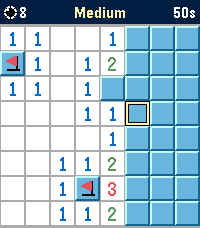
GamesMinesweeper, rebuilt from scratch for Pebble Time 2. Clear an 8×8 minefield right on your wrist – with your finger or with the buttons. TOUCH (Pebble Time 2) • Tap a cell to open it, hold it to plant or remove a flag. • Tap the top bar to zoom in for bigger cells, drag with one finger to move around, tap the top bar again to zoom out. BUTTONS (all models) • UP moves the cursor across, DOWN moves it down. Both wrap around the edge; hold to move continuously. • SELECT opens a cell, hold SELECT to plant or remove a flag. • Open a number again to clear all its neighbors once the matching flags are in place. FEATURES • Three difficulty levels: Easy (6 mines), Medium (10), Hard (14) • Your first move is always safe • Highscores: a top-5 list of your fastest times for every difficulty, saved on the watch • A big BOOM when you hit a mine, confetti when you win, and an animated trophy for every new record • "Backlight always on" option in Settings, for long games in the dark • English and German, picked automatically from your watch language • Zoom mode with one-finger panning on the Pebble Time 2 touchscreen • Runs entirely on the watch, no phone connection or companion app needed Built for the color display of Pebble Time 2, and also runs on Pebble Time, Pebble 2 and Pebble 2 Duo.
 5
5BORK
GamesBORK! BORK! BORK! (BORKs when a button is pressed. Also BORKs when opened via quick launch for faster BORKing! Bork sound from https://pixabay.com/sound-effects/nature-dog-bark-effect-382711/)
 5
5Change Counter
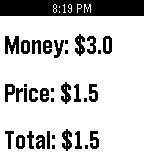
Tools & UtilitiesThis basic change counter helps you calculate how much change you will have left. Up - Increase Your Money Down - Increase The Price Select - Calculate Change Long Press Select - Clear
 5
5Next NASCAR Race
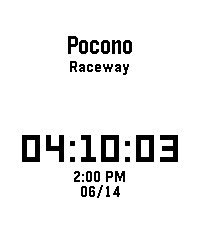
Tools & UtilitiesThis app shows you when and where the next NASCAR Cup Series race is in your local time. In addition, it also features a dd:hh:mm countdown until the next race. I made this app for myself because I wanted a super basic app that just shows the place, time, and date of the next NASCAR Cup Series race. Note: Race times and dates may change. Delays and schedule changes will not appear in the app.
 5
5Verse
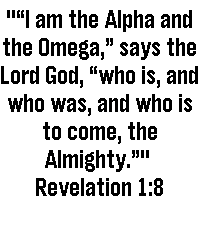
DailySimple app to get a verse of the day Powered by ourmanna.com API
 5
5DVB
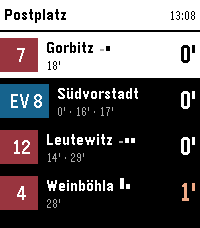
Tools & UtilitiesNavigate Dresden's public transport network from your wrist. This app shows you upcoming departures for stops around you. You can also view and follow a specific trip. On opening the app it shows you a list of stops around you, hold Select on a specific stop to mark it as a favorite and it will always be shown. Select a stop to view upcoming departures. Aside from the next departures, you can also see later ones for the same line and direction right below. If available, the app also shows occupancy data for all upcoming departures, so you can know if it might be worthwhile to wait for a later connection. If you select a departure, you can see the entire trip and the current position of the specific vehicle. This updates live, just keep it open to watch it along the route. The app supports three distinct styles of the departure, change it by long-pressing Select, then up/down and Select again to choose one.
 5
5Friture App
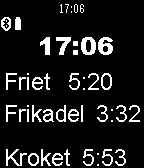
Tools & UtilitiesHoud bij hoe lang de frites, frikandellen en kroketten in de friture zitten. Als ze klaar zijn trilt de app.
 5
5MTG Life Counter
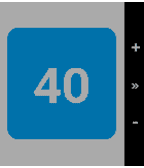
Tools & UtilitiesKeep track of your life in a Magic the Gathering game Simple counter that you can reset for 20 or 40 life depending on the format. - Press the top button to increase your life total. - Press the bottom button to decrease your life total. - Press the middle button to reset to your default life total. - Press and hold the middle button to set your new default life total.
 5
5Signet
Tools & UtilitiesSignet is a web3 authenticator for Antelope networks, created by AtomicHub. Log in to atomichub.io using Signet as your seal. Currently supporting WAX and XPR Network. Vaulta, EVM, and Bitcoin versions coming soon. Any app can integrate using the Signet Wharfkit plugin! Secrets are generated on your watch, and password-protected with encryption, in case you lose it. With Signet, you can access an ecosystem of art, games, and more. Unleash your creativity! This is an Alpha release. Please do not use this wallet to store valuable assets (yet).
 5
5Musetrap
Tools & UtilitiesMusetrap is a tool to provide prompts to ignite your inspiration. This watchapp is a stripped-down version of the musetrap.org web application.