 7
7LuxParking
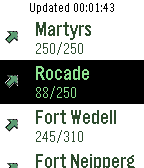
DailyA Pebble watchapp for displaying parking occupancy in Luxembourg city using the RSS feed provided by Ville de Luxembourg. The first screen shows a list of city areas. If you select an area, you will see the list of parkings for that area, with additional information: -number of available spaces / total spaces -an icon indicating occupancy trend -the text will be green if the parking has available spaces, red if it's full or closed
 7
7Lift
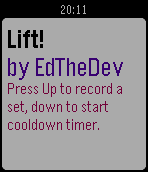
Health & FitnessCount exercise sets and track 90 seconds to cool down in between, as needed.
 7
7Sports Simplified
DailyA simple Pebble watchapp that pushes NHL game timeline pins for the Vancouver Canucks and Montreal Canadiens.
 7
7eCribbage Tournaments
DailyTimeline Pins for eCribbage.com* tournaments. You can subscribe to pins for different kinds of tournaments: Traditional, Variations, Kings, etc. You'll get a reminder 30 minutes before a tournament starts, and you'll also get a notification of any tournaments added with less than 24 hours notice. This is the first non-watch face that I've created, so all feedback is welcome. Features planned for 3.0: - Update notifications if something changes - Proper removal of cancelled tournaments - Ability to indicate you've signed up for a tournament so you can receive a notification right before it starts. * If you aren't a member, eCribbage.com is free to join. When prompted, tell them chasepeeler referred you!
 7
7Countdown_touch
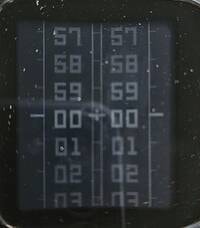
Tools & UtilitiesPebble countdown app that uses the touchscreen to set the minutes and seconds, while the top-right button is used to start and stop the countdown. During the last ten seconds, the app gives an audible countdown. When the countdown reaches zero, the end is indicated both audibly and visually.
 7
7Park@SG
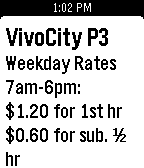
Tools & UtilitiesFetch available carpark lots and rates for major shopping malls and developments in Singapore. Data source from http://www.mytransport.sg
 7
7UNO
GamesUno
 7
7PebbleGRT
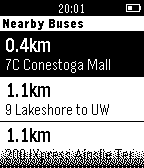
DailyCheck real time bus times and distances for GRT in the Kitchener/Waterloo area! - Click on a Nearby Bus to see Delay and Upcoming Stops - Click on a Nearby Stop to see Upcoming Buses
 7
7Pekkle
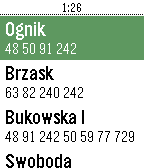
DailyPoznań, Poland timetable app. Shows stops around you and fetches live data about departure times from PEKA system. tags: Poznań, Poznan, mpk, ztm, peka
 7
7Wrist Anatomy
Tools & UtilitiesSimple reference tool for learning the names and articulations of carpal bones found in the wrist, right from your own wrist! No color yet! Features: 1. Name of carpal bone with a handy mnemonic name below each bone. 2. Small image indicating the general position of the selected bone. 3. On selecting a particular bone, short information on the articulations with other adjacent bones is presented in a scrollable window. The mnemonic used is: "Some Lovers Try Positions That They Cannot Handle". This is a common device for memorising the bones and their order.
 7
7PebbleKimai
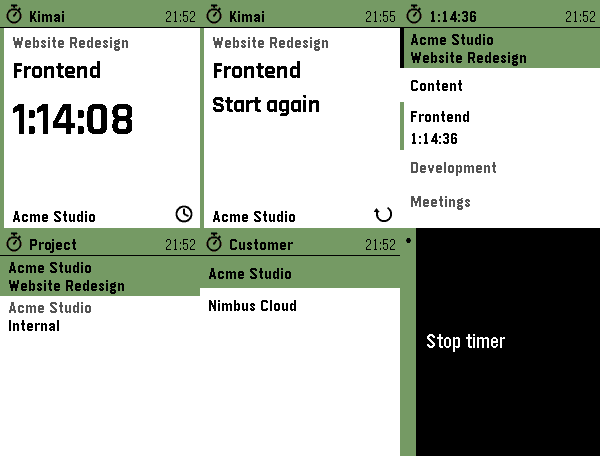
Tools & UtilitiesTrack your time in Kimai, straight from your wrist. Start, stop and switch Kimai time tracking from your Pebble. Recent activities in one press. Touch on PT2. 5 languages. PebbleKimai puts your self-hosted Kimai time tracking on your wrist. The home screen is a card: the project you are booking on, the activity you are on, and a big ticking elapsed time — or, when idle, your last activity with a one-press "Start again". Tap the time to stop, long-press Down for the activities you ran recently, or open the full list to start something else. The Kimai server always stays the source of truth. FEATURES • Start screen at a glance — project, activity and a big ticking elapsed time, or your last activity with a one-press restart when idle. • Recent activities — one long press shows the last five activities you ran, across every project. Picking one books it on its own project and selects that project on the watch, so an activity bound to another project just works. • Touchscreen on Pebble Time 2, using the watch's own touch navigation: tap a row to start/stop/switch, swipe right to go back — the same feel as every other menu on the watch. On the start screen, each part does what it shows: tap the elapsed time to stop, the project to change it, the icon for your recent activities. Physical buttons keep working everywhere. • Active-project row on the watch — tap to choose the project time is booked on; long-press to choose a customer, and the project list filters to that customer. Your latest choice is remembered on the watch. • Shows your global activities plus the activities bound to the active project. • One press to start when idle. Stop and switch each ask for a single confirmation, so a running timer is never stopped by accident — including a stray tap on the screen. • Live, drift-free elapsed time: the watch always recomputes it from the server's start time, so it stays accurate even after a reconnect. • The running timer in the app list, ticking on after the app closes. • Optional tones on start and stop, and a green backlight while a timer runs (Pebble Time 2). List rows follow your watch's text size. • Available in English, Nederlands, Français, Deutsch and Español — on the watch and in the settings — following your watch language or set manually. • Privacy: your API token stays on the phone and is never sent to the watch. SETUP 1. In Kimai, create an API token (your profile → API Access). 2. In the Pebble app, open PebbleKimai settings and enter your server URL and token. Reopen settings to pick a default project (and customer, if you have more than one). You can change both on the watch anytime. Your phone needs network access to your Kimai instance (same network, or via a reverse proxy / VPN). HTTPS with a valid certificate is recommended. Works on Pebble Time / Time 2 (Basalt, Chalk, Emery), the Pebble Round 2 (Gabbro), the Pebble 2 Duo (Flint) and the Aplite and Diorite platforms.
 7
7Viber
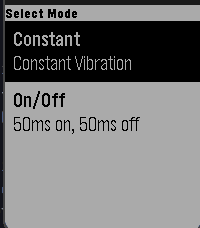
Tools & UtilitiesViber is an app that vibrates your watch! Currently there are 2 different modes: 1. Constant vibration 2. On/Off vibration that pulses in 50ms intervals Once you choose a vibration, press any button to vibrate and then press any button to pause vibration Note: This app can drain battery rather quickly
 7
7PebbleRain
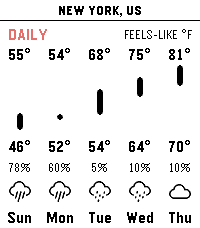
Tools & UtilitiesPebbleRain brings comprehensive real-time weather forecasts directly to your Pebble watch. Powered by Open-Meteo, you can track local current conditions and extended forecasts without any paid subscriptions. [FEATURES] - Simple Three Pages: Press UP/DOWN to cycle between current conditions, a 24-hour hourly forecast, and a 14-day daily outlook. - Multi-Location Support: Long-press UP/DOWN to cycle between current GPS and your custom locations. - Actual vs. Feels-Like Toggle: Press SELECT to instantly switch between actual and apparent temperatures across all pages. - Metric & Imperial Units: Long-press SELECT to toggle between metric (°C, km/h) and imperial (°F, mph). - Touch Navigation: Full support for horizontal touch scrolling to view timeline chart. - Configurable Settings: Use the app settings to toggle live GPS, add cities or custom coordinates, and manage saved locations. [REQUIREMENTS] Requires an active internet connection on paired phone. No API keys required.
 7
7PLC Dipswitch
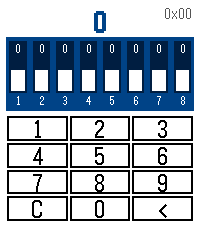
Tools & UtilitiesA simple utility to set or check DIP switches on various electronic equipment such as Modbus nodes. compatible with Time 2 and Round models.
 7
7MARC Tracker
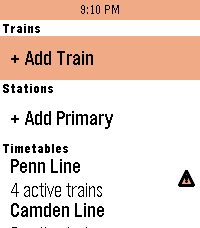
Tools & Utilities"Oh hi MARC!" MARC Tracker is a real-time MARC (Maryland Area Rail Commuter) and VRE (Virginia Railway Express) train status app, allowing you to follow trains on all 5 DMV-area regional passenger railroad lines at the touch of a button. Features: - See upcoming stops, arrival times, and estimated delays for all trains. - View current service alerts for MARC trains (VRE service alerts not currently supported) - Favorite up to 4 trains and 2 stations for quick glances, or scroll through the timetables to view every active, scheduled, completed, and canceled train today. - Works with Pebble Time 2, Pebble Round 2, Pebble 2 Duo, Pebble 2, Pebble Time Round, Pebble Time, and Pebble Time Steel. Originally inspired by the MARC Map app for iOS by Quinn Patwardhan and Pebble apps for many other regional rail services. Uses Maryland Department of Transportation (MDOT) and Virginia Railway Express (VRE) data but is not in any way affiliated with or endorsed by MDOT, MARC, or VRE.