 16
16PebCiti - NYC CitiBike and London Barcla
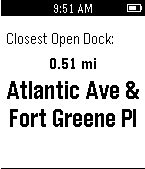
DailyA simple, open-source app to show the nearest available bike share dock or bike on your Pebble. New York City's CitiBike and London's Barclays Cycle Hire are currently supported.
 16
16Walkr
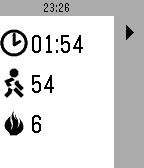
Health & FitnessWalkr tracks your steps taken and calories burned during a training lap. Walkr uses the built-in health kit in your Pebble. When launched Walkr will show the last recorded values. To start a new lap, press the play button. You can pause anytime by pressing the pause button. To end a lap, press the stop button twice within a 5 seconds time frame. Exiting the app will stop the lap as well. Warning: do not rely on this app to give you a complete and precise readout. The app uses the Health Service and inherits the deficiencies of the Health Services.
 16
16hassgraph
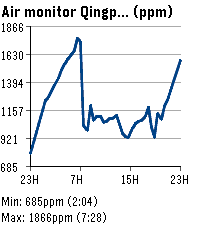
Tools & UtilitiesHome Assistant entity line graphs on your wrist. Supports multiple entities.
 16
16Spring!
DailyEfficient navigation from your wrist Spring! is a dedicated companion for commuters navigating public transport networks in Sweden. Utilizing the device's location, the application identifies the nearest stops for buses, trams and subways nationwide. Data is provided by Trafiklab
 16
16Gabagool.
GamesGabagool. featuring: Gubby THE Plexer [JP] (explicit) as seen on CloudPebble (sorry guys) Crowned first pebble shitpost
 16
16Vuoro
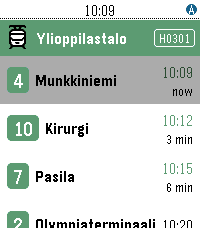
DailyVuoro finds the nearest public transport stops in Finland using your phone's GPS and shows the next departing lines with real-time predictions. Pin your favourite stops, see your city and zone at a glance — across Helsinki, Tampere and many more Digitransit cities. Works on all Pebble models. Supported cities; Helsinki, Tampere, Hämeenlinna, Joensuu, Jyväskylä, Kotka, Kouvola, Kuopio, Lahti, Lappeenranta, Mikkeli, Oulu, Pori, Raasepori, Rovaniemi, Turku, Vaasa
 16
16Phil collins
DailyDirty mustard tiger
 16
16Werkbank
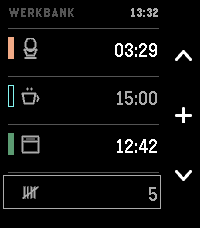
DailyThree timers and a tally counter, for when your hands are already busy. In a kitchen or a workshop you often can't look at a screen or type a label: your hands are covered in dough, or holding something. Three tracks, side by side. The question this screen answers is not "how long has this one got" but "which of these finishes first" — a comparison, so all three are shown at the same size and scale at once. A carousel hides two of them; a ring of arcs distorts them. This is a list. Each track has its own colour — the label you never have to set. USING IT Up / Down — choose a track. Select — set a time; or start, pause, resume, acknowledge. The middle icon always shows what the button will do next. While setting: Up and Down change the time, and holding a button runs through it. The step grows with the value — ten seconds under a minute, half a minute up to ten, then whole minutes. Select starts it. Back keeps the time without starting it. Select, held — give the track a pictogram. Eleven, each one a thing that takes time: an egg, a pot, an oven, a bowl for dough to rise, a cup to steep, a brush for paint to dry, a clamp for glue to set, laundry, a tablet, an hourglass for anything else, and a blank to remove one. Naming stays optional; a timer starts without a label, always. Down, held — reset. On a track that empties it, even mid-run; on the counter it returns to zero. Never a short press; the pictogram survives. No text entry — the watch has no keyboard. No configuration page either: roughly half of those in the Pebble catalogue no longer load. A running track has a filled bar, a set one a hollow bar. That difference is a shape, not a shade: in sunlight two bright tones stop being two tones, a shape survives. When a timer ends, the watch tells you which one, with its colour and its pictogram, and at what time it actually ended — not "now". If it was in a drawer when it happened, "now" would be a lie. This works with the app closed. It vibrates. It does not beep. The Pebble Time 2 is the first Pebble with a speaker, and a timer that sounds off in a shared kitchen is an intrusion into a room, not just a wrist. Silence is the default, not a setting to find. The counter at the bottom counts to 9999, one press each — rows, reps, batches, laps. No phone required, ever. No companion app, no network access, no account, no adverts, no tracking. Everything runs on the watch — which is also why nothing here can be switched off by a server in five years' time.
 16
16MicroNote
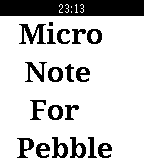
Tools & UtilitiesWrite down and view important information you need to remember: a phone number, a URL, directions, etc. Press UP to enter numbers, press DOWN to enter letters, SELECT to move cursor forward. HOLD SELECT to move cursor backward. HOLD UP and DOWN simultaneously to clear. Leave your phone at home!
 16
16Sykerö Smart Alarm
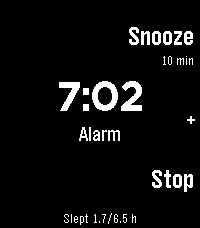
Tools & UtilitiesSykerö Smart Alarm wakes you a few minutes early, at a moment you are already stirring — and never a minute later than the time you set. Instead of firing at the first twitch of movement, it learns how still you have been tonight and waits for a sustained rise above your own baseline: a real lighter-sleep signal, inside a window you choose ahead of your alarm. There is always a hard time behind it, so a quiet night still wakes you on time. A "last night" summary on the watch shows how still you were, what it took to trigger, and when it would have fired at each other sensitivity — so you tune it from your own data instead of guessing. A gradual wake instead of one abrupt buzz: vibration starts gentle with long gaps, then tightens and strengthens, with sound joining later on watches with a speaker. Choose Gentle, Normal or Insistent, or set your own timing. A deliberate stop gesture (long press, or a two- or three-tap) means a sleepy hand can't dismiss it by accident. Up to 8 alarms, each with its own repeat days, snooze and skip-next. Everything is configured from your phone; the watch shows status and quick actions. Worth ten minutes before your first night — what the watch measures, how it decides, every setting, and what the app deliberately does not do: https://github.com/Sykero-Software/PebbleSykeroAlarm/blob/master/docs/how-it-works.md
 16
16Quick Timer
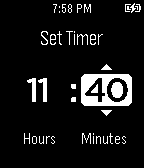
Tools & UtilitiesA simple and powerful watch app to quickly create timers. Features: - Vibration and flashing on timer completion - Auto-hiding toolbar to prevent accidental button taps - Quickly restart a timer with a button tap - Pause a timer and then resume it - Tap and hold to quickly scroll through numbers - Tap and hold middle button to go back when setting a timer
 16
16Pikkleball
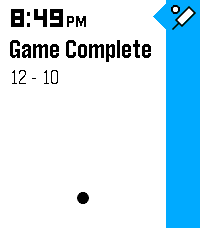
Health & FitnessTrack your Pickleball match scores! - 🎯 Supports 3 modes, Standard (11 pt. match) and Rally scoring (15 or 21 pt. matches) - 💾 Saves/Restores during exits - 😎 Automatically tracks serves on Standard matches while scoring - ✌️ Automatically adjusts scoring goal to assert wins by 2 points (in both modes) - 👆 Supports touch (tap) to bump scores Controls - [Back] - Exits - [Select] Change modes (Start screen) | Mark self as starting server (on game start) | Hold for 3s to reset score (mid game) | Back to menu (on game end) - [Up/Down] Select starting side | Mark which side scored
 16
16TransSee Transit Time
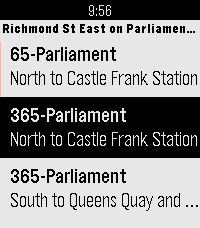
DailyReal-time transit arrival predictions for more than 200 transit agencies across Canada, US and around the world. See www.transsee.ca for the complete list. Currently requires TransSee Premium which costs from CAN$2 for one week to CAN$40 for one year. You must enter your Tidbyt/TronByt Premium Id from your premium email in the settings to activate it. Launching the app will show the stops within 500m. Select a stop for predictions for the next three vehicles. TransSee generates a prediction range based on past travel time for most agencies. Press down to see different branches and alert messages. From the TransSee website settings you can check off “Show link to ‘Send to Watch’”, then you can select a stop from the website and it will appear first on the stop list on your watch no matter how far away it is. Based on Toronto Transit Time by Chester.
 16
16NFL Update
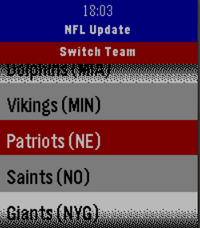
NotificationsNever miss a game. NFL Update brings your favorite team's full season schedule right to your wrist — live scores, final results, and upcoming games, all without touching your phone. No companion app needed, everything is ready to go once you select your team! Made for Time and Time 2, Round and Round 2 coming soon! Features: 📅 Full 2026 NFL season schedule for your chosen team 🔴 Live in-game scores with quarter and clock updates ✅ Final scores with W/L results, color-coded green for wins and red for losses 📊 Win/loss record always visible in the header 🏠 Home and away indicator for every game 📌 Next 3 upcoming games automatically pinned to your Pebble timeline ⏰ 1-hour pre-game reminder notification ⚙️ Pick your team once from the built-in team wheel — all 32 NFL teams supported 🔄 Press Select anytime to refresh with the latest data from ESPN
 16
16Voice J ↔︎ E
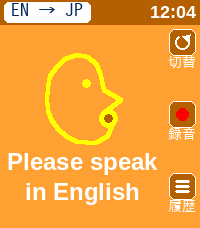
Tools & Utilities英語と日本語相互に対応した翻訳アプリです。 アプリを日本語用と英語用に切り替えて使用します。 翻訳された文字は相手に見せるために180度画面を回転させることができます。 This is a translation app that supports both English and Japanese. You can switch between the Japanese and English modes within the app. You can rotate the screen 180 degrees to show the translated text to the other person.