Pinball on your wrist!
with the ability to load custom maps via your phone saving on the watch, allowing you to play any time, and allowing the ability for anyone to make maps for the game
To Upload a custom map to your watch, go to the receive map Menu option, select,
and then go to Your phone in the Pebble app go to the Watch app on the Pebble app,
and then go to the settings and then enter the map into the settings clay text field,
Then click submit and then you should see the status change on the watch,
Then just wait a few seconds then exit of the watch app, and then when you open it again you should have the option to play the new map.
(there is a debug option, if you press select again in the map Receive it will load a Hardcoded map)
Only compatible with Core Time 2, Core Time 2 Round, Due to new Moddable JS engine that's only available on those two + ( the new JS engine having file access ),
currently supported pinball objects/Map settings + map codes
pop bumpers = W + tag 2,
paddles = D,
bumper = U,
walls = W + tag 1
score plates = Q,
Velocity line colour = V,
Initial balls date and size = B,
Game over Text And settings = G,
High Score text And settings = H,
Score counter settings = S,
physics Settings = P, ( gravity Friction and all that stuff)
Map name = N,
Teleport pad = T
score walls = W + tag 3
TODO
Once I received my order of the Pebble time 2, test map loading and saving works properly And it works properly on proper hardware,
Drop targets, (Probably wondering how to do the best system for linking drop targets, Drop target group ID?)
Spinner, (Attempt but took up too much memory)
What the format looks like (With comments, comments have to be removed, To be a valid map)
================================================
N SillyBounce //map name
P 6,0.35,0.995,0.8,10,10 //ballRadius,gravity,friction,wallBouncy, maxSpeed, maxLaunch //Physic settings
S 2,2,40,16,Bitham-Black,30,255,85,170,85,255,255 //x,y,Width, height, font, fontSize, R,G,B (Normal Colour),R,G,B (High score Colour), //score Text location
G GAME OVER,0.43,0.5,160,40,Bitham-Black,30,255,255,255 //gameOverText, x,y,Width, height, font, fontSize, R,G,B //High Score text
H NEW\\nHIGH SCORE,HIGH SCORE\\n,0.46,0.68,180,60,Bitham-Black,30,85,255,255 //highScoreText, Fail highScoreText, x,y,Width, height, font, fontSize, R,G,B //High Score text
K 85,0,85 //R,G,B //Background colour
B 0.94,0.30,0,0,255,0,85 // startX, startY, vx (Technically overrridden), vy (Technically overrridden), r,g,b //ball
U 0.075,0.265,6,40,170,0,170,255,85,255,3 //x, y,Radius , hit score, (Centre colour) r,g,b, (Ring colour) r,g,b, Bounce Strength //Bottom left hard access bumper
W 0.9,0.6,0.75,0.75,bonker,255,170,0,3 //x1, y1, x2, y2, behavior, r,g,b //Right bonker
W 0.35,0.1,0.1,0.4,wall,255,255,255 //x1, y1, x2, y2, behavior, r,g,b //Topless bunker wall left
Q 0.95,0.60,6,50,85, 85, 0,255, 255, 0,6 //x, y,Radius , hit score, (Inactive colour) r,g,b, (Active colour) r,g,b //Bottom right pressure plate Yellow
D left,0.25,0.9,0.2,0.45,-0.45,0.3,0,255,0 //side, pivotX, pivotY:, length:, restAngle:, activeAngle:, angularSpeed, r,g,b //Paddle left
T 0.17, 0.40,6,0,50,85, 85, 0,255, 255, 0,0,0"; //x, y,Radius , Linked ID, (Central colour) r,g,b, (Ring colour) r,g,b, ExitballVX, ExitballVY //Top right pressure plate Yellow
D right,0.75,0.9,0.2,2.6916,3.5832,0.3,0,255,0 //side, pivotX, pivotY:, length:, restAngle:, activeAngle:, angularSpeed, r,g,b //Paddle Right
V 0,255,0 //r,g,b // Velocity line colour
Q 0.95,0.50,6,100,170, 0, 0,255, 0, 0,6 //x, y,Radius , hit score, (Inactive colour) r,g,b, (Active colour) r,g,b //Middle right pressure plate Psion
================================================
For more information on map format check out the github + Source code
https://github.com/Bod9001/PebblePinball/tree/main
(NOTEs loading maps from phone and saving on watch not yet tested WIP, I may need some help with this due to not having a Core Time 2,
+ not tested on physical hardware due to cloud pebble build only supporting ,Core Time 2, Core Time 2 Round
+ physics can bug out, this is due to writing a custom implementation )
Secret TODO
Port to older Watches? (Wouldn't be able to load custom maps, but this should still work okay otherwise)
Competition note:
was accidentally submitted 4 hours early for wave 2 of the competition, due to time zone differences, was removed after like five minutes of being up, after realising the error 19
19 19
19 19
19 19
19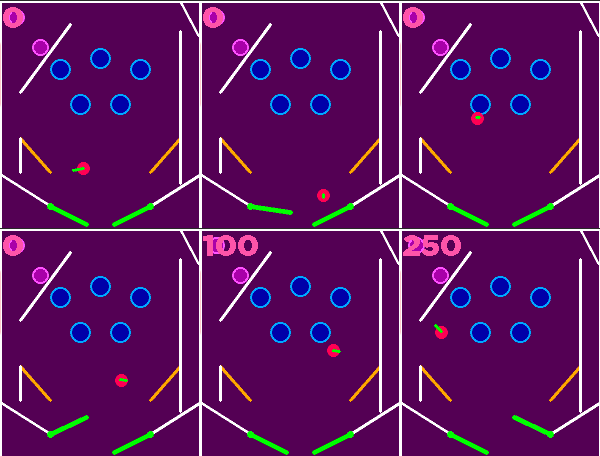 19
19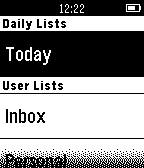 19
19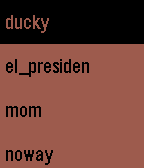 19
19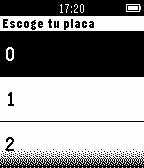 19
19 19
19 19
19 19
19 19
19 19
19 19
19 18
18