 18
18Ping Pong Score
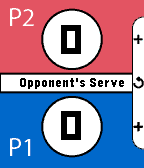
GamesUse your pebble to keep track of score and serve during a game of ping pong. Increment the score by pressing up or down on your watch for either you or your opponent. Also, press the middle button to undo a recent score change. Great for all table tennis players!
 18
18El Universal
DailyEl periódico líder de noticias en México evoluciona para que a través de las nuevas tecnologías llegue la información a tu reloj inteligente. Sumérgete a la experiencia en Pebble donde podrás encontrar el contenido más destacado del medio periodístico.
 18
18QuickHue
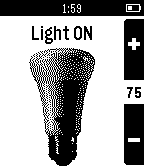
RemotesPebble app to facilitate quick control of a Philips Hue light bulb. It will toggle the preselected light ON or OFF as soon as the app loads, so it is designed to be registered as a button shortcut for quick light control. When the app is already open the Up and down will also change the light brightness. Automatic pairing with the bridge has been added. Any questions or bugs can be reported in the "source link" below.
 18
18Metronome
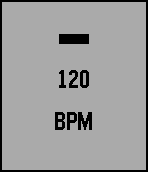
Tools & UtilitiesA simple metronome that provides visible and haptic feedback through vibration. It was made with the intention of being non-distracting while still noticeable.
 18
18TidePebble
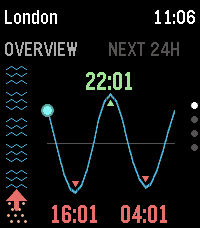
Tools & UtilitiesTidePebble puts the local tide forecast on your wrist. It uses your phone’s location to find the nearest available marine forecast and displays the next 24 hours as a clear tide-height chart on your Pebble. See how much beach is there right now with the "beachometer" on the overview and now pages. See the current tide level and direction at a glance, check the next high and low tides, and browse the full daily curve directly from the watch. TidePebble also shows current swell height and sea temperature, using Metric or Imperial as appropriate. Prefer another spot? Open the settings page to search for a location manually or switch back to phone GPS at any time. Forecast data is provided by Open-Meteo. TidePebble is intended for general planning and should not replace official local tide tables or safety information. Feedback and ideas are welcome - please contact me using the link below …
 18
18Pacelet
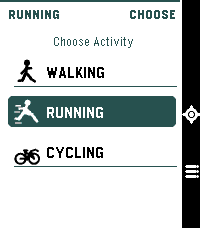
Health & FitnessA simple activity tracker, using phone GPS
 18
18Still Alive
GamesPortal end credits song 'Still Alive' Runs entirely on device, a little over 700 kilobytes Credits run after song due to screen size. I was too lazy to try to fit the ASCII art onto the screen as well. "Still Alive" and all Portal characters, music, and content are the property of Valve Corporation. Most of the data came from this repo: https://github.com/errorer/Portal_StillAlive_Python
![Swiss Transit [BETA]](https://assets.repebble.com/screenshots/55fecf6c4d083d7dea000086-0.png) 18
18Swiss Transit [BETA]
DailySwiss Transit saves you the hassle of pulling out your phone to check which public transport connection you need to take. With one click, it checks connections from stations near you to stations near your destination. If you are enjoying the app, please consider buying me a drink paypal.me/GMateo You can do the following: -Add stations near you to the favorites -Edit how far you are willing to walk to your destination or delete the favorite (long-press select on a favorite) -Scroll through connections -Press select on a connection to see where you need to transfer (green screen) Before using the app, you need add your favorite stations by visiting them and adding them from nearby stations. The app uses the SBB API so it shows connections from SBB and all local public transport providers in Switzerland Don't hesitate to contact me if you have an idea for an enhancement or a problem.
 18
18Baseball Pitcher
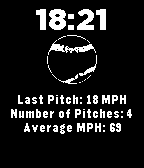
Health & FitnessAre you looking to improve the speed and consistency of your pitching? Strap on your Pebble, open your Baseball Pitcher app and start pitching! Get your most recent pitch speed and your average pitch speed over your entire practice.
 18
18WindSock
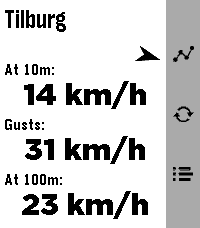
DailyWindSock is a basic location based wind Forecast app that I made mainly for my drone flying. But I'd imagine it being useful for many outdoor activities 🚁⛵😎 Watch: 🔶 Main screen shows current wind speeds at your current location (shown on top) at 10m , gusts and at 100/120m, and a small arrow for bearing 🔶 Forecast screen (down button) gives you a (touch-)scrollable 24hr hourly forecast of all these values (also bearing!). Where a line turns red when either Gusts or 100/120m Winds exceed your set warning threshold 🔶 12hr forecast Graph screen (up button) for all three values (Gusts in red in colour screens). Adapts to km/h, mph, m/s or kts choice. Phone side settings: 🔷 Choose wind speed unit between kilometers per hour (the default), miles per hour, meters per second or knots. 🔷 Choose between wind models 'Global' (the default) and 'Benelux'. 🔷 Choose your own 'Strong wind warnings' speed limts The Benelux KNMI model is slightly more accurate for NL, BE and LX (the model I used as main up to v1.2) but reports the high winds at 100m instead of 120m. The 100m/120m label on main will switch accordingly with your model choice. 👉 Just select Refresh on the watch main screen to apply any changes (or just refetch the data). ☑️ Chosen wind model or wind speed unit are persistent over launches. Data comes from Open-Meteo so should give you a worldwide coverage. Resolving phone's location into location-name done by a call to BigDataCloud. App uses phone location and loads all data fresh every time you start the app. Like what me and Claude made? Then give it some love in the store 😘🩷 And do check out my other stuff here:
 18
18Heart Rate FX
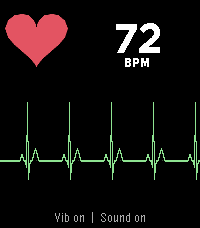
Tools & UtilitiesYour pulse as a trace, a sound and a light. Heart Rate FX turns your watch into a bedside monitor. It reads the optical sensor and shows every beat three ways at once: a sweeping ECG-style trace, a short monitor beep through the speaker, and the backlight swelling in time with your heart. Where the watch reports the interval between two measured beats, the app follows those intervals rather than an averaged number, so the rhythm on screen is the rhythm in your chest. The status line says "Live" then. FEATURES - Sweeping trace that draws a P-QRS-T complex for every beat - Monitor beep at 880 Hz, held on a stream so the amplifier cannot click between beats - Backlight that pulses with the beat, in any colour, at an adjustable floor - Vibration click on every beat, for quiet rooms and watches with no speaker - Beep pitch, volume, trace speed and trace colour adjustable - Demo pulse for showing the app without a sensor - English, German, French, Spanish, Italian, Dutch, Portuguese, Polish, Swedish BUTTONS - Select: vibration on or off - Up: sound on or off - Down: step through what the backlight does - Down, held: demo pulse on or off Settings live in the Pebble app on your phone, under the gear next to Heart Rate FX. The speaker and the colour backlight exist only on the Pebble Time 2. Other watches get the trace and the vibration, and leave the backlight alone. This is not a medical device. The trace is drawn from the intervals the watch measures; it is a picture of your pulse, not a recorded ECG. Vibe coded from start to store. That is the only reason it exists alongside a full time job. The app is free and has no ads. If you enjoy it, a coffee is much appreciated: https://buymeacoffee.com/SIDEffects
 18
18Fontastic
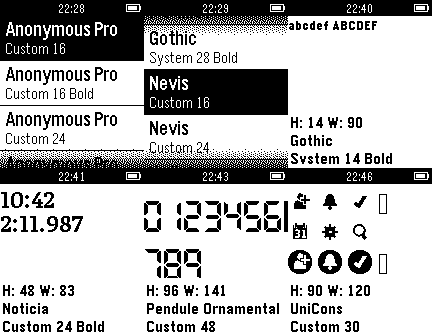
Tools & UtilitiesPreview how fonts are displayed on the Pebble. Aimed at developers with the goal of helping them decide if their app should use a built-in font or one of the more popular custom fonts. Includes monospaced, digital (LCD / 7-segment display), and sans serif families. Most are clear and readable when sized down to be small or even extremely tiny. Open source repository on GitHub so you can see how this was done and use the fonts in your own project.
 18
18Indigo Remote+
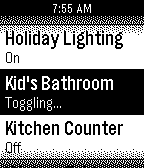
RemotesAn updated version of Zach Benz's Indigo Remote app. A remote control for Perceptive Automation's excellent Indigo home automation server for Mac OS X. There is a limit of 50 devices and 50 actions. There is now a filter feature so that you can prefix the devices/actions you want to load on the watch and only have those show up.
 18
18UAT
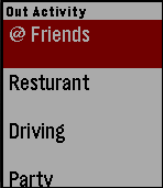
NotificationsI bring to you the ability to see past yourself, and on to others. With UAT (you-at), you can now keep track of up to 5 of your most favorite people by simply checking your wrist. 3 Easy Steps: 1.) create a username and password in the settings 2.) one-time log in 3.) add members and deleted username to view status Do you need some practice friends? you can enter your own username or one of the following as a family member. 1.) mre 2.) a 3. )b 4.) c 5.) d
 18
18Indicadores Chile
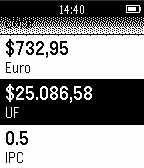
DailyPrimera versión de Indicadores Chile para Pebble, podrás ver los onomásticos, UF, UTM, valor del dólar y más en tu reloj Pebble. By Chalalo