 19
19Heartrate2Pebble
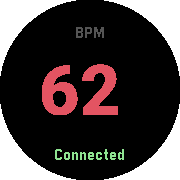
Health & FitnessTurn any Pebble watch into a heartrate monitor. This app is designed for owners of Pebble watchs without builtin heart rate monitor but own standalone Bluetooth wearables and want to view their heartrate without constantly checking their phone. The Android companion app can be found at: https://github.com/meerkat42/heartrate2pebble/releases Please dont hesitate to report Bugs and Feature Requests at: https://github.com/meerkat42/heartrate2pebble/issues
 19
19Nicolas Cage Quotes
Tools & UtilitiesAn app to show quotes from Nicolas Cage movies, chosen randomly from a list. Made at Northwestern University's WildHacks. This app is open source and freely available on GitHub.
 19
19Roll
GamesWant to play a game that requires rolling a die, but you lost it? Have no fear, Roll app is near! Wiggle your Pebble or push one of the buttons to get your lucky number!
 19
19De Lijn
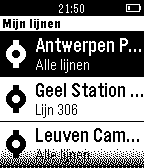
DailyCheck snel real-time doorkomsten van bus of tram aan je favoriete haltes van De Lijn – onmiddellijk op je Pebble. Deze app is onafhankelijk ontwikkeld en wordt niet beheerd of ondersteund door Vlaamse Vervoersmaatschappij De Lijn. Ontwikkeld voor pendelaars in Vlaanderen, België.
 19
19Star traveler
Tools & Utilitiesalways wanted to travel faster than lightspeed between stars? now it's possible! app built especially for pebble. idea based on: the screensaver called "flying trough space" notes: might decrease battery time (updating screen multiple times/second)
 19
19Misfit MC
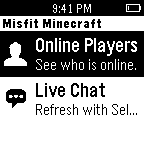
DailySee who is online the Misfit Minecraft server, and monitor the live in-game chat. Press the Select button on either view to refresh the content.
 19
19UnlockThePlock
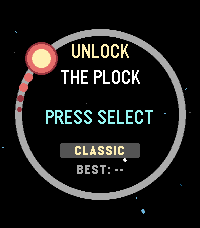
GamesA clone of the game "Pop The Lock" For pebbles, this time it's kinda more space themed.
 19
19minutes viber
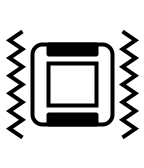
Tools & UtilitiesThis app tell you the current time by the vibration. The vibration is for hour, for quarter then for minutes. This app will terminate immediately just after the vibration so it is expected to be assigned as the quick launch.
 19
19ForeCasWatCompanion
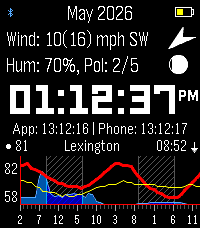
Tools & UtilitiesI made a version of the forecaswatch2 watchface that runs as an app, so you can interact with it and have different info. I found that binding the app to a quicklaunch button helps it feel like a seamless feature of the FCW2 face. Features are: Top screen shows extra weather info, such as wind speed and direction, moon phase, humidity, pollen info (need a key from google cloud maps pollen, otherwise shows barometer), second screen shows personal weather station from wunderground via ID entered in settings screen. Bottom screen shows 48 hour extended forecast with wind line in yellow thanks to cdlenfert on a branch of the original face that has not been implemented there yet. 2nd screen shows 7 day high and low temps with rain chances as bars beside. Middle screen shows time with seconds, or zulu time. Side buttons toggle corresponding screens, as well as touching the top and bottom screen. Holding middle button forces a weather fetch. Last sync shown below clock, will auto sync if older than 10 minutes or location has moved more than 5k. App times out after 30 seconds of interactivity (minus touch screen) and exits back to watchface. Stays open when settings screen is open on phone. All credit to mattrossman for building original watchface, all this was based on forecaswatch2, using google antigravity to code additional features mentioned.
 19
19Odjezdy MHD
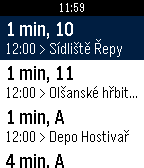
DailySeznam odjezdů spojů MHD z nejbližších zastávek v okolí.
 19
19Watch Tools
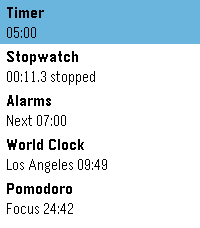
Tools & UtilitiesFive watch utilities in one place, wearing the same design as the weather app built into PebbleOS: a clean white card, one big number, and a ring that shows you where you are at a glance.
 19
19PobbleCopter
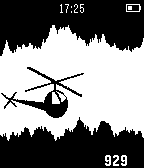
GamesA simple helicopter game, get as far as you can by rotating your wrist, crash and start again!
 19
19Olde English Insult Generator
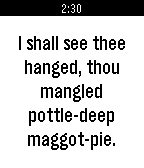
Tools & UtilitiesOn the go and you run into an enemy! Have no fear! Get a classy insult with a click of a button on your Pebble. Get a new insult with every click for eternal verbal jousting.
 19
19Nuggetz
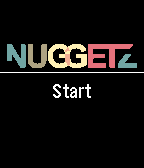
GamesNuggetz is a FREE TO PLAY reaction game for the Pebble Time and Pebble Time Round. It is based upon the Stroop effect. The task is easy: Just name the color in which a word is written, not the word itself. If you make a mistake the game is over. Sounds easy? Just give it a try and play the game for free. Tell your friends to play it as well and find out, who can score the highest. The companion apps are OPTIONAL and only required in order to submit your high score to the Apple Game Center or the Google Play Games Services.
 19
19KVV.live
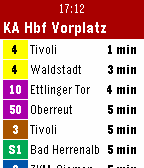
DailyShows live departure data from Karlsruhe's public transit (KVV). Configure your frequented stops on the phone, then view departure information on Pebble. Data is taken from live.kvv.de Deutsch Zeigt Live-Abfahrtsdaten des Karlsruher Verkehrsverbundes (KVV) an. Zuerst die üblichen Stationen am Handy einstellen, dann die Abfahrtszeiten auf der Pebble ansehen. Daten kommen von live.kvv.de