 21
21Checklist with Web
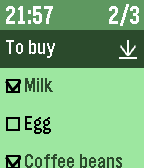
Tools & UtilitiesDo you have checklist on Wunderlist or CarbonFin outliner or dropbox ? This app import your checklist data from Wunderlist or CarbonFin outliner, or plain text list on web file server like as dropbox. * CarbonFin outliner is an iOS outliner App. * Features - import checklist from web service , Wunderlist or CarbonFin Outliner or dropbox . - can reload recent 5 checklists quickly - display current time - display checked item number and all item number * How to operate - select cursor with up/down button - at item line, check/uncheck with select button - at checklist name line, reload with select button, delete with long push select button - at bottom line of named "Delete Checked", delete all checked items with select button * How to import checklist from web - see config file of this App * Note - Please set checklist URL again after version up from ver.1.3 or lower .
 21
21Decision Maker
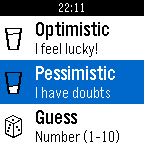
Tools & UtilitiesThe decision making process was never easy. This pebble app is here to help you out! Whether you are optimistic or pessimistic there is always a quote response for you!
 21
21CoffeeTime
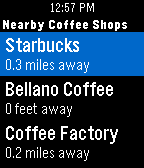
DailyEver have that moment when you are trying to find coffee shops in an area you're not familiar with? Fret not, CoffeeTime is here to guide you. All you have to do is to launch CoffeeTime, and you will see a list of nearby coffee shops along with its distance (This process could take up to 5 seconds as your phone's GPS pinpoints your location). Click into it and you can see the store's address so you know which direction to go! - Possible Use Cases - > Experiencing caffeine withdrawal in an unfamiliar territory > Craving for coffee while stuck at a traffic light > Suggesting a #coffeemeetup with your buddies > Not sure where to bring your crush to a coffee date without awkwardly checking your phone Last but not least: We do not store your location information nor do we collect any other data. Now you can look for coffee right at your wrist!
 21
21Exec File
RemotesAn app that allows you to execute remote files from your pebble. The app needs a companion app, server, to be running on your local network and to be accessible via HTTP. The number of files that you can execute is not limited, and you also get visual feedback in form of message. The message contains whatever was written to stdout or stderr. More info and companion server can be found at https://github.com/romanmatiasko/exec-file-pebble
 21
21Esteem Aid
Health & FitnessFeeling down? Are your friends hating on you? Do you feel like nobody loves you at all? Welcome to Esteem Aid, the app that recognizes some of us just need a shot in the arm to get going. Get the praise you deserve any time of the day. Soon, you’ll be wondering who needs friends anyway when Esteem Aid is only a glance away?
 21
21Dota2Timer
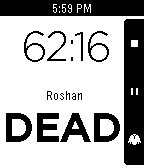
GamesA timer app for DOTA2. Features: Roshan status - Press a button when Rosh is killed, and you'll get a display of its status (dead or alive) or the chances of it having respawned. Optional vibration on "53 Optional vibration on 03:00 When paused, allows to correct the timer. The application is still under development but functional. Please file bugs and request features on my github page!
 21
21Base Camp - Daily Puzzles
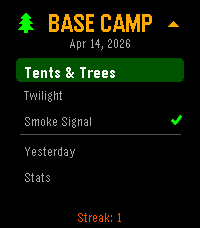
Games3 Daily Puzzles! 2 difficulty levels each. Date Seeded so everyone gets the same puzzle every day. Designed for the Pebble. Tents & Trees: Find a campsite for every tree where its touching a tree, but not near another campsite! Smoke Signal: Follow the guides on the side to light the correct fires! Twilight(binario): Fill the grid with suns and moons, can never have 3 in a row, all rows/cols must have equal # of each, every row unique! Stats and play yesterdays in case you missed it. Use the 4 Pebble buttons as directions (UP/DOWN/LEFT/RIGHT) and tap to select/toggle the cell. (New! tried to fix tap logic... as a fallback, if it doesn't work, you can LongPress Select to toggle.)
 21
21Flight Companion
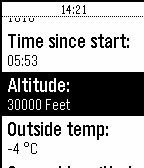
NotificationsFlight Companion shows you flight data directly on your Pebble! Information like remaining flight time, groundspeed or altitude are directly and instantly readable on your wrist. This App works on all Lufthansa Board Connect Flights (also Eurowings continental Flights with Wings Entertain) and uses an certified and safe open API. Just connect to the in-flight-WiFi and it will work like magic. If not connected to Lufthansa Board Connect or Eurowings Wings Connect Flight Companion will only show some Demo Data. If you press the select-button you will be able to set an alarm for any desired time before your arrival. Simply shake your wrist to update data!
 21
21Jue Ju
Tools & Utilities絕句,又稱截句、斷句,四句一首,短小精萃;是唐朝流行起來的詩歌體裁,屬於近體詩的形式。 本程式包含唐詩三百首中八十首絕句。 資料來源:Wikisource
 21
21Wellby Health
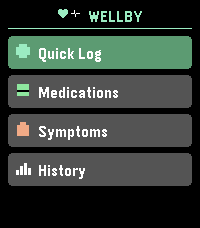
Health & FitnessWellby is a health tracking app for Pebble that puts daily check-ins on your wrist. Log mood, energy, and pain in under 10 seconds. Track medications with one tap. Record symptoms with severity levels. View 14-day trend charts. Set reminders. Customize your symptom list, medications, colors, and more from the phone settings. Designed for people managing chronic illness who need quick, consistent tracking without pulling out their phone. No data ever leaves your watch or phone.
 21
21Mindful Practices
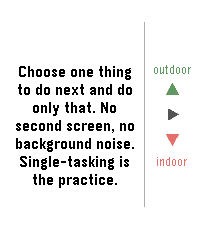
DailyAn app to remind you to slow down and smell the flowers. This app comes will many prompts that can help you be a little more mindful each day and even set reminders if you'd like to get in the habit of enjoying this odd life we're in.
 21
21Koishi - 小石
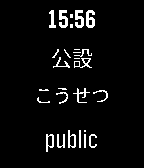
Tools & UtilitiesKoishi - 小石 is a Pebble Watchapp for the japanese learning service called WaniKani, which teaches Japanese to tens of thousands of users by utilizing a well known learning mechanism called Spaced-Learning-Repetition (SRS). Combining this learning system with the watchapp, one can more immerse themselves in this target language. You will need a japanese language pack for your Pebble to correctly display japanese characters on the screen. I recommend this free package http://wh.to/pebble/wiki.php but consider donating to the author. With this watchapp you will be able to choose between showing the recent unlocks words or the critical items. Show a different word each minute with the 'automode' or manually, first the japanese word and later the pronunciation and meaning on the click of a button. You could configure the watchapp to use the darktheme, if it suits better with your pebble style than the light theme. If you have suggestions or encounter any problem, contact me and I'll help you. If you find this watchapp usefull, please consider making a donation : 12WqEENZgRGCLpRYiuutuAT3WsmCFS2BBQ
 21
21Squire
Tools & UtilitiesSquire allows you to communicate with either OpenClaw or Hermes using Telegram
 21
21Golfsol
GamesFawzmaGames presents Golfsol. Golfsol is a fast paced solitaire game based off golf solitaire. Move the card select with the top button. Middle button is used to select the card and put on the bottom row. You need to chain your cards with other cards that are value above or below the previously shown card. Bottom button adds a card to the pile.
 21
21Hourly Rate
Tools & UtilitiesSee time as money. Good for anyone who works by the hour, or who puts a $$$ value on their time. Great for attorneys, consultants, et al. Configurable hourly rate with a start / stop timer. Shake wrist to toggle between seeing hours or dollar value as main display. Works with iOS and Android.