Pour Decisions - Weekly Drink Tracker
Unknown
Watchapp
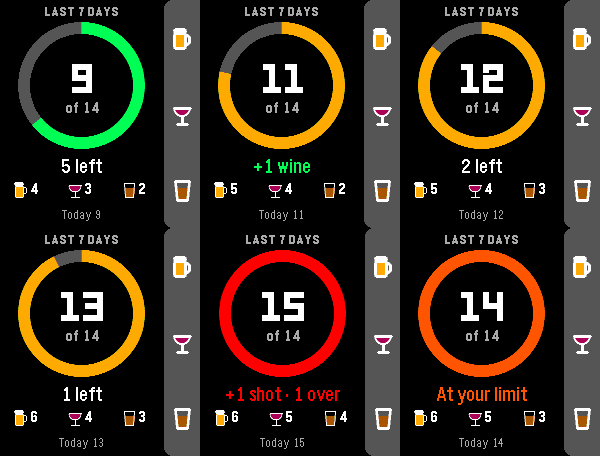
Description
Make some Pour Decisions with this simple drink counter for your wrist. One button for each drink, one glance to see where your week stands.

HOW IT WORKS

Up: +1 beer
Middle: +1 wine
Down: +1 shot
Hold any button to take back an accidental press

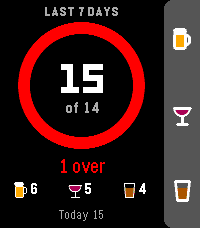
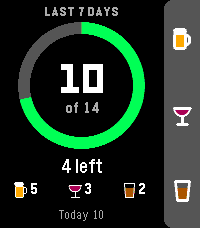
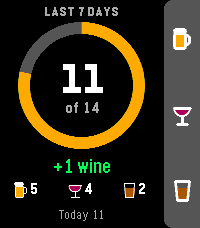
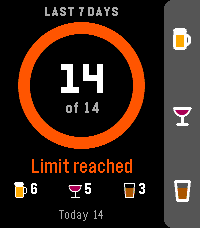
A progress ring fills up as you get closer to your weekly limit. It starts green, turns yellow near the limit, orange when you hit it and red when you go over. The watch buzzes when you reach your limit, so you don't have to keep checking.

FEATURES

Weekly total shown against your limit, plus how many drinks you have left
Separate counts for beer, wine and shots
Today's count, and in rolling mode, how many drinks drop off at midnight
Quick buzz to confirm each add, double buzz for each undo
Your weekly total shows under the app name in the launcher
Works offline and keeps everything on your watch

SETTINGS (from the Pebble phone app)

Weekly limit: defaults to 14, the NIAAA low-risk guideline for men (7 for women). Set it anywhere from 1 to 40.
Week style: a rolling 7 days (default), or a calendar week that resets every Sunday.

One drink = 12 oz of beer, 5 oz of wine, or a 1.5 oz shot.

Built for Pebble Time 2. Also runs on Pebble Time, Pebble Time Steel and Pebble 2.
- DeveloperUnknown
- CategoryTools & Utilities
- PlatformsTime/Time Steel, 2, 2 Duo, Time 2
- Updated2026-09-27
- Version1.1.0