 47
47Weather-O-Graph
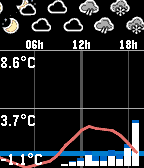
DailyThis app displays current weather forecast in a graph form, from one of the following services: * yr.no (probably most of the world) * aladin (Czech republic) Controls: * 'up/down' scrolls the view * 'middle' button press resets the view * 'down' long press switches the service
 1
1Bahá'í Prayers
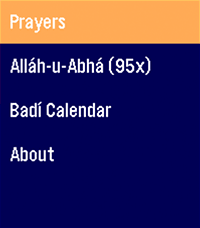
DailyAn application for Bahá'ís to access a quick prayer book, act as a digital replacement for prayer beads in a pinch, and show you the current date on the Badí / Bahá'í calendar! COMING SOON: * Pre-populate holy days and feasts on your timeline * Qiblih finder (I have to figure out the heading / compass API... my brain hurts)
 12
12Star Fighter Flight Game
GamesRetro top down airplane game. Captain Featherbottom has kidnapped your favorite donkey "Bill the Horse". You must jump in your space triangle and do space shooting to get him back. Get powerups for 3 different main weapons - Lasers, Rockets, Something I cant remember thats like bullets. Collect gold for powerups b/c I think I made it way to hard... 50 levels. If they are broken tell me. If anything is broken tell me. Help me save Bill!
 9
9deathtime
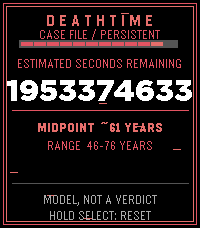
Tools & UtilitiesUnlike the pebble, we might not be reborn??? 😟 Uses the same principles as Vsause's death clock except instead of 80 dollars, it's free. made by a afraid agnostic. (of course its not to be accurate and is an estimation) (obligatory Monty Python reference) Why are we here, what's life all about? Is God really real, or is there some doubt? Well tonight we're going to sort it all out For tonight it's the Meaning of Life
 11
11Ishiki JP
DailyFlashcards on your wrist. Flip, grade, repeat. Supports the Japanese language. Review your Anki decks straight from your Core Time 2. Pick a deck, read the front, press to flip, and grade with a single button — ✓ Good · ~ Hard · ✗ Again — with a color flash and a buzz. Long cards scroll, due counts update as you study, and a quick vibrate tells you if the phone link drops. Private and offline: it reads your cards from AnkiDroid on your phone (which syncs to AnkiWeb itself) — no account, no server, nothing leaves your device. **Requires (Android):** the free Ishiki companion app + AnkiDroid on the same phone. Get the companion: github.com/f4nu/ishiki **Controls:** Up/Down scroll · Select reveals · then Up = Good · Select = Hard · Down = Again · hold Up/Down to scroll a long answer.
 1
1BB Intercept
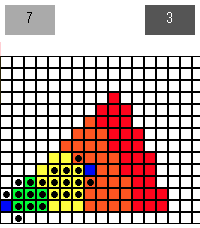
Tools & UtilitiesAn interception calculator for Blood Bowl. Simply set the x/y coordinates of the target square from the thrower and it will show you all squares which can intercept the pass.
 12
12Notion Notes
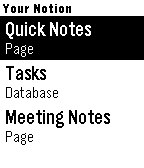
Tools & UtilitiesCapture notes by voice and run your Notion — right from your wrist. Notion Notes turns your Pebble into a voice-powered remote for Notion. Speak a thought, tick off a task, or open a page — all in a couple of button presses. 🎙 Voice capture Press, speak, confirm. Your words are saved straight to the Notion page or database you choose — a new note, a new task, done in seconds. 🗂 Your whole workspace, automatically Every page and database you share with the app just shows up. No URLs to copy, no IDs to paste — pick a target and go. ✅ Check things off Tick to-dos, checkbox columns, and status fields (Not started → Done) directly from your wrist. Your changes sync to Notion instantly. 🧭 Drill in Open databases to browse their rows, step into sub-pages, and dig into a row to see and edit the content inside it. 📝 Reads real pages Pages that mix notes, lists, and tasks stay readable — items are grouped into Tasks, Pages, and Notes so nothing turns into a wall of text. 🗑 Manage on the go Long-press any item for quick actions: open it, or delete it (safely — deleted items go to Notion's trash and can be restored). Set up in a minute Create a Notion integration, paste the API key into the app settings, and share the pages you want. That's the whole setup. Your watch. Your Notion. Hands-free.
 14
14Trizones
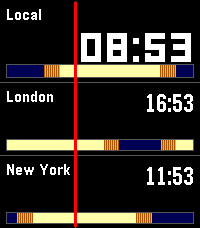
Tools & UtilitiesTrizones lets you track three time zones at a glance - perfect for remote teams, frequent travelers, and anyone with family scattered across the globe. Each row shows a city name, its local time, and a colour-coded sunrise/sunset band so you can instantly see whether it's day or night there. The band shifts as the sun moves, giving you a visual sense of where each city is in its day. Features - Three simultaneous time zones, fully configurable - Sunrise and sunset visualised for each city - Optional sunrise/sunset time display - 5+ themes: Midnight, Aurora, Dusk, Slate, Ice, and more - Time travel: step forward and backward in time with the Up/Down buttons to plan calls across zones - Press Select to instantly return to the current time - 40+ cities pre-loaded including London, Tokyo, New York, Sydney, Lagos, Dubai, San Francisco, Buenos Aires, Tel Aviv, and more Designed for Pebble Time 2, support for more models will come in the future.
 30
30Music Assistant Control
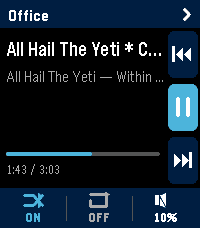
RemotesMusic Assistant Remote turns your Pebble Time 2 into a proper remote for your Music Assistant server. Transport, volume, multi-room grouping, and one-tap shortcuts to your library — all from your wrist. It's built specifically for the Time 2's touchscreen and four buttons. Music Assistant works either as a standalone server or as a Home Assistant add-on; either is fine. The now-playing screen shows the current track, artist, album, elapsed and total time, and a progress bar. The right edge of the screen has a column of three icons for previous, play-pause, and next — they're tap targets, but the watch's UP, SELECT, and DOWN buttons do the same things. Along the bottom is a strip showing whether shuffle and repeat are on, plus the current volume. Tap the shuffle bit to flip it. Tap repeat to cycle off, all, one. Tap the volume bit to jump into a full-screen volume control where UP and DOWN nudge the level and SELECT mutes. Switching players is easy. Tap the player name at the top of the screen and you get a list of every player your server knows about, sorted alphabetically, with a green/amber/grey dot showing whether each one is playing, paused, or idle. By default the watch sticks to whatever player is currently playing, but tap any row to take over a different one. Long-press any player row in that list and you get an action sheet for grouping. If the player is on its own, you'll see a list of every other player it can join. If it's already in a group, you'll see options to leave, add another player, or tear the whole group down. Members appear indented underneath their master in the list, with a chain badge on the master so you can read the setup at a glance. Quick Play is the shortcuts feature. Long-press SELECT on the now-playing screen and you get a menu of up to ten things you've pinned — albums, artists, playlists, whatever your library has. Tap one and it starts playing on whichever player you're currently controlling. You set the shortcuts up on the settings page from your phone: type into the search box, the page hits your Music Assistant server directly, you tap a result to pin it. The shortcuts live on the watch too, so the menu still works even if your phone hasn't synced yet. A few things worth knowing before you configure it. The settings page is served from GitHub Pages, so your Music Assistant server needs to accept CORS requests from that origin. If you're running MA as a Home Assistant add-on the easiest fix is a small bit of config on whatever reverse proxy you have in front of it.
 81
81Small Places
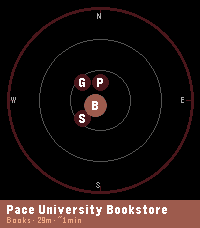
DailySmall Places Discover the independent businesses and hidden gems around you — no chains, no noise. Small Places uses OpenStreetMap to surface nearby cafes, bookstores, vintage shops, bakeries, parks, and more, filtered by walking distance and updated as you move. Built to help you slow down and appreciate the small things in life. ! Developer Notice (June 22nd 2026) - This app is currently powered by the free Overpass API. Overpass has been experiencing increased traffic as of late and is working on developing strategies to best manage the quantity of requests they receive. While this app does everything it can to be a good user of the Overpass API and minimize requests, the landscape for interacting with the Overpass API is currently very volatile. For the Small Places app, this means sometimes requests may sometimes be dropped and businesses will fail to populate. As the situation develops, alternative solutions to provide you information about local small businesses are being considered ! Features: - Live nearby list with walk-time estimates and closing-soon warnings - Compass radar view showing places by direction and distance - Smart time-of-day priority sorting (coffee shops in the morning, bars in the evening) - Mood presets to instantly switch your search focus — Morning Fuel, Lunch Break, Evening Out, Weekend Wander - Save spots you want to visit later to "My Places" for quick reference - Chain filtering keeps results locally-owned and independent - Background wake-ups so results are ready when you raise your wrist - Configurable radius, poll interval, hours filter, and measurement units - Manual latitude/longitude input mode lets you explore local businesses anywhere in the world from the comfort of your current location (or simply get a better idea of the app's abilities without downloading to a physical watch) Supported Business Categories: Art & craft, bakeries, bars & pubs, bike shops, bookstores, cafes, clothing, florists, game stores, gift shops, grocery, hardware, libraries, music stores, parks, pet stores, restaurants, specialty food, toy stores, vintage & second-hand shops. Platform notes: - Full experience (color, radar view) on Pebble Time 2, and Pebble Time Round 2 - Pebble 2 Duo: all features supported, radar view not available to save you some space for a more lightweight small places experience - Original Pebble: supported with a reduced nearby list (5 places) and bookmark limit (10); radar view not available. Just the core functionality without modern space expectations weighing you down. Powered by OpenStreetMap contributors — this app wouldn't exist without their effort. --- If you would like to give back and make sure your favorite local businesses in the area are on the map and well documented for everyone to enjoy, please check out OpenStreetMap: https://www.openstreetmap.org. This app is not directly affiliated with OpenStreetMap but does draw its data from there. The OpenStreetMap editor interface is fairly easy to use for making quick updates in your local community. Please ensure proper contributor standards are maintained and contribute responsibly!
 27
27Colorful QR
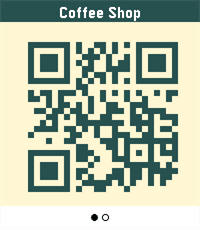
Tools & UtilitiesColorful QR turns your Pebble Time 2 into a colorful barcode & QR wallet. Store loyalty cards, passes, and codes (QR, Aztec, Data Matrix, PDF417, Code 128) — and give each one its own colors: pick the code color and the background so every card is instantly recognizable on your wrist. The title ribbon auto-contrasts so labels always stay readable, and you set each card's colors from a simple settings page in the Pebble app — no account required.
 71
71World Clock
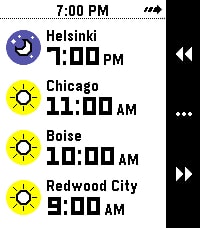
Tools & UtilitiesWhat's the current time in Helsinki, Boise, and Redwood City? When it's 4 PM in Amsterdam, what time will it be Sydney? Instantly answer questions like these right on your wrist with World Clock! With World Clock, you can choose up to 8 timezones to display at your wrist. You can also use Time Travel to scrub forward and backwards in 30-minute increments, so you can compare different timezones. To use it, open the Settings app on your phone and select cities to add to the list. World Clock will automatically populate the name field with the name of the city, but you can change it to whatever you like. You can also quickly enable and disable timezones, too. Time offsets are calculated by the phone, and synchronized to the watch. The watch caches all of the cities and time offsets, so if your phone isn't nearby, you can still use World Clock. Your phone will check on all of the timezones whenever World Clock starts, just in case something like Daylight Savings Time has happened recently (and you'll see a small "X" if the watch wasn't able to sync with the phone). If you like to switch Pebbles, no problem! The timezone list is saved on the phone, and automatically synchronized to whatever Pebble you are wearing. Pebble Round 2 support coming as soon as it arrives!
 14
14Meme Stream
Tools & UtilitiesMeme Stream shows random captioned memes pulled live from Reddit's popular meme communities via the public meme-api.com service. Press any button for the next meme. All content is sourced from Reddit and is NOT created, owned, hosted, or endorsed by the developer, who accepts no liability for what appears. An NSFW/spoiler safety filter is applied using Reddit's own content tags only - the developer does not control, review, or guarantee what is shown. Viewer discretion advised.
 1
1Basebble
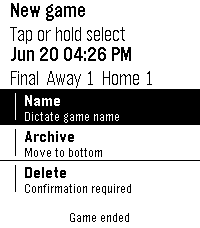
Tools & UtilitiesA simple baseball game score tracker for Pebble
 16
16Spring!
DailyEfficient navigation from your wrist Spring! is a dedicated companion for commuters navigating public transport networks in Sweden. Utilizing the device's location, the application identifies the nearest stops for buses, trams and subways nationwide. Data is provided by Trafiklab