 7
7BusPebbIL
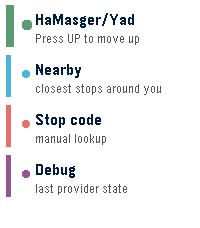
Tools & UtilitiesInitial Rebble Appstore release for Pebble. Includes live Israeli bus arrivals, favorite stops, nearby stop lookup, manual stop-code lookup, cached fallback data, configurable settings, hidden diagnostics, and first-run button guidance. Use Up/Down to move, Select to open or refresh, Long Select to save/remove favorites, and Back to return home. The app is entirely vibe-coded - use at your own risk
 19
19WikiRadar
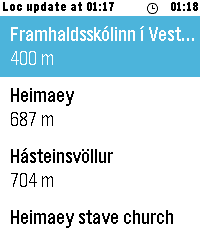
Tools & UtilitiesWikiRadar shows you Wikipedia articles about the places around you. SCAN — a list of nearby articles with distances, refreshed automatically as you move around. READ — full article intros on your wrist, cached for offline reading. NAVIGATE — a live compass arrow points at the place you picked, with the distance counting down as you walk. Long-press any place in the list to jump straight to the compass. Shake to refresh. Configurable Wikipedia language (13 languages), search radius, and metric or imperial units. Should work on every Pebble, but only tested on the Pebble Time 2
 16
16London Underground Tracker
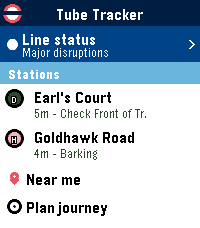
Tools & UtilitiesLondon Underground Tracker is a fast, real-time app for departures and navigating the Tube on Pebble. It started quite small (single-station departures) but grew into a full-featured, glanceable Underground app. If there are any fixes or additions you want to see, please reach out! A few notable features… - Current London Tube line service status - See live departures, platforms, and timings across all Underground and Overground stations - View approximate tube locations and crowding data - Find your closest stations and jump straight into live departures - Simple route finder for tube-to-tube travel with changes Disclaimer: This app is an independent project and is not affiliated with, endorsed by, or connected to Transport for London (TfL).
 59
59Chess Puzzles
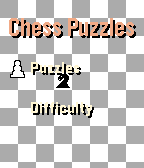
GamesNow with touch screen support! Sharpen your chess instincts from your wrist. Chess Puzzles brings real, rated tactical puzzles from Lichess directly to your Pebble watch. No phone staring required. Just press a button, think, and play. ## Features - **Real puzzles, live from Lichess** — every session pulls a fresh rated puzzle from the world's largest free chess server - **Offline-ready** — your last fetched puzzle is cached on-watch; 7 fallback puzzles ensure you can always play, even without a phone - **7 difficulty bands** — from Easiest (~600 Elo) to Expert (~2400 Elo) - **Wrong-move feedback** — a short vibration and "Wrong! Try again" keep you honest without giving the answer away ## Future features [ ] **Puzzle solved counter** — your lifetime solve count is tracked in persistent storage [ ] **Solve calendar** — daily puzzles mark the calendar so you can track your streak [ ] **Support for round screens** - Chess puzzles on any Pebble
 16
16Vuoro
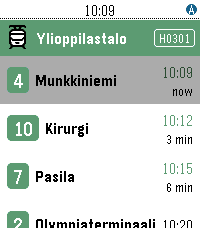
DailyVuoro finds the nearest public transport stops in Finland using your phone's GPS and shows the next departing lines with real-time predictions. Pin your favourite stops, see your city and zone at a glance — across Helsinki, Tampere and many more Digitransit cities. Works on all Pebble models. Supported cities; Helsinki, Tampere, Hämeenlinna, Joensuu, Jyväskylä, Kotka, Kouvola, Kuopio, Lahti, Lappeenranta, Mikkeli, Oulu, Pori, Raasepori, Rovaniemi, Turku, Vaasa
 3
3TripBuddy
Tools & UtilitiesConnect this app to your travel management portal like Tripit. Been a long time coming and now finally it is available. Just copy and paste the calendar feed URL into the settings a voila! Have fun!
 0
0Activity Tracker Pro
Dailytest
 5
5BKK Departures
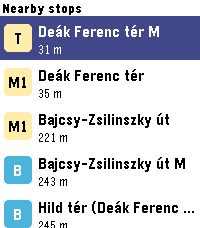
DailyLive Budapest public transport departures on your wrist - nearby BKK stops, real-time countdowns, and favourites.
 2
2SG Toto & 4D
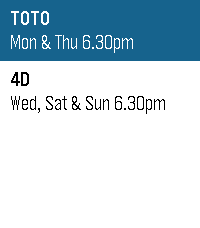
DailyHuat ah! 🎉 Feeling lucky? SG Toto & 4D puts the latest Singapore Pools results right on your wrist. Results are updated shortly after every draw — TOTO on Monday & Thursday, 4D on Wednesday, Saturday & Sunday, 6.30pm sharp. Good luck — may your numbers finally come home!
 3
3WasteWatch
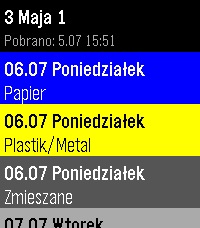
Tools & UtilitiesPersonal app to check my waste collection schedule without pulling out the phone. Shows upcoming dates with color-coded waste types (Bio, Paper, Plastics, Glass, Green, Mixed). Data from kiedywywoz.pl via OCR. Built for Kraków but works with any municipality that uses the kiedywywoz.pl service — just provide the appropriate API token.
 52
52Pebble eReader
Tools & UtilitiesRead EPUB books on your Pebble watch. Upload an EPUB via the in-app settings page, then read chapter-by-chapter with proper headings, progress tracking, and a chapter menu.
 7
7MIDI Recorder
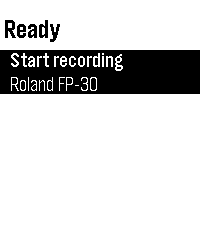
Tools & UtilitiesControl MIDI Recorder from your wrist — start/stop recording with one tap and see the recording time and connected MIDI device at a glance. Pair it with the Sykerö TimeStyle watchface to see your live recording status right on your watchface. Companion to the MIDI Recorder Android app, a Bluetooth MIDI / piano recorder.
 2
2Rasktur
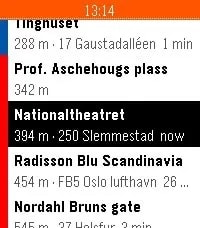
Tools & UtilitiesSee the next buses, trams, metro, trains and ferries departing from stops around you, with live times from Entur's national data. Save the places you actually travel to - home, work, the office in Bergen - and Rasktur pins the closest boarding stop with a service heading that way to the top. Colour-coded by mode, shake to refresh. Works across Pebble, Pebble Time, Time Round, Pebble 2 and Time 2.
 25
25UV Guard
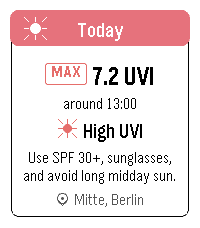
Health & FitnessUV Guard helps you know when the sun is worth taking seriously. Get a quick, glanceable UV forecast on your Pebble with the information that actually matters: how strong UV will get, when it peaks, and whether sunscreen, sunglasses, shade, or covering up is a good idea. The app shows Today and Tomorrow with maximum UVI, peak time, a simple four-part day timeline, and plain-language sun protection advice. It can use your current device location or a manually selected place. UV Guard can remind you before you head out with a morning UV digest, and warn you when the UVI reaches your chosen protection threshold. Forecasts are cached, so the watch can still show the latest available guidance when the phone or network is not ready.
 32
32Pebble Tides
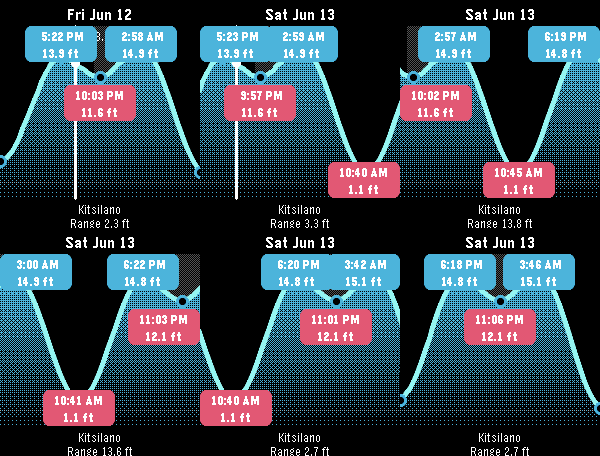
Tools & UtilitiesPebble Tides shows the day's tides at a glance: a graph of the high and low tides with their exact times and heights, the current water level, whether the tide is rising or falling, and optional mid-tide times. It uses your location to pick the nearest tide station and keeps working offline by caching a week of predictions, or pin a region ahead of a trip to cache up to 45 days across a whole area. Features: - Uses your location to pick the nearest tide station - Daily tide graph with high/low times and heights - Current level with a rising/falling indicator - Optional mid-tide times (off by default) - Sunrise and sunset night shading - Step through tides with the buttons; long-press to jump a day, Select to jump to now - Feet or metres, 12 or 24 hour clock, all set from the phone - Caches a week of predictions and refreshes once a day; works with the phone out of range - Pin a region for an upcoming trip: download up to 45 days for every station within a chosen radius, then see the nearest one offline as you move Coverage: Pebble Tides covers - Canada (Fisheries and Oceans Canada, DFO) - United States (NOAA) - Australia and the South Pacific (Bureau of Meteorology, BOM) - United Kingdom, Ireland and the Channel Islands (UK Hydrographic Office, EasyTide) It picks the station nearest you, or the nearest station inside a region you pin for an upcoming trip. If you'd like another region added, let me know and I'm happy to look at adding it. Controls: Up/Down step tides, long-press Up/Down jump a day, Select jumps to now, Back exits.