 4
4Quran
DailyThe Holy Quran fully offline independent from phone connectivity.
 18
18WindSock
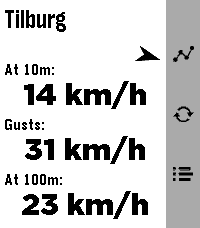
DailyWindSock is a basic location based wind Forecast app that I made mainly for my drone flying. But I'd imagine it being useful for many outdoor activities 🚁⛵😎 Watch: 🔶 Main screen shows current wind speeds at your current location (shown on top) at 10m , gusts and at 100/120m, and a small arrow for bearing 🔶 Forecast screen (down button) gives you a (touch-)scrollable 24hr hourly forecast of all these values (also bearing!). Where a line turns red when either Gusts or 100/120m Winds exceed your set warning threshold 🔶 12hr forecast Graph screen (up button) for all three values (Gusts in red in colour screens). Adapts to km/h, mph, m/s or kts choice. Phone side settings: 🔷 Choose wind speed unit between kilometers per hour (the default), miles per hour, meters per second or knots. 🔷 Choose between wind models 'Global' (the default) and 'Benelux'. 🔷 Choose your own 'Strong wind warnings' speed limts The Benelux KNMI model is slightly more accurate for NL, BE and LX (the model I used as main up to v1.2) but reports the high winds at 100m instead of 120m. The 100m/120m label on main will switch accordingly with your model choice. 👉 Just select Refresh on the watch main screen to apply any changes (or just refetch the data). ☑️ Chosen wind model or wind speed unit are persistent over launches. Data comes from Open-Meteo so should give you a worldwide coverage. Resolving phone's location into location-name done by a call to BigDataCloud. App uses phone location and loads all data fresh every time you start the app. Like what me and Claude made? Then give it some love in the store 😘🩷 And do check out my other stuff here:
 39
39Thataway!
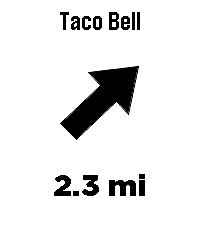
Tools & UtilitiesThataway! points an arrow at the closest anything. Type any business or place name - Taco Bell, Starbucks, a grocery store - and the arrow on your wrist always points at the nearest one, with live distance. Turn, and the arrow turns with you. Always points to the closest match. No routes, no maps, just a direction and a distance, as the crow flies. To enter a location or change settings go to Thataway! in the pebble app on your phone and click on the Settings button. Mark where you're standing: hold the middle button to save your current spot - your campsite, the trailhead, where you parked. The app grabs a precise GPS fix, tells you how accurate it is, and the arrow leads you back. No cell coverage needed. Save up to three favorite places with GPS coordinates in settings - these work without cell coverage too. UP and DOWN cycle between your search, your marked spot, and your saved places right from the watch. Fuzzy search - sloppy spelling still works Vibrates on arrival (optional) Imperial or metric units Optional live GPS accuracy readout The watch needs its Bluetooth connection to the Pebble app at all times - the phone provides the GPS. Internet is only needed for searching; marked and saved destinations work with no data signal at all, perfect for the backcountry. Distances are straight-line, not driving directions. If the watch asks, wave it in a figure-8 to calibrate the compass. Note: Support for the OG pebble time is not confirmed yet, if you try it and it works please let me know, I have only done emulator testing of it. Search data (c) OpenStreetMap contributors, via Photon and Overpass.
 14
14Solfarer Atlas
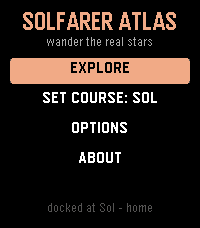
Tools & UtilitiesTravel where you like. Solfarer Atlas is the Local Bubble as a place you can walk around: 2,236 real star systems within 100 light-years of Sol - Proxima Centauri, Barnard's Star, Wolf 359, Tureis, Guniibuu, and the rest - from the Hipparcos catalog, in their true spectral colors. No hourly schedule, no daily seed, nothing waiting for you. Where the Solfarer watchface walks one path chosen for you, the Atlas hands you the whole neighborhood: the map centers on wherever you're docked, and the 24 nearest stars are yours to cycle through, one button at a time. Each one has a page - spectral class, absolute magnitude, distance from Sol, the constellation it belongs to - and, more to the point, what the trip would cost you. Set course and go. Every journey is honest special relativity: a 1g burn to the midpoint, flip, and brake. The flight plays out as a twin-paradox cutscene with both clocks running at their true relative rates - 7.8 light-years to Wolf 359 ages the universe 9.5 years and you 4.5. Your career keeps the tally: how many hops, how far you've roamed, the farthest you've ever been from home, and how much younger you are than everything you left behind. * 2,236 real star systems, names, classes, and constellations included * The 24 nearest neighbors from wherever you stand - the neighborhood re-sorts every time you arrive * A lifetime ledger: hops, light-years, and the gap between your clock and the universe's * Set course for Sol from the title menu, from anywhere in the Bubble * Options on the watch, no phone needed: full, quick, or no flight replay; confirm before travel; a buzz on arrival; and a reset back to Sol * Sibling of the Solfarer watchface and the Lighthaul courier game - same bones, real galaxy The physics is real: exact time dilation, honest 1g rocketry in rapidity. The stars are real too. Go and see them.
 78
78Workout HR
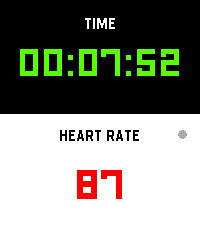
Health & FitnessI’m finally launching my dream workout app, built exclusively to make that glorious Pebble Time 2 screen pop! Get all your vital stats—elapsed time and real-time heart rate—that’s actually easy to read while you're breaking a sweat. It’s time to manage your gains more effectively while keeping that classic Pebble quirkiness alive on your wrist!
 2
2Bit Spender Fork
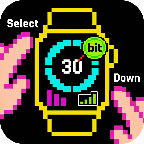
DailyFork of Tonda's Bit Spender App. Recreated using Gemini to add some new QoL features. Now used for MY thesis! Select a focus which starts a 30 minute timer. After 30 minutes, you earn a bit. You can hold Select to add a bit without the timer. Hold Down to see stats. New QoL features include: - Combined the Bit Display with the Bit Selection Display so that you can select a timer as soon as the app opens - Persistent Timer which runs even when you exit out of the app. Also vibrates and brings you back to the app when the timer goes off - Made Daily Bits have colors corresponding to your focus so you can visually see what you've been focusing on during the day - made a smoother way to add specific bits without a timer (holding select now works consistently) - Made the histograms stacked with color so you can visually see what you've been focusing on the last few days - When using app with Quick Start, exits you out of app 3 seconds after starting timer - Can cancel timer
 2
2Film Devle
Tools & UtilitiesBlack and White photographic film development timer
 1
1Landy Remote
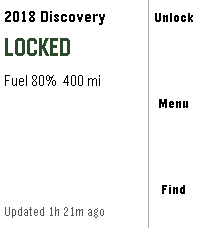
RemotesLock, unlock and find your Jaguar Land Rover from your wrist. **Anonymous usage statistics are collected and can be turned off in settings — see Privacy below.** **What it does** - Lock and unlock — unlock asks you to confirm first - Honk and flash to find the car in a car park - Find my car — compass arrow and distance to its last reported position - Remote climate — start and stop, with the cabin temperature set on the watch - At-a-glance status — locked or unlocked, fuel and range, doors or windows left open, and how fresh the data is - Tyre pressures, mileage, service and AdBlue distances, fluid warnings - Miles or kilometres, °C or °F, kPa, bar or psi Buttons for anything your vehicle or subscription does not support are not shown — the app asks your car what it can do rather than assuming. **You need** - A Jaguar or Land Rover with an active InControl subscription - The Pebble Core phone app - Lock, unlock and honk also need InControl Remote Premium-class service and your vehicle PIN **Safety** If the app cannot confirm you are stationary, the controls disappear and only information is shown. It will not send a command to a vehicle that might be moving. Expect this if location permission is off, or indoors with a poor GPS fix. **Privacy** Your credentials and vehicle data go straight from your phone to Jaguar Land Rover. This app has no server in between, and your password is never stored — only renewable tokens, on your phone. Anonymous usage statistics are collected by default and can be switched off in settings. Counted: app opens and version, which feature was used, whether a command succeeded or failed, whether the safety lock-out triggered, which services your vehicle supports, and the country of the request. Never collected: your VIN, your car's location, speed or distance, your email, PIN or tokens, or any vehicle status such as fuel, mileage or lock state. **Honestly** Remote commands go via Jaguar Land Rover's servers to the car's mobile connection. They take 5–20 seconds and sometimes fail, more often on older vehicles. The app tells you which happened — the car refused it, the car did not answer, or it could not be reached — because those need different responses from you. This app uses an interface Jaguar Land Rover provides for their own web app. It is not a published API and carries no compatibility guarantee, so a change at their end can stop it working until the app is updated. **Unofficial software. Not affiliated with, endorsed by, sponsored by, or supported by Jaguar Land Rover Limited. "Jaguar", "Land Rover" and "InControl" belong to their respective owners and are used only to describe what this app works with.** Source: https://github.com/ankur22/landy-remote
 5
5Talking Clock
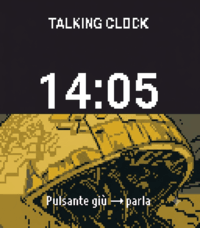
Health & Fitness## Talking Clock – English Version A small, standalone watch application that announces the exact current time in English when the user presses a button or performs a double tap on the screen. The user can choose which action will trigger the time announcement. For example, the time can be announced by pressing one of the watch buttons or by double-tapping the screen. ### Features * The application runs entirely on the watch. * It does **not require a connection to a mobile phone**. * The current time is announced using the watch's built-in speaker. * The time is pronounced **in English**. * The user can choose between the **12-hour and 24-hour formats**. * The **upper-right button** is used to switch between the 12-hour and 24-hour formats. * The other available buttons can be selected to announce the current time. * A **double tap on the screen** can also be used to announce the current time. * The application announces the **exact current time** according to the watch's internal clock. ### English Voice This is the English version of the application. All time announcements are spoken in English. For example: * **24-hour format:** “It is fourteen thirty-five.” * **12-hour format:** “It is two thirty-five PM.” The application should work completely **offline** and independently from any smartphone. No connection, synchronization, or companion mobile application should be required for the time announcement function.
 1
1Talking Clock IT
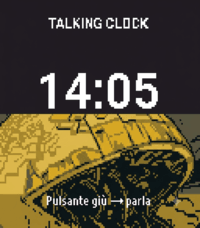
Tools & Utilities## Talking Clock – Italian Version A small, standalone watch application that announces the exact current time in Italian when the user presses a button or performs a double tap on the screen. The user can choose which action will trigger the time announcement. For example, the time can be announced by pressing one of the watch buttons or by double-tapping the screen. ### Features * The application runs entirely on the watch. * It does **not require a connection to a mobile phone**. * The current time is announced using the watch's built-in speaker. * The time is pronounced **in Italian**. * The user can choose between the **12-hour and 24-hour formats**. * The **upper-right button** is used to switch between the 12-hour and 24-hour formats. * The other available buttons can be configured to announce the current time. * A **double tap on the screen** can also be configured as a trigger for announcing the time. * The application announces the **exact current time** according to the watch's internal clock. ### Italian Voice This is the Italian version of the application. All time announcements are spoken in Italian. For example: * **24-hour format:** “Sono le quattordici e trentacinque.” * **12-hour format:** “Sono le due e trentacinque del pomeriggio.” The application should work completely offline and independently from any smartphone.
 38
38Another Alarm
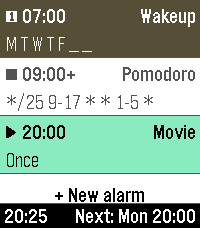
Tools & UtilitiesYet another alarms app, with cron mode for maximum flexibility, and many other useful features. Features: - Alarm sound & vibration - Increasing alarm volume - Snooze - Multiple alarms - Labeled alarms - Weekday-based repeat scheduling - Cron-based repeat scheduling - Quick disable / enable / skip next occurrence - High configurability The alternative cron mode makes it possible to define very versatile alarm repeat schedules. E.g., an alarm can be configured as "*/25 9-17 * * 1-5 *" to fire every 25 minutes between 9-17 o'clock on Mon-Fri for an automated work-time pomodoro interval timer. Cron mode allows scheduling configuration for - minute, - hour, - day of month, - month, - day of week, and - week number (ISO). The user interface follows the design of the Another Timer app. Use them both to feel familiar. Alarms can be labeled on the watch using the builtin touchscreen keyboard. The keyboard is adopted from metuuu's brilliant Mölkky Scorekeeper app, https://apps.repebble.com/m-lkky-scorekeeper_bb6ffbee520f4c4cafc2b424.
 2
2Wiz Light Control (test)
Tools & UtilitiesCurrently in progress
 1
1HyperView
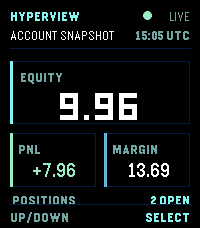
Tools & UtilitiesRead-only Hyperliquid account dashboard for Pebble Time 2. View equity, unrealized PnL, margin, open positions, and recent fills directly on your wrist. Configure your public wallet address in the phone settings. No private keys. No trading.
 35
35AquaCave - Drink Water!
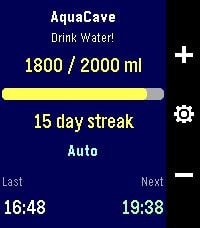
Health & FitnessAquaCave — Drink Water! A smart, focused water tracker for your Pebble. AquaCave helps you stay hydrated by tracking your daily water intake right from your wrist and reminding you to drink throughout the day. No phone required to use it — everything runs on the watch. Log a drink with a single button press, watch your progress bar fill toward your daily goal, and keep your hydration streak alive day after day. Features - Quick logging — add or remove water with the up/down buttons, in amounts you choose - Custom daily goal (500–4000 ml), or let AquaCave calculate it automatically based on your body weight, activity level, heart rate, and local outdoor temperature - Two reminder modes: a fixed interval, or an automatic mode that paces reminders evenly across your day - Active hours — only get reminded between your chosen start and end time, never overnight - Sleep-aware reminders — when enabled, reminders automatically pause while you're asleep and resume when you wake up, using Pebble Health sleep detection - Early-drink pacing — if you log a drink before your active window starts, reminders adjust so they spread out naturally from your start time instead of clustering - Streak counter plus statistics: 7-day average, best streak, and goals reached this month - Drink history with timestamps and an overview of your upcoming reminders - Optional vibration, left- or right-hand button layout - Settings menu with 5 organized sections — configure everything directly on the watch - Phone companion app with two-way sync: all settings are backed up to your phone and automatically restored when you pair a new watch or reinstall the app - Available in 8 languages: English, German, French, Spanish, Italian, Portuguese, and Simplified & Traditional Chinese — automatically detected from your watch language Compatible watches: Pebble Time, Pebble Time Steel, Pebble 2, and Pebble Time 2 (color and black-and-white displays supported). Support development AquaCave is free. If you find it useful and would like to support its development, you can buy me a coffee here: https://ko-fi.com/gessm — thank you!
 11
11Mölkky scorekeeper
GamesKeep score for Mölkky on your Pebble. Add up to 16 players, record each throw, undo mistakes, and view past games and player stats. Includes optional three-miss and final-round rules, offline watch storage with phone sync, and English/Finnish language support.