 29
29Pebble Gym
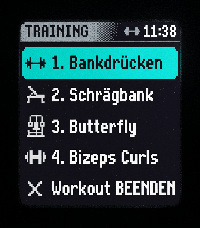
Health & FitnessHevy Workout Routine Companion & History Tracker for Pebble Smartwatches NOTE This is a Vibe-Coding project! 🎸✨ Built interactively using advanced agentic AI pair-programming to prototype, test, and implement features on-the-fly. PebbleGym brings your fitness routines directly to your wrist. Compatible with all Pebble platforms (optimized for Pebble Time 2/emery), it allows you to easily import your training plans from the provider Hevy using public links – or simply create your own custom routines directly in the app settings. During the workout, the watch displays the current set with target values, compares them with your history ("Last Time"), and logs your achieved weights and repetitions. Need to adjust your weights or reps on the fly? Simply long-press the up/down buttons to edit them directly on your watch. A built-in rest timer with haptic feedback ensures your breaks are perfectly timed. Thanks to a clever protection mechanism (long-press), accidental clicks are prevented, and a quick exercise menu lets you flexibly jump between exercises at any time if a machine in the gym is occupied. Plus, with the new workout persistence feature, your progress is always safe – even if you accidentally close the app, you can pick up right where you left off. Export your entire history as a CSV file anytime!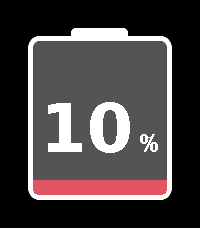 8
8Big Rock Battery
Tools & UtilitiesI can't see any of the built in battery gauges on the default watch while wearing my glasses, let alone without them on. This solves that problem: A giant watch battery gauge that I can see from across the room.. (well, with my glasses on anyway). Configurable thresholds and colours. I have it bound to a quick launch button on the watch to make it easy to get to.
 1
1PebbleMetro
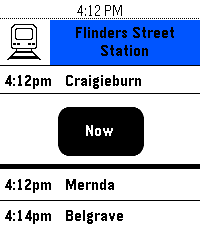
DailyPebbleMetro is a simple watch-app that allows you to display upcoming departures from your favourite stops using the Melbourne PTV API. Support’s all stops supported by the API including metro stations, rural stations, tram stops and bus stops. Configure your favourite stops using the built-in app configuration page. If you run into any issues, feel free to contact me.
 11
11Beehave
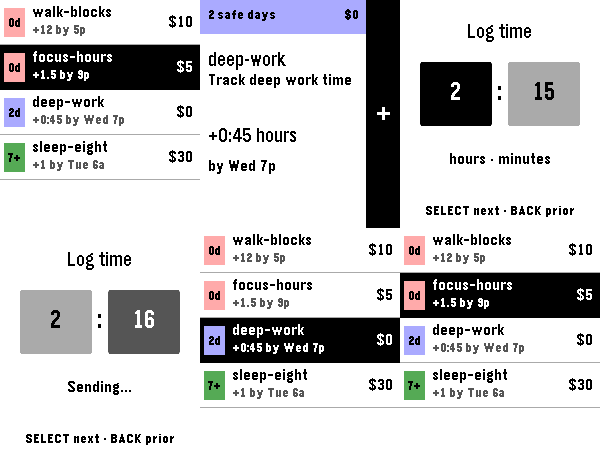
Tools & UtilitiesBeehave is an unofficial Beeminder client for Pebble Time 2. It lists goals in Beeminder urgency order. Open a goal to see its safety buffer, requirement, deadline, and pledge. For manual goals, log integer, decimal, or time values with the watch buttons. Beehave creates reminder times from your Beeminder Lead Days, Start Alerts, deadlines, and Zeno settings. The watch schedules these reminders locally. Beehave does not use Pebble Timeline or a separate server. Cached goals remain available when the phone is unavailable. Queued reminders can still open, and you can snooze them. A fresh sync and datapoint post require the phone and network. Beeminder remains authoritative. A logged datapoint does not mark a goal as safe or complete. A refresh gets the current goal state from Beeminder.
 1
1RaceTimer
Tools & UtilitiesSailboat race timer
 11
11AQI Monitor
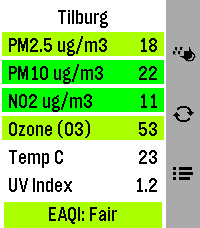
DailyAir Quality and Pollen monitor for Pebble Time 2 (Emery) Features: 🔶 Main screen shows current PM2.5, PM10, NO2, Ozone (O3) polutant values as wel as Temperature in Celsius and UV Index for your current location (shown on top) and at the bottom the general European Air Quality Index. 🔶 Background of polutant cells changes colours according to EU severity threshold values. 🔶 Forecast screen (Down button) with 24hr hourly forecast for each polutant, scrollable with both touch! and buttons. With a sticky header 😊 🔶 Pollen screen (Up button) with general pollen warning atop and 24hr forecast Graph for Weeds, Grasses and Trees. ⚠️ Pollen is Europe only and only during season ⚠️ Data comes from https://open-meteo.com and should provide worldwide coverage. The threshold values for the colouring of the boxes (severity) are according to EU norms, and so is the general EAQI index at the bottom (which is constructed from the other polutants so should again work worldwide, just EU norms). Location resolving to name by BigDataCloud reverse geoloc call. Pollen data is ONLY available in the EU, AND only during pollen season. It will show -No data available at this time- and a blank graph if nothing comes in for your location. This Pebble app needs colours 🏳️🌈 (and mucho pixels space), so that's why I only targeted Emery with this app 😊 Like what me and Claude made? Then give it some love in the store 😘🩷 And do check out my other stuff here:
 15
15Tick Every
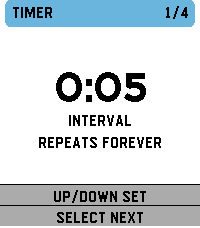
Tools & UtilitiesSupports: Aplite, Basalt, Chalk, Diorite, Emery, Flint and Gabbro. English by default; French and optional local session history are available from Configure in the Pebble mobile app. Tick Every is a simple haptic timer that keeps running until you stop it. Choose an interval, optionally add a start delay, then launch the timer. The watch gives two short pulses when timing begins. It then vibrates at every cycle. A long pulse represents five cycles and short pulses represent the remainder, with clear pauses between pulses. Includes pause/resume, optional haptic counting and opt-in local history: 32 recent sessions on the watch, plus every successfully synchronized session in the phone archive with no app-imposed count limit. The timer and watch history work offline. Français Tick Every est un timer haptique simple qui tourne jusqu’à ce que vous l’arrêtiez. Choisissez un intervalle et, si besoin, un délai de démarrage. La montre émet deux petites vibrations au démarrage, puis vibre à chaque cycle. Une vibration longue représente cinq cycles et les courtes le reste, avec des pauses nettes entre impulsions. Pause/reprise, comptage haptique désactivable et historique local optionnel : 32 sessions récentes sur la montre, plus toutes les sessions synchronisées dans l’archive du téléphone sans plafond imposé par l’app. Le timer et l'historique montre fonctionnent hors ligne.
 23
23PebbleKuma
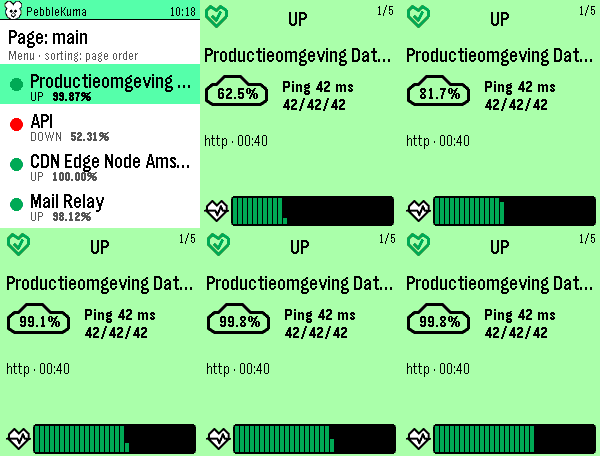
Tools & UtilitiesPebbleKuma brings your Uptime Kuma status pages to your Pebble Time 2. Browse a clean list of your monitors at a glance, a colored dot tells you what's up, down, in maintenance, or pending, with the 24-hour uptime right beside it. Tap a monitor for a full card, color-coded by its status, showing the uptime percentage, current ping (with min/avg/max), monitor type, last check time, the latest status message when something's wrong, and a heartbeat history graph. Page up and down to flip through monitors; the numbers count up and the heartbeats sweep in as you go. Sort by page order, name, or "problems first" (down → pending → maintenance → up, worst uptime leading). Pick a default in settings and switch instantly from the watch. Setup is quick: enter your Uptime Kuma base URL and the status-page slugs you want in the phone settings. Everything is fetched on the phone and streamed to the watch, so it stays light and responsive. Note: your Uptime Kuma server must be reachable from your phone (use your VPN if it's internal).
 32
32Cairn
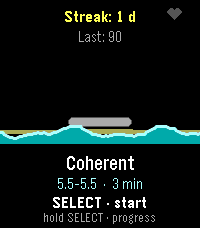
Health & FitnessBreathe with the tide. A guided breathing coach with live heart rate. Inhale and the water rises, exhale and it falls. Finish a session, lay a stone. Cairn turns a breathing exercise into a tide. Start a session and the waterline rises while you inhale and falls while you exhale, uncovering a cairn of stones on the shore — no counting, no timer to stare at, just a rhythm to follow. A pulse on your wrist marks every phase change — a nudge to breathe in, a double tick to hold, a longer pull to breathe out — so you can follow the rhythm with your eyes closed. While you breathe, the watch reads your heart rate every second. Afterwards you get a calm score out of 100 built from completion, how far your heart rate came down, how strongly it rose and fell with your breathing — real physiology, respiratory sinus arrhythmia — and, on watches that deliver it, your actual heart rate variability (RMSSD, the beat-to-beat detail behind true HRV). It is the difference between a session you were present for and one you merely sat through. Finish a session and a stone is added to your cairn. Keep it up day after day and the stack grows, badges unlock, and the progress screen shows where your calm score and resting heart rate are heading over the last week and month — with one line of coaching drawn from that history. FEATURES • Four patterns: Coherent (5.5 s in / 5.5 s out), Box, 4-7-8, and a Custom rhythm you set in half-second steps. • Sessions of 1, 2, 3, 5, 10 or 15 minutes. • Live heart rate, sampled every second, with a priming screen so the starting reading is a real baseline. • A calm score from completion, heart-rate drop, breath-linked heart-rate swing and — where the watch supports it — real heart rate variability (RMSSD), with an honest fallback when there is no reading at all. • A growing cairn, six badges, a personal best and your last 20 sessions. • 7- and 30-day trends for calm score and resting heart rate, plus a coaching line. • A distinct haptic pulse per breathing phase, and soft chimes at four volume levels; backlight, vibration and heart-rate display all switchable. • Settings on the watch or from the phone (Clay). • Made for the Pebble Time 2 (Emery) colour screen; works without the phone. • Available in English, Nederlands, Français, Deutsch and Español, following your watch's system language.
 20
20Polly
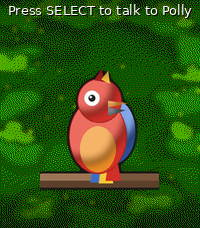
Tools & UtilitiesPolly — your talking parrot Polly is a colourful parrot for your Pebble Time 2 that actually talks out loud through the watch speaker. - **SELECT** — dictate a sentence and Polly speaks it back. - **UP** — ask a question and Polly answers in a sentence or two, powered by Google Gemini's free tier. - **DOWN** — pick one of your own preset "quick phrases" and say it instantly. Speech is generated by Google Cloud Text-to-Speech, with dozens of languages and voices to choose from. Between chats the parrot blinks, tilts its head, steps, hops and flaps on its branch. Requires a Pebble Time 2 (speaker + microphone). Bring your own free Google API keys — Cloud Text-to-Speech for the voice, and an AI Studio (Gemini) key for the optional ask-AI button. Both are entered in the app settings and stay on your phone. Voice, language, volume, animation frequency and quick phrases are all configurable.
 6
6PBL-7
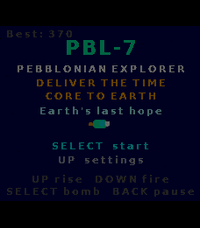
GamesA landscape shmup through the solar system. Hold your Pebble Time 2 sideways and fly PBL-7 to Earth. Rise, fire, dodge, and beat a boss on every planet. 11 planets, secrets, 5 languages. PBL-7 is a sideways-held arcade shoot-'em-up for the Pebble Time 2. Turn your watch a quarter turn — the three buttons line up along the bottom and the screen becomes a 228×200 landscape playfield. You are PBL-7, a Pebblonian explorer carrying the Time Core to Earth to save it. Every planet mistakes you for an invader and sends its champion to stop you. Hold UP to rise, release to fall, DOWN to fire (don't hold it too long or the gun overheats and jams), and SELECT for a screen-clearing smart bomb. Fight your way past a themed boss on each of Mercury, Venus, Mars, Jupiter, Saturn, Uranus and Neptune — each with its own gimmick, from acid clouds and gravity wells to splitting rings and lightning storms. After every boss you choose one of three Pebble-themed upgrades that carry through the run. Hidden on each planet is a lost Pebble device to collect — find all eight to unlock the true ending, and beat Neptune without taking a hit to open a secret portal. FEATURES • Landscape gameplay — held sideways, a real quarter-turn shmup. • 11 planets: Mercury → Neptune, a secret boss-rush, a hidden ally world, a Moon base and a three-phase Earth finale. • A themed boss with a unique gimmick on every planet. • Upgrade cards after each boss, 8 hidden collectible Pebbles, and two secret endings. • Weapon-heat system: burst-fire beats mashing — or switch the jam off in Settings for easy mode. • Settings: backlight, weapon jam (easy mode), rumble, sound, reset save. • Made for the Pebble Time 2 (Emery) colour screen; plays entirely offline. • Available in English, Nederlands, Français, Deutsch and Español, following your watch's system language automatically. • Progress, records and collectibles saved on the watch.
 9
9PebbleDiver
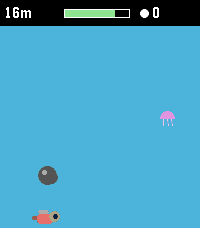
GamesA one-button deep-sea dive. Hold to swim up, let go to sink. Dodge rocks and jellyfish, grab pearls and air, upgrade your gear, and dive as deep as you dare. PebbleDiver is a one-button arcade dive for the Pebble Time 2. Hold SELECT to swim up, hold DOWN to dive faster, let go to sink — that's the whole control scheme. Dodge rocks and jellyfish on the way down, scoop up pearls and air bubbles, and see how deep you can go before your oxygen runs out. Pearls carry over between runs. Spend them in the shop on a bigger oxygen tank, faster fins, a lamp that pulls nearby pearls and bubbles toward you, or a sword. The deeper you go, the darker the water and the faster the current — and from 30 m down, sharks start hunting you instead of just drifting past. Dodge them, or equip a sword and tap UP (or the touchscreen) to fend one off for extra pearls. Legend says a magic Pebble waits deep below for divers who have fully equipped themselves. Whether that legend is true is for you to find out. FEATURES • Genuine one-button gameplay: hold to rise, release to sink, DOWN for a burst of extra descent speed. • Oxygen meter with a fair "pity" system — bubbles never stay scarce for long, so a dry spell never turns into an unfair death. • Pearls persist between runs — build up your stash and gear up over time. • Shop with four upgrades, five levels each: Oxygen tank, Fins, Lamp, Sword. • Sharks actively hunt you from 30 m down — dodge them, or fend one off with a sword (UP or a screen tap) for a pearl payout. • Water darkens and the current quickens the deeper you dive, for a real sense of descent. • Made for the Pebble Time 2 (Emery) color screen. • Plays entirely offline — no phone app, no internet connection needed. • Available in English, Nederlands, Français, Deutsch and Español, following your watch's system language automatically. • Your pearls and upgrades are saved on the watch itself.
 1
1Golf Stroke Counter
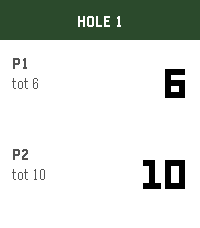
Tools & UtilitiesKeep score for two players on the course. Up adds a stroke for P1, Down for P2. Select goes to the next hole. Hold a button to undo. Scores save through all 18 holes.
 6
6Color Labratory
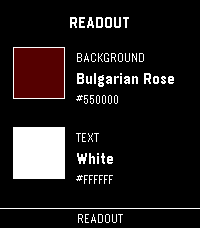
Tools & UtilitiesA quick way to test out colors on your physical watch. Quickly scroll through every color the e-paper screen has to offer. Then check it against secondary text colors to complete the palette. Hold up and down to jump color families. If you like the app, consider funding my coffee addiction (thank you!) BTC bc1q7esequqkl8sg96je7zu045zyat2sg2x3ey8plu XMR 844dKmmRGpR2KPJd9pSin3NqYu7vH7AtdLFBRRPip8mkcS4NH61JvnKRi3zTHV91TvRerJHMHy8ihPSaso8wpgrhJKqsHN5
 2
2Hubitat Control
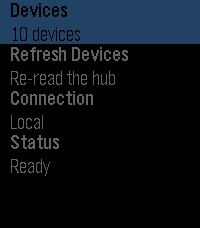
RemotesControl your Hubitat home from your wrist. A Pebble watch app for lights, dimmers, speakers, locks, garage doors, shades, and sensors, talking to your hub through its built-in Maker API app — over your home network or through Hubitat's cloud relay when you are out. No account, no third-party service, no bridge to install. Your hub and your phone are the only things involved.