 6
6SoundboardPOC
GamesSoundboard proof of concept to play audio on the Pebble watch. Just some random audio clips that I like
 7
7Fit Tracker
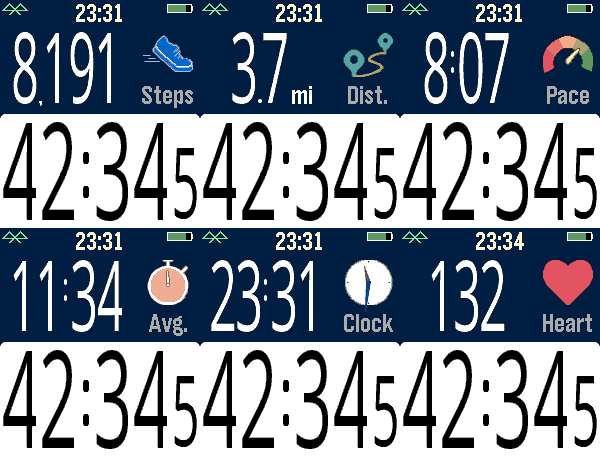
Health & FitnessExercise app that records elapsed time, heartrate, and distance. Exports FIT files for Strava and other online applications. The bottom button is used for starting and stopping. The top button switches the top line mode between steps, distance, current speed, average page, current time, and (if available) heartrate. Device-dependent features are heartrate, speaking, and touchscreen. There are custom settings for the watch to speak the interval distances or times (Pebble Time 2, Pebble Duo). The touch screen can be used to switch between the modes, similar to the up button. A touch over 0.2 seconds is recognized, and the left and right side of the screen change the mode forward or backward. Use the middle button to activate the menu for custom feature. These include showing tenths, bluetooth, battery, metric/imperial. Interval notifications by time or distance are supported, and the notifications can be by vibration or (if available) the speaker announcing the interval. You can see your mapped workouts at https://fit.setpebble.com. In order for your activity to be linked to your account, you will need to enter your Pebble serial number both for your account and when you adjust the app settings using the Pebble companion app. After a workout, do a long press on the up button to either Save or Delete your workout. If saved and you have a SetPebble account, you can see your workout at https://fit.setpebble.com. There is a Strava limit of 10 users (including me!), and I am not allowed to request an increase until we reach 10 users.
 1
1Strava sync app
Health & FitnessStill in the beta stage but I'm building an app that allows you to track runs and walks, and, taking advantage of your phones GPS, gets a GPX file to upload to whatever workout app you use that supports them, the target case being Strava. DISCLAIMER - NOT AFFILIATED WITH STRAVA
 1
1Futbol
Tools & UtilitiesKeep track of futbol scores in European top leagues, MLS, liga MX.
 2
2APRS Beacon
Tools & UtilitiesOne-press APRS position beacon for licensed amateur radio operators. Pick a map symbol and a privacy radius on the watch, press UP (or quick-launch) and your phone's GPS position is reported to the APRS-IS network - blurred by a random offset inside the radius you chose (500 m to 5 km, or exact). **Requires a valid amateur radio licence, your own callsign and an APRS-IS passcode (entered once in the phone settings page).
 11
11Quick Voice Notes
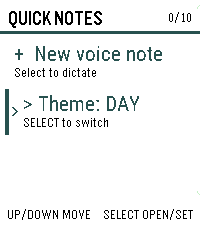
Tools & UtilitiesCapture a thought before it gets away. Inspired by the Index 01 ring. Quick Voice Notes turns a short spoken note into text directly from your Pebble Time 2, then lets you review it before saving. Notes are stored on the watch with their timestamps and appear newest first. Open any note to read the full text, delete individual notes, or remove all notes after confirmation. A day/night theme switch keeps the list comfortable to read in different lighting. Dictation is provided by the paired phone, so the phone must be connected and its voice-dictation service must be available. Quick Voice Notes does not record or store audio. The watch stores up to 10 notes, with a maximum of 240 characters per note.
 21
21Dashboard 2
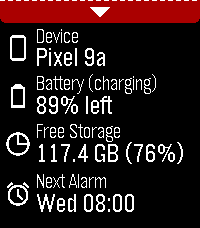
Tools & Utilities**IMPORTANT**: Requires Android companion app which is available from GitHub (https://github.com/C-D-Lewis/pebble-dev/tree/master/watchapps/dashboard2) or compiled from source with Android Studio. Modern successor to Dashboard, which is largely defunct now due to background app Android policy and permissions clampdowns since 2016. Starting with minimal features, and adding more as they are deemed possible with opt-in special device access as required. The focus is on modularity, maintainability, and re-usability. Data available: - Device name - Device battery level and charging status - Device free storage space - Next Android alarm Toggles / features available: - Find Phone with loud sound - Cycle through ringer modes (requires opt-in permission, see below) Uses PebbleKit Android 2 to retrieve information about the phone and control some toggles / features via the official Pebble Android app.
 9
9Klotski
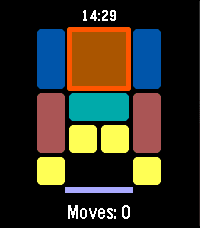
GamesKLOTSKI A classic sliding block puzzle for your wrist. Slide the blocks, clear the path, and escape the largest piece through the exit — in as few moves as possible. This app uses the most famous of the traditional Huarong Dao (Klotski) layouts, known as "Heng Dao Li Ma" (横刀立马) — the classic "Escape Cao Cao" puzzle. Its shortest known solution takes 81 moves. FEATURES Classic 4x5 Huarong Dao / Klotski board layout Button-only controls, no touch required Move counter tracks your progress Score based on move efficiency (closer to the optimal 81 moves = higher score) High score saved on your watch Quit confirmation so you don't lose progress by accident CONTROLS UP / DOWN: Cycle through pieces SELECT (short press): Select a piece, then cycle through move directions (Up, Right, Down, Left) SELECT (long press): Execute the move in the selected direction BACK: Cancel selection / confirm quit to title GOAL Move the large 2x2 block down to the exit at the bottom of the board. The fewer moves you use, the higher your score. Version 1.1.5
 30
30MirrorMov
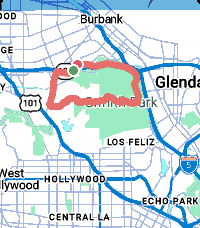
Health & FitnessYour Pebble is a sports watch. MirrorMov records your ride, run or hike with a live map, heart rate and cadence, then hands you a real FIT file you can take anywhere. MirrorMov requires a subscription from mirrormap.app. COMPATIBLE WITH STRAVA - Upload finished activities straight to your own Strava account, automatically on finish or manually from your history - Pull your own Strava routes onto the watch and navigate them with live progress and a breadcrumb - Your chosen sport carries into the upload, so activities land correctly categorised - Connect or disconnect whenever you like RECORDING - GPS at ~1Hz for a real activity track - Heart rate from the watch HRM, cadence from step rate - A live map while you record: your position on real map tiles, not just numbers - True pause/resume -- paused time and distance are genuinely excluded - Crash-safe: a background worker keeps logging if the app closes mid-activity, and the gap is stitched when you return MAPS AND ROUTES - Real map tiles with day and night themes - Two styles: Urban for streets, Outdoor for trails - Import your own GPX routes and navigate them YOUR DATA, YOURS - Every activity saved on your phone with full track and sensors - Browse your history: sport, date, distance, duration - Export any activity as a FIT file -- Garmin Connect, Komoot, TrainingPeaks, anywhere - Delete anything, any time - No Strava account required: recording, maps, history, GPX import and FIT export all work standalone REQUIREMENTS - A subscription from mirrormap.app - An Android phone. iOS is not supported -- iOS PebbleKit JS lacks the browser APIs the map depends on. Pebble Time 2 gets all 23 sport types and larger route capacity. Pebble Time and Time Steel get the core six. mirrormap.app/mirrormov
 2
2Meal Tracker
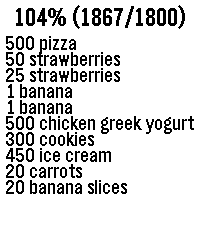
Health & FitnessTrack your mealies If started via quick launch, the dictation service automatically starts. You can say things like "banana", "small banana", "big banana", "500 grams of chicken, cucumber, and yogurt." After confirmed a food item, the app automatically closes after 3 seconds. It has a hardcoded number of target grams at 1800 per day.
 8
8BOM Weather
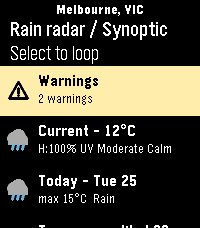
Tools & UtilitiesAn app for the Australian Bureau of Meteorology (BOM) weather service. Features: - Set or auto-detect your town for weather specific to you - Looping Rain Radar with various distance views (use up/down buttons) - Looping Synoptic chart - Current weather information - Weather forecast for each of the coming 7 days - Weather warning notices - Coastal info + costal specific warnings - Touch screen enabled Built for Pebble Time 2. Support for other Pebbles added as best I can. If you find a bug or have a suggestion, let me know!
 2
2Debate Timer for Pebble
Tools & UtilitiesA dedicated timer for British Parliamentary debating. Track speeches, POI periods and speaker order directly from your wrist. Features: 7-minute BP speech timer POI period from 1:00 to 6:00 Vibration alerts for important time points Speaker progression through all 8 BP speeches Start, pause, reset and next-speaker controls Fully offline — no phone or internet connection required Designed for debaters, judges and tournament organizers.
 14
14HeadeRSS
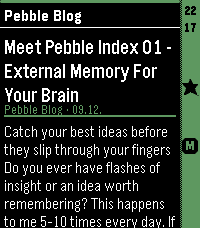
DailyPull feed headings and summaries from any Google Reader-compatible API, such as FreshRSS, and enjoy a lightweight reading experience on your Pebble. - Show all articles either at folder level or per feed. - Mark articles as read or unread as you open them. - Mark articles as favorites. - Minimalistic settings. Designed as a companion reader for quickly browsing your feeds on Pebble, this app lets you discover and triage articles on the go, then read the full content later in your upstream RSS reader. Because it connects to a full-featured RSS backend, there is no built-in limit on the number of feeds you can use—the feed management stays where it belongs: in your RSS service.
 462
462Home Assistant WS
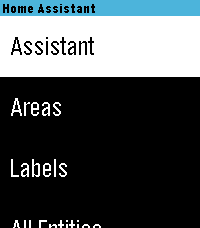
RemotesHome Assistant control with real-time updates, voice commands, entity history, calendars, and support for a wide range of devices and helpers. Control your Home Assistant smart home directly from your watch. Browse and control entities, check live states, view history graphs, view and edit calendars, manage To-Do lists, control media, and use voice commands with Home Assistant Assist, ChatGPT, and other conversation agents. * Real-time Home Assistant status updates and control via WebSocket * Browse entities by area, type, or favorites * Control lights, switches, fans, covers, climate devices, alarms, timers, media players, and much more * Voice commands with multiple Home Assistant conversation agents * View entity history with graphs and recent state changes * View and edit Home Assistant calendars and events * Full media controls including volume, seek, source, shuffle, repeat, and speaker grouping * Manage Home Assistant To-Do lists * Edit helpers including numbers, selects, text, dates, and times * Touchscreen support on compatible watches * Support for all Pebble screen sizes, including round watches and Pebble Time 2 Home Assistant WS connects directly to your Home Assistant instance and does not require a separate cloud service. iOS Compatibility Note: This app requires the new Core Devices Pebble app for iOS. The older legacy Pebble app uses an outdated JavaScript engine and is not compatible.
 8
8Subtitles
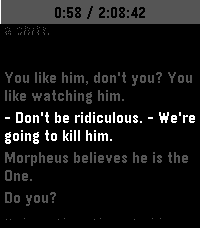
Tools & UtilitiesThis is an app to see the subtitles of a movie or show on your watch :)