 8
8Phone Dialer
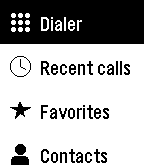
Tools & UtilitiesPhone Dialer lets you place calls from your Pebble without reaching for your phone. Call a favourite, browse your contacts, call back someone from your recent calls, or type any number on the keypad. Favorites shows your starred contacts, and Contacts is grouped from A to Z so you can find anyone in a few presses. Recent calls lists your latest 100 calls, with missed, incoming, and outgoing calls clearly marked. The keypad covers digits, *, #, and + for international numbers. Every call asks you to confirm first, so a stray press never dials anyone. On Pebble Time 2 and Pebble Round 2, tap keys, swipe through lists, and tap the green Call button, or use the buttons on any Pebble. Choose a dark or light theme, and arrange the main menu in the order you use most, either in the phone app or on the watch. Android only. Phone Dialer requires its free Android companion app, which places the calls through your phone. Allow Phone access to make calls, Contacts for Favorites and Contacts, and Call history for Recent calls; each feature works on its own. Your contacts and call history stay on your phone and watch and are never sent to a server. On dual-SIM phones, set a default calling SIM. For emergencies, use your phone directly. Created by Ark-am. Discover our work and custom software development services at https://ark-am.com/
 1.8K
1.8KChecklist
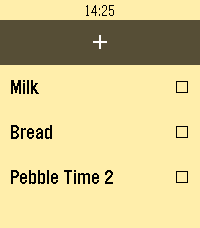
Tools & UtilitiesA checklist on your watch! Grocery shopping will never be the same. You can use Checklist to keep track of anything you need without needing to hold your phone: things to-do, shopping, and more! Features: - Manage the list directly from your phone! Add, edit, and delete checklist items directly from the settings page, including export and importing list items! - Add items directly from your watch via voice input! Like the app? Please "heart" it! "...only one app, a simple list-making app called Checklist, which uses the watch’s microphone to add tasks, really proved useful." —MIT Technology Review "I loved the convenience of adding items to the Checklist app just by speaking" —Tom's Guide
 48
48Sidecar by flwkt
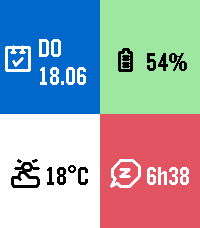
DailySidecar by flwkt Your watchface looks great — but it probably does not show everything you care about. Sidecar is a quick-launch companion watchapp that fills the gaps: a configurable grid of complications you can open in one press and dismiss just as fast. Love a minimal face with no clutter? Keep it. When you need steps, sleep, weather, or battery at a glance, Sidecar is there. Complications Assign any of these to up to six grid slots: - Current weather — Live temperature with a weather icon for current conditions - Weather forecast — High and low temperatures for today with a forecast icon - Steps — Today's step count - Distance — Distance walked or run today - Heart rate — Current heart rate in BPM - Battery — Watch battery level as a percentage - Date — Day of week and calendar date - Time (with seconds) — Current time including seconds; ticks every second only while shown - Sleep total — Total sleep duration for today - Deep sleep — Restful (deep) sleep duration for today - None — Leave a slot empty; only active slots are shown The grid layout adapts automatically based on how many slots you use, from a single full-screen cell up to a 2x3 grid. Features Built for Quick Launch — Assign Sidecar to a Quick Launch button on your Pebble Time 2 for instant access. Press Back, Up, or Down to exit and return to your watchface. Weather from your phone — Current conditions and today's forecast use your phone's location via Open-Meteo. Pick Celsius or Fahrenheit in settings. Health data — Steps, distance, heart rate, and sleep metrics read from Pebble health services when those complications are enabled. Make it yours — Set global background and foreground colors, or turn on per-cell colors for a bolder look. Pick a system font (Gothic, Roboto Condensed, Droid Serif, Bitham, and more) or leave it on Auto to scale with your grid size.
 20
20Clear Alarm
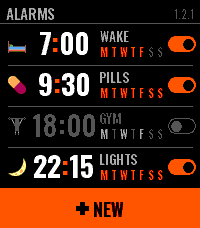
Tools & UtilitiesClear Alarm is an alarm clock for Pebble Time 2 that you can read at a glance. Each alarm has a face — a small picture you choose on the watch — beside its time, its name and the days it keeps, and a switch that shows whether it is on. A tap on the row turns it on or off right there in the list; a hold opens it. Setting one is two wheels, hours and minutes, that turn under your finger and run on when you flick them; the side buttons step and, held, run through the values. The week comes as four shapes — daily, weekdays, weekends, custom — and the buzz as four patterns you pick by feeling each one. When it rings you get the face, the name, the hour, and two keys: SNOOZE and one big OFF. A palm on the watch silences it. Snooze puts the alarm off by 5, 10, 20 or 30 minutes, an hour or two hours. After OFF or a snooze the app steps aside within ten seconds and your watchface is back. An alarm that repeats rings again on its next day, and one that does not switches itself off. Names are typed on the phone, in Latin or Cyrillic, and the watch sets them in capitals. Everything else can be set on the phone too, and what you set on the watch shows up there. The faces are Twemoji (CC-BY 4.0), reduced to the watch's colours.
 0
0Trasher
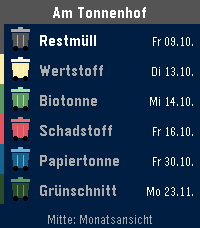
DailyBESCHREIBUNG DEUTSCH ---------------------------------------------------------------- Trasher zeigt dir, welche Tonne als Nächstes rausmuss – direkt auf der Uhr. • Liste: jede Tonnenart einmal, mit dem nächsten Termin (Heute, Morgen, Wochentag) und deiner Straße oben • Monatsansicht: kleine Tonnen in der passenden Farbe an jedem Abholtag, drei Monate zum Blättern • Timeline: Abholtermine der nächsten zwei Wochen als Pins in Tonnenfarbe, mit Erinnerung am Vorabend und am Morgen (Uhrzeiten einstellbar) • Einrichten am Handy: Ort, Straße und ggf. Hausnummer aus Listen wählen – kein Tippen. Danach die eigenen Tonnen anhaken. Unterstützt werden die Abfallkalender der großen Plattformen RegioIT (AbfallNavi), AWIDO und Jumomind/MyMüll – rund 3.000 Orte in Deutschland, z. B. Kreis Unna, Aachen, Nürnberg, Solingen, Kreis Viersen, Kreis Pinneberg, Darmstadt-Dieburg, Landkreis Fulda, Landkreis Rosenheim und viele weitere. Fehlt dein Ort in der Auswahl, nutzt deine Gemeinde einen anderen Anbieter. Bedienung: Mitte = Monatsansicht, Mitte lang = neu laden, Hoch/Runter = blättern. Datenschutz: Deine gewählte Adresse wird mit einer zufälligen Gerätekennung auf ni3d.de (Deutschland) gespeichert, damit die Uhr sie abholen kann. Kein Konto, keine Werbung, keine Weitergabe. Termine ohne Gewähr – maßgeblich ist der Kalender deines Entsorgers. BESCHREIBUNG ENGLISCH ---------------------------------------------------------------- Trasher tells you which bin goes out next – right on your watch. Made for Germany. • List: each bin type once, with its next date (today, tomorrow, weekday) and your street on top • Month view: small bins in matching colors on every collection day, three months to browse • Timeline: collections of the next two weeks as pins in bin colors, with reminders the evening before and in the morning (times adjustable) • Set up on your phone: pick town, street and house number from lists – no typing. Then tick your bins. Supports the waste calendars of the major German platforms RegioIT (AbfallNavi), AWIDO and Jumomind/MyMüll – about 3,000 towns, e.g. Kreis Unna, Aachen, Nuremberg, Solingen, Darmstadt-Dieburg and many more. If your town is missing, your municipality uses another provider. Controls: Select = month view, hold Select = reload, Up/Down = scroll. Privacy: Your selected address is stored with a random device ID on ni3d.de (Germany) so the watch can fetch it. No account, no ads, no sharing. Dates without guarantee – your waste company's calendar is authoritative.
 0
0Toroidal Tic-Tac-Toe
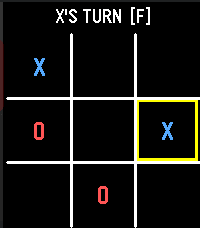
Gamestic-tac-toe game, but on a 3D torus. A very simple game where every box is a center and the edges all wrap around.
 67
67Micro Deckbuilder
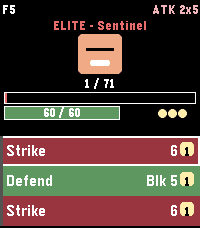
GamesRoguelike deckbuilder: 30 floors, 52 cards, 21 enemies, 8 relics, Fight/Event forks. Time 2. Controls UP / DOWN — scroll the hand / menu SELECT — play highlighted card (spends energy) Long‑press SELECT — end turn (enemy acts, new hand drawn) Long‑press UP — open the potion menu Long-press DOWN in combat opens the deck BACK — return to main menu (autosaves run if still alive) Main menu New Run — fresh starter deck, random seed Continue — resume a saved mid‑battle run (persistent flash) Daily — everyone gets the same dungeon today (RTC‑seeded) Ascension — cycle through unlocked difficulty levels (A0–A2) Class — Knight / Rogue (Rogue unlocks on first victory) How to Play — 11‑page paged tutorial (keywords, forks, modifiers) Deck — inspect every card in your current deck (with "+" flags) Settings — vibration toggle, reset run save, reset scores Achievements — 8 achievements with earn state High Scores — best floor, daily best, max ascension, top 5 Mechanics Cards: Attack (red), Skill (green), Power (blue). Damage, block, poison, strength, weak, vulnerable. Each has a "+" upgraded variant with bonus effects. Damage math: (base + strength) × (vuln ? 1.5 : 1) × (weak ? 0.75 : 1), truncated integer; block absorbs before HP. Enemies (21 total): Slime, Wolf, Skeleton, Imp, Goblin, Ghoul, Sentinel (elite), Shadow Lord (boss), Ancient (final boss), Lich (boss, poison‑on‑attack), Dragon (boss, big single hits + breath), Bat, Spider (bleed‑on‑attack), Orc, Witch (weak‑on‑attack), Zombie (rage on hit), Wraith (big block), Harpy (multi‑hit), Vampire (lifesteal), Mimic, Archer. Enemy quirks: poison‑on‑attack, weak‑on‑attack, lifesteal, rage, heavy block, multi‑hit — quirks modify how normal enemies threaten you. Relics (8 passive artifacts, belt of 6): earned on boss kills. Bronze Scales — 3 thorns at combat start Vajra — +1 strength at combat start Anchor — 10 block at combat start Magic Flower — +50% healing from cards and rest sites Pocket Watch — draw +1 at turn start when hand ≤ 2 cards Torii — incoming hits ≥10 take −3; hits 5–9 take −1 Lens — Skills cost 1 less (min 0) Charcoal — on Exhaust, +1 energy Thorns / Frail: new status effects; thorns retaliates on hit, frail reduces block gain by 25%. Ascension: A0 = standard, A1 adds +10% enemy HP, A2 adds +20% HP and +4 enemy strength. Unlocked by clearing the Ancient. Rest sites: after every non‑final boss kill, choose Rest (heal 50% max HP) or Upgrade (add "+" to a non‑upgraded deck card). Victory: killing the Ancient on floor 30 shows the VICTORY! overlay and tags your top‑5 entry with WIN + ascension level. Tips Block resets at the start of your turn — spend it or lose it. Vulnerable stacks from Bash are the fastest way to burst a boss. Upgrade Strike+ early — every run is carried by your basic attacks. Anchor + Vajra together make turn 1 absurd. Draft Strike‑heavy. Torii softens Dragon / Ancient big hits (−3 on swings ≥10). Watch tops up draws when your hand is thin (≤2 cards). Save rest‑site heals for the Ancient fight unless you're about to die. Bronze Scales + Thorns buff snowballs against multi‑hit enemies. Daily has the same opening hand every time; memorise the optimal line.
 15
15Clear Calculator
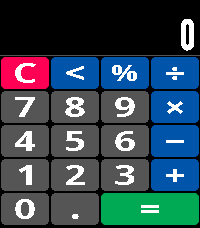
Tools & UtilitiesClearCalc is a touch calculator drawn for the Pebble Time 2's screen rather than squeezed onto it. The digits are set in a widened face that fills each key, so the pad stays readable at a glance instead of asking you to squint. Every press answers back: the key lights up, a magnified copy of it pops up well clear of your fingertip the way a phone keyboard does, and a short haptic tick confirms the tap - a 20 ms pulse, not the thud of a notification buzz. Add, subtract, multiply, divide, percentages and a backspace, with results up to thirteen digits.
 12
12Gate Nine
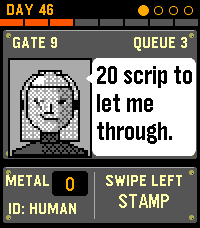
GamesANVIL HOLDINGS TETHYS DEEP MINING COLONY NOTICE OF ASSIGNMENT: GATE NINE You have been assigned to Gate Nine. Do not ask about the previous inspector. Each shift, mine workers queue at your booth. Check their papers against their faces, against each other, and against daily Anvil Directives. The Directives change often to meet the needs of the company. Adherence to the Directives is mandatory. Crew, contractors and colonists use this gate. So do cyborgs, drones, and things that only look human. Some even tell you the truth. Use the tools available to you to vet their stories. Your parents and your child live with you in Anvil housing. They depend on you alone. Your partner was shipped to another colony to better support the Company. Anvil reminds you that they graciously waived the transfer fee. One salary fits most. Anvil sets all prices. Your appreciation is expected. A topside transfer out of the mines may be offered. The fee will be posted in advance. Anvil accountants have determined the fee is feasible. Report to the Gate, inspector.
 10
10Type Reminders
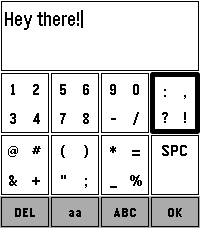
Tools & UtilitiesMoving from Alpha to Beta! If you find any bugs or have any recommendations, let me know! I've had a lot of issues with Pebble's voice to text feature, partly due to my use case, and I wanted a way to still add reminders to my timeline. I couldn't find anything I liked, so I thought I'd try making a keypad style keyboard to type in reminders. I can only test on the Time 2 for now, but it should work on all but the round watches! This is now in a fairly stable and usable state. There may still be some issues and I have a few more minor changes I'll make, but nothing that should change the functionality of the app by much. Still, if you find any bugs or have any ideas you'd like to see me implement, let me know!
 7
7Sprinkle Do
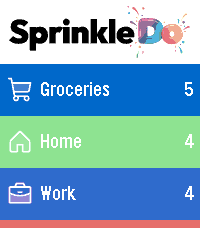
Tools & UtilitiesSprinkle Do is your shopping lists and to-dos, right on your wrist. Browse your sections at a glance, check off shopping items with a single tap, and add new tasks by voice - all synced live with the Sprinkle Do web and Android app.
 4
4Better Alarm
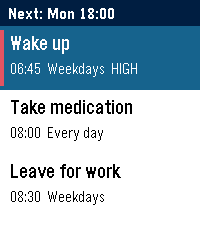
Tools & UtilitiesBetter Alarm won't let you dismiss it half-asleep. To stop or snooze it, you solve a random button challenge: press a sequence, time a hold, or hold one button while pressing another. The sound pauses while you work on it and comes back if you stop. Leaving the app doesn't help, because it relaunches itself until you're done. High-priority alarms need two challenges, have no snooze, and check that you're awake 5 minutes later. Set alarms on the watch, or manage them all from your phone.
 2
2Signal Station
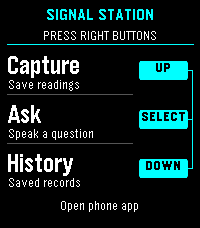
Tools & UtilitiesEXPERMENTAL This is a signal / presence awareness system with a Pebble face serving as interface and capture tool. It also offers chat from your wrist with the language model you choose, enriched by signal intelligence all around you and over time, whatever you choose. The phone keeps full conversations; the watch shows a short, scrollable reply. Install the separate Signal Station Android app first: https://dr.eamer.dev/downloads/apps/signal-station/ On your Android phone, tap Download for Android, open the APK, allow installation from your browser if asked, and tap Install. Open Signal Station, go to Ask, choose Set up answers, and add your provider, model and key. Provider usage charges apply. Capture and local History need no key. Keep your usual Pebble app installed and your watch paired there. In Signal Station on the phone, open Settings, Connected devices, Watch connection. Choose your Pebble app and watch, then tap Check connection. Open Signal Station on the watch. The right-side buttons are Up for Capture, middle for Ask, and Down for History. Up/Down scroll replies; Back returns home. Dictation depends on watch support. Hold the middle button while reading a reply, then open Signal Station on your phone and tap Open full reply. Requires Android build 16 or later. Resume conversation is a separate choice. The backlight stays on throughout app use. Hold Down at home to open the Home favorites chosen on your phone. Connect Home Assistant, openHAB or Geepers in Android build 17 or later. Home access is optional; actions ask for confirmation unless you have allowed that exact action. Still in testing. By Luke Steuber.
 2
2Dick Tracy: Agent Command
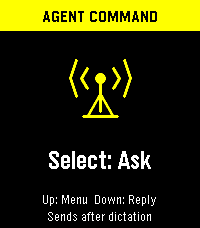
Tools & UtilitiesAsk from your Pebble, keep the conversation going on Android, and choose the model, search tools and speaking voice independently. The watch shows a compact reply; the phone keeps the full answer, formatting and source links. Requires Android 8 or later, the Dick Tracy Watch companion, and your usual paired Pebble phone app. Get the companion and setup details: https://dr.eamer.dev/dicktracy/ ON THE WATCH Press Select to dictate a question or follow-up. It sends when Pebble dictation ends; choose Send: Review first to check the transcript before sending. Up/Down scroll, Back cancels, and holding Select marks the full reply to open on your phone. The menu includes New conversation, larger text, Tools On/Off, Watch voice, Voice test and Auto-read. Sending mode and text size persist. The backlight stays on while the app has focus. ANDROID CHAT AND HISTORY Type questions without a watch. Read selectable Markdown answers with clickable citations, a Sources list and a label showing which tools ran. Reopen saved replies to read or listen, continue an earlier conversation, start a new chat, or edit a failed question and retry. Up to 200 question/reply records are saved; Delete all clears history while keeping your provider keys and settings. The phone screen stays awake while the app is visible. ANSWER SOURCES OpenAI, Anthropic, xAI, Gemini, OpenRouter, Runware, Hugging Face, Mistral, Cohere, Ollama Cloud and Kimi, plus a custom HTTPS endpoint compatible with Chat Completions. Enter a model ID or choose a preset. Each provider keeps its own key, model and tool selection. Anthropic also has a workspace-ID field. Check saved setup sends a short test with tools off, without adding it to History. ON-DEVICE MODELS Gemini Nano uses Android AICore on supported phones and requires the companion to stay on screen. Gemma offers a resumable 2.59 GB Gemma 4 E2B download with size/SHA-256 checks, or import of a portable GPU/CPU .litertlm model. Downloads default to unmetered networks; local model files can be removed separately from chats. Models need compatible hardware and enough storage/RAM. Local inference never silently falls back to a hosted model. Optional search and hosted speech still send data to their selected services. SEARCH AND TOOLS Configure these in Android Settings → Tools, then toggle the saved selection from the watch. Tools start off. Availability depends on the chosen model and account. • OpenAI: web search/page reading and hosted calculations. • Anthropic: web search, link reading and hosted calculations. • xAI: web search/page reading, X search and hosted calculations. • Gemini: Google Search, URL context, hosted calculations and places/maps on supported models. • OpenRouter: web search, link reading and current time. • Mistral: web search and hosted calculations. • Ollama Cloud and Kimi: standalone search and link fetching. Any answer source, including local models, can instead use OpenAI, Ollama Cloud or Kimi for search. That service retrieves evidence; your selected model writes the answer. The watch shows a source count and the phone opens the links. Search budget offers 1–3 calls where supported; it is not a spending cap. Calculations run at the provider, and maps use a place you name rather than phone location. VOICES AND PLAYBACK Use any answer provider with ElevenLabs, OpenAI, Runware, Mistral or installed Android offline voices. ElevenLabs includes voice presets and your own account's voice ID. Listening settings have Slower/Normal/Faster speeds, Test voice and a separate saved speech selection. Tap Listen beside any saved answer for phone playback. Experimental watch speech uses the phone to synthesize the full answer and sends buffered audio sections to compatible Pebble Time 2 or Pebble 2 Duo firmware. No voice model is installed on the watch. Auto-read starts off; enable it on phone or watch to speak new watch-requested replies automatically. Phone questions do not trigger watch playback. Select or Back stops audio, and Listen moves playback to the phone. Watch mute is respected; pauses and limited speaker quality remain possible. PRIVACY, COSTS AND LIMITS Keys and conversations use AES-256-GCM with Android Keystore and are excluded from backup. Hosted answers receive the question and up to ten recent exchanges from the same conversation/provider/model. Hosted speech receives the reading text. Pebble's own dictation service handles speech recognition and when recording ends. The watch's text reply is limited to 900 UTF-8 bytes; the full answer remains on Android and is used for speech. Hosted requests use your provider accounts and may cost money; an app subscription may not include API credit. These details cover watch 1.8.0 with Android 0.9.0-dev (build 11). By Luke Steuber — https://lukesteuber.com
 10
10SprinkleDo Timer
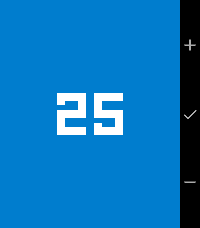
Tools & UtilitiesA simple, colorful multi-timer for Pebble. Create several countdown timers at once, each tracked independently and running even while backgrounded. Big monospaced digits, one-tap creation, and a full-screen alarm that keeps buzzing until you dismiss it.