 23
23Willie
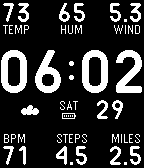
FacesStraight forward watch face with quick info at your fingertips for your next jog or hike. Top row from the left is temperature (C or F), humidity (%) and wind speed (kph or mph). Bottom row is active time (hours), step count (thousands) and distance walked (km or miles). To change the units from imperial to metric, go into the Pebble phone app settings and change miles to kilometers. Wang determines the weather based on your GPS coordinates which it detects on app install. To refresh the GPS coordinates, open the settings page and click "Save". Weather info is powered by Yahoo! and is updated once an hour. Additional options under settings: - hourly vibration - backlight on arm raise gesture - leading zero for hour display Health info powered by Pebble Health.
 7
7Instruments
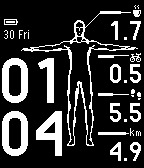
FacesWear a health monitor, not a smart watch. Does your job subsidize the purchase of a health monitor but not a smart watch? No problem. Use this as your watch face and fool your boss into thinking it's only a health monitor. From top to bottom is calories (per 1000), active time (in hours), steps (per 1000) and distance walked (per 1000). In settings you can change: - Display no leading zero for the hour. - Turn off bluetooth disconnect vibration. - Hourly vibrate with configurable time range. - Raise arm gesture to turn on backlight. - For Pebble 2 watches with built in heart rate monitor, you can replace the active seconds with your heart rate.
 32
32Blueprint
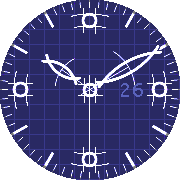
FacesThe seconds hand can be turned on in settings. Alternate black and white version can be activated in settings. Small animation at the beginning.
 410
410Motherboard
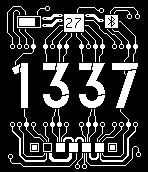
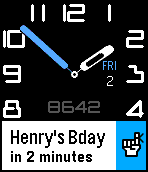
FacesA PCB/circuit watch face for Hackster meetup group. Shows date, battery level and bluetooth status up top. Day of week on bottom being the filled in square. Change colors in settings.
 1.4K
1.4KFourier
FacesSpecial thanks to Pat Reilly for the design. You can change the color of every part of the watch in the settings page. The second hand is hidden by default to maximize battery life, but you can turn it on in apple settings. When battery is under 30% a low battery icon appears on the top right. Your current step count (stats pulled from the Pebble Health app) can be displayed, but is hidden by default. The AHA recommends taking at least 10,000 steps per day. If displaying your step count is enabled, your step count will be replaced by your sleep duration and displayed for 30 minutes when you wake up, as detected by Pebble Health. Detection is delayed by 5 minutes. Other optional settings: Hourly vibrate with per hour pattern. Show/Hide date and week. Increase date size. Icon and vibrate on bluetooth lost. Turn on backlight with casual arm gesture. The face is squeezed during Timeline Peek.
 143
143This Then That
RemotesInitiate IFTTT triggers from your Pebble using the microphone. HOW TO USE =========== Start the app and say [trigger] [value]: EXAMPLE ========= "Turn lights off" . "Turn thermostat, 70" . "Send text Mary stuck in traffic will be late" . "Remind me meeting at 4 pm" . Other supported formats are: [trigger] [key] [value 1] [value 2] [value 3] FEATURES ========= - Supports multiple keys - Set triggers that fire without confirmation - Jump into dictation mode when opening from quick launch and exit app automatically - Word lookup and replace (useful for converting names to email addresses) - Vibration on success/failure so you can speak without looking - Clean interface and glanceable icons - Event is recorded on your Pebble timeline (optional) - Last command saved and visible in app launcher IFTTT.com ======== To use this app, you need to "connect" your account to the "IF Maker" channel on the IFTTT website. Then copy your maker "Key" to the app in the app settings page. You also need to create some "recipes" on the IFTTT website that use "Maker" as the trigger and give it a name. Then add the same name in the app settings page so that the app can recognize it. With IFTTT you can controls things like Facebook, Twitter, WeMo, Nest, OneNote, Blogger, Dropbox, Evernote, Gmail, Spotify, Wordpress, etc. This app does not require your IFTTT password and cannot access your IFTTT account details. Supports pmkey.xyz. This app is NOT affiliated with IFTTT Inc. FEEDBACK ======== Share your feedback on the Pebble forums here: http://tinyurl.com/tttpbl
 87
87Chinos
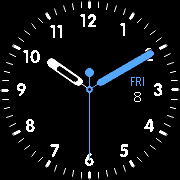
FacesBased on TH3 but with numbers as requested by Thomas Ella.
 148
148Tailpiece
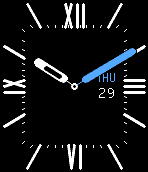
FacesMake the Pebble Time Steel look real classy. You can change the colors in the settings page.
 539
539TH4
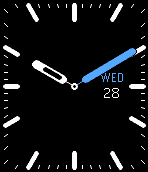
FacesBased on TH3, but changed to a square face. This simple watch animates when you go back to it from the timeline. You can change the color of every part of the watch in the settings page. The second hand is hidden by default to maximize battery life, but you can turn it on in settings. When bluetooth connection is lost, the watch vibrates and shows the bluetooth icon. When battery is under 30% a low battery icon appears on the top right. Hourly vibrate can be turned on by specifying a time range in settings. Text size can be increased in the settings page.
 1.2K
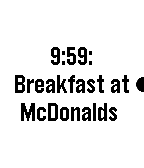
1.2KNote To Self
Tools & UtilitiesAdd (future) reminders and (past) notes to your watch timeline using the microphone. HOW TO USE: Add reminders by saying: "Remind me to go swimming at 4pm" "Swimming lesson in 2 hours and 15 minutes" "At 4 o'clock go swimming" "Swimming at 4 tomorrow" Add past and current notes by saying: "Note that I left home at 8am" "I took my pills 5 minutes ago" "Just fed the parking meter" The key to determine whether an event is in the past is if the sentence starts with "Note", or if the word "ago" proceeds the time like "1 minute ago", or if no time exists. Undo the last event added by saying: "Cancel that" "Cancel last" "Undo" NATURAL LANGUAGE: You can also use natural language like "remind me at 4:30 to buy tickets" or you can use concise language like "buy tickets at 4:30". Both will result in the text "buy tickets" in your timeline set at 4:30. DESIGN: This app is designed to be used with minimal interaction. After speaking your command, it will be added to the timeline immediately without requiring any confirmation buttons to be pressed. If the command was successful, the watch will give off a double vibration. If an error occurs, it will give off a long vibration. RESPONSIVENESS: Events on the timeline may take up to 15 minutes to show up. MISC: All events are pushed to your Pebble timeline and not saved elsewhere. If you set the app as as a quick launch shortcut, it closes the app after the event is added.
 10
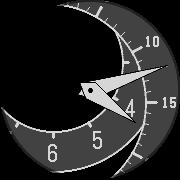
10Tilt Wheel
FacesThe hour and minute markers are on 2 large wheels that tilt towards the viewport such that the current hour and minutes are always visible.
 45
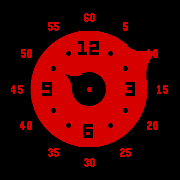
45Knobs
FacesA knob for minutes on the outside and hours on the inside.
 112
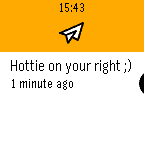
112Buzz Me
FacesWear a QR code in public that when scanned, allows the person to send messages to your Pebble Time. When someone scans your QR code, a browser will open on their phone and they can type messages to appear on your watch anonymously. Messages also show up on your Timeline. Useful as a way for strangers to engage with you and to meet new people. This also works even if it is not your default watch face. It just needs to be loaded on your watch for you to receive messages.
 26
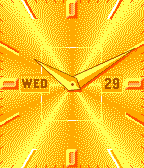
26Gold Digger
FacesI'm not saying I'm a gold digger.
 152
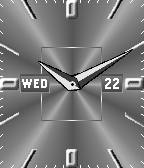
152Aluminium
Faces"Pebble to the Metal" with this brushed aluminium watch face to show your love for all things metal. Don't settle for that digital display with numbers floating around in space, crap. Crave that etched look and feel with grainy surfaces and pointy edges. It ain't a stainless steel Rolex or Cartier, but it'll do. Watch vibrates when bluetooth connection is lost.
 78
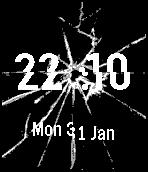
78Da Hood
FacesMake sure you're wearing a broken watch with a cracked screen before entering a dodgy neighborhood.
 107
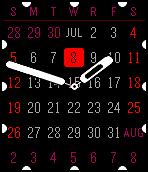
107Handy Calendar
FacesI made this because I needed a glanceable calendar while also having an analog watch face. It shares the same core as TH3, but with a calendar as the background. The line under the week name changes length according to your battery level. When bluetooth connection is lost, the watch vibrates and shows a bluetooth icon.
 625
625Voyager
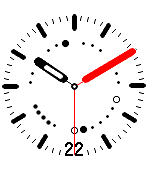
FacesA regular watch, but inside it are a series of dots to indicate the month, week and battery level. At the top are 12 dots that represent the 12 months with the current month marked in bold red. The 6th dot is selected indicating that it's June. At the bottom left are 5 dots to indicate battery level. At the bottom right are 7 dots to indicate the week with the first and last dot being red to indicate Sunday and Saturday respectively. For example, if the 2nd dot is bold, it indicates Monday. You can change the first dot to be Sunday or Monday in settings. The second hand is hidden by default to maximize battery life, but you can turn it on in settings. Customize the colors in settings. When bluetooth is disconnected, the watch vibrates and shows a bluetooth icon. Hourly vibrate is set to go off once at noon, but you can set a time range in settings. The vibrate pattern follows the Roman numerals: 3 o'clock = III = short+short+short 6 o'clock = VI = long+short 9 o'clock = IX = IVV = short+long+long 12 o'clock = XII = VVII = long+long+short+short The hourly vibrate is late by 10 seconds to avoid overlapping with vibrations from calendar events.
 2K
2KTH3
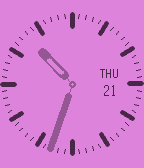
FacesReally simple watch design that animates when you go back to it from the timeline. You can change the color of every part of the watch in the settings page. The second hand is hidden by default to maximize battery life, but you can turn it on in settings. When bluetooth connection is lost, the watch vibrates and shows the bluetooth icon. When battery is under 30% a low battery icon appears on the top right. Hourly vibrate can be turned on by specifying a time range in apple settings. Text size can be increased in the settings page.
 188
188Orbit II
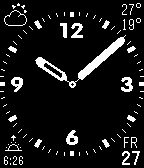
FacesThe watch hands are aesthetically round and pleasing to the eye and readable from afar. Enjoy this contemporary classical analog time piece with your friends and co-workers. Inspired by the Japanese art of zen gardens, which are round and peaceful. Watch face has the following complications: - Day of week and day of month - Battery level (only shows when under 30% or charging) - Bluetooth indicator shows BT when disconnected and also vibrates - Weather icon (sun, cloudy, rain, thunder, haze) - High/low daily temperature (Celsius or Fahrenheit) - Sunrise/sunset time Watch also has these additional features: - Specify the time frame when weather data should be fetched/updated (default is to update after midnight) - Specify how often to update (every X hours) - Shows tomorrow's weather after 9pm (configurable) - Optional white background - Hourly vibrate (with unique pattern for each hour) You can specified your city by manually typing in latitude and longitude coordinates or using the GPS of your phone. The hourly vibrate uses roman numerals to indicate the hour: 3 o'clock = III = short+short+short 6 o'clock = VI = long+short 9 o'clock = IX = IVV = short+long+long 12 o'clock = XII = VVII = long+long+short+short The hourly vibrate is late by 10 seconds to avoid overlapping with vibrations from calendar events.