Willie
Turner Yey
Watchface
Description
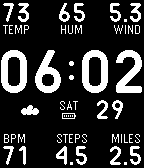
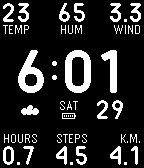
Straight forward watch face with quick info at your fingertips for your next jog or hike.

Top row from the left is temperature (C or F), humidity (%) and wind speed (kph or mph).

Bottom row is active time (hours), step count (thousands) and distance walked (km or miles).

To change the units from imperial to metric, go into the Pebble phone app settings and change miles to kilometers.

Wang determines the weather based on your GPS coordinates which it detects on app install. To refresh the GPS coordinates, open the settings page and click "Save".

Weather info is powered by Yahoo! and is updated once an hour.

Additional options under settings:
- hourly vibration
- backlight on arm raise gesture
- leading zero for hour display

Health info powered by Pebble Health.
- DeveloperTurner Yey · Is this you? Claim your app ›
- CategoryFaces
- PlatformsTime/Time Steel, 2, 2 Duo, Time 2 (scaled)
- Updated2016-11-30
- Version1.1