 276
276Horologicube
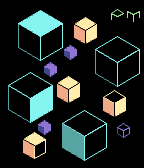
FacesTime shown on the faces of cubes. The hours are shown on 3 visible sides of 4 large blue cubes - count those that are "lit". 5-minutes are shown in the same way on 4 medium-sized yellow cubes. Single minutes are shown on 4 small purple cubes - with a whole cube being "lit" for each minute. AM/PM marker at the top shown from fragments of 2 additional small green cubes. Screenshots: 7:19AM, 12:26AM, 3:53PM, 4:45PM, 10:21PM (with Quick View) Designed by Peter Fletcher, who has designed watches for Tokyoflash and a number of the faces I have published. The watchface has been produced with the designer and is published with his permission.
 28
28Hexagons
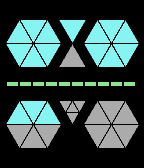
FacesBringing together my love of hexagons and triangles. Easy to read, with hours shown in 2 hexagons in the upper half, 5-minute blocks in 2 hexagons in the lower half and the additional single minutes in the triangle between the 5-minute hexagons. Time is always in 12-hour mode with 2 triangles between the hour hexagons indicating am (top) & pm (bottom). The battery level is indicated on the line between the hours and minutes. The color changes as the level reduces: - Green: 60% and above - Yellow: 30% - 50% - Red: 20% and below The background shapes (i.e. those not lit for the time) have 3 options on the settings screen: - Dark gray - Light gray - Hidden Screenshots show: (1) 3:58 AM (dark gray shapes, battery 50%) (2) 9:54 AM (dark gray shapes, battery 20%) (3) 1:31 PM (hidden shapes, battery 20%) (4) 12:15 AM (light gray shapes, battery 100%) (5) 7:43AM (with Quick View) This is a new design, just for the Pebble, but I also have a number of designs from the Tokyoflash Design Studio ported on the Pebble, so check these out too. Click on "More from this Developer" for the 20 most recent. To see more, search for my last name: Rawlins
 32
32Digit
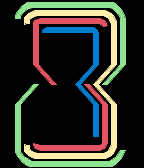
FacesA digital watchface where the numbers are arranged one inside the other in a Russian doll style, with each number an hour glass shape to avoid cross-overs. The time is read from the outside. The two outer digits are the hours and the smaller inner two are the minutes. The digits are different colors to make it easier to read: 10-hours in green, single hours in yellow, 10-minutes in red and single minutes in blue. The simple cryptic display should appeal to people who like things that are a bit different, but is still recognisable to the more conservative. Time will display in 12-hour or 24-hour mode, depending on the watch setting. The screenshot examples show: (1) 08:52 (2) 09:36 (3) 23:57 (24-hour mode) Design created by Peter Fletcher and originally appeared on the Tokyoflash Design Studio. It is published with the designers’ permission, and sanctioned by Tokyoflash. The original design can be found here: http://blog.tokyoflash.com/2012/07/21/digit-stacked-mkiii-an-led-watch-from-the-3rd-dimension/
 41
41Elements
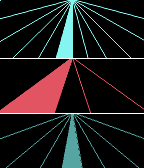
FacesDesign from the Tokyoflash Design Studio, created by László Scheffer. This watchface is divided into three parts that symbolizes sky, earth, and water. ‘Sky’ shows hours, ‘earth’ shows 10 minute groups, and 'water' shows single minutes. The screenshot examples show: (1) 06:25 (2) 02:56 This watchface is published with the designers’ permission, and sanctioned by Tokyoflash. The original design can be found here: http://blog.tokyoflash.com/2010/10/15/the-elements-led-watch-concept/ To see other sanctioned Tokyoflash watchfaces, click on "More from this Developer". Note: Currently, only the most recent 20 are showing. To see more, search for my last name: Rawlins
 72
72L7
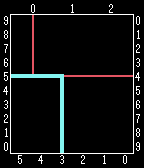
FacesL7 Numbers are arranged around a rectangle and connected by two right-angled lines. Reading the time is easy: the thin (red) line connects the hour digits, and the thicker (blue) connects the minute digits. Time is consequently read clockwise around the face, starting at the top. The name? L7 as in ‘square’. This will appeal to those who appreciate a geometric display that is somewhat cryptic, yet actually very easy to read. Time will display in 12-hour or 24-hour mode, depending on the watch setting. Version 2 adds the configuration option to fill the areas rather than just have lines (user request) - see screenshot 5. The screenshot examples show: (1) 6:25 (2) 12:36 (3) 4:35 (4) 17:17 (in 24-hour mode) (5) 8:17 (filled) Design from the Tokyoflash Design Studio, created by Anders Svedell. The watchface has been published with the designer's permission, and sanctioned by Tokyoflash. The original design can be found here: http://blog.tokyoflash.com/2011/01/14/l7-square-geometric-concept-watch/ To see other sanctioned Tokyoflash watchfaces, click on "More from this Developer".
 120
120Tangled
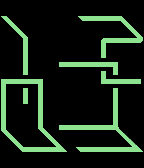
FacesA digital watchface where the digits appear to be all tangled up, hence the name “Tangled”. You can easily tell the time by reading the top two digits for hours, and the bottom two digits for minutes. This will appeal to those who appreciate a geometric display that is somewhat cryptic, yet actually very easy to read. Time will display in 12-hour or 24-hour mode, depending on the watch setting. Using the configuration screen, it is possible to change both the background and time colors. If same color is chosen for both, watchface converts foreground to black or white to ensure it still shows. The screenshot examples show: (1) 12:20 (cyan on dark blue) (2) 12:03 (green on black) (3) 12:00 (lilac on black) (4) 02:39 (white on black) (5) 21:59 (blue on white / 24-hour) This watchface was designed by Heather Sable and originally appear on the Tokyoflash Design Studio. It is published with the designers’ permission, and sanctioned by Tokyoflash. The original design can be found here: http://blog.tokyoflash.com/2012/02/01/tangled-watch-design-gets-the-time-all-in-a-twist/
 38
38Ripples
FacesDigital watchface using ripples. Time shown as parts of large ripples surrounded by smaller ripples, with hours at the top and minutes at the bottom. The horizontal line on the numbers is replaced by a middle dot (middle of the ripple). 12 or 24 hour format depending on watch settings. 12 hour displays AM/PM at the bottom of the screen in medium sized ripples. Colours are configurable for background, time and background ripples (which can also be switched off). Screenshots show: (1) 12:49AM - cyan on black, mid-blue ripples (my favorite) (2) 09:25PM - yellow on dark red, orange ripples (3) 16:58 (24 hour) - mid blue on black, purple ripples (4) 01:31AM - yellow on blue, no ripples (5) 03:34 - cyan on blue, purple ripples (Quick View) What's your favorite color combination? This design originally appeared on the Tokyoflash Design Studio and is published with the designer's permission, and sanctioned by Tokyoflash. The original design found here: http://blog.tokyoflash.com/2014/09/02/ripples-watch-with-soothing-droplet-animation/
 70
70Monarch
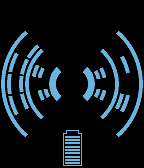
FacesA digital watchface with the time appearing on the "wings" of a butterfly, hence the name Monarch. The dark segments (negative space) show the digits of the time - hours to the left, minutes to the right. Displays in 12 or 24 hour mode, depending on watch settings. On the hour, the wings "flutter" for a short period. This can also be set to happen when you shake the watch. A battery is optionally shown at the bottom of the display. The color of the wings can also be changed. Note. When Quick View triggered, battery is not shown. The screenshot examples show: (1) Animation ("flutter") at 06:00 (2) 12:39 (with battery at 60%) (3) 04:57 (4) 17:48 (in 24-hour mode) (5) 06:59 (with Quick View) The design from Heather Sable from the USA originally appeared on the Tokyoflash Design Studio. It is published with the designer's permission and sanctioned by Tokyoflash. The original design can be found here: http://blog.tokyoflash.com/2013/03/11/the-butterfly-effect-monarch-lcd-watch/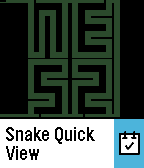 326
326Snake
FacesA digital watchface in either 12 or 24 hour mode. The inspiration is the old game “Snake”. In that game, as you control a snake around the screen, pixel blocks appear which you try to intercept. As your snake eats the blocks the snake gets longer and longer. Here it is not a game, but when the minutes change, the snake starts at the top left corner and grows. As it does this, it creates a negative of the current time using the one continuous line - hours at the top, minutes at the bottom, with the colon between. As the snake's body is a continuous line, that does not touch itself, it cannot create central circles in numbers, so the numbers that normally have these lose part of one of the sides. Look at the example screenshots to see how these are displayed: 0, 6, 8 and 9. Version 4.0 adds support for Pebble 2 and requires Pebble firmware v4.0.2 or later. Screenshots: (1) Animation (slower than the watchface), shows the snake creating 17:21. (2) 12:59 (3) 08:46 (4) 17:25 (24-hour) (5) 08:52 (with Quick View) Screenshots: (1) Animation (slower than the watchface), shows the snake creating 17:21. (2) 12:59 (3) 08:46 (4) 09:01 (with Quick View) Design created by Peter Fletcher from UK and originally appeared on the Tokyoflash Design Studio. It is published with the designer's permission, and sanctioned by Tokyoflash. The original design can be found here: http://blog.tokyoflash.com/2011/12/05/snake-watch-slithers-onto-your-wrist/
 25
25Honeycomb
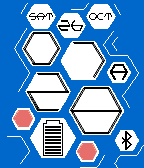
FacesA digital watchface in 12-hour or 24-hour format, depending on the watch settings. The idea for this watch was inspired by honeycomb, as the name suggests, with information displayed in the hexagonal cells. The time is shown in the 2 pairs of large cells – top two showing hours, bottom two minutes. Additional cells show: - Day, day of month and month in the top 3 cells - Battery level in the large cell bottom left - Bluetooth connection in the bottom right cell - In 12-hour format, 1 small cell near the hours shows A (am) or P (pm) - Remaining small cells randomly show as empty or full Configuration enables choice of three background colors: - Black - Blue - Red When Quick View appears, the day of the month is shown with the time. The example screenshots show: (1) 7:28AM Saturday 26 October, 90% battery, 12-hour (2) 12:34 Saturday 26 October, 60% battery, 24-hour, no bluetooth (3) 3:38PM Sunday 07 June, 20% battery, 12-hour (4) 9:23PM Wednesday 10 June, 70% battery, 12-hour (5) 19:44 (with Quick View) Design created by Peter Fletcher and taken from the Tokyoflash Design Studio. This watchface is published with the designer's permission, and sanctioned by Tokyoflash. The original design can be found here: http://blog.tokyoflash.com/2012/02/14/honeycomb-lcd-watch-2-ways-to-tell-the-time/
 29
29Lunar: Dark Side
FacesDesign from the Tokyoflash Design Studio, created by Heather Sable. Inverted version of Lunar. A digital watchface in 12-hour format. It uses a rectangular four-quadrant format for the digits with circular pieces cut out to create recognizable yet abstract looking digits. Top two digits are the hours, bottom two the minutes. By placing the four digits into the quadrants without showing lines to separate them, the display appears to be simply an artistic looking pattern – maybe swiss cheese, or moon craters, hence the name. The screenshot examples show: (1) 06:25 (2) 12:57 (3) 05:33 (4) 11:11 This watchface is published with the designers’ permission, and sanctioned by Tokyoflash. The original design can be found here: http://blog.tokyoflash.com/2012/01/05/lunar-watch-perfect-for-citizens-of-moon-base-alpha/ To see other sanctioned Tokyoflash watchfaces, click on "More from this Developer".
 16
16Lunar
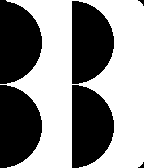
FacesDesign from the Tokyoflash Design Studio, created by Heather Sable. A digital watchface in 12-hour format. It uses a rectangular four-quadrant format for the digits with circular pieces cut out to create recognizable yet abstract looking digits. Top two digits are the hours, bottom two the minutes. By placing the four digits into the quadrants without showing lines to separate them, the display appears to be simply an artistic looking pattern – maybe swiss cheese, or moon craters, hence the name. The screenshot examples show: (1) 12:57 (2) 06:24 (3) 09:38 (4) 11:11 This watchface is published with the designers’ permission, and sanctioned by Tokyoflash. The original design can be found here: http://blog.tokyoflash.com/2012/01/05/lunar-watch-perfect-for-citizens-of-moon-base-alpha/ To see other sanctioned Tokyoflash watchfaces, click on "More from this Developer".
 68
68Bilateral
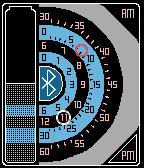
FacesThe face of the watch has been halved and divided into four concentric half rings of markers. The first two (nearest the centre of the watch) show the hours. The smallest ring shows 0-6 and the larger 6-12. The outer two rings show the minutes, the smaller of the two shows 0-30 and the largest 30-60. The time is highlighted by rings around the relevant hour and minute. Additional items: - battery level on the left side of the face - Bluetooth connection in the middle - AM/PM on top / bottom of the right side. Version 2 brings color for the Pebble Time watches. The screenshot examples show: (1) 3:15pm 100% battery, Bluetooth connection (2) 5:18am 90% battery, no Bluetooth connection (3) 11:08pm 50% battery, Bluetooth connection Design from the Tokyoflash Design Studio, created by Peter Fletcher. The watchface has been produced with the designers' permission, and sanctioned by Tokyoflash. The original design can be found here: http://blog.tokyoflash.com/2013/11/25/bilateral-shows-time-in-four-concentric-half-rings/ To see other watchfaces designed by Peter, including ones for Tokyoflash, along with others from the Tokyoflash Design Studio sanctioned by Tokyoflash, click on "More from this Developer".
 22
22Latitude
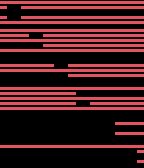
FacesA digital watch display that includes hours, minutes, and seconds in the format hhmmss from top to bottom. Each digit is made of seven segments, but they are all horizontal, which makes them flatten out a bit and allows for 6 digits to be displayed quite easily. Screenshots show: (1) 04:38:25 (2) 09:46:17 (3) 06:39:13 (4) 06:48:56 (5) 08:10 (with Quick View) This design was created by Heather Sable and originally appeared on the Tokyoflash Design Studio. It is published with the designers’ permission, and sanctioned by Tokyoflash. The original design can be found here: http://blog.tokyoflash.com/2013/02/14/slim-latitute-watch-design-stretches-time/
 64
64Inside Out
FacesA digital watch with the digits stacked inside each other. The time is read from the inside-out, so the 10-hours start in the middle, then the single hours, then 10-minutes and finally the single minutes on the outside. The digits themselves are quite easy to distinguish. You just need to note the differences between the 1 and the 7, and the rest should come naturally. Displays in 12-hour or 24-hour format, depending on watch settings. Screenshots show: (1) 10:24 (2) 09:03 (inverted) (3) 20:39 (24-hour format) (4) 23:58 (24-hour format, inverted) Designed by Heather Sable and originally appeared on the Tokyoflash Design Studio. The watchface is published with the designers’ permission, and sanctioned by Tokyoflash. The original design can be found here: http://blog.tokyoflash.com/2012/05/07/inside-out-lcd-watch-stacks-up-time-digits/
 4
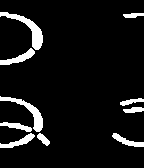
4Kizamu 12
FacesDesign from the Tokyoflash Design Studio, created by Heather Sable and Matthew Weiss. This version of Kizamu that displays in 12-hour mode. A digital watch with the digits in the four quadrants, cut down the middle and positioned against the sides of the display, so you can still determine what the digit would be. They are somewhat curved digits, to give a more abstract feel to the display. The top left and top right are the hours, and bottom left and bottom right are the minutes. The screenshot examples show: (1) 12:00 (2) 11:44 (3) 07:23 (4) 09:56 This watchface is published with the designers’ permission, and sanctioned by Tokyoflash. The original design can be found here: http://blog.tokyoflash.com/2012/12/31/kizamu-led-watch-takes-the-edge-off/ To see other sanctioned Tokyoflash watchfaces, click on "More from this Developer".
 11
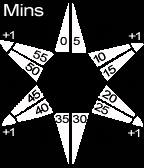
11Dark Star
FacesDesign from the Tokyoflash Design Studio, created by Peter Fletcher. The time is told by a 6 pointed star shape in an analogue format. Each of the points is faceted into two halves to create 12 facets in total and divided into an inner ring for hours and an outer ring for 5 minute blocks. The ends of four of the points display single minutes to be added to the 5-minutes. The first three images are screenshots showing: (1) 08:20 (2) 09:03 (3) 00:34 The last two images are not screenshots, but explain how to read the time. This watchface is published with the designer's permission, and sanctioned by Tokyoflash. The original design can be found here: http://blog.tokyoflash.com/2014/01/16/dark-star-led-watch-lights-up-facets-to-tell-time/ To see other sanctioned Tokyoflash watchfaces, click on "More from this Developer".
 6
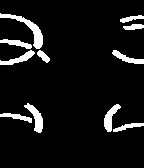
6Kizamu
FacesDesign from the Tokyoflash Design Studio, created by Heather Sable and Matthew Weiss. A digital watch with the digits in the four quadrants, cut down the middle and positioned against the sides of the display, so you can still determine what the digit would be. They are somewhat curved digits, to give a more abstract feel to the display. The top left and top right are the hours, and bottom left and bottom right are the minutes. The original design had LEDs in the relevant positions that were used in different combinations to give the numbers – this resulted in different sizes for the different numbers. These same forms have been kept here, so some numbers are larger than others – this adds to the very different look. The screenshot examples show: (1) 23:44 (2) 09:38 (3) 05:56 (4) 16:47 (5) 21:52 This watchface is published with the designers’ permission, and sanctioned by Tokyoflash. The original design can be found here: http://blog.tokyoflash.com/2012/12/31/kizamu-led-watch-takes-the-edge-off/ To see other sanctioned Tokyoflash watchfaces, click on "More from this Developer".
 8
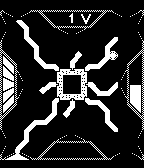
8Circuitboard
FacesDesign from the Tokyoflash Design Studio, created by Justin Schofield. An analogue watchface. 5-minutes are located around the outer edge with blocky shapes and hours are located a little further in as round shapes against the circuits. Single minutes are located at top and bottom, displayed as Volts & Amps (continuing the electrical/circuitboard theme). At the top, 1 minute appears as “1V” and 2 minutes as “1-1V” (adding these together gives 2 minutes). At the bottom, 3 minutes appear as“3A” and 4 minutes as “1-3A” (adding 1 & 3 gives 4). Telling the time is as simple as locating the shapes (hours and 5-minutes) around the edges and adding the single minutes. On the left is a battery indicator, in 20% increments. On the right are AM/PM indicators – AM top, PM bottom. The circuits leading to the time indicators do not actually indicate anything, but the changing effect as hours and 5-minutes pass provide an almost random appearance. The following screenshots show: (1) 14:36 (battery 100%) (2) 09:04 (battery 100%) (3) 15:57 (battery 40%) (4) 00:08 (battery 40%) (5) 01:15 (battery 100%) This watchface is published with the designer's permission, and sanctioned by Tokyoflash. The original design can be found here: http://blog.tokyoflash.com/2015/01/19/circuit-watch-creates-electronic-pathways-to-display-time/ (this had hours & 5-minutes in reverse - we changed to a more normal configuration here) To see other sanctioned Tokyoflash watchfaces, click on "More from this Developer".
 11
11Monza
FacesDesign from Peter Fletcher (who has designed watches for Tokyoflash), produced exclusively for the Pebble. The time is told by the lights in the gaps on the wheel shape disappearing. There are 12 rows of lights highlighting the 12 hour positions of an analogue clock. Each light represents a 15-minute increment. There are a further 14 lights around the outside that represent single minutes (starting with the top right one for 1 minute). 2 final points to note: At 12:00 all hour & 5-minute lights are off At 00:00 all hour & 5-minute lights are on The following screenshots show: (1) 01:59 (2) 09:36 (3) 02:04 (4) 12:00 (5) 00:00 This watchface has been co-developed with the designer and is published with the designer's permission. To see watchfaces designed by Peter for Tokyoflash, along with others from the Tokyoflash Design Studio sanctioned by Tokyoflash, click on "More from this Developer".